

Guess The Drawing
- Reviews
- 4.5
- Version
- 2.3
- Installs
- 10,000,000+

Screenshots
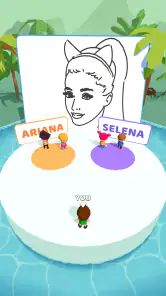
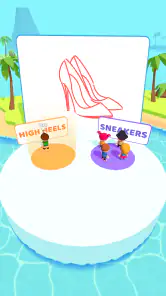
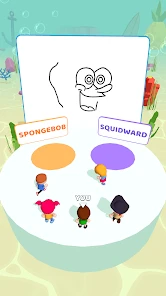
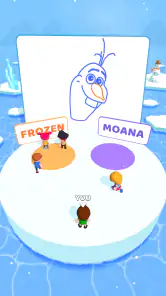
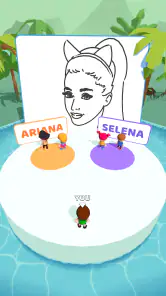
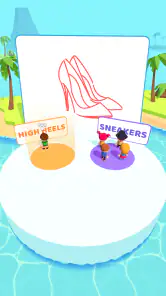
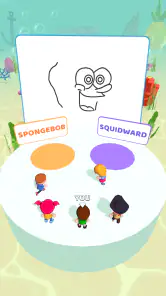
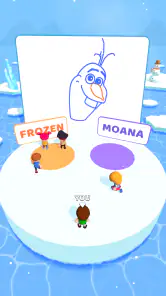
 Analysis by Frivlyz
I approach Guess The Drawing as a quick, social drawing-and-guessing game rather than a serious art app. Its appeal is the pressure of turning an idea into a recognizable sketch, then seeing whether another player can read it. That simple premise can make a quiet moment more entertaining, especially when the drawing is messy enough to become part of the joke. Before jumping in, though, it helps to know what sort of play experience to expect and where a little patience may be needed.
Getting Started with the Fun
Jumping into Guess The Drawing is as easy as pie. Once you download the app, you can either play solo or grab some friends for a multiplayer session. The app doesn’t waste time with complicated setups, so you’re in the game before you know it. What I found particularly cool is how it caters to both quick five-minute breaks and longer gaming sessions. Perfect for those "waiting for the bus" moments or a lazy Sunday afternoon.
Where Players Can Get Stuck
The basic idea is easy to grasp, but the experience depends on how quickly you can turn a prompt into a clear visual clue. I find that the hard part is not drawing beautifully; it is choosing which few details matter most. If I try to sketch every part of an object, I can run short on time and leave the important outline unfinished. A better approach is to start with the most recognizable shape, then add one or two clues that distinguish it from similar answers.
That makes the game lively, but it can also frustrate anyone expecting a relaxed digital sketchbook. A hurried line may be misunderstood, and a wrong guess is not always a sign that the other player is careless. Sometimes my drawing simply leaves too much room for interpretation. I treat that ambiguity as part of the challenge, while keeping in mind that players who want patient, detailed artwork may prefer a drawing app without a guessing objective.
How It Works
So, here’s the deal: you get a prompt to draw something while your friends or the app’s AI tries to guess what it is. Sounds simple, right? But trust me, when the countdown starts, and you’re frantically trying to scribble a masterpiece, it’s anything but! The app provides a plethora of categories ranging from "Movies" to "Animals," keeping things fresh and challenging. I must admit, my giraffe ended up looking more like a mutated llama, but hey, laughter is guaranteed.
For a group, I’d use the game as a shared activity rather than something to leave running in the background. One person can draw while everyone else watches or makes guesses, then the roles can shift so the less confident artists get a turn without being put on the spot for too long. If you are playing alone, the appeal is different: it is more about testing how clearly you can communicate an idea than showing off polished work. That distinction helps set expectations before you start.
Setup Checks Before a Session
If a game seems slow to start or a drawing feels awkward to control, I would first check the simple things: whether the app has finished loading, whether the phone responds normally to touch, and whether the current connection is stable when trying to play with others. Closing and reopening the game is a sensible first step if it stops responding. These are general checks, not special tricks, but they can separate a temporary device hiccup from a problem with the session itself.
Gaming Stories You May Enjoy

Dancing Road Turns Short Breaks Into a Test of Rhythm and Timing

Super Stylist Makes Every Outfit a Test of Taste and Patience

Dominoes on Your Terms: Who Should Play and Who Should Pass

Pokémon GO Makes the Familiar World Feel New

Chess.com Turns Rematches Into Rivalries, but Community Has Its Costs

Archery Battle 3D Review: Sharp Aiming, Unclear Feedback
On a small screen, I also find it useful to keep my strokes economical. A finger is less precise than a stylus, and fine details can become clutter rather than helpful clues. Before starting, I make sure I can hold the phone comfortably and draw without covering the key part of the screen with my hand. If the controls feel difficult, simplifying the picture is often more effective than trying to draw smaller and smaller details.
Features That Stand Out
One of the standout features of the app is its intuitive interface. The drawing tools, although basic, are easy to use and responsive. I loved the undo button, which quickly became my best friend during a botched attempt at drawing a bicycle. The app also includes a chat feature for multiplayer sessions, so you can tease your friends about their artistic (or not-so-artistic) abilities in real-time.
The basic tools suit the central challenge, but they also set a clear limit: this is not where I would go to make a polished illustration. I use undo to remove a confusing stroke rather than repeatedly redrawing the whole picture. That small habit keeps the sketch readable and saves time. Chat can add personality to a shared round, although the game is a better fit for players who enjoy quick banter than for anyone who wants a quiet, solo creative session.
Another nifty feature is the replay option, where you can watch your drawing process unfold like a time-lapse video. It’s both hilarious and humbling to see your creative process, and it makes sharing your creations on social media a breeze.
I find the replay most useful as a way to spot where a drawing went off track: perhaps I added too much detail before establishing the outline, or made a shape that looked obvious in my head but not on screen. That makes it more than a punchline after a round; it can help me change how I approach the next prompt. If I’m playing with friends, watching the sketch develop can also extend the fun beyond the moment of guessing.
Who It Suits, and What to Try Instead
This is a good fit for people who like party-style trivia, visual jokes, and low-pressure competition. It can work during a short wait, as an activity with friends, or as a casual way to see whether your drawing communicates an idea. I would be less likely to recommend it to someone who wants a deep single-player campaign, a full set of professional art tools, or a calm place to practice drawing without a timer or a guessing goal.
Compared with ordinary trivia games, the answer is not just something you recall; you have to represent it in a sketch, so quick visual thinking matters as much as knowing the subject. Compared with open-ended drawing apps, the game gives the sketch a purpose and an audience, but offers less room for careful refinement. I would choose a conventional quiz for knowledge-focused rounds and a dedicated art app for detailed work. This one sits between those options, and its best moments come when the group enjoys the imperfect drawings as much as the correct guesses.
When the App May Not Be the Cause
If a multiplayer moment does not go smoothly, I try to work out whether the issue is the game, the connection, or the way the group is using it. A weak or interrupted connection can affect online activity, while a noisy room or people talking over one another can make the guessing harder even when everything is working normally. For a clearer test, I’d try again when the connection is steady and ask players to take turns speaking rather than calling out at once.
It is also worth remembering that a confusing answer can come from the sketch, not a technical fault. If others keep guessing the same wrong thing, I would rethink the silhouette or add a distinctive clue on the next attempt. If the controls stop responding altogether, reopening the game and checking that the phone itself is behaving normally are reasonable first steps. I would avoid assuming that every missed guess or awkward round means the app is broken.
What Keeps You Coming Back
The game’s replayability is what keeps me hooked. With regular updates and new drawing prompts, Guess The Drawing ensures that you never run out of ideas or fun. The competitive element, whether you’re playing against friends or strangers, adds an exciting edge to each session. Plus, the leaderboard feature is a nice touch for those with a competitive streak.
In everyday use, I can imagine opening it while waiting for a friend at a café, then inviting them into a quick round instead of scrolling separately. The useful trade-off is that the fun depends on having the right mood: a few people willing to guess and laugh make even a rough sketch entertaining, while a player looking for a solitary, carefully paced game may not get the same value. If you enjoy measuring progress, the leaderboard gives competition a longer arc, but I would treat it as an extra rather than the reason to play.
For a practical sense of its scale, Supersonic Studios LTD made this free trivia game, which has an average rating of 4.5 from around 15,000 ratings and more than 10 million installs. It is rated for Everyone, so it is an easy option to consider for a mixed-age group, while the quick visual format still works best when everyone understands the prompt and is comfortable taking a turn. The game was released on January 7, 2022, and version 2.3 is the current version; it supports OS 7.0 or later. Optional in-app purchases are listed at $2.99 per item, so I would check purchase prompts carefully if a child is playing.
One question I would ask before installing is whether it costs anything to try: the game is free, though it offers those optional purchases. Another is whether an older device can run it; the stated minimum is OS 7.0, so I would check the phone’s system version before troubleshooting a failed install. The practical answer to whether it works for a group is yes, provided players are happy with quick turns and rough sketches; for a solo player, its appeal is more limited and depends on enjoying the drawing challenge itself.
My Practical Verdict
In conclusion, Guess The Drawing is a fantastic way to unleash your inner artist, whether you're a Picasso in the making or just someone looking for a good laugh. The app’s user-friendly design, coupled with its endless fun factor, makes it a must-try. So, grab your stylus (or just your finger) and dive into the world of doodles and giggles. Happy drawing!
My recommendation is a little more specific: try it when you want a light, social guessing game and do not mind that the drawings can be awkward or misunderstood. Keep sketches simple, use replay to notice what made a clue unclear, and save detailed art-making or serious trivia for apps built around those goals. If that sounds like your kind of short break, I think this is an easy game to give a chance.
Guess The Drawing Pros and Cons
Pros
- Engaging multiplayer mode.
- Wide variety of drawing prompts.
- Enhances creativity and imagination.
- User-friendly interface.
- Regular updates with new features.
Cons
- Requires constant internet connection.
- Ads can be intrusive at times.
- Limited free content.
- Occasional bugs and glitches.
- In-app purchases can be pricey.
Frequently Asked Questions
What is Guess The Drawing and how does it work?
Guess The Drawing is an engaging mobile app game where players attempt to identify drawings created by other users. The app offers a platform for a fun and interactive guessing game, allowing users to draw and guess in real-time. Players earn points based on the accuracy and speed of their guesses, making it both entertaining and competitive.
Is Guess The Drawing free to download and play?
Yes, Guess The Drawing is free to download and play on both Android and iOS devices. However, the app may offer in-app purchases for additional features, tools, or ad-free experiences. These optional purchases enhance gameplay but are not required to enjoy the basic functionalities of the app.
What are the main features of Guess The Drawing?
Guess The Drawing boasts various features, including a multiplayer mode where users can compete with friends or random players, a wide range of drawing tools to unleash creativity, and a leaderboard system to track and compare scores. Additionally, the app frequently updates with new challenges and themes to keep the gaming experience fresh and exciting.
Is Guess The Drawing suitable for all ages?
Guess The Drawing is designed to be family-friendly and suitable for all age groups. The content is appropriate for children, teens, and adults, making it a perfect game for family gatherings or casual play. Parental guidance is suggested for younger children to ensure they understand the game mechanics and online interactions.
Does Guess The Drawing require an internet connection to play?
Yes, an internet connection is required to play Guess The Drawing, as it involves real-time interaction with other players. The game relies on online connectivity to allow players to join multiplayer games, submit drawings, and guess others' creations. A stable internet connection ensures a smooth and uninterrupted gaming experience.


