

GTA: San Andreas - Definitive
- Reviews
- 4.1
- Version
- 1.87.0
- Installs
- 50,000+

Screenshots


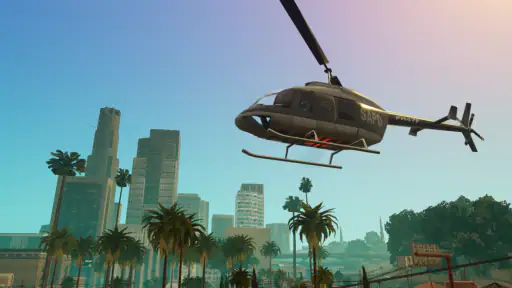
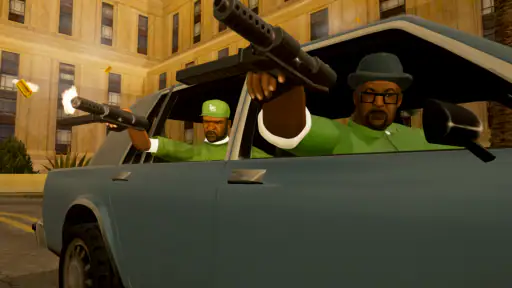
 Analysis by Frivlyz
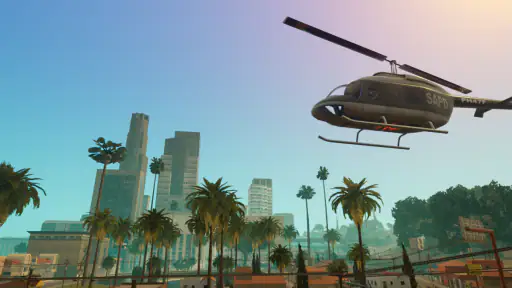
I spent time with GTA: San Andreas - Definitive as a mobile action game, paying particular attention to how comfortably it works in different situations rather than judging it only by its famous open world. My overall impression is that this is still a substantial crime-and-adventure experience for someone who wants a story-driven game on a phone or tablet, but it is not automatically easy for every player to control, read, or play for long sessions. The scale of San Andreas is impressive on a mobile screen, while the same scale can also expose the limits of touch controls, small text, and demanding visual scenes.
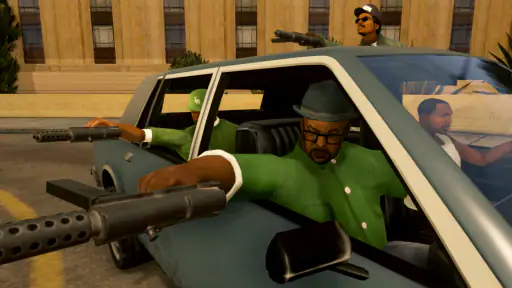
Rockstar Games brings Carl “CJ” Johnson’s return to Los Santos to iOS and compatible devices in this version. It sits firmly in the mature end of the action category, with a Mature 17+ rating, strong language, violence, criminal themes, and other material that make it unsuitable for children. I would recommend it most readily to adults who already know they enjoy open-world missions and are willing to spend time adjusting the controls. I would be more cautious about recommending it to anyone looking for a quick, quiet, low-pressure game that can be picked up with one hand.
Readability and navigation across a large mobile world
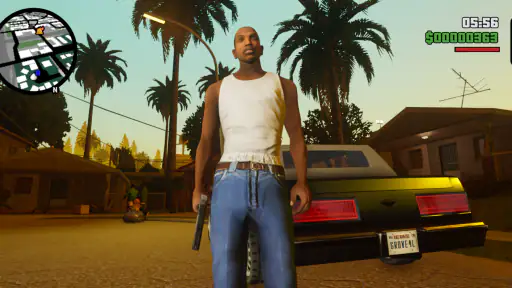
The first thing I noticed was how much information the game asks me to process at once. San Andreas is not a narrow sequence of levels. Streets, vehicles, pedestrians, mission markers, combat situations, and the wider map all compete for attention. On a larger phone, the world remains recognizable and enjoyable, but the interface can feel crowded when I am driving quickly or trying to respond to danger. A tablet gives the game more breathing room and is, in my view, the better choice for anyone who finds small interface elements tiring.
Navigation is easier when I slow down and treat the map as part of the experience rather than relying on hurried glances. I found that planning the next destination before setting off reduced the need to repeatedly look away from traffic. This is a small habit, but it matters for players who struggle with rapid visual switching. The open-world design rewards patience: stopping safely, checking where I need to go, and then continuing is often more comfortable than trying to read directions while driving through a busy area.
The game’s visual identity is strong, but its darker interiors, nighttime streets, and fast movement can make important details harder to distinguish. Players with reduced contrast sensitivity may prefer a brighter screen, a larger device, and a room without reflections. I would not treat those adjustments as cosmetic. They can determine whether a mission feels readable or like a blur of road, shadows, and interface prompts.
Text deserves similar attention. Dialogue and mission information are part of the game’s storytelling, so a player who has difficulty reading small lettering may find a phone less comfortable than a tablet. I recommend checking the opening scenes in the intended playing position before committing to long sessions. If I have to hold the device close or squint to follow conversations, the problem becomes tiring quickly, especially during missions that combine reading with driving or combat.
One useful approach is to separate story-heavy play from action-heavy play. I can use a quiet moment to read objectives and understand the next task, then begin the mission once I am ready. That workflow is more accessible than trying to absorb every instruction while moving. It also helps players who need extra processing time, because the game’s open structure allows some room to prepare instead of rushing immediately from one event to another.
Gaming Stories You May Enjoy

Dancing Road Turns Short Breaks Into a Test of Rhythm and Timing

Super Stylist Makes Every Outfit a Test of Taste and Patience

Dominoes on Your Terms: Who Should Play and Who Should Pass

Pokémon GO Makes the Familiar World Feel New

Chess.com Turns Rematches Into Rivalries, but Community Has Its Costs

Archery Battle 3D Review: Sharp Aiming, Unclear Feedback
Why the open-world structure helps some players
The freedom of San Andreas can support different energy levels. If a difficult mission becomes frustrating, I can spend time exploring, driving, or handling another activity before returning to the story. That flexibility is valuable for players who need breaks from intense concentration. It also makes the game more suitable for short, self-directed sessions than a strictly linear action title would be, although the controls themselves can still make short sessions demanding.
There is a trade-off here. The same freedom can make the game less predictable. A player who depends on a clear, step-by-step route may find the number of possible destinations and activities overwhelming. I think this is one of the clearest differences between this title and a simpler mobile action game: the reward is a much richer world, but the player has to organize their own attention.
Motor demands, touch controls, and sensory load
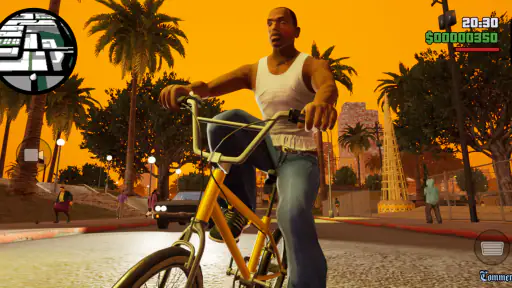
Touchscreen controls are the central accessibility question for this release. Driving, aiming, moving, changing direction, and reacting to threats all compete for fingers and screen space. I could adapt to the layout, but it never felt as precise as a physical controller. That does not make the game unplayable; it means the learning curve is part of the purchase decision. Players with limited dexterity, tremor, joint pain, or difficulty performing rapid multi-finger actions should test their comfort early rather than assuming the familiar console design will translate perfectly to glass.
Driving is a good example of the compromise. Touch input makes casual movement possible, but tight turns, sudden escapes, and busy traffic demand more correction than a physical stick would. I found that controlled speed was more reliable than trying to drive aggressively everywhere. This is also a practical strategy for players who need fewer abrupt movements: taking wider turns and avoiding unnecessary speed can reduce repeated corrections and frustration.
Combat places a different burden on coordination. The player may need to move, look, aim, and react within a small visual area. For someone with limited reach or reduced precision, that combination can become tiring. I would not recommend buying this version solely because the story is appealing if the player already knows that touch-based action games cause hand strain. A compatible controller, where supported by the device and game setup, may improve comfort, but I would treat that as a personal equipment choice rather than a guaranteed solution.
There is also a sensory side to the experience. Gunfire, crashes, sirens, explosions, and a busy soundtrack contribute to the atmosphere, but they can be intense for players sensitive to sudden sound or visual chaos. Playing with the volume at a comfortable level and taking breaks between missions can make a noticeable difference. I especially prefer not to start a demanding mission when I am already tired, because the combination of noise, movement, and quick decisions makes mistakes more likely.
For players who use hearing assistance or cannot rely fully on audio, the visual presentation becomes more important. Story scenes and action depend on seeing what is happening, while audio helps establish urgency and context. I would therefore recommend playing in a position where the screen is easy to see rather than treating sound as the main guide. The game’s cinematic style is enjoyable, but it does not remove the need for careful visual attention.
Practical control habits that reduce friction
I found three habits especially useful. First, I keep both hands available during missions instead of trying to play one-handed while walking or commuting. Second, I pause mentally before entering a crowded situation, since rushing into action usually creates more touch corrections. Third, I use the open world as a recovery space after a difficult sequence. A short drive or change of activity gives my hands and attention a break without forcing me to abandon the story.
These habits do not transform the controls into a fully accessible interface, but they make the game less exhausting. They also explain why I see this release as better suited to deliberate sessions than to casual play while multitasking. If someone wants a game they can operate with minimal attention, this is the wrong kind of action experience.
Playing in different everyday situations
Where and when the game is played changes the experience considerably. At home, with the device supported and the player seated comfortably, the large world feels much closer to the intended console-style experience. On a commute, the same game becomes less dependable. Movement, glare, interruptions, and limited hand position make driving and combat harder, and losing focus can quickly turn a simple objective into a failed attempt.
A realistic use case for me would be playing a story mission in the evening with the phone resting securely, notifications minimized, and enough time to finish or pause at a natural point. I would not choose it for a five-minute queue if I wanted a calm experience. Loading into a large world, remembering the current objective, and adjusting to touch controls all take more mental energy than a compact arcade game.
Short sessions are still possible, especially when I choose a clear activity instead of beginning a complicated mission. Exploring a familiar area or driving toward a known destination works better during a brief break than starting a sequence that demands constant attention. Players who need frequent pauses can benefit from this self-directed structure, but they should expect that some missions are easier to enjoy when played without interruption.
Screen size is another everyday consideration. A phone is more portable, but a tablet is generally kinder to readability and touch accuracy. The trade-off is obvious: the larger device is less convenient to carry and hold. I would choose based on the player’s actual routine rather than assuming portability is always the priority. Someone who plays at a desk or on a stand may gain more from a larger display than from having the game available everywhere.
The game also deserves a content check before it is shared with a household. Its Mature 17+ rating is not a minor label. The themes and presentation are intended for adults, and parents should not treat the mobile format as a sign that it is family-friendly. For adult players, the rating accurately sets expectations; for younger players, I would skip it entirely.
Where the mobile version still creates barriers
The biggest limitation is that accessibility depends heavily on the player’s device, posture, vision, hearing, and motor comfort. A game built around driving and third-person action has an inherently busy control problem on a touchscreen. Even after learning the layout, I still had moments when a finger covered part of the action or a quick input did not feel as exact as I wanted. That is a meaningful weakness, not just a minor adjustment period.
Performance and comfort can vary with the hardware in use, so I would be careful about expecting the same experience from every phone that meets the operating-system requirement. The game requires iOS 11 or later, and the current version is 1.87.0. Those details make compatibility easier to assess, but they do not tell me how comfortable a particular screen, battery condition, or device shape will be during extended play.
Cost is another barrier. The game is priced at $19.99, with in-app purchase entries also shown at $19.99 per item. That places it well above the typical free mobile action game and changes what I expect from it. I would only buy it if I specifically wanted a substantial single-player open-world experience on mobile. Someone comparing it with inexpensive casual games may find the price difficult to justify, while a fan seeking a full-scale Rockstar Games adventure may see the larger scope as the reason to consider it.
The audience size suggests an established mobile presence, with more than fifty thousand installs and an average rating of 4.1 from roughly three thousand ratings. I see that as a useful sign of interest, not a guarantee that the controls will suit every player. Ratings tend to combine opinions about story, nostalgia, graphics, performance, and handling, so a player focused on accessibility should weigh the control demands more heavily than the headline score.
Compared with simpler action games, this release offers far more freedom, character-driven storytelling, and environmental variety, but it asks much more from the player. Compared with playing the same kind of open-world game with a physical controller, touch input is the compromise. Compared with a modern, tightly guided mobile adventure, San Andreas can feel less immediately streamlined, yet its open structure gives players more control over pace and activity. The best alternative depends on which limitation matters most: complexity, precision, portability, or price.
Who should choose it, and who should pass
I think it is a strong choice for an adult player who values a long-form action story, enjoys exploring rather than following a narrow path, and can comfortably use touchscreen controls. It is also a good fit for someone who wants to revisit a large Rockstar Games world away from a console, provided the device has a screen and control arrangement that feel comfortable.
I would advise skipping it if the main goal is effortless one-handed play, very large text, minimal sensory stimulation, or simple controls that can be mastered immediately. Players with significant hand fatigue may prefer a game designed around slower input or a device setup with a physical controller. Likewise, anyone buying for a child should choose something else because of the Mature 17+ content rating.
My inclusive verdict on GTA: San Andreas - Definitive
After looking at both the game and the situations in which people actually play it, I see this as an ambitious mobile adaptation with meaningful flexibility but clear physical and sensory demands. Its open world lets me choose my pace, take breaks, and return to missions when I am ready. That is its most inclusive quality. It does not force every player through a single relentless sequence, and players who can manage the controls can shape the experience around their available time and energy.
At the same time, the touchscreen interface remains the deciding factor. Small visual details, rapid action, driving corrections, and busy sound design can make the experience tiring or inaccessible for some players. A larger screen, stable posture, careful pacing, and a compatible controller may improve the situation, but none of those choices should be assumed to solve every individual barrier.
My recommendation is therefore specific rather than universal: buy it if you want a mature, expansive action adventure and are comfortable making the mobile format work for you. I would choose the tablet version for readability, play seated when possible, and reserve demanding missions for uninterrupted sessions. If your priority is low-effort control or highly predictable sensory input, a simpler action game is likely the better option.
For the right player, the price buys an unusually broad experience rather than a disposable mobile distraction. For the wrong player, the same ambition becomes the problem. Its accessibility strength is freedom of pace, while its main weakness is the amount of coordination and attention demanded by touch-based play. That balance is what should guide the decision more than nostalgia or the familiar name alone.
GTA: San Andreas - Definitive Pros and Cons
Pros
- Large open-world map with varied cities
- countryside
- and activities.
- Expanded story offers many missions and memorable characters.
- Wide selection of vehicles
- weapons
- clothing
- and customization options.
- Touch controls support adjustable layouts and external controller compatibility.
- Cloud saves help continue progress across supported devices.
Cons
- High storage requirements may be difficult for devices with limited space.
- Some visual bugs and performance drops can appear on older phones.
- Touchscreen aiming may feel imprecise during fast-paced gunfights.
- The mature themes and violence are unsuitable for younger players.
- Requires a compatible device with strong hardware for the best experience.
Frequently Asked Questions
What is GTA: San Andreas – Definitive Edition?
GTA: San Andreas – Definitive Edition is a remastered version of Rockstar Games’ classic open-world action game. It follows Carl “CJ” Johnson as he returns to Los Santos and becomes involved in gang conflicts, family problems, crime, and corruption. This edition includes upgraded visuals, improved lighting, updated character models, modernized controls, and other presentation changes while retaining the original story and large, explorable world.
Is GTA: San Andreas – Definitive Edition suitable for children?
No. The game is intended for mature players because it contains strong violence, criminal activities, profanity, sexual references, drug-related themes, and mature storylines. Its open-world design also allows players to engage in activities that may be inappropriate for younger audiences. Parents should check the official age rating for their region and consider the game’s content carefully before allowing a child to download or play it.
What devices are compatible with the mobile version?
Compatibility depends on the specific Android or iOS device, operating-system version, available storage, and hardware performance. Because this is a visually enhanced open-world game, older phones and tablets may experience reduced graphics quality, longer loading times, or performance problems. Before downloading, check the official store listing for the current requirements and make sure your device has enough free space for the installation and additional game data.
Does the game require an internet connection to play?
The mobile version may require an internet connection for downloading the game, verifying access, signing in to a supported service, or receiving updates. After installation and any required activation steps are completed, much of the single-player campaign can generally be played offline. However, requirements can vary by platform and publisher policy, so it is best to review the store description before traveling or relying on the game without a connection.
Does GTA: San Andreas – Definitive Edition include multiplayer?
GTA: San Andreas – Definitive Edition is primarily a single-player experience and focuses on its story campaign, exploration, missions, side activities, and character progression. It does not provide the same online multiplayer mode associated with GTA Online. Players should therefore download it for the narrative adventure and open-world gameplay rather than competitive or cooperative online features. Availability of any platform-specific functions may vary, so check the official listing for details.


