

GRID™ Legends: Deluxe Edition
- Reviews
- 4.4
- Version
- 1.1.4RC7
- Installs
- 5,000+

Screenshots


 Analysis by Frivlyz
I approach GRID™ Legends: Deluxe Edition as a serious mobile racing game, not a quick arcade diversion. That distinction matters before you install it: the appeal is the feeling of committing to a race, learning how a car behaves, and returning to improve a result. If you mainly want a tiny session that can be paused at any second, this may feel more demanding than the usual casual racer. If you want a fuller console-style racing experience on a phone or tablet, it is much easier to see the attraction.
Where the first hurdles tend to appear
The first practical question is whether your device is a comfortable place to race. This is a paid game from Feral Interactive, released on December 10, 2024, and its current version is 1.1.4RC7. It needs Android 12 or later. Those details are worth checking before spending money, especially if you use an older phone or are considering playing on a device you do not use every day. The game is rated Everyone 10+, so it is aimed at a broad audience, though its presentation and driving may still suit players who enjoy focused competition more than relaxed, hands-off play.
Another possible sticking point is expectation. The cinematic opening and dramatic racing-story framing make a strong first impression, but the racing itself is the reason to stay. I would not choose it just to watch a motorsport story unfold; I would choose it because I want that drama to lead into races. Likewise, its variety of modes is appealing, but a large menu of options can be less useful than a simple pick-up-and-play loop if all you want is one uncomplicated race on a short break.
Setup checks that can save frustration
Before buying, I would check the operating-system requirement and make sure the device I plan to use is the one I actually want to race on. A game can technically launch yet still feel awkward if the screen is too small for touch input or the device is being held in a way that makes steering uncomfortable. I would also make a first test run in a low-pressure setting rather than judging the controls in a close race. That gives you room to see whether touch or tilt feels natural without a result on the line.
The game costs $13.49, so I see it as a deliberate purchase rather than something to grab casually and forget. That price makes it sensible to think about how often you play racing games and whether you enjoy returning to learn a course or tune your approach. It has a 4.4 average from around 700 ratings, and the Android listing shows over 5,000 installs. Those figures suggest real interest, but they cannot tell you whether its controls, pacing, or style match your own habits; a short, careful first session can.
Making a race feel better on mobile
I focus here on the small choices that make mobile racing feel less awkward, from finding a comfortable way to hold the device to giving each session a clear purpose. A familiar race can be a useful place to test one adjustment without the pressure of learning everything at once. Next, I look at how to recover when a run goes off course.
Recovering when a session goes wrong
When a race feels messy, I would change one thing at a time instead of switching controls, car setup, and driving approach all at once. Start by deciding what went wrong: was it a corner entry, a late reaction, or simply unfamiliarity with the car? Then repeat the race with one adjustment. That small habit makes the game easier to learn and helps you tell whether touch or tilt gives you the clearer feedback. It is more useful than treating every loss as proof that the controls are bad.
Gaming Stories You May Enjoy

Dancing Road Turns Short Breaks Into a Test of Rhythm and Timing

Super Stylist Makes Every Outfit a Test of Taste and Patience

Dominoes on Your Terms: Who Should Play and Who Should Pass

Pokémon GO Makes the Familiar World Feel New

Chess.com Turns Rematches Into Rivalries, but Community Has Its Costs

Archery Battle 3D Review: Sharp Aiming, Unclear Feedback
There is a practical reason to keep early sessions focused: mobile play is often interrupted. If you get pulled away halfway through a longer session, it can be hard to remember which settings you changed or what you were trying to improve. I find it better to give each play period one modest aim, such as getting comfortable with steering or concentrating on smoother cornering. That approach does not require a special feature; it is simply a way to make short sessions feel productive instead of frustrating.
When the game is not the problem
Not every rough race means the game is at fault. A cramped grip, glare on the display, or a phone that shifts in your hands can make precision driving harder than it should be. If steering suddenly feels inconsistent, pause and check your posture and surroundings before changing several in-game options. For tilt controls, hold the device steadily and avoid resting it at an angle that makes neutral steering difficult. For touch controls, make sure your thumbs can reach the controls without covering too much of the view.
It is also worth separating a preference from a technical problem. If touch feels too direct but tilt seems imprecise, that may simply mean neither method suits the way you hold your device. I would test both in a calm race before deciding, and I would not expect one control style to feel equally good to every player. If the game is otherwise responsive but you keep missing the same corner, practice and a more comfortable grip may help more than repeatedly restarting or changing everything.
Who will get the most from it
This is a stronger fit for players who enjoy racing as a skill to build. The story mode, “Driven to Glory,” gives single-player play a dramatic frame, while multiplayer offers a different kind of test for anyone who wants to race against other people. The Deluxe Edition’s additional cars and tracks also give returning players more variety to explore. I would especially recommend it to someone who likes to alternate between a structured single-player experience and competitive races rather than sticking to one brief mode.
For a realistic everyday example, imagine having a quiet stretch at home after dinner. You can settle in, choose a race, and spend the session getting a better feel for a car instead of trying to squeeze in a frantic round while walking between errands. On a commute or during a very short wait, I would be more cautious: mobile racing can demand steady attention, and the cinematic presentation makes the game feel better when you have enough time to focus. It is not the choice I would make for distracted play.
How it compares with other mobile racers
Compared with lightweight arcade racers, this game asks for more attention and offers a more involved motorsport presentation. That is a strength if you want races to feel substantial, but a trade-off if you prefer exaggerated boosts, extremely short rounds, or a casual loop that needs little concentration. Against other serious racing games, its combination of story framing, multiplayer, extra cars, and tracks gives it a broad appeal. I would still choose a simpler arcade alternative for quick, low-pressure play, and a different racing game if I mainly wanted a very specific driving style rather than a mix of modes.
The key comparison is not just how impressive a game looks; it is what you want from the time you spend with it. Here, the added content is most valuable if you will actually revisit different cars and tracks. If you tend to finish one mode and move on, the Deluxe Edition’s breadth may matter less than the initial racing experience. That is why I would decide based on the kind of player I am, not on the size of a feature list.
Small habits that improve the experience
One useful tip is to treat car customization as a way to make a race feel manageable, not as a reason to keep chasing a perfect setup. Change a setting only when you can describe the problem it is meant to solve. If a car feels difficult through corners, for example, note where you lose control before adjusting anything; otherwise, it is easy to forget what helped. I also like to revisit a familiar race after trying a different car, because that makes it easier to notice how much of the result comes from the vehicle and how much comes from my own driving.
Sound is another practical part of the experience, not merely decoration. The engine and tire audio can make a race feel more immediate, but the same intensity may not suit every setting. When you want to play somewhere quiet, lowering the volume or using a more restrained setup is a sensible choice. When you have room to focus, the sound helps make the racing feel lively. This is a game I would enjoy more when I can pay attention to it than when I am trying to play silently and half-watch something else.
What to expect from the purchase
Because this is a premium game, the central question is whether its variety will translate into repeated play for you. I would not buy it solely because it has a story, nor solely because it offers multiplayer. The purchase makes more sense if you want both a single-player route with a cinematic tone and races you can approach as a test of driving skill. If you prefer free-to-start games, short sessions, or a simple endless loop, the upfront cost and more involved feel may be a poor match.
Before committing, I would also think about how you usually play on mobile. Do you have a comfortable way to hold the device? Can you give a race your attention? Do you enjoy experimenting with different cars, or do you want one quick mode you can dip into without learning anything? Those questions are more useful than assuming that a high production style automatically makes a game right for everyone. The ratings are encouraging, but personal fit is what decides whether the price feels worthwhile.
Unleashing the Racing Beast: First Impressions
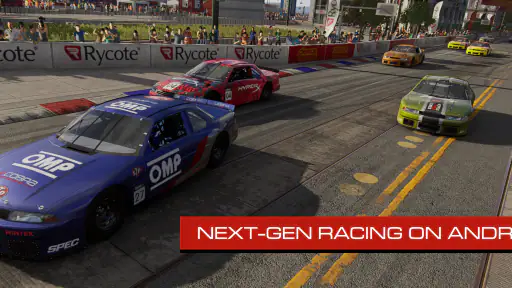
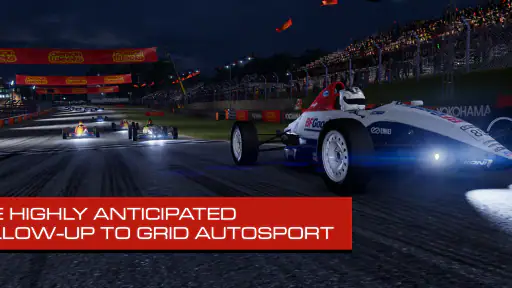
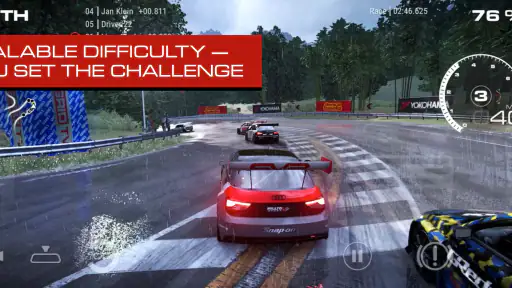
From the moment you download and launch GRID™ Legends, you know you’re in for a treat. The graphics are nothing short of stunning, offering crisp and realistic visuals that make you feel like you're on the track. The game kicks off with a cinematic introduction that sets the stage for what’s to come—an epic journey through the world of motorsports.
Gameplay and Features: Feel the Rush
Now, let's talk about what really matters—the gameplay. GRID™ Legends offers a variety of modes to keep you entertained. Whether you're in it for the single-player story mode, “Driven to Glory”, or the intense multiplayer races, there's something for everyone. The story mode is engaging, weaving a narrative that feels like a mix of reality TV and racing drama.
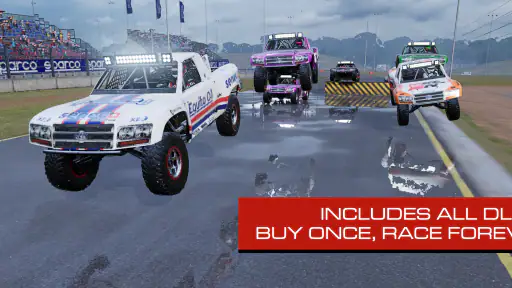
But wait, there’s more! The Deluxe Edition comes loaded with extra content, including additional cars and tracks, which means more ways to test your skills and strategies. And if you’re a fan of customization, you’ll love the options to tweak your cars to suit your racing style.
The Sound of Speed
Sound design in racing games often gets overlooked, but not here. The roar of the engines, the screeching of tires, and the crowd’s cheers are all captured perfectly, enhancing the immersive experience. It’s like having your personal racing symphony at your fingertips.
Handling and Controls: Smooth as Butter
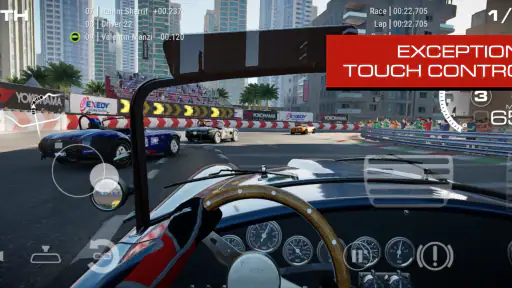
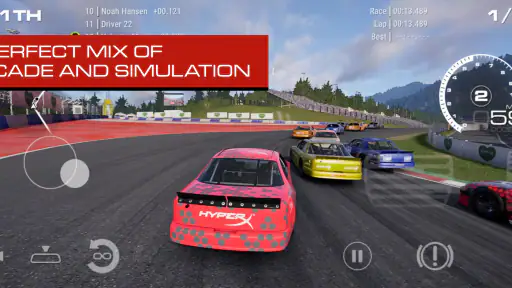
One thing that can make or break a racing game is how it feels to control the cars. I’m happy to report that GRID™ Legends excels in this department. The controls are intuitive, whether you’re using touch or tilt controls, and the cars respond beautifully, allowing for precision handling that’s crucial during those tight corners.
Final Lap: Is it Worth It?
So, is GRID™ Legends: Deluxe Edition worth your time and money? Absolutely, if you’re a fan of racing games. It’s a well-rounded package that delivers on all fronts—graphics, gameplay, and sound. Whether you’re a casual gamer or a hardcore racing enthusiast, this game offers something for everyone. So go ahead, give it a spin, and feel the rush!
GRID™ Legends: Deluxe Edition Pros and Cons
Pros
- Engaging storyline with rich narratives.
- Stunning graphics and realistic visuals.
- Diverse range of cars and tracks.
- Smooth controls and responsive gameplay.
- Multiplayer mode enhances competition.
Cons
- Requires a high-performance device.
- Large storage space needed.
- In-app purchases can be costly.
- Occasional bugs and glitches.
- Online play can drain battery quickly.
Frequently Asked Questions
What is GRID™ Legends: Deluxe Edition and what makes it different from the standard version?
GRID™ Legends: Deluxe Edition is an expanded version of the popular racing game, offering additional content that isn't available in the standard edition. It includes extra vehicles, events, and customization options, enhancing the overall gameplay experience. Players can enjoy more in-depth racing scenarios and a richer narrative, making it an appealing choice for racing enthusiasts.
What platforms is GRID™ Legends: Deluxe Edition available on and how can I download it?
GRID™ Legends: Deluxe Edition is available on multiple platforms, including PlayStation, Xbox, and PC. To download it, users can visit their respective platform's digital store, such as the PlayStation Store, Microsoft Store, or platforms like Steam for PC users. Availability on mobile platforms may vary, so it's important to check the respective app store for Android or iOS compatibility.
Does GRID™ Legends: Deluxe Edition require an internet connection to play?
While GRID™ Legends: Deluxe Edition offers a rich single-player campaign that can be enjoyed offline, certain features such as multiplayer modes and online events do require an internet connection. To fully experience all the interactive features and updates, a stable internet connection is recommended.
Are there any in-game purchases or microtransactions in GRID™ Legends: Deluxe Edition?
Yes, GRID™ Legends: Deluxe Edition includes in-game purchases and microtransactions, allowing players to buy additional content, vehicles, and customization options. These purchases can enhance gameplay but are not necessary to progress through the game. Players should be aware of these options to avoid unexpected spending.
What are the minimum system requirements for playing GRID™ Legends: Deluxe Edition on PC?
To run GRID™ Legends: Deluxe Edition smoothly on a PC, users should ensure their system meets the minimum requirements. This includes having a modern multi-core processor, at least 8GB of RAM, and a compatible graphics card with updated drivers. Additionally, sufficient storage space is needed for installation. Checking these requirements can prevent performance issues.


