

Grand Theft Auto: Vice City
- Reviews
- 3.7
- Version
- 1.12
- Installs
- 1,000,000+

Screenshots
 Analysis by Frivlyz
When I first booted up Grand Theft Auto: Vice City on my phone, I felt an immediate wave of nostalgia wash over me. It's as if I was transported back to the early 2000s, a time when I would spend countless hours glued to my PlayStation, living out my wildest open-world fantasies. But now, with just a tap, I had the city of Vice City right in my pocket. Let me tell you, it felt surreal!
How the mobile version fits today
That first impression still explains the main appeal: this is a full, story-led arcade action game built around a sprawling city, not a quick puzzle or a run that resets after a few minutes. Rockstar Games released it for mobile on Dec 6, 2012, and the current version is 1.12. Those details matter less as a promise of new features than as context: this is an older console-era game adapted for phones, and it feels like one. Its appeal is the complete Vice City experience in a portable form, rather than a modern mobile design built around short sessions or frequent interface changes.
I’d choose it when I want a world I can return to over several days: one session can move the story forward, while another can be spent simply driving around and finding my bearings. A practical use case is a quiet evening at home when I have enough time to focus on a mission and can keep the phone steady, rather than a brief commute where interruptions make a chase frustrating. The game’s open structure gives me room to decide what counts as progress, but the touch controls mean that not every setting is equally comfortable for every player.
What its age means for returning players
The long gap between its original arrival and its present mobile version is part of the trade-off. Vice City’s visual style still has character, and its clear silhouettes and saturated colors help the city remain readable on a small screen. At the same time, this is not a remake that rebuilds the experience around current mobile conventions. If you are returning after playing it on a console, expect familiar design and pacing, not a substantially reimagined game. If you are new, the older presentation can be charming, but it may also feel less smooth or immediate than newer open-world titles.
That distinction helps explain who is likely to enjoy it most. I’d recommend it to someone who values a memorable setting, a defined story, and the freedom to wander between missions. I’d be more cautious recommending it to a player who mainly wants a polished touch-first action game, online competition, or a fast sequence of short challenges. It is also rated Mature 17+, so it is not a suitable choice for younger players. The version runs on Android 7.0 or later, while iPhone and iPad owners should check their device’s store compatibility before buying rather than assume every mobile device will handle it.
Welcome to the 80s
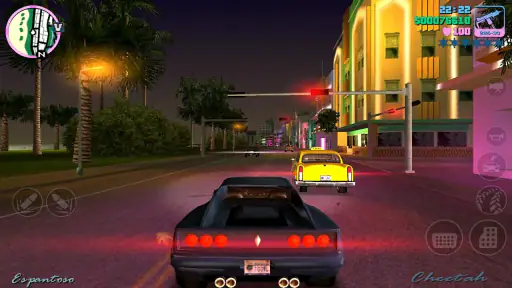
The game kicks off with vibrant neon lights, synthwave music, and the all-too-familiar voice of Tommy Vercetti, our protagonist. If you’re a fan of the 80s vibe, Grand Theft Auto: Vice City delivers it in spades. The graphics might not be cutting-edge by today’s standards, but they’ve been beautifully optimized for mobile. The colorful, bustling streets of Vice City are just as I remembered—teeming with life and full of opportunities for chaos.
Gameplay Dynamics
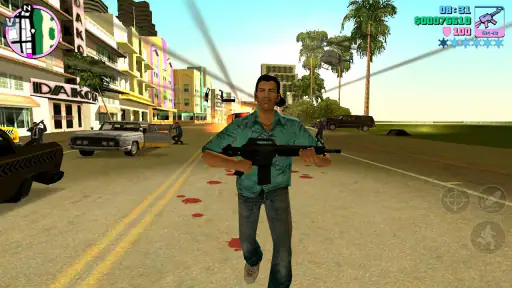
Now, let's talk about the gameplay. It’s classic GTA through and through. You have the freedom to do just about anything you want, whether it’s completing missions, exploring the city, or simply causing mayhem. The controls have been adapted for touchscreens, which, while a bit clunky at first, become second nature after a few missions. There’s also controller support, which I highly recommend for a more comfortable experience.
Gaming Stories You May Enjoy

Dancing Road Turns Short Breaks Into a Test of Rhythm and Timing

Super Stylist Makes Every Outfit a Test of Taste and Patience

Dominoes on Your Terms: Who Should Play and Who Should Pass

Pokémon GO Makes the Familiar World Feel New

Chess.com Turns Rematches Into Rivalries, but Community Has Its Costs

Archery Battle 3D Review: Sharp Aiming, Unclear Feedback
One useful adjustment is to give yourself time to learn the touch layout before tackling the most demanding driving or combat moments. A mission can feel harder than it really is if I am still reaching for the right on-screen control, so I use early, lower-pressure play to build the muscle memory. If the screen feels crowded under my thumbs, a compatible controller is a sensible alternative; it changes the comfort of play without changing the game’s older mission design. I would not buy it assuming touch controls will feel as precise as a dedicated controller from the first minute.
Making progress at your own pace
Vice City works best when I treat its open city as part of the game rather than as a corridor between objectives. If I have only a little time, I can explore a nearby stretch of town or take a short drive instead of starting a mission that I may have to abandon. When I do have a longer block free, I can focus on the story and give a difficult sequence a fair attempt. This flexibility is a real advantage over many arcade games that expect repeated, tightly timed rounds, though it also means the game does not always provide the quick, self-contained payoff those alternatives offer.
For a realistic day-to-day example, I might play at home after dinner, with headphones on and a controller nearby. I can spend that session following the plot, then stop before I am tired enough to make careless driving mistakes. On a noisy train or while waiting for an appointment, I would be less likely to begin a tense mission: a sudden interruption can break concentration, and touch controls are easier to fumble when I am holding the phone awkwardly. The portable format makes the city available in spare moments, but it does not make every moment a good time to play.
The game costs $4.99, so I’d think about the kind of entertainment I actually want before purchasing. For a player looking for a substantial single-player world and a story to revisit, a one-time purchase can be easier to understand than a free game built around repeated prompts or small transactions. If I only want something for a few minutes at a time, a lightweight arcade alternative is probably a better fit. The price makes most sense to someone who will explore beyond the opening and enjoy the freedom to move between missions, driving, and discovery.
Mission rhythm and city exploration
The missions are as engaging as ever, with a storyline that keeps you hooked. From dealing with shady characters to high-speed chases through the city, there’s never a dull moment. Plus, the voice acting is top-notch, which adds layers of depth to the characters and the overall narrative.
Even so, I would not describe the mission flow as uniformly easy. A chase or firefight asks for more coordination than simply cruising through the city, and the touch interface can make that difference noticeable. When a sequence goes badly, it helps to separate the problem: was I unfamiliar with the controls, rushing the objective, or struggling with the game’s older handling? Trying again with a controller, or taking a calmer approach to the same task, is more useful than assuming the whole game is a poor fit. Players who dislike retrying missions may find that friction more irritating than the freedom between them is rewarding.
Exploration is a better choice when I want to enjoy Vice City without placing every session under pressure. I can pay attention to how the neighborhoods change in mood, follow a road I have not taken, and let the radio and scenery carry the experience. This is one of the game’s less obvious strengths on mobile: the city can make a short visit feel worthwhile even when I do not complete a major objective. The trade-off is that open-ended wandering does not provide the same clear sense of achievement as finishing a story mission, so players who need constant goals may prefer a more structured arcade game.
Soundtrack and Atmosphere
One of the standout features of Vice City has always been its soundtrack. The game boasts a killer selection of 80s hits that enhance the entire gaming experience. Whether you're cruising down Ocean Beach or engaging in a firefight, the music sets the perfect mood. It’s like having your own personal time machine set to the best decade ever!
Beyond the music, the atmosphere of Vice City is just captivating. The attention to detail in recreating a Miami-esque city is impressive. The sun-soaked beaches, the nightclubs, the bustling urban landscape—it all feels alive and immersive. It's a playground that invites you to explore every nook and cranny.
What to expect before installing
The game has an average rating of 3.7 from around 200,000 ratings, with about 19,000 written reviews and over 1 million installs. I read that as evidence of a large audience with mixed reactions, not a guarantee that it will suit every device or play style. The most useful way to judge it is to compare its particular strengths with what you want: a distinctive setting, story missions, and free exploration, rather than a fresh visual overhaul or a touch-first control system.
Before buying, I’d check that my device meets the operating-system requirement and that I have a comfortable way to control the game. On Android, the minimum is version 7.0. I would also consider where I usually play: a larger screen and a steady grip make the city easier to navigate, while a controller is worthwhile if driving and combat are the parts I care about most. Those small decisions can shape the experience more than nostalgia alone.
For existing players, version 1.12 is the current release to look for, but I would not treat the version number as proof of a recent overhaul. The firm takeaway is that the mobile edition continues to be available in this established form; any expectation of future additions or changes should remain just that, an expectation. I’d make a purchase based on the game as it is now, not on a hoped-for update. That is especially important if a particular device feature or modern convenience is essential to your enjoyment.
Who should make the trip
I think the strongest reason to pick up this mobile edition is not simply that it brings a familiar game to a phone. It is that its city, story, music, and free-roaming rhythm still work together as a recognizable whole. Returning fans can revisit a place they remember, while newcomers can see why this particular entry has endured, provided they are comfortable with an older game’s pacing and presentation. I would skip it if my priority were a newly designed mobile experience, effortless touch controls, or nonstop short-form action.
For me, the sensible approach is to play with patience: learn the controls somewhere low stakes, use a controller if touch starts to distract from the missions, and choose story sessions when I can give them proper attention. I also like that I can switch to casual exploration when I do not want the pressure of an objective. That mix makes the game more adaptable than a simple arcade score-chaser, even though it asks for more time and attention than one.
Final Thoughts
In conclusion, Grand Theft Auto: Vice City for mobile is a nostalgic trip down memory lane that still holds up today. Whether you’re a returning fan or a newcomer to the series, this game offers something for everyone. The blend of a rich storyline, engaging gameplay, and a killer soundtrack makes it a must-have on your mobile device. So, buckle up and get ready for some 80s-infused chaos—it’s going to be a wild ride!
Grand Theft Auto: Vice City Pros and Cons
Pros
- Immersive open-world experience.
- Rich storyline and engaging missions.
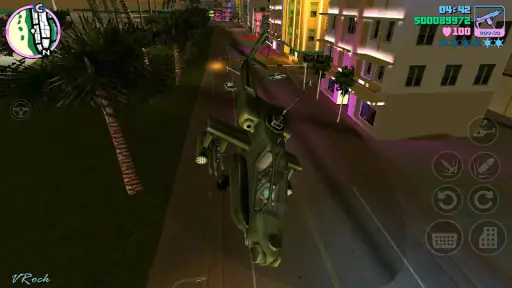
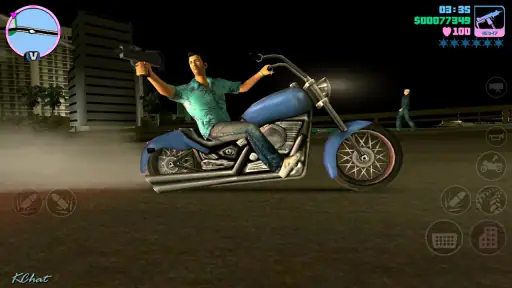
- Wide variety of vehicles to drive.
- Customizable controls for convenience.
- Nostalgic 80s music and vibe.
Cons
- Controls can be challenging on mobile.
- Graphics look dated on high-res screens.
- Some missions feel repetitive.
- Long loading times can be frustrating.
- In-app purchases can be pricey.
This Game in Other Languages
Frequently Asked Questions
What are the system requirements for Grand Theft Auto: Vice City on mobile devices?
Grand Theft Auto: Vice City requires Android version 7.0 or iOS 8.0 and up to run smoothly. It's recommended to have at least 1.5GB of free storage space and a device with a minimum of 1GB RAM for optimal performance. Ensure your device meets these specs to avoid any gameplay issues.
Can I play Grand Theft Auto: Vice City offline on mobile?
Yes, Grand Theft Auto: Vice City can be played offline once it has been downloaded and installed on your mobile device. This allows for uninterrupted gameplay without needing a constant internet connection, making it convenient for users who are often on the go or have limited data access.
Is there any in-app purchase in Grand Theft Auto: Vice City?
Grand Theft Auto: Vice City is a paid app, meaning you will need to purchase it initially to download it. However, once purchased, there are no additional in-app purchases required to enjoy the full game. This ensures that players can enjoy the entire gaming experience without further financial commitments.
How does Grand Theft Auto: Vice City perform on mobile compared to the original PC version?
The mobile version of Grand Theft Auto: Vice City has been optimized for touchscreen devices, featuring updated graphics and controls to suit mobile gameplay. While it may not match the full graphics quality of the original PC version, it provides a satisfying nostalgic experience with smooth performance and enhanced visual effects tailored for mobile devices.
What should I do if Grand Theft Auto: Vice City crashes or has performance issues on my mobile?
If you encounter crashes or performance issues while playing Grand Theft Auto: Vice City, first ensure your device meets the minimum system requirements. Closing background apps, rebooting your device, and ensuring sufficient storage space can also help. If problems persist, try reinstalling the app or contacting customer support for further assistance.


