

Graffiti Quote Color by number
- Reviews
- 4.8
- Version
- 1.0.52
- Installs
- 500,000+

Screenshots
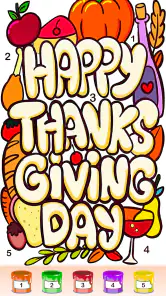

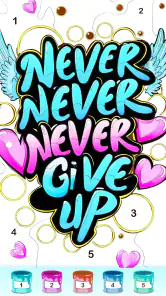


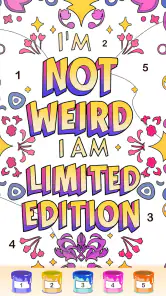
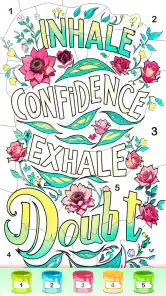
 Analysis by Frivlyz
I tend to judge a coloring game by how quickly it lets me settle into a session, rather than by how elaborate its artwork looks in a store preview. Graffiti Quote Color by Number is built around a simple idea: fill numbered sections in graffiti-style designs, many paired with words or quotes. It is a low-pressure activity for a phone or tablet, not a drawing studio, and that distinction helps set expectations. I would reach for it when I want a small creative task that can fit between other things, rather than a game that demands a long stretch of concentration.
What a quick session feels like
The basic loop is easy to grasp: choose a design, match the numbered areas with their colors, and watch the image take shape. That simplicity is useful when I have only a few minutes, because there is no need to learn a complicated set of controls before starting. The graffiti theme gives the pictures a different feel from the flowers, landscapes, and mandalas that often dominate coloring apps, while the accompanying text makes each finished page feel more like a designed poster than a plain pattern.
As a board game, it is an unusual fit: the main activity is not strategy or competition, but completing a structured coloring page. I would think of it as a casual, puzzle-like coloring game rather than a traditional board game with turns, opponents, or a campaign. That makes it a better match for someone seeking a quiet, self-paced pastime than for someone expecting tactical play or a social match.
Speed expectations and the rhythm of coloring
The interaction is deliberately uncomplicated, so the game’s appeal does not depend on fast reactions. I can work through a design at my own pace, tapping the areas that correspond to the selected color. The steady repetition is part of the relaxing effect, though it can also feel a little mechanical if I want to make freehand choices or change the artwork beyond the coloring task. This is guided creativity: the design and its numbered structure do much of the planning for me.
For a short break, I find it helpful to choose a page that looks manageable rather than opening the most intricate-looking option first. A completed design gives a clear stopping point, which is convenient when I am waiting for an appointment or taking a pause between chores. If I start coloring without much time, I can still make progress, but I would not treat every page as something guaranteed to finish in one sitting. The comfortable pace comes from being able to stop when I want, not from a promise that every image is quick.
Busy sessions, battery expectations, and practical trade-offs
During a longer coloring session, the repeated tapping can become less relaxing than it first seems, especially if I am trying to fill small sections with precision. I would take breaks rather than push through a page just to finish it. A stylus may be more comfortable than a fingertip on a tablet if I have one, although the game’s straightforward tap-based approach is also easy to use without extra equipment. The practical trade-off is that the same simplicity that makes it approachable can make extended play feel repetitive.
I would also keep the session flexible instead of treating the app as a place to create a polished piece of original art. The numbered layout guides the result, so the pleasure is in revealing the image and seeing the quote come together, not in deciding every mark myself. If I want a personal sketchbook, a drawing app is the stronger choice; if I want a ready-made composition to color without planning one, this format makes more sense.
Gaming Stories You May Enjoy

Dancing Road Turns Short Breaks Into a Test of Rhythm and Timing

Super Stylist Makes Every Outfit a Test of Taste and Patience

Dominoes on Your Terms: Who Should Play and Who Should Pass

Pokémon GO Makes the Familiar World Feel New

Chess.com Turns Rematches Into Rivalries, but Community Has Its Costs

Archery Battle 3D Review: Sharp Aiming, Unclear Feedback
Reliability and recovering your place
Coloring works best when I can give it my attention, but real life interrupts. I would avoid starting a detailed page at a moment when I know I will need to switch rapidly between apps, and I would pause at a natural point if I need to put my phone away. That is sensible for any mobile activity involving a partly completed task, rather than a claim that this game has a particular saving or recovery feature. The experience is most comfortable when I can return to it at my own pace without making completion feel urgent.
For a more dependable routine, I would use it as a brief, optional break rather than rely on it to fill a long commute or keep a child occupied without supervision. Its Teen content rating is worth noting for families choosing apps, and parents should make their own call about whether the coloring activity and available content suit a younger player. The game’s calm format may be approachable, but an age rating should not be mistaken for a guarantee that every family will find it appropriate.
Designs, value, and who will enjoy it
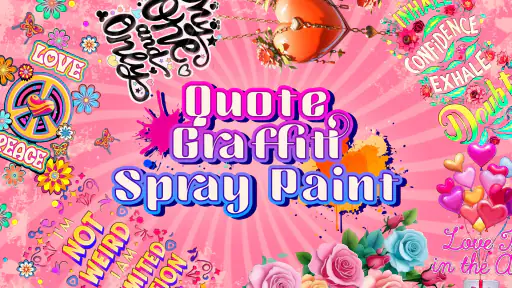
When I first opened Graffiti Quote Color by Number, I was greeted with a vibrant collection of graffiti designs that are both inspiring and fun to look at. The app offers a variety of designs, each accompanied by motivational quotes that add a bit of wisdom to your art session. It's like having a personal art gallery in your pocket, ready to be colored at any moment.
Easy to Use Interface
The interface is straightforward and user-friendly. You don't need to be tech-savvy to navigate through the app. The main screen displays all the available designs, and you can simply tap on one to start coloring. The color palette is extensive, providing a wide range of colors to choose from, ensuring your graffiti masterpiece is as vibrant as you want it to be.
Coloring Experience
The coloring process is as easy as pie. Each graffiti design is divided into numbered sections, and all you have to do is match these numbers with the colors from the palette. It's a relaxing activity that allows you to unwind and let your creativity flow. Plus, the app provides a satisfying sense of completion once you finish a design. Trust me, watching the colors fill in is oddly satisfying!
Working around the limits of guided art
One useful way to approach the numbered format is to treat it as a visual break rather than as a test of artistic skill. I can focus on one color at a time, which gives the session a small, repeatable rhythm. If I am tired, that structure is easier to return to than a blank canvas, where I would have to choose a subject, composition, and palette before making a mark. On the other hand, anyone who wants to invent a graffiti piece from scratch may find that the numbered sections leave too little room for personal expression.
The quote element also changes how I might use the finished page. I would choose a design whose lettering or message I like, then color it as a compact creative activity during a quiet evening. That is different from using a general coloring book, where the main attraction may be intricate patterns or realistic scenes. Here, the combination of street-art styling and text is the specific draw; if slogans and quote-based artwork do not appeal to me, the theme may wear thin even if I enjoy coloring.
How it compares with other coloring choices
Compared with freehand drawing apps, this game asks for far less setup and decision-making, but gives me less control over the final image. Compared with a paper coloring book, it is easier to carry and does not require pencils or cleanup, while the phone screen can feel cramped when a design has many small areas. And unlike competitive board games, it does not offer the push and pull of an opponent or a strategic objective. I would choose it for guided, solo downtime, not for collaboration, artistic freedom, or a lively group game.
A practical tip is to try a smaller-looking page first and see whether tapping through the numbered spaces feels soothing or tedious. That quick test tells me more about whether the format suits me than the theme alone. If I enjoy seeing an image gradually emerge, I can move on to more involved designs; if I find myself wishing I could freely recolor or redraw sections, a different kind of art app is likely a better use of my time.
Sharing, updates, and spending choices
One of the features I absolutely love about Graffiti Quote Color by Number is the ability to share your completed artwork with friends on social media. It's a great way to showcase your artistic skills and maybe even inspire others to pick up the app and start coloring. Additionally, the app frequently updates its library with new designs, so there's always something fresh to look forward to.
Sharing is most appealing if I already enjoy showing finished digital coloring pages to friends; it is not essential to the core activity. I would finish a design first and then decide whether it is worth sharing, rather than letting the social side turn a relaxing pastime into another task. The app is free to download, while optional in-app purchases range from $1.99 to $59.99 per item. Because the price range is broad, I would try the free experience before spending and consider whether extra content or an ad-free option is genuinely valuable to me. Purchases are a personal choice, not a requirement for deciding whether the coloring style itself works.
Fun Coloring World is the developer, and the game has an average rating of 4.8 from around 9,800 ratings, with more than 500,000 installs. Those figures suggest that many players have tried it, but they do not tell me whether its particular mix of quotes and numbered coloring will suit my taste. It was released on May 15, 2023, and version 1.0.52 is the current version. I would still base my decision on the central activity: a guided page-by-page coloring routine with a graffiti look.
Device fit and a realistic everyday use
The game is listed for devices running Android 7.0 or later. That gives Android users a useful compatibility baseline, but it does not tell me how quickly it will run on every device or how much storage or battery a session will use. I would judge performance on my own phone: open a design, try several colors, and notice whether the screen remains comfortable to work with. On a small display, detailed sections may be harder to tap accurately; a larger phone or tablet can make the same task feel less cramped.
A realistic use would be opening a page while waiting for a friend at a café, coloring a few sections, then putting the phone away when the conversation begins. Another is a short wind-down at home, choosing a quote design and finishing only if the session still feels relaxing. In both cases, the benefit is that the activity has a clear focus and does not require art supplies. It is less suitable when I need something that can be played one-handed while walking, when I want a highly interactive challenge, or when I am trying to avoid screen time altogether.
For reliability, I would keep the app updated through the platform I use and avoid assuming that a partly completed image will be recoverable in every situation, such as after changing devices or reinstalling. That is a cautious habit, not a claim about a particular backup system. If retaining every finished piece matters to me, I would use the available sharing option for work I especially like rather than depend on an undocumented workflow. This small distinction helps separate casual enjoyment from treating the app as a permanent art archive.
Who should choose it—and who should skip it
I think it is a good fit for people who enjoy guided coloring, like graffiti-inspired visuals, and want a low-pressure activity that can be picked up in short bursts. It may also work for someone who finds blank-page drawing intimidating but still wants to feel involved in making an image. The quotes add a clear identity that many general coloring games do not have, so fans of text-led designs may find the collection more appealing than a broader assortment of unrelated pictures.
I would skip it if I wanted original drawing tools, elaborate gameplay, multiplayer competition, or a coloring experience centered on choosing every color and shape myself. I would also be cautious if repetitive tapping irritates me or if I strongly prefer paper and colored pencils. Those are not faults in the game so much as mismatches between its fixed, numbered workflow and what I want from a creative app. For a more open-ended project, a drawing program is a better alternative; for a more social evening, a traditional board game is likely to be more satisfying.
My performance verdict
All in all, Graffiti Quote Color by Number is a delightful app that offers a unique blend of creativity and relaxation. Whether you're a seasoned artist or just looking for a fun way to pass the time, this app has something for everyone. It's a wonderful way to explore graffiti art without leaving any mess behind on the walls. Give it a try, and you might just find your new favorite hobby!
My more measured recommendation is to think of it as a simple coloring companion, not a full art tool or a demanding game. Its easy-to-follow loop, quote-led graffiti designs, and portable format are the reasons I would try it. The limitations are just as clear: the numbered approach can become repetitive, the screen may feel small for detailed work, and optional purchases may matter to players who want more content or fewer interruptions. With a 4.8 average and a free starting point, it is easy to see why people give it a look, but my advice is to test a page or two and decide whether the steady tapping genuinely helps you unwind.
Graffiti Quote Color by number Pros and Cons
Pros
- Provides relaxing coloring experience.
- Wide variety of graffiti designs.
- Easy to use for all ages.
- Boosts creativity and focus.
- Offline mode available.
Cons
- Limited free content.
- Contains ads during use.
- Might be repetitive.
- In-app purchases required.
- No option to create custom designs.
Frequently Asked Questions
What is Graffiti Quote Color by Number?
Graffiti Quote Color by Number is a creative mobile app that allows users to engage in art by coloring graffiti-style quotes. The app provides a unique platform for art enthusiasts and those looking to relax by coloring vibrant and artistic graffiti quotes using a color-by-number approach.
How does the color-by-number feature work in this app?
The color-by-number feature in Graffiti Quote Color by Number is designed to be intuitive and user-friendly. Each image is divided into sections, each marked with a number that corresponds to a specific color. Users simply tap on a section and fill it with the designated color, creating a beautiful and completed graffiti artwork.
Is Graffiti Quote Color by Number suitable for all ages?
Yes, Graffiti Quote Color by Number is designed to be suitable for users of all ages. Its simple interface and easy-to-follow color-by-number system make it accessible for children, teens, and adults alike. The app offers a fun and educational way to explore creativity, regardless of age.
Does the app require an internet connection to function?
Graffiti Quote Color by Number primarily functions offline, allowing users to enjoy coloring without needing an internet connection. However, an internet connection may be required for downloading new content or updates to keep the app fresh with new graffiti quotes and features.
Are there any in-app purchases or advertisements?
While Graffiti Quote Color by Number is free to download and use, it may include optional in-app purchases for additional content or ad-free experiences. Some advertisements might be present in the app, providing users with the option to support the developers by purchasing premium features or removing ads.


