

Girls Nail Salon - Kids Games
- Reviews
- 4.4
- Version
- 1.64
- Installs
- 10,000,000+

Screenshots


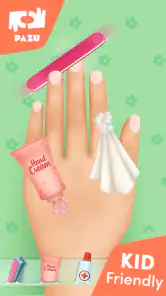

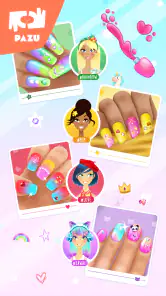
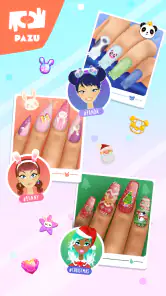


 Analysis by Frivlyz
Have you ever found yourself scrolling through the app store looking for a fun and creative game for your kids? Well, let me introduce you to Girls Nail Salon - Kids Games. This app is a delightful playground for children who love to explore their artistic side, especially when it comes to nail art.
Unleashing Creativity
First things first, Girls Nail Salon - Kids Games is all about letting kids dive into the world of nail art in the most entertaining way possible. As soon as you launch the app, the vibrant colors and playful design immediately grab your attention. It's like stepping into a virtual nail salon where your child is the artist. The app offers a variety of nail shapes, colors, and patterns to choose from, ensuring endless combinations. It's a fantastic way for kids to express themselves and let their imagination run wild.
Simple and Engaging Gameplay
What I love about this app is its simplicity. The interface is incredibly user-friendly, making it accessible for younger children who might not have the patience for complicated controls. With a few taps, they can choose a nail shape, select from a rainbow of nail polishes, and add cute little stickers or glitter. It's as easy as pie, and the results are always stunning, which keeps the little ones coming back for more. The app even has a save option, allowing kids to show off their creations to family and friends.
Making a Creation Feel Complete
A useful way to get more from a short play session is to give it a small creative brief: ask your child to make a design for a particular mood, season, or imaginary character. That turns choosing colors and decorations into a sequence of decisions rather than a quick tap through every option. I would let the child explain why the colors work together, too. It keeps the activity focused on their ideas, not on producing a design that looks like an adult’s version of a perfect manicure.
The save option also gives a natural stopping point. A child can finish a design, save it, and come back to a new idea another time instead of feeling they need to keep playing until they have tried everything. If the game is being used during a wait or a journey, I’d agree on a simple endpoint before handing over the device: complete one design, save it, then put the device away. That small routine makes this kind of open-ended play easier to fit into a family day.
Educational Benefits
Aside from being a fun pastime, the app subtly incorporates educational elements. As kids play, they enhance their motor skills and hand-eye coordination, which are crucial for their development. While they might not realize it, they're learning to make choices and decisions, boosting their confidence in their creative abilities. It's not just about painting nails; it's about nurturing a child's growth in a fun and engaging way.
Moreover, the app provides a platform for kids to learn about color combinations and patterns. It’s fascinating to watch them experiment and discover what looks good together. Who knows, they might even pick up a thing or two about fashion along the way!
Gaming Stories You May Enjoy

Dancing Road Turns Short Breaks Into a Test of Rhythm and Timing

Super Stylist Makes Every Outfit a Test of Taste and Patience

Dominoes on Your Terms: Who Should Play and Who Should Pass

Pokémon GO Makes the Familiar World Feel New

Chess.com Turns Rematches Into Rivalries, but Community Has Its Costs

Archery Battle 3D Review: Sharp Aiming, Unclear Feedback
Where It Fits Among Kids’ Games
I see this as a pretend-play art activity rather than a game built around levels, scores, or winning. That distinction matters when choosing something for a child: the appeal is making a design, not improving a character or beating a challenge. Compared with a general drawing app, the nail-salon theme gives children a clear canvas and a playful set of choices, which can help a child who enjoys decorating but feels unsure when faced with a blank page. A broader art app is the better fit if they want to draw freely or work on pictures beyond nails.
It can also sit alongside hands-on crafts, but it is not a replacement for them. Physical coloring or craft materials offer tactile practice and the chance to make something away from a screen; this game offers quick experimentation without needing supplies or cleanup. I would choose it for a short creative break, and choose a real craft when the goal is a longer activity with materials to handle. For a child who is mostly interested in racing, puzzles, or clear goals, the salon theme may simply not hold attention for long.
Everyday Use and Age Fit
A realistic moment for this game is a child waiting beside a parent at an appointment or relaxing at home on a rainy afternoon. The parent can invite them to make a design for a favorite pretend character, then ask them to describe one choice they made. That gives the session a little conversation and keeps the child in charge of the artwork. Since the game is rated Everyone, it is presented for a broad audience, but I would still decide whether its beauty theme suits a particular child rather than assuming every child will enjoy it.
The controls are described as straightforward in my experience, but younger children may still need help at first with the sequence of selecting and decorating. I would sit with them for the first design, show how to save it, and then let them explore independently if they are comfortable. For a child who finds tapping and choosing frustrating, a physical coloring activity may be a more relaxing option. And if a parent wants a structured lesson with a defined skill to practice, this open-ended salon play is not a substitute for a dedicated learning exercise.
Free to Start, With Purchases to Consider
The game is free to download, while optional in-app purchases are listed from $6.49 to $59.99 per item. That range is important for a parent to notice before a child starts playing: free installation does not mean every possible purchase is free. I would review purchase settings on the device and make the family rule clear before handing it over. The listed range alone does not tell me which items a child will encounter, how often purchase prompts appear, or what any particular item contains, so I would not promise that every part of the experience is available without spending.
For a fair decision, treat the free version as something to try first, then judge whether the available creative play is enough for your child before considering any purchase. There is no competitive advantage to weigh in the way there might be in a multiplayer game; the central activity is personal design. Still, spending can matter in a children’s app, and I would not let a child make purchase decisions independently. If your priority is an experience with no in-app spending at all, this may not be the right choice unless you can manage purchases through the device’s settings.
What the Store Facts Mean in Practice
Pazu Games is the developer, and the game is categorized as educational. It has a 4.4 average from around 52,000 ratings, with more than 10 million installs. Those figures suggest that many families have tried it, but they do not tell me whether it will suit a particular child, how much content that child will enjoy, or whether the purchase options will feel worthwhile. I use popularity as context, not as a promise of quality for every household.
The game is free, carries an Everyone age rating, and was released on February 11, 2020. Version 1.64 requires Android 6.0 or later. Those practical details help with the basic download decision, but they do not answer every family’s questions about day-to-day use. If you are choosing it for a specific device, check that device’s compatibility before installing; if you are choosing it for a child, focus just as much on the theme and your purchase rules as on the age label.
Questions Worth Settling Before Play
Will a child need an internet connection? I would not infer an offline mode from the creative activity itself, so if you need a game for a flight or a place with weak reception, test it before relying on it there. Can a child keep every design forever? The save option makes it possible to show creations, but I would avoid treating it as a permanent gallery or storage service. If a particular design matters, a parent can check what the device allows for preserving it rather than assuming every saved item is backed up.
Is it suitable for every child who likes art? Not necessarily. The narrow focus on nail decoration is a strength for a child who enjoys that theme and a limitation for one who wants open-ended drawing or a different kind of play. Does the educational label mean formal teaching? I would read it more modestly: the activity can encourage choices, coordination, and experimentation with color, but the child is chiefly playing and creating. Those distinctions help set realistic expectations before the first session.
Final Thoughts
In conclusion, Girls Nail Salon - Kids Games is a brilliant app for kids who love to play and create. It's perfect for keeping them entertained on a rainy day or during a long car ride. With its vibrant design, easy-to-use interface, and educational benefits, it's a win-win for both kids and parents. If you're on the lookout for an app that combines fun and learning, this might just be what you need. So why not give it a try and let your kids' creativity shine?
My recommendation is strongest for a child who enjoys choosing colors, patterns, and decorations and is happy to make a design without needing a score or a new level to chase. I would skip it for a child who wants broader drawing tools, tactile craft time, or a game with clearly measured progress. For parents, the sensible approach is to try the free download with purchase controls in place, see whether the theme genuinely holds the child’s interest, and then decide if it earns a place in the regular rotation.
Girls Nail Salon - Kids Games Pros and Cons
Pros
- Fun and engaging gameplay for kids
- Wide variety of nail polish colors
- Creative freedom with nail designs
- User-friendly interface
- Encourages creativity and imagination
Cons
- In-app purchases can be excessive
- Advertisements disrupt gameplay
- Limited features without payment
- Requires internet for full functionality
- Repetitive content over time
Frequently Asked Questions
What is Girls Nail Salon - Kids Games?
Girls Nail Salon - Kids Games is an interactive mobile application designed for children, especially girls, to explore their creativity by designing and decorating virtual nails. The app offers a variety of nail polish colors, patterns, and accessories to create unique nail art, making it an entertaining and educational experience for kids who love fashion and design.
Is Girls Nail Salon - Kids Games safe for children to use?
Yes, Girls Nail Salon - Kids Games is developed with child safety in mind. It offers a kid-friendly interface with no inappropriate content. However, parents should be aware of possible in-app purchases and ads that might appear during gameplay, so it’s advisable to supervise younger children while they play.
Does the app require an internet connection to function?
Girls Nail Salon - Kids Games does not require a constant internet connection to play, which makes it convenient for users to enjoy the game on the go. However, an internet connection might be necessary for downloading updates or accessing certain features like additional nail art designs or seasonal content.
Are there any in-app purchases in Girls Nail Salon - Kids Games?
Yes, while the basic version of Girls Nail Salon - Kids Games is free to download, it offers in-app purchases to enhance the gaming experience. These purchases can include additional nail colors, patterns, and decorations. Parents may want to monitor these purchases to ensure they align with their spending preferences.
What devices are compatible with Girls Nail Salon - Kids Games?
Girls Nail Salon - Kids Games is compatible with both Android and iOS devices. It requires iOS 10.0 or later for Apple devices and Android 5.0 or higher for Android devices. It’s important to ensure your device meets these requirements to enjoy a smooth gaming experience without any technical issues.


