

GamePoint Bingo Games of Bingo
- Reviews
- 4.6
- Version
- 1.301.60862
- Installs
- 1,000,000+

Screenshots




 Analysis by Frivlyz
When I think about bingo on a shared phone or tablet, the key question is not only whether a round is fun, but whether it fits the way people in the household actually use that device. GamePoint Bingo is a lively, social take on a familiar board game, so it can suit a quick solo break or a moment when someone wants the bustle of a room full of players. I would treat it as one person’s game at a time, though: sharing a screen does not automatically mean sharing an account, progress, or in-game resources.
A game that fits short breaks
The appeal for me is that bingo is easy to understand even if you have not played a mobile version before. You can settle into a round without learning a complicated control scheme, while the themed rooms, bonuses, and social activity give regular play more texture than simply marking numbers on a card. That makes it a reasonable choice for a quiet stretch on the sofa, a wait between errands, or a short break when you want something more engaging than scrolling.
It is less suitable when you need a game that can be paused at any moment without consequence. A live round has other players involved, so I would start one only when I can give it a little attention. If the household device is likely to be needed suddenly, waiting until it is free is better than beginning a session that someone else may interrupt.
Shared devices need a little planning
For a family tablet or a phone passed between adults, I would agree on who is using the game before opening it. That sounds obvious, but it helps avoid confusion over whose activity or purchases are attached to the session. I would not assume that separate people automatically receive separate game spaces just because they take turns holding the same device; check the account and sign-in arrangement on the device before treating it as a shared family game.
There is also a practical distinction between sharing a screen and playing together. The multiplayer rooms bring real players into the experience, but that does not mean people sitting beside you are necessarily playing as a coordinated team. If you want a household activity, you can take turns choosing a round or watching the caller’s progress, but agree beforehand how you will handle the device and any in-game choices. That keeps a casual session from turning into a dispute over who used the coins or selected a room.
Spending and session boundaries
The game is free to download, but optional purchases are part of the picture, with in-app items ranging from $0.99 to $234.99. That is a wide span, and I would be especially careful on a shared device: a younger or less experienced player may not think of a tap as a real purchase. Before handing the tablet over, I would review the device’s purchase safeguards and make sure everyone knows that optional items cost money. I would also set a personal rule for myself—play with the free options first, and only consider spending after I understand what an item changes.
That approach matters because bingo’s appeal is partly its pace. Bonuses and power-ups can make a session feel more varied, but they can also encourage the urge to keep going or to buy something that seems useful in the moment. I would decide how long I want to play before starting, rather than letting a run of close calls determine the length of the break. If you prefer games with no purchase prompts or no possibility of optional spending, a traditional offline bingo set is a better fit.
Gaming Stories You May Enjoy

Dancing Road Turns Short Breaks Into a Test of Rhythm and Timing

Super Stylist Makes Every Outfit a Test of Taste and Patience

Dominoes on Your Terms: Who Should Play and Who Should Pass

Pokémon GO Makes the Familiar World Feel New

Chess.com Turns Rematches Into Rivalries, but Community Has Its Costs

Archery Battle 3D Review: Sharp Aiming, Unclear Feedback
Age, chat, and household expectations
The age rating is Teen, which is worth taking seriously when deciding whether it belongs on a shared family device. The social side includes interaction with other players, so I would not present it as a children’s game simply because bingo itself is familiar. For a teen, I would talk plainly about chatting with strangers, avoiding personal details, and stepping away from an interaction that feels uncomfortable. Those are sensible expectations for any game that puts players in contact, not a reason to assume every conversation will be a problem.
As an adult, I find the social element a welcome change from playing against a silent screen, but it also means the game is not ideal for someone who wants a fully private, offline experience. If a household member prefers predictable play without chat or other people, a solo puzzle or a physical bingo game may be more comfortable. I would choose based on the person’s comfort with live interaction rather than on the familiar look of bingo cards.
Who is likely to enjoy it
I would recommend it most to someone who already likes bingo, enjoys light competition, and does not mind sharing a game space with strangers. It can also work for a player who wants a colorful board game with a social layer, without having to organize a group in person. If your main goal is a calm pastime, the themed presentation may still appeal, but the live-room energy and chat are part of the package to keep in mind.
On the other hand, I would steer away if you want a strict one-time purchase, a fully offline game, or a session that never asks you to think about optional extras. It is also not my first choice for a group expecting to cooperate around one screen; the game’s social play is broader than a private household match. In those situations, a local multiplayer board game or a physical bingo set gives the group more direct control over rules and turn-taking.
So, I recently had the chance to dive into GamePoint Bingo, and let me tell you, this isn't just your grandma's weekly bingo night. If you're a fan of bingo and looking for a way to spice up your gaming experience, this app might just be your new go-to.
First Impressions
Right off the bat, the app's interface is vibrant and user-friendly. Navigating through the menus is a breeze, even if you're not exactly a tech guru. What struck me initially was the energy of the game. It's like walking into a lively bingo hall with a modern twist. The colors are bold, the graphics are crisp, and there's a certain charm that makes you want to dive right in.
Gameplay and Features
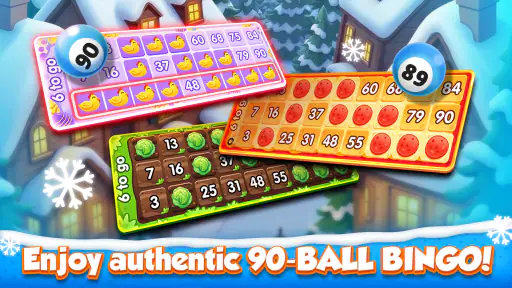
Now, let's talk about the gameplay itself. GamePoint Bingo offers a variety of bingo rooms, each with its own unique theme and charm. Whether you're in the mood for a classic 75-ball bingo or something a bit more exotic, there's a room for you. The game also throws in some fun surprises like power-ups and daily bonuses that keep things interesting.
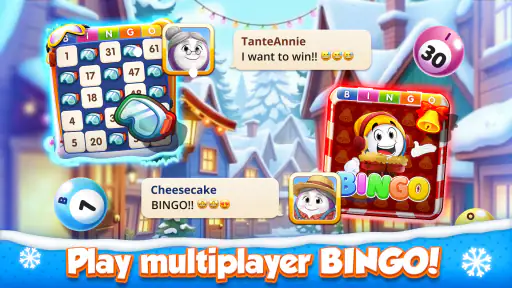
One of the coolest features is the multiplayer aspect. You can join games with players from all over the globe. It's a neat way to make new friends and share the joy of yelling "Bingo!" from the comfort of your couch. The chat feature is also a nice touch, allowing you to interact with other players and maybe even engage in a bit of friendly banter.
Social and Interactive Elements
Speaking of interaction, the social component of GamePoint Bingo is a real standout. You can team up with friends or make new ones through the app. There are also tournaments and events that add a competitive edge. If you're a bit of a social butterfly, this game has got you covered.
There's a sense of community here that I haven't seen in many other mobile games. The developers have done a great job of fostering a welcoming environment, and it shows in the active player base that seems genuinely engaged and friendly.
In-App Purchases and Monetization
Alright, let’s get real for a second. Like many free-to-play games, there's a monetization aspect. You can buy coins or power-ups to enhance your gameplay. However, I found that you can enjoy the game without feeling pressured to spend money. It's all about finding that balance, and GamePoint Bingo seems to have struck it pretty well.
Plus, the daily bonuses and free coins keep the game accessible, which is always a plus in my book.
Graphics and Sound
Let’s talk aesthetics. The graphics are clean and colorful, definitely a feast for the eyes. Each bingo room has its own theme, which keeps things fresh and exciting. The sound effects and background music are upbeat and engaging, adding to the overall lively atmosphere of the game.
The developers have clearly put a lot of thought into making sure every aspect of the game is polished and enjoyable.
Making the most of a round
One useful way to approach a live bingo session is to treat the bonuses as a reason to explore the game, not as a promise that a particular round will go your way. I would try a room, learn its pace, and pay attention to how its theme and any available power-ups affect my enjoyment before spending anything. That small check-in helps separate “this is fun for me” from “I feel I should keep playing because I have already started.”
If I were introducing it to someone else in the household, I would first show them the basic flow while I was present, then let them decide whether they like the social atmosphere. That is more useful than assuming that a familiar bingo format will suit everyone. Some players enjoy the quick decisions and room activity; others would rather mark cards at their own pace without a live crowd.
How it compares with other bingo options
Compared with a paper bingo night, this version is more convenient when nobody is available to organize a group, and the online rooms supply opponents and conversation without everyone needing to be in the same place. The trade-off is that the app sets the environment: you are entering its rooms and social flow rather than choosing every house rule yourself. For a family gathering where conversation and flexible rules matter most, paper cards may be more satisfying.
Against a simple offline bingo app, GamePoint Bingo leans much more toward shared play and events. That can make it feel lively when you want company, but it is not an advantage for every mood. If I am looking for a quiet, interruption-free pastime, an offline alternative is the more predictable choice. If I want the feeling of joining a public game from home, the online format is the reason to choose this one.
What the numbers and platform details mean
GamePoint is the developer, and the game has been available since March 18, 2015. Its current version is 1.301.60862, with Android 8.0 as the minimum operating-system requirement. Those details are useful when checking an older device before installing, especially if a shared tablet has not been updated in a while. The game is free, has a Teen content rating, and its average rating is 4.6 from around 46,000 ratings; it has passed one million installs.
I see that scale as a sign that the game has found an audience, not a guarantee that every room or social exchange will match your preferences. The roughly 2,100 written reviews also sit alongside a game that has changed over time, so I would judge it by the experience you get now rather than assuming every player’s history will be identical. It is sensible to check the device’s compatibility and available space before installing, then explore the free play first.
A realistic household routine
Imagine a shared tablet being free after dinner while one person has ten minutes before doing something else. I would open the game only if I had enough time to follow a round, choose a room that feels approachable, and avoid spending while I was still learning its rhythm. If another person wants a turn, I would finish or leave at a natural point, then hand over the device rather than letting them make choices in the middle of my session.
For households with different comfort levels around online chat, a quick conversation beforehand prevents awkward surprises. One person may enjoy the friendly exchange, while another may want to focus only on the cards. I would make that preference clear and keep the game optional, rather than making it the default activity for everyone who picks up the tablet.
Final household verdict
With a 4.6 average and more than a million installs, it is clear that GamePoint Bingo has broad appeal, but the right fit depends on what you want from bingo. I like its bright presentation, themed rooms, and the feeling that other people are playing alongside me. Its live social focus, optional purchases, and Teen rating are also reasons to make a deliberate choice about when and by whom it is used on a shared device.
For an adult or teen who enjoys online company and can keep purchases in perspective, I think it is an easy game to try without paying upfront. For younger children, a household that wants separate personal spaces, or anyone who dislikes chat and monetized extras, I would choose a different bingo option. My recommendation is to start with a short, free session, see whether the live-room atmosphere suits you, and decide from there whether it deserves a regular place on your device.
So, would I recommend GamePoint Bingo? Absolutely. It's a fun, engaging, and social way to enjoy bingo. Whether you're a seasoned bingo player or just someone looking for a new game to try, this app offers something for everyone.
The mix of classic gameplay with modern twists, the vibrant community, and the engaging graphics make it a standout in the world of mobile gaming. So, download it, give it a whirl, and who knows? You might just find yourself hooked.
Happy bingo-ing!
GamePoint Bingo Games of Bingo Pros and Cons
Pros
- Engaging multiplayer mode
- Frequent in-game events
- User-friendly interface
- Variety of bingo rooms
- Generous rewards system
Cons
- In-app purchases are costly
- Ads can be intrusive
- Limited offline functionality
- Occasional connectivity issues
- Some features are paywalled
Frequently Asked Questions
What platforms is GamePoint Bingo available on?
GamePoint Bingo is available on both Android and iOS platforms. You can easily download the app from the Google Play Store or the Apple App Store. This ensures that players with a variety of devices can enjoy the game anytime, anywhere, with seamless cross-platform compatibility.
Is GamePoint Bingo free to play?
Yes, GamePoint Bingo is free to download and play. However, like many mobile games, it does offer in-app purchases. These purchases can enhance the gaming experience by providing additional features or faster progress. Remember, these purchases are optional, and players can enjoy the game without spending any money.
What features does GamePoint Bingo offer?
GamePoint Bingo offers a range of exciting features including various bingo rooms, daily bonuses, and social interactions with players worldwide. It also includes special events and in-game challenges that add an extra layer of excitement and engagement, keeping the gameplay fresh and entertaining.
How does the social aspect work in GamePoint Bingo?
The game offers a robust social experience, allowing players to chat with friends or meet new people from around the globe. You can join clubs, participate in team events, and even send gifts to friends. This social interaction is one of the key elements that make the game enjoyable and engaging.
Are there any special events or promotions in GamePoint Bingo?
Yes, GamePoint Bingo frequently hosts special events and promotions to keep the gameplay exciting. These events often provide unique rewards and challenges, encouraging players to participate regularly. Keeping an eye on these events can significantly enhance your gaming experience with exclusive prizes and bonuses.


