

Galactica
- Reviews
- 4.2
- Version
- 1.0.4
- Installs
- 5,000+

Screenshots
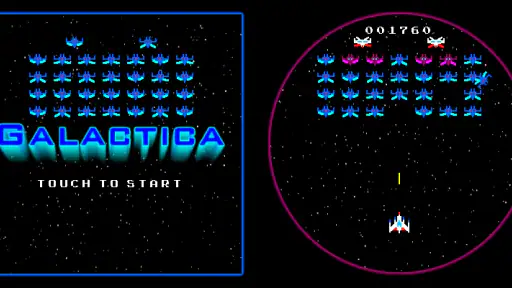
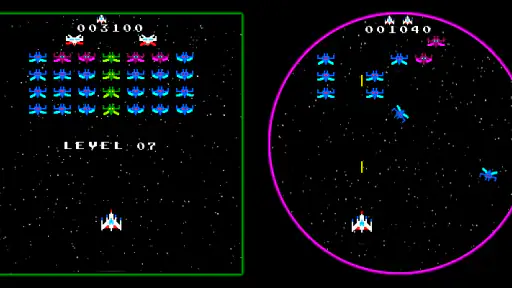
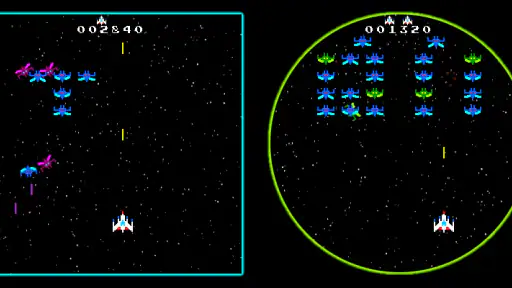
 Analysis by Frivlyz
Sharing a smartwatch can make a tiny arcade game an unexpectedly social part of a household routine. I can picture passing the watch to someone nearby during a quiet moment, letting them try a short burst of play, then taking it back without handing over a phone or setting up a separate gaming session. That sort of quick, casual use is where Galactica makes the most sense: it is an arcade game built for a smartwatch, rather than a sprawling mobile game squeezed onto a small screen.
A quick turn on a shared watch
The best household scenario is simple: one person has a spare minute, the watch is already on their wrist or close at hand, and a brief game feels more appealing than opening a larger device. A watch-sized arcade game can fit into those gaps while waiting for someone, winding down after a task, or taking a short break together. I would treat it as a small shared diversion, not as a game night centerpiece. Its appeal is the low commitment implied by the format, not a promise of a long campaign or a deep multiplayer session.
On a shared device, I would make the handoff clear. Agree on whose turn it is, and avoid assuming that a game started by one person will automatically keep another person’s progress separate. That is useful advice for any game used on a device that moves between people: the watch belongs to someone, and the game experience should be treated as part of that person’s device use rather than as a household account system.
Set expectations before handing over the watch
A smartwatch is a very different place to play from a phone or tablet. The display and controls are constrained by the form factor, so I would approach this as a compact arcade experience, not as a substitute for a console shooter or a larger-screen space game. That trade-off can be a strength when all I want is a quick diversion, but it also means it is not the right pick for someone who wants expansive levels, detailed menus, or the kind of visual scale that rewards sitting down and focusing.
Before buying, check that the watch you intend to use meets the game’s operating-system requirement. The minimum OS is 7.0, and the current version is 1.0.4. Those details matter more than the game’s space theme if the device is older or shared across family members. I would also install and try it yourself before offering it to someone else, so you can see whether the controls feel comfortable on that particular watch and whether the short-form play suits the person receiving it.
There is a practical boundary here: a game on a shared watch does not automatically create separate profiles or separate turns. I would not promise children or other family members that their progress, preferences, or play history will be kept distinct. Instead, treat each turn as casual use, and make sure the owner of the watch is comfortable with other people using it. That keeps a simple arcade game from becoming a confusing device-sharing arrangement.
Coordinating turns without making it a project
For a household, the easiest way to share a watch game is to keep the arrangement informal. One person plays while the others wait, then the watch goes back to its owner. If several people are interested, a short turn-taking routine is less awkward than trying to coordinate a longer session around a tiny screen. I would avoid framing it as a competitive family tournament unless everyone has already tried the controls and enjoys the same style of play; the format is better suited to spontaneous challenges than to elaborate group plans.
Gaming Stories You May Enjoy

Dancing Road Turns Short Breaks Into a Test of Rhythm and Timing

Super Stylist Makes Every Outfit a Test of Taste and Patience

Dominoes on Your Terms: Who Should Play and Who Should Pass

Pokémon GO Makes the Familiar World Feel New

Chess.com Turns Rematches Into Rivalries, but Community Has Its Costs

Archery Battle 3D Review: Sharp Aiming, Unclear Feedback
It is also worth deciding when the watch should remain available for its usual purpose. A wearable is often carried throughout the day, so game time should not interfere with the owner’s normal use of it. In practice, I would keep play to moments when the watch is not needed for something else, and return it promptly after a turn. That small bit of coordination is more useful than expecting the game itself to manage a shared schedule.
Age, trust, and a sensible fit
The game has an Everyone content rating, which makes its stated age context broad. I would still use ordinary judgment when choosing a game for a child: an age label does not tell you whether the controls are easy for that child, whether the small screen is comfortable, or whether the child will enjoy a short arcade session. Letting them try it beside you is a better test than assuming that a space theme or a general rating guarantees a good fit.
At $0.99, this is a paid game rather than a free trial. That is a modest purchase, but I would still think about whether the intended player actually likes smartwatch gaming before buying it for a shared family device. If the watch owner is the main player and everyone else might occasionally take a turn, the purchase is easier to justify than if several people expect a full-featured game they can each make their own. Jatrix is the developer, and the game has an average rating of 4.2 from around 31 ratings, with over 5K installs. I read those figures as signs of a small, established audience, not as proof that the game will suit every watch or player.
It was released on February 14, 2020, and its version is 1.0.4. For a buyer, the useful point is simply to check the version and compatibility information on the device before paying, especially if the watch is shared or has not been updated recently. I would not buy it expecting a steady stream of new household features; I would buy it for the arcade experience it offers now.
The Universe at Your Fingertips
When you first launch Galactica, you’re greeted with an expansive universe teeming with stars, planets, and mysteries waiting to be uncovered. The game’s graphics are truly a sight to behold, offering vibrant colors and intricate details that make each celestial body feel unique. It’s clear that the developers put a lot of effort into creating a visually appealing experience, and it pays off from the get-go.
Gameplay That Keeps You Hooked
Now, let’s talk about the gameplay, which is where Galactica truly shines. The game combines elements of strategy and exploration, requiring players to manage resources, build fleets, and explore the vast unknown. Each decision you make can have far-reaching consequences, adding a layer of depth that keeps you on your toes. It’s like chess, but in space—strategizing your next move while anticipating potential challenges.
One of the aspects I particularly enjoyed is the freedom to carve out your own path. Whether you want to become a formidable space trader, a feared pirate, or a peaceful explorer, Galactica provides the tools to do so. This level of autonomy makes the game feel personal, as if the universe is truly yours to conquer.
A Community of Space Enthusiasts
Another highlight of Galactica is its community. The game encourages interaction with other players, whether through alliances or trading. It’s a feature that adds another dimension to the gameplay, making it a socially engaging experience. Plus, it’s always fun to see how other players are navigating their own space journeys.
The developers have also done a commendable job of keeping the community involved with regular updates and events. It’s nice to see a game that not only listens to its players but actively incorporates their feedback to enhance the overall experience.
Final Thoughts
In conclusion, Galactica is more than just a game; it’s an adventure that transports you to a universe filled with endless possibilities. Its blend of strategy, exploration, and community engagement creates a well-rounded experience that’s hard to put down. Whether you’re a seasoned strategist or a newbie looking for a captivating mobile game, Galactica is definitely worth a try. Just be prepared to lose track of time as you explore the stars!
That description of an expansive strategy adventure does not match the confirmed identity of this title: it is a classic-style arcade shooter for a smartwatch. For that reason, I would not rely on the claims about trading, fleets, alliances, or a player community when deciding whether to get it. The more useful expectation is a focused shooter in miniature. Compared with the usual phone arcade game, its key distinction is the watch format; compared with larger space shooters, it gives up room for elaborate controls and presentation in exchange for being close at hand.
If you want a quick game that lives on a compatible smartwatch, the format is the strongest reason to consider it. If you want a broad universe to explore, strategic resource management, or a social game built around shared progress, I would choose a different title whose features are clearly designed for those needs. The same goes for anyone who dislikes playing on a very small screen or prefers longer sessions: a phone or tablet arcade game will usually be more comfortable and easier to follow.
My practical tip is to test a short session when you are not in a hurry. Notice whether the watch controls feel natural, whether the screen is comfortable to look at, and whether the game is enjoyable in brief bursts. Those are the questions that matter most for a wearable game, and they are more reliable than judging it by the space setting alone. If the answer is yes, it can be a handy little distraction; if not, the low price does not make an awkward fit worthwhile.
For a household, I would recommend it to the watch owner who likes classic arcade shooters and is happy to let someone else try a turn now and then. I would skip it as a shared family purchase if the expectation is separate accounts, coordinated multiplayer, or a substantial game everyone can play for long stretches. Its stated Everyone rating and accessible premise may make it appropriate for a broad audience, but personal comfort with the tiny interface remains the deciding factor.
My verdict is modest but positive: think of this as a small, watch-based arcade diversion, not the sprawling strategy game described in the older text above. If that distinction matches what you want, the price is easy to understand and the smartwatch-first design has a clear use. For anything more social, expansive, or comfortable for group play, I would pick a larger-screen alternative instead.
Galactica Pros and Cons
Pros
- Stunning graphics and visual effects.
- Engaging storyline with multiple endings.
- Smooth performance on various devices.
- Wide variety of levels and challenges.
- Frequent updates with new content.
Cons
- Requires internet connection to play.
- High battery consumption over time.
- In-app purchases can be costly.
- Some levels are extremely difficult.
- Limited language support.
Frequently Asked Questions
What is the main objective of Galactica?
Galactica is an immersive space exploration game where players navigate through various galaxies and complete missions to uncover the secrets of the universe. The main objective is to explore new planets, gather resources, and build alliances with alien species while battling against hostile forces. Players can customize their spacecraft, upgrade technologies, and strategize to conquer challenging missions.
Is Galactica free to play or does it have in-app purchases?
Galactica is free to download and play, providing players with a robust gaming experience without any initial cost. However, it does offer optional in-app purchases for players who wish to enhance their gameplay experience. These purchases can include special items, resources, or cosmetic upgrades, allowing players to progress faster or personalize their gaming experience.
What platforms is Galactica available on?
Galactica is available on both Android and iOS platforms, making it accessible to a broad audience of mobile gamers. Users can download it from the Google Play Store for Android devices or the Apple App Store for iOS devices. The game is designed to run smoothly on a wide range of smartphones and tablets, ensuring an engaging experience for all players.
Does Galactica require an internet connection to play?
Galactica primarily requires an internet connection for downloading updates, accessing certain features, and participating in online multiplayer modes. However, it also offers offline gameplay options, allowing players to enjoy the game without an internet connection. This flexibility makes Galactica suitable for playing on the go, whether you have internet access or not.
How can players contact customer support if they encounter issues in Galactica?
Players experiencing issues with Galactica can contact customer support through several channels. The game provides an in-app help section where users can submit queries or report problems. Additionally, players can reach out to the support team via email or through the official website, where they will find a dedicated support page with FAQs and troubleshooting tips to assist with common issues.


