

FreeCell Solitaire
- Reviews
- 4.5
- Version
- 3.19.0.20251209
- Installs
- 10,000,000+

Screenshots
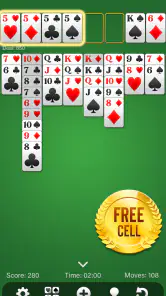
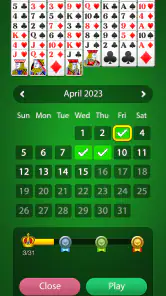
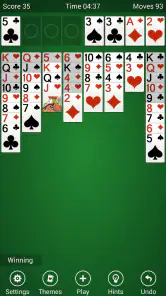
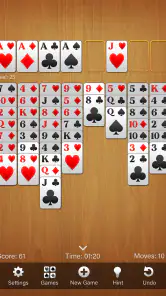
 Analysis by Frivlyz
I like card games that are easy to start but still give me something to think about after the first few rounds. FreeCell Solitaire fits that space well. It is a free card game from Solitaire Card Games , Inc., built around the familiar FreeCell format rather than a large collection of unrelated distractions. I can open it for a short break, study a difficult layout, or settle into several games when I want a quiet activity.
That simplicity is also the main decision to make. This is not the right choice if you want a social card table, dramatic presentation, or a rotating set of very different game modes. It makes more sense for someone who specifically enjoys arranging cards, planning several moves ahead, and learning from mistakes. After spending time with it, I see it as a focused patience game that succeeds because it keeps the central puzzle in view.
What to consider before choosing this FreeCell game
I’d weigh the game’s narrow focus against the kind of break you want: it gives you one recognizable puzzle to settle into, rather than a menu of changing activities. If you enjoy building a habit around improving at the same rules, that focus can be a benefit; if you rely on novelty to return, it may wear thin sooner. The next section looks at what that focused approach does better than common alternatives.
The appeal is thoughtful play, not quick luck
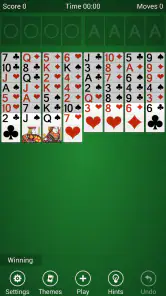
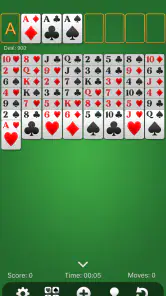
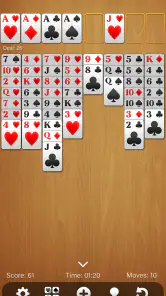
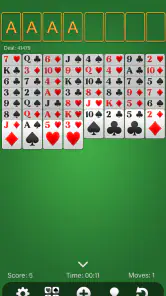
FreeCell looks familiar at first, but it rewards a different mindset from many casual solitaire variants. The open cells give me temporary storage, while the tableau requires careful sequencing. I cannot simply wait for a lucky draw to rescue a poor position. Each move changes the space available for later moves, so a decision that seems harmless can make the rest of the board awkward.
That makes the game a good fit for players who enjoy planning. I often pause before moving a card, not because the controls are difficult, but because I am checking whether I am using a free cell too early or blocking a useful sequence. The best sessions feel closer to solving a compact logic puzzle than passing time with random card flips.
Short sessions work, but the game rewards patience
A realistic everyday use is a quiet ten-minute break while waiting for an appointment or commuting without a reliable connection. One layout can provide enough concentration to pull my attention away from a busy day. If I lose, I can usually identify a questionable choice and try again with a better plan, which gives the next attempt a purpose.
It also works for longer sessions, although the experience is intentionally repetitive. The basic rhythm remains card arrangement, planning, undoing a questionable move, and trying to complete the foundations. Players who enjoy mastering one ruleset may find that comforting. Players who need constant novelty may feel that the same structure becomes predictable.
Gaming Stories You May Enjoy

Dancing Road Turns Short Breaks Into a Test of Rhythm and Timing

Super Stylist Makes Every Outfit a Test of Taste and Patience

Dominoes on Your Terms: Who Should Play and Who Should Pass

Pokémon GO Makes the Familiar World Feel New

Chess.com Turns Rematches Into Rivalries, but Community Has Its Costs

Archery Battle 3D Review: Sharp Aiming, Unclear Feedback
Its long availability suggests a mature, familiar choice
The game was released on August 17, 2016, and its current version is 3.19.0.20251209. It supports devices running Android 7.0 or later. Those details matter mainly because this is not a brand-new experiment: it has had time to establish a recognizable FreeCell experience while still receiving a current version.
Its audience is broad as well. The game is rated for Everyone, and it is free to download. That combination makes it easy to recommend for a family member who wants a straightforward card puzzle without a complicated learning curve. I would still explain that “easy to start” does not mean every board is easy to solve; the challenge comes from planning rather than complicated rules.
What I look for in the playing experience
When I judge a FreeCell app, I care less about decorative extras and more about whether the board lets me think clearly. Cards need to be readable, taps need to feel predictable, and the game should not make a simple move feel like a negotiation with the interface. A focused layout is especially important because FreeCell already asks me to track several possible sequences at once.
I also pay attention to recovery. Undo is valuable in this type of game because experimentation is part of learning. It lets me test a move, notice that it blocks a needed card, and return without throwing away the entire attempt. I use that ability as a learning tool rather than treating every undo as a failure. The important distinction is whether I am exploring a position or merely repeating random moves.
Three habits that make a real difference
My first useful habit is to avoid filling every free cell immediately. An empty cell is not just a parking place; it is working space that can help me move a longer sequence later. If I occupy all of them with cards that could have stayed in the tableau, I reduce my options before the difficult part of the layout begins.
My second habit is to look for cards that are buried under a useful sequence, not only for the next card I can send to a foundation. Moving a low card upward may feel like progress, but opening a column can be more valuable if it exposes a card needed to build a longer run. This changes the game from “move anything available” to “create room for the next important move.”
My third habit is to treat empty tableau columns as strategic tools. I try not to fill one simply because a card fits there. An empty column can help relocate a sequence and free a blocked area, so using it too soon may remove the best route through the position. These small choices are where the app has more depth than its simple appearance suggests.
Where this app wins against common alternatives
For me, its clearest advantage is how much of the puzzle is visible before I commit to a move, making it easier to connect choices with their consequences. That gives deliberate players a different kind of satisfaction from draw-driven solitaire, though it also means less surprise. Here’s how that distinction affects the choice between this app and broader card-game options.
It is stronger than a random solitaire pick for deliberate players
Many people use “solitaire” to mean any solo card game, but the experience can vary greatly between formats. Draw-based games often make me react to what appears next, while FreeCell gives me more visible information from the start. That makes it a better match when I want decisions to matter more than luck.
Compared with a collection containing Klondike, Spider, Pyramid, and other variants, this game has a narrower identity. That is a limitation if I want to change rules whenever I get bored, but it is an advantage when I want to improve at one specific puzzle. I do not spend time choosing a mode; I open the game and begin working on the board.
The focused format is helpful on modest devices
A single card format is easier to approach than a large game hub filled with menus, events, and competing objectives. I can hand the device to someone who already knows FreeCell and expect them to understand the basic task quickly. The Everyone age rating also supports that uncomplicated role.
The game has reached over ten million installs and holds a 4.5 average from around eighty-five thousand ratings, with roughly four thousand nine hundred written reviews. Those figures do not replace personal testing, but they do show that the format has found a substantial audience. I read that as evidence of broad appeal rather than proof that every player will enjoy the deliberately restrained design.
It encourages learning instead of disposable play
A good FreeCell session leaves me with something to remember. I may notice that I opened a column too late, wasted a free cell, or moved a sequence without considering the card underneath. That feedback makes repeated attempts worthwhile. With some casual alternatives, losing feels like a reason to start another random round; here, losing can reveal a better way to think.
One practical approach is to slow down at the beginning. I scan the tableau for cards that can move directly to the foundations, but I do not rush to clear everything that looks available. I first consider whether a move opens a column, preserves a free cell, or creates a useful descending sequence. That small pause is often more valuable than fast tapping.
It is a sensible free option for a specific need
Because the game is free, the initial decision is low risk. I can try it without committing to a paid card collection or buying a physical deck. For someone who wants a familiar solo activity on an Android device, that makes the experiment easy.
The trade-off is that “free” does not automatically mean it is the best value for every player. If I wanted a premium-feeling presentation, a broader ruleset, or a game designed around competing with other people, I would compare other categories first. This app earns its place through focused FreeCell play, not through trying to cover every possible card preference.
Where another type of card app may fit better
I would point a social player toward a multiplayer card experience instead. FreeCell is fundamentally a personal puzzle, so it does not replace the conversation, rivalry, or shared table feeling of playing with friends. Someone who wants a changing opponent or a communal atmosphere may quickly find the solitary format too quiet.
I would also suggest looking elsewhere if variety is the main requirement. A multi-game solitaire package may be better for a player who moves between familiar formats depending on mood. A traditional draw-based game can feel more relaxed when the player prefers uncertainty and quick decisions. FreeCell is more suitable when visible information and careful planning are part of the fun.
Players seeking a highly animated game may also be disappointed by the core concept. The satisfaction comes from solving the layout, not from a story, character progression, or a dramatic reward loop. I consider that a strength when I want a calm break, but it is a genuine weakness for anyone who needs spectacle to stay engaged.
When the learning curve becomes the drawback
Although the rules are approachable, the strategy is not always obvious to a new player. A beginner may move cards toward the foundations too quickly, fill the free cells, and then wonder why the board has become impossible to reorganize. The app is easier to enjoy if I accept that early losses are part of learning the structure.
That can be frustrating for someone who expects every solitaire round to be a light, nearly automatic activity. The game asks for attention even when the interface looks simple. If I am tired and only want to make obvious matches without thinking, a gentler variant may suit me better.
Switching from another solitaire app
If you already use another solitaire app, I’d treat a switch as a change in rhythm, not just a change of interface: FreeCell asks you to preserve working space and plan around cards you can already see. Try a few sessions with that in mind before deciding whether its slower, more considered decisions suit you. The next section turns that fit into recommendations for different playing habits.
The practical cost is small, but the habit change is real
Moving to this game is straightforward for anyone already comfortable with FreeCell. The rules remain the main point of reference, so I do not need to learn a new card hierarchy or a completely different objective. The larger adjustment is psychological: I need to stop expecting luck to solve a bad position and start protecting future options.
If I am coming from Klondike, I may initially miss the suspense of revealing cards from a stock. FreeCell replaces that uncertainty with a more open board and a heavier responsibility for my own choices. If I am coming from a broad solitaire collection, I may miss switching formats, but I gain a cleaner path to practicing one style deliberately.
How I would test it without overcommitting
I would begin with several short sessions rather than judging the game after one frustrating layout. During those sessions, I would watch for three things: whether the card movement feels natural, whether I can read the full board comfortably, and whether I enjoy reconsidering my decisions after a loss. Those questions reveal more than simply asking whether the first game was won.
I would also set a personal rule for undo. For learning, I might undo only the last few moves and identify the mistake. For relaxed play, I might use it more freely. This keeps the feature from turning the game into mindless trial and error while still allowing me to understand how a different line changes the board.
What I would tell a first-time player
Do not treat the free cells as permanent storage, and do not assume that moving a card to a foundation is always the best immediate action. Look for empty tableau columns, preserve room for long sequences, and think about which buried card you want to expose next. When a layout fails, review the first moment when your available space began shrinking; that is often more useful than staring at the final blocked position.
I would also recommend playing with a calm pace. The game does not reward frantic tapping, and a few seconds of planning can prevent several moves that later need to be undone. That slower rhythm is one of the reasons I find it useful during a break: it occupies my attention without demanding the intensity of a competitive game.
My recommendation for different kinds of players
I’d choose this for someone who wants a quiet, repeatable card puzzle, but not for a player who needs social competition or a steady stream of new modes. The useful question is whether you enjoy reviewing a decision after a board stalls, since that habit is central to getting lasting value here. With that distinction in mind, I can make a more specific recommendation by player type.
Who should install it
I recommend it to anyone who wants a focused solo card puzzle, especially players who enjoy improving through repeated attempts. It is a strong fit for quiet breaks, offline-style personal entertainment, and people who prefer a familiar ruleset over a crowded feature list. Its free price and Everyone rating make it easy to try, while its mature presence gives it the feel of an established option rather than a novelty.
I also think it suits experienced solitaire players who want to concentrate on FreeCell specifically. The open information makes strategic mistakes easier to examine, and the free cells create enough room for advanced planning. The game is simple enough for a newcomer to understand, but it has enough decision-making to keep a patient player engaged.
Who should skip it
I would skip it if my priority were multiplayer interaction, frequent changes of rules, a narrative campaign, or a highly animated presentation. I would also hesitate if I wanted a very casual game where most moves are obvious and losing rarely requires reflection. In those cases, a social card game, a varied solitaire collection, or a lighter luck-driven format may be a better match.
The narrow focus is the central trade-off. I get a clear FreeCell experience, but I should not expect it to become a complete replacement for every other card game. Knowing that before installing it prevents the most common disappointment: mistaking a focused puzzle for a broad entertainment bundle.
My final view
After using it as a decision rather than simply a download, I find FreeCell Solitaire easy to recommend for the right person. It is free, familiar, and thoughtfully demanding without requiring a complicated setup. The best reason to choose it is not the size of its audience or the age of the release; it is the way each move asks me to balance immediate progress against the space I will need later.
My clear recommendation is this: choose it if you want a calm, strategic solo card game and are willing to learn from imperfect attempts. Choose another category if you need social play, constant variety, or a more theatrical experience. For me, its focused design is exactly what makes it useful. I can open it for a few minutes, make meaningful decisions, and leave feeling that I solved something rather than merely filled time.
FreeCell Solitaire Pros and Cons
Pros
- Works offline
- making it convenient for travel or areas with limited connectivity.
- Simple rules and controls make it accessible to beginners and casual players.
- Undo options help recover from mistakes without restarting the entire game.
- Short rounds fit well into quick breaks or daily downtime.
- Usually requires little storage and runs smoothly on older devices.
Cons
- Ads may interrupt play or appear prominently in the free version.
- Some deals can feel repetitive after extended sessions.
- Advanced players may miss detailed statistics or strategy tools.
- Touch controls can cause accidental card moves on smaller screens.
- Features and visual quality vary considerably between different versions.
Frequently Asked Questions
What is FreeCell Solitaire, and how is it played?
FreeCell Solitaire is a classic single-player card game in which the goal is to move all cards to the four foundation piles, organized by suit from Ace to King. Unlike many solitaire variations, nearly every deal can be solved with careful planning. You arrange cards in descending order with alternating colors, while using four free cells as temporary spaces to help reorganize the tableau.
Is FreeCell Solitaire free to download and play?
Most FreeCell Solitaire apps are free to download and offer the main game without requiring payment. However, the exact experience depends on the version you choose. Some editions may display advertisements, offer optional in-app purchases, or include premium features such as ad removal, extra card designs, statistics, hints, or additional game modes. Check the store listing before installing.
Can I play FreeCell Solitaire offline?
Yes, FreeCell Solitaire is generally suitable for offline play once it has been installed. You can usually start new deals, continue games, and use the basic card controls without an internet connection. Internet access may still be needed for advertisements, cloud synchronization, leaderboards, updates, or purchases, depending on the specific Android or iOS version.
Is FreeCell Solitaire suitable for beginners?
FreeCell Solitaire is approachable for beginners because the rules are simple and many apps include helpful features such as hints, undo buttons, automatic card movement, tutorials, and difficulty settings. Nevertheless, winning requires more planning than simply making the first available move. New players should focus on uncovering face-down cards, preserving free cells, and avoiding blocked columns.
Does FreeCell Solitaire collect personal data or require an account?
A basic FreeCell Solitaire game usually does not require an account to play, but privacy practices vary between developers. Some apps may collect device information, usage data, advertising identifiers, or purchase details, particularly when ads and analytics are included. Before downloading, review the app’s permissions and privacy policy, especially if you want to avoid tracking or cloud-based features.


