

FreeCell Solitaire: Card Games
- Reviews
- 4.6
- Version
- 6.5.5.4477
- Installs
- 10,000,000+

Screenshots
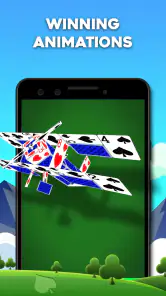
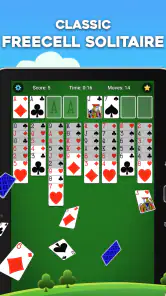
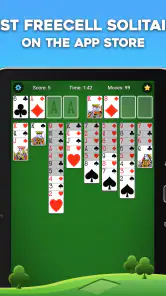
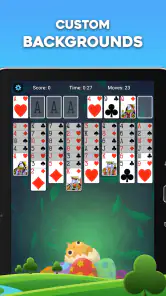
 Analysis by Frivlyz
When I’m choosing a phone version of a familiar card game, I care about more than whether it deals a hand. I want the rules to stay recognizable, the cards to be manageable on a small screen, and the game to suit short breaks as well as longer sessions. FreeCell Solitaire: Card Games is a free card game from MobilityWare, and its appeal is straightforward: it brings the planning-focused FreeCell format to a mobile device without asking players to learn a different kind of solitaire.
That makes it an especially natural fit if you already know FreeCell from a computer or a deck of cards and want a convenient version to return to. If you are new to the game, the learning curve is gentle, but the decisions still matter: a move that looks useful now can leave you with fewer options later. I find that balance more satisfying than a solitaire game where success mostly depends on waiting for a lucky sequence.
What to consider before choosing a FreeCell app
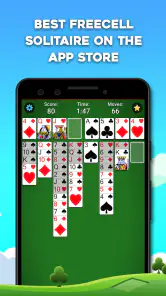
FreeCell rewards planning, so the quality of a mobile version depends on whether you can read the layout and make moves comfortably. On a phone, card columns can feel crowded, particularly if you prefer larger text or have a smaller display. I’d try a few moves at a relaxed pace before settling into longer sessions; if you often mis-tap cards, the convenience of playing anywhere may not outweigh the screen-size limitation.
It also helps to decide what you want from solitaire. If you like studying a board and working through a puzzle, this is a better match than a game built around quick luck and constant new deals. If your main goal is a rapid, low-attention distraction, a simpler matching game may suit you more. FreeCell asks you to keep track of what you have moved, so it is most enjoyable when you can give the board at least a little focus.
Why this version suits routine play
In everyday use, the game works well as a small mental reset: I can start a deal while waiting for a meal, pause to think through a sequence, and return when I have another quiet moment. A useful habit is to look at the free cells and empty columns before moving cards. Those spaces are not just convenient parking spots; using them too early can restrict later moves. Thinking a turn ahead is often more valuable than clearing a card as soon as it becomes available.
That planning gives the game a different rhythm from Klondike-style solitaire, where uncovering hidden cards can drive much of the play. FreeCell exposes the cards from the start, so the challenge is less about what might be underneath and more about arranging what you can already see. I like that transparency because it makes a stuck position feel like a puzzle to reconsider rather than simply bad luck. It also means a casual player can learn from a failed attempt by noticing which space or sequence became a bottleneck.
Where another kind of solitaire may be better
FreeCell is not the right choice for every mood. If you want a game that feels more spontaneous, or prefer uncovering cards gradually, another solitaire format may be a better fit. Likewise, people looking for a social card table or a head-to-head match should choose a game designed around direct competition instead. The familiar solo-puzzle structure here is its strength, but it also sets a clear boundary around the experience.
Gaming Stories You May Enjoy

Dancing Road Turns Short Breaks Into a Test of Rhythm and Timing

Super Stylist Makes Every Outfit a Test of Taste and Patience

Dominoes on Your Terms: Who Should Play and Who Should Pass

Pokémon GO Makes the Familiar World Feel New

Chess.com Turns Rematches Into Rivalries, but Community Has Its Costs

Archery Battle 3D Review: Sharp Aiming, Unclear Feedback
Compared with a paper deck, a phone version saves setup and makes it easy to play in small gaps during the day. The trade-off is that digital controls and screen layout can never feel exactly like moving physical cards. If you value the tactile ritual most, a real deck may be more enjoyable. If you want a compact way to revisit FreeCell without carrying anything extra, the app has the more practical advantage.
The Classic Game with a Modern Touch
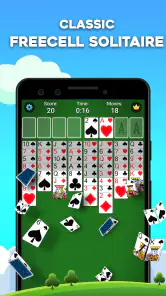
When I first downloaded FreeCell Solitaire: Card Games, I was pretty excited to see how the developers managed to transition this beloved game to a touch screen. Spoiler alert: they did a fantastic job! The app's interface is sleek and user-friendly, making it easy for anyone to get started. I loved how the game maintains the integrity of the original FreeCell, while also adding a sprinkle of modern flair.
Gameplay that Keeps You Hooked
The gameplay is as smooth as butter. If you're not familiar with FreeCell, don't worry; it’s one of those games that’s easy to learn but challenging to master. The app guides you through the basic rules and offers hints if you get stuck, which is perfect for newcomers. For the seasoned players, the app provides a satisfying challenge with thousands of card deals to solve. I found myself getting lost in the game for hours, trying to beat my previous scores. Talk about addictive!
Features that Stand Out
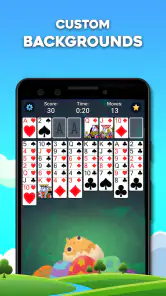
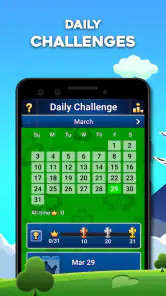
One of the standout features of this app is its customization options. You can change the background themes and card designs to suit your mood, which adds a personal touch to your gameplay. And let's not forget about the daily challenges! These are a fun way to test your skills and keep the game feeling fresh. Plus, there’s a leaderboard to see how you stack up against other players. It’s always fun to have a little friendly competition, right?
Those options also shape how I’d use it. A calmer background and a card face that is easy for me to distinguish make longer sessions more comfortable than choosing a design just because it looks striking. I’d settle on a readable setup first, then treat the visual choices as a small refresh when the game starts to feel familiar. The daily challenges offer a reason to return, while the leaderboard is best viewed as optional motivation rather than the point of playing; I can enjoy solving a deal without needing to compare my pace with anyone else.
Practical questions before you install
The game is free to download, though it includes optional in-app purchases priced from $1.99 to $29.99 per item. I’d treat those as a personal choice, not a requirement for enjoying the basic card puzzle. If you prefer to avoid spending inside games, check the purchase prompts carefully and keep your store settings in mind. The app is rated Everyone, so its content is suitable for a broad audience, including families looking for a quiet solo game.
It has been available since September 15, 2011, and its current version is 6.5.5.4477, with Android 6.0 as the minimum operating system. Those details make it easier to judge whether an older device is likely to meet the stated requirement, but a compatible system does not guarantee that every phone will feel equally comfortable for card play. I would also consider how often I actually want to play: this is a focused single-player pastime, not a replacement for a varied collection of games.
MobilityWare’s title has a 4.6 average from around 315,000 ratings, with roughly 40,000 written reviews and over 10 million installs. That level of reach suggests many people have made it part of their casual game rotation, but popularity alone is not a reason to install it. The useful question is whether you enjoy FreeCell’s visible-board, think-ahead style. If you do, the app’s familiarity and adjustable presentation are more relevant than its audience size.
Who should keep looking
I would skip this one if I wanted a fresh ruleset, a story, or a game that constantly changes its objectives. FreeCell’s appeal comes from repeating a recognizable structure and improving how I handle it, not from a sequence of new modes or surprises. Players who find repeated layouts monotonous may prefer a broader solitaire collection, while someone who wants a more social experience should look for a card game built around multiplayer sessions. Choosing those alternatives is not a knock on this app; it is simply a matter of wanting a different kind of play.
There is also a useful distinction between a hint and a complete solution. A hint can help me spot a move I overlooked, but I still need to understand why it helps if I want to improve. When I get stuck, I try undoing the last few moves and examine whether I used a free cell without a plan or blocked a column that could have helped later. That approach turns a frustrating dead end into a practical lesson, rather than encouraging me to tap through suggestions without learning the pattern.
Why You'll Love It
So why should you download this app? Well, if you’re a fan of card games, it’s a no-brainer. The FreeCell Solitaire: Card Games app offers a perfect blend of nostalgia and modern gaming. Whether you’re looking to kill some time or want a game that exercises your brain, this app delivers. Plus, it’s free to download, so you really have nothing to lose!
My recommendation is strongest for someone who already likes the logic of FreeCell or wants a patient introduction to it. I’d use it during a commute while seated, on a quiet break, or at home when I want something absorbing without starting a longer game. If I have only a few seconds and cannot concentrate, I would save the deal for later rather than make rushed moves; a little attention is what makes the puzzle rewarding. For a quick reflex game, a social match, or a more varied solitaire sampler, I’d choose something else.
In conclusion, the FreeCell Solitaire: Card Games app is a delightful addition to any card game enthusiast’s collection. It’s easy to play, visually appealing, and offers just the right amount of challenge. So, go ahead and give it a try. Who knows, you might just find your new favorite pastime!
FreeCell Solitaire: Card Games Pros and Cons
Pros
- Free to play with in-app purchases
- Smooth and intuitive gameplay
- Variety of card designs
- Offline play available
- Daily challenges for rewards
Cons
- Contains ads during gameplay
- Lacks multiplayer mode
- Occasional app crashes
- Frequent notifications
- Limited customization options
Frequently Asked Questions
What is FreeCell Solitaire: Card Games?
FreeCell Solitaire: Card Games is a popular card game app available for Android and iOS devices. It offers a classic solitaire experience with a twist, where all cards are dealt face-up from the start, allowing players to plan their moves strategically. The app is designed to provide hours of entertainment and mental stimulation for solitaire enthusiasts.
Is FreeCell Solitaire: Card Games free to play?
Yes, FreeCell Solitaire: Card Games is free to download and play. However, like many free apps, it may include in-app purchases and ads. These in-app purchases can enhance the gameplay experience by offering features like ad removal or additional game themes. Players can enjoy the game without spending money, but optional purchases are available.
Does FreeCell Solitaire: Card Games require an internet connection?
No, FreeCell Solitaire: Card Games does not require an internet connection to be played. This makes it an excellent choice for those who want to enjoy the game offline, such as during travel or in areas with limited connectivity. However, an internet connection might be needed to access certain features, such as leaderboards or app updates.
Are there any customization options available in FreeCell Solitaire: Card Games?
Yes, FreeCell Solitaire: Card Games offers a range of customization options to enhance the player experience. Users can choose from different card designs, backgrounds, and themes to personalize the game to their liking. These customization options allow players to create a game environment that suits their visual preferences, making the gameplay more enjoyable.
Can beginners play FreeCell Solitaire: Card Games easily?
Absolutely, FreeCell Solitaire: Card Games is designed to be user-friendly and accessible to players of all skill levels. The app includes detailed tutorials and tips for beginners to help them understand the rules and strategies of FreeCell. This makes it easy for new players to get started and enjoy the game without prior experience in playing solitaire.


