

Fancy Color - Paint By Number
- Reviews
- 4.8
- Version
- 1.7.1.3
- Installs
- 10,000,000+

Screenshots


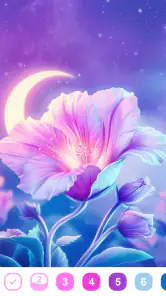

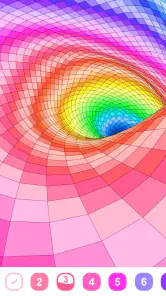



 Analysis by Frivlyz
Fancy Color - Paint By Number is a delightful app that brings out the artist in everyone. It’s a vibrant world where numbers meet colors, allowing you to create stunning masterpieces without the need for any artistic skills. In this review, I'll walk you through my personal experience with this app and why it might be the perfect addition to your collection.
Why number-led coloring works
The main appeal of this board-style coloring game is its simple rule: each part of a picture has a number, and each number matches a color. Instead of deciding what to draw or which shade belongs where, I can concentrate on finding the right spaces and filling them in. That small amount of structure makes the activity easy to pick up when I have only a few spare minutes, while the gradual change from blank sections to a finished image gives me a clear sense of progress.
I find this approach especially useful when I want a quiet activity but don’t feel like planning one. It is less open-ended than drawing or freehand coloring, which can be a relief if a blank page feels intimidating. At the same time, it still asks for attention: I need to locate the matching numbered areas and keep track of the colors as the picture develops. The result is a gentle balance between following instructions and seeing a whole image take shape.
That balance also explains where the game may not suit someone. If you want to choose every color, invent your own composition, or develop drawing skills, a blank canvas or a more traditional art app will give you more control. Here, the creative choice is mainly in how steadily you work through the picture, not in redesigning it.
Getting Started with Fancy Color
Once I downloaded Fancy Color - Paint By Number, I was immediately drawn in by its user-friendly interface. The app opened with a welcoming tutorial that guided me through the basics of selecting a picture, choosing a color, and filling in the numbered spaces. It was intuitive and straightforward, perfect for both beginners and seasoned artists looking for a relaxing pastime.
How a session fits into real life
In practice, I’d use a picture in short stretches rather than treating it like a project that needs a long, uninterrupted sitting. For example, after putting the kettle on, I could open a partially completed image, choose one color, and fill the matching spaces before moving on with my day. That makes the game easy to return to: I can stop when I need to, then pick up the same simple task later without having to remember a complicated sequence.
A useful habit is to focus on one color at a time instead of tapping around the whole image at random. It gives the session a natural stopping point and makes it easier to notice which areas still need attention. On a small phone screen, that deliberate pace can also help me avoid missing tiny sections. I wouldn’t expect the experience to replace a proper break away from screens, but it works well as a low-effort pause when I want something calmer than a fast game or an endless feed.
Gaming Stories You May Enjoy

Dancing Road Turns Short Breaks Into a Test of Rhythm and Timing

Super Stylist Makes Every Outfit a Test of Taste and Patience

Dominoes on Your Terms: Who Should Play and Who Should Pass

Pokémon GO Makes the Familiar World Feel New

Chess.com Turns Rematches Into Rivalries, but Community Has Its Costs

Archery Battle 3D Review: Sharp Aiming, Unclear Feedback
The numbered format can be welcoming for newcomers because it removes the pressure to make artistic decisions. It can also be satisfying for people who already enjoy coloring but want a more guided activity. The trade-off is that the same guidance may feel repetitive if you prefer making choices about composition, color, and technique yourself.
The Artistic Experience
What I loved most about Fancy Color is the sheer variety of images available. From intricate mandalas to cute animals and scenic landscapes, there’s something for everyone. Each image is segmented into numbered sections, and each number corresponds to a specific color. All you need to do is tap on the color and fill in the corresponding section of the image. It’s as simple as that!
The app also offers a satisfying "tap and fill" feature, which makes the coloring process smooth and enjoyable. As someone who finds solace in coloring, I appreciated how this feature allowed me to unwind and focus solely on the colors and patterns.
Choosing a picture without turning it into a chore
With different kinds of imagery to choose from, I’d pick according to the mood and time I have rather than assuming every picture will feel equally relaxing. A design with many small areas may reward patient, close attention, while a simpler-looking image can be a better choice when I want a lighter session. That is a practical distinction to keep in mind: the number-based method stays straightforward, but the amount of tapping and visual searching can vary from one picture to another.
If I’m unsure whether I want to commit to a longer coloring session, I’d start with an image that looks manageable and see how the pace feels. I wouldn’t treat completion as the only measure of a good session. Filling a few sections can still offer a pleasant change of focus, and stopping before the activity starts to feel like a task is part of using it well.
Compared with physical coloring books, this format avoids needing to gather pens, choose a palette, or find space to spread out materials. Compared with free-drawing apps, it asks for less skill and gives less creative freedom. Its strongest place is between those alternatives: a ready-made image and a clear task, with enough visual progress to make a short session feel rewarding.
Features that Stand Out
Fancy Color doesn’t just stop at providing a coloring experience; it enhances it with features like the ability to save your completed artworks and share them with friends on social media. There’s also an option to watch your painting process in a time-lapse video, which is a fantastic way to see your artistic journey from start to finish.
Another standout feature is the daily challenges. These challenges offer new images daily, keeping the content fresh and engaging. It’s a great way to keep users coming back for more, as there's always a new image to tackle.
What to consider before settling in
Daily challenges can give me a reason to return, but I’d treat them as an invitation rather than an obligation. If I already have a picture underway, switching to a new one just because it is available could interrupt the more relaxing rhythm of finishing at my own pace. I’d use the challenge when I want a fresh prompt and ignore it when I’d rather continue what I started.
Saving and sharing finished artwork can make completed pictures feel more personal, while a time-lapse gives me a quick way to look back at the process rather than only the final result. Those options are most useful if I enjoy keeping a record or showing a finished image to someone. If I mainly want a private, quiet activity, they can remain extras instead of becoming the reason to play.
There are practical considerations too. The game is free to download, with optional in-app purchases priced from $0.99 to $69.99 per item, so I’d be mindful of purchase prompts and check any item details before spending. It is rated for Everyone, and its current version is 1.7.1.3, with Android support beginning at version 5.1. Those details make it easier to judge whether it fits a device and household, but they do not change the basic appeal: the core activity is a guided way to color pictures one numbered area at a time.
Because the experience is centered on tapping and matching, screen size and comfort matter. A larger display may make small sections easier to see, while anyone who tires quickly from repeated touch input may prefer shorter sessions. I’d also keep expectations grounded: the relaxing effect depends on whether I enjoy patient, repetitive coloring. The format can help me settle into a calm task, but it is not a guarantee that every image or session will feel soothing.
Who gets the most from it
Mint XX Games’ board game has a 4.8 average from around 32,000 ratings, with roughly 3,800 written reviews and over 10 million installs. I can see why a guided coloring format has broad appeal: it offers a clear activity without demanding drawing experience, and its Everyone age rating makes it suitable to consider for a wide range of players. I’d recommend it most to people who like visual puzzles, predictable steps, and the satisfaction of completing an image gradually.
It is also a reasonable choice for someone who wants a small, low-pressure activity during a quiet moment at home or while waiting for an appointment. I would not choose it for a child who needs active, hands-on play, nor for a player looking for competition, strategy, or a deep progression system. Those needs call for a different kind of game. And if you dislike repeated tapping or prefer total control over your artwork, a physical coloring book or freeform drawing tool is likely a better fit.
One question I’d ask before downloading is whether I want guidance or freedom. Fancy Color is built around the first: select a picture, follow its numbered colors, and watch it fill in. Another is whether optional purchases fit how I want to use a free game; the listed item range is broad enough that I’d avoid tapping through a purchase without checking what it covers. For Android users, the minimum OS requirement is 5.1; the game is also available on iOS.
Why You Should Try It
If you're someone who enjoys coloring or is looking for a new hobby to pick up, Fancy Color - Paint By Number is definitely worth a try. Its ease of use, combined with an extensive library of images and engaging features, makes it a must-have app for anyone looking to relax and unleash their creativity.
In a world where stress is ever-present, finding a moment of peace through coloring can be incredibly beneficial. So, why not give Fancy Color a try? You might just find it to be the perfect escape from the hustle and bustle of everyday life.
Fancy Color - Paint By Number Pros and Cons
Pros
- User-friendly interface for easy navigation.
- Wide variety of coloring pages available.
- Regular updates with new content.
- Option to save and share finished artwork.
- Offline mode available for convenience.
Cons
- Contains in-app purchases for exclusive features.
- Frequent ads can be disruptive.
- Limited color palette in the free version.
- Requires internet for initial content download.
- Performance issues on older devices.
Frequently Asked Questions
What is Fancy Color - Paint By Number?
Fancy Color - Paint By Number is a digital coloring book app that allows users to relax and unwind by painting intricate designs with a simple tap. The app provides a wide variety of artwork categories, including animals, nature, and mandalas, ensuring there's something for everyone. The app is designed to be user-friendly, making it accessible for both children and adults who enjoy coloring.
Is Fancy Color - Paint By Number free to use?
Yes, Fancy Color - Paint By Number is free to download and use. However, it offers in-app purchases for additional features and content. Users can purchase premium color palettes, exclusive designs, and an ad-free experience. While the core functionality is available for free, these optional purchases enhance the overall experience for those who wish to access more content.
Can I use Fancy Color - Paint By Number offline?
Fancy Color - Paint By Number does offer offline functionality. Users can download specific designs and palettes while connected to the internet, allowing them to color without an active connection. This feature is particularly useful for those who wish to use the app during travel or in areas with limited internet access. However, some features, like accessing new designs, require an internet connection.
Is Fancy Color - Paint By Number suitable for all ages?
Yes, Fancy Color - Paint By Number is designed to be suitable for all ages. The app features a variety of designs that cater to different skill levels, making it a perfect choice for both children and adults. Its intuitive interface ensures that even younger users can enjoy the app without assistance. Additionally, the app is free from inappropriate content, ensuring a safe and enjoyable experience for all users.
How often are new designs added to Fancy Color - Paint By Number?
New designs are regularly added to Fancy Color - Paint By Number, keeping the content fresh and engaging for users. The app's developers frequently update the library with new themes and categories based on user feedback and current trends. This ensures that users always have access to the latest and most popular designs, providing endless opportunities for creativity and relaxation.


