

Eye Color Mix
- Reviews
- 4.6
- Version
- 1.2.6.0
- Installs
- 5,000,000+

Screenshots

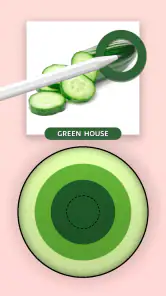
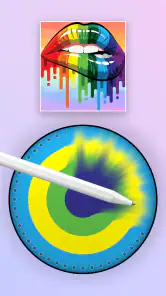
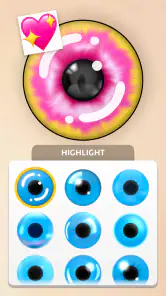


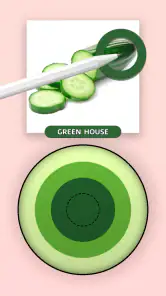
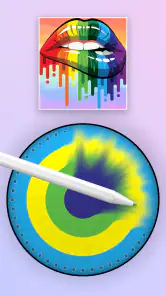
 Analysis by Frivlyz
I like eye-color games best when they give me a small, clear goal rather than asking me to spend ages learning complicated controls. Eye Color Mix is built around that kind of quick creative play: you work with paint shades, combine colors, and see what you can make. It suits a spare few minutes when I want something visual and low-pressure, though it is less suited to anyone looking for a deep simulation with a long campaign or elaborate systems.
From a first color choice to a finished look
I find the appeal of Eye Color Mix easiest to judge by following the small choices that make up a session: picking a direction, testing a shade, and deciding whether the result feels right. That keeps the focus on playful experimentation rather than on a long checklist of tasks. It also makes the next question useful: what counts as progress when the main reward is seeing a color choice take shape?
Simple goals that make it easy to begin
The first appeal is how direct the central idea feels. I can focus on a color, try a different mix, and judge the result without first mastering a complicated set of rules. That makes the game approachable for younger players and for anyone who wants a casual creative activity rather than a demanding challenge. The age rating is Everyone, and CrazyLabs LTD publishes the game as a free simulation.
The early goal is less about winning through elaborate strategy and more about making choices that produce a pleasing result. That distinction matters: if you enjoy experimenting with shades and seeing how combinations change, the basic loop has a natural pull. If you need a story, competitive matches, or a steadily escalating puzzle challenge to stay interested, the premise may feel too light.
What progress feels like while you play
Because the play centers on painting and matching, progress is easiest to appreciate visually. A useful habit is to make one change at a time and compare the new shade with the previous one. When several color choices are adjusted at once, it can be harder to tell which decision improved the result. Taking that slower approach turns a quick tap-based activity into a small exercise in observation.
I also find that the game works better when I treat a result as a little experiment instead of trying to make every attempt perfect. Try a warmer direction, then a cooler one; notice whether a subtle shift makes the overall look feel more balanced. That is a practical way to get more out of color-mixing play without assuming the game has a hidden technical editor or complex customization tools.
Challenge, rhythm, and reasons to return
The challenge here is chiefly about choosing colors, not mastering a punishing difficulty curve. That keeps the mood relaxed, but it also means players who thrive on strict tests may want a more puzzle-heavy alternative. I would approach it as a short-session game: play for a few minutes, make a few decisions, and stop when the creative loop has done its job. It does not need to become a daily commitment to be enjoyable.
Gaming Stories You May Enjoy

Dancing Road Turns Short Breaks Into a Test of Rhythm and Timing

Super Stylist Makes Every Outfit a Test of Taste and Patience

Dominoes on Your Terms: Who Should Play and Who Should Pass

Pokémon GO Makes the Familiar World Feel New

Chess.com Turns Rematches Into Rivalries, but Community Has Its Costs

Archery Battle 3D Review: Sharp Aiming, Unclear Feedback
For a realistic everyday use, I can imagine opening it while waiting for a friend or taking a quiet break between tasks. A quick round gives me something more active than scrolling, while still being easy to put down. It can also be a simple shared activity with a child: compare two color choices and talk about which one looks more convincing. That works best when the goal is playful exploration, not treating the result as professional advice about appearance.
As a free game, it is easy to try without making a purchase decision first. The trade-off is that a light, accessible design may not satisfy someone who wants substantial long-term progression. Before downloading, I would ask myself whether I actually enjoy testing colors for its own sake. If I do, its modest scope is part of the appeal; if I mainly want unlock-heavy advancement, a deeper simulation is likely a better fit.
Where it sits among other creative games
Compared with a general coloring game, the focus here is narrower: the fun comes from matching and merging colors rather than filling a large scene with many unrelated details. Compared with a photo-editing tool, it is meant to be played, not used as a precise retouching workflow. That makes it a better choice for casual experimentation than for anyone who needs dependable, fine-grained control over a real photograph.
One useful way to decide whether it suits you is to notice what part of the process you enjoy. If you like predicting how two shades will combine, this game’s core activity should feel engaging. If your priority is drawing freely, building a complete image, or editing selfies for a polished post, a dedicated art or photo app will offer a more appropriate set of tools. The narrower focus is a genuine strength for quick play, but a limitation when you want a broader creative workspace.
Who will enjoy it—and who may move on
I would recommend it to players who like color experiments, accessible simulation games, and short sessions without a steep learning curve. It may also suit families looking for an easy activity that invites conversation: ask which shade feels brighter or more natural, then try another combination. Since it is rated for Everyone, its general audience is broad, although younger players will still benefit from a grown-up helping them navigate any device or store settings.
I would skip it if I wanted realistic professional color grading, a detailed character creator, or a progression system that keeps introducing demanding new mechanics. Those expectations call for a different kind of app. I would also avoid judging it by whether it can replace a real-world decision about changing eye color: a playful color experiment is not a substitute for trying contact lenses safely or consulting an eye-care professional.
Practical expectations before installing
The game is free, has an average rating of 4.6 from around 51,000 ratings, and has passed 5 million installs. It was released on September 23, 2023, and the current version is 1.2.6.0, with Android 6.0 as the minimum operating-system requirement. Those details suggest it has reached a substantial casual audience, but popularity alone cannot tell me whether its particular color-mixing loop will hold my attention.
For someone deciding whether to try it, the key question is not whether it offers every feature found in a broader art app. It is whether a focused activity built around painting, matching, and combining shades sounds relaxing. I would install it for that specific reason, give the core loop a short trial, and keep it only if the process itself feels satisfying rather than expecting a large game to unfold around it.
My verdict on its pace and staying power
What gives the game its best chance of keeping me engaged is the immediate feedback of experimenting with color. Small decisions can be satisfying when I pay attention to the difference between one mix and the next. The same simplicity limits its staying power for players who need layered goals or a sharper difficulty curve. I see it as an approachable creative diversion, not a deep simulation designed to occupy hours at a time.
My practical tip is to approach each session with one small intention: try a new direction, compare a pair of shades, or simply see what a different combination looks like. That keeps the experience focused and helps avoid expecting a substantial progression structure where the appeal is really the act of experimenting. If that sounds like the kind of low-pressure play you want, it is a reasonable game to try; if you want sustained challenge, choose a more demanding alternative.
Have you ever imagined what you would look like with a different eye color? Whether you’re considering a new look or just want to have some fun, Eye Color Mix is the app that lets you experiment with your eye color in just a few taps. Trust me, I’ve tried a bunch of these apps, and this one’s got a little something special.
Getting Started with Eye Color Mix
First off, let me just say that downloading and setting up Eye Color Mix is a breeze. Available on both Android and iOS, this app doesn’t require a ton of space or permissions, which is always a relief. Once you’ve installed it, you’re greeted with a user-friendly interface that's super easy to navigate. No steep learning curve here, folks!
Features You’ll Love
The app boasts a variety of features that make it stand out from the crowd. You can choose from a wide spectrum of eye colors and even mix your own custom shades. The real-time adjustment feature is pretty slick; it allows you to see changes instantly as you adjust the hue and intensity. Plus, the app uses advanced facial recognition technology to ensure that the color blends naturally with your eyes, avoiding that fake look you’d get from less sophisticated apps.
Another cool feature is the ability to save your favorite looks. You can create a gallery of different eye color experiences, which is perfect if you’re indecisive like me and want to go back and forth between options.
Playing with Possibilities
Using Eye Color Mix feels like having a digital makeup artist. You can go from a subtle change to a dramatic transformation with just a few tweaks. Ever wanted to try a bold purple or a deep, mysterious green? This app lets you experiment without any commitment. The results are surprisingly realistic, and you can share your new looks directly on social media to get opinions from friends.
One thing I particularly appreciate is the app’s attention to detail. The subtle shading and reflections make the colors look incredibly lifelike. It’s like the app knows exactly how to catch the light just right, which adds to the realism.
Wrapping It Up: Why You Should Try Eye Color Mix
In conclusion, if you’re looking to spice up your selfies or just want to have some fun with your appearance, Eye Color Mix is definitely worth a download. It’s intuitive, fun, and offers a level of customization that keeps you coming back for more. Whether you’re a social media enthusiast or just someone who loves trying new things, this app provides a delightful and engaging experience.
So go ahead, give it a spin and see what new looks you can create. Who knows, you might just find your new favorite eye color!
Eye Color Mix Pros and Cons
Pros
- Easy to use interface
- Wide variety of eye colors
- Real-time preview feature
- High-quality results
- Great for social media sharing
Cons
- Limited customization options
- Ads can be intrusive
- Premium features are costly
- Occasional crashes
- No offline mode available
Frequently Asked Questions
What is Eye Color Mix and how does it work?
Eye Color Mix is an app designed to let users experiment with different eye colors on their photos. By using advanced photo editing technology, it allows you to seamlessly change the eye color in your images to see how different shades look on you. It's a fun tool for anyone curious about trying out new eye colors without the need for contact lenses.
Is Eye Color Mix free to use, or does it require a purchase?
Eye Color Mix offers a free version with basic features available for all users. However, to unlock advanced functionalities and a wider range of eye colors, there is a premium version available for purchase. This allows users to fully explore all the creative possibilities that the app offers.
What devices are compatible with Eye Color Mix?
Eye Color Mix is compatible with both Android and iOS devices, making it accessible to a wide range of smartphone users. Whether you have an Apple iPhone or an Android device from brands like Samsung or Google, you can download and enjoy the app from the respective app stores.
Can Eye Color Mix change eye colors in real-time through the camera?
Currently, Eye Color Mix does not support real-time eye color changes through the camera. The app is designed primarily for editing existing photos where you can manually select and change the eye color. Real-time features may be considered in future updates, depending on user demand and technological advancements.
Is Eye Color Mix safe to use on my photos?
Yes, Eye Color Mix is safe to use on your photos. The app does not store or share your images without your consent. It uses secure technology to ensure that your privacy is protected while you edit and save your photos. It's important to review the app's privacy policy to understand how your data is handled.


