

Explore Daniel's Neighborhood
- Reviews
- 3.4
- Version
- 4.6.7
- Installs
- 100,000+

Screenshots







 Analysis by Frivlyz
I like children’s apps best when a child can make something happen, see a clear response, and decide what to do next without needing an adult to explain every tap. That’s the basic appeal of Explore Daniel's Neighborhood: it turns familiar places and pretend play into small opportunities to explore. I’d consider it for a preschooler who enjoys Daniel Tiger and is ready to play through everyday situations on a screen, especially when a grown-up can join in now and then rather than treating it as an unattended activity.
The game comes from PBS KIDS and is listed as an educational title for Everyone. It costs $2.99, so I’d think of it as a paid activity to choose deliberately, not a free app to try casually. Its average rating is 3.4 from around 1,600 ratings, with about 240 written reviews; more than 100,000 installs suggest that many families have at least tried it. Those figures don’t tell me whether it suits a particular child, but they are useful context alongside the actual question: does the play feel inviting enough to bring a young child back?
Starting with a familiar place
The first useful step is to let the child choose where to go, then watch what they do before offering instructions. The setting is a neighborhood rather than a sequence of abstract lessons, which gives pretend play a recognizable frame. The store summary points to the doctor’s office and school, and the wider experience described here also includes places such as a bakery and music shop. That everyday backdrop makes it easier to connect screen play with experiences a child may already know or be curious about.
A practical way to begin is to sit alongside your child and ask a simple question tied to the scene: what might happen at a check-up, or what would they like to make? Then give them time to explore. The point is not to turn every interaction into a quiz. It is to leave room for the child to lead, while using the pretend setting as a gentle prompt for conversation. For a child who is nervous about an upcoming appointment, imaginative play may provide an approachable starting point, though it should complement—not replace—a real conversation with a caregiver or health professional.
Exploring the World of Daniel Tiger
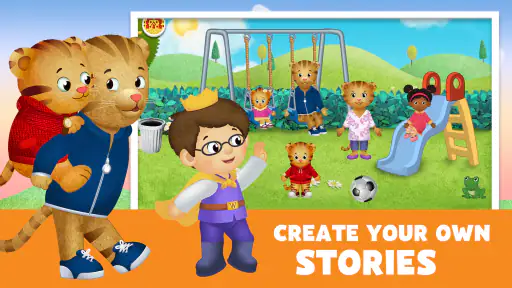
Once I launched the app, I was greeted with vibrant graphics and the familiar tunes of the show, instantly creating a welcoming atmosphere. The app is designed for preschoolers, and it does an excellent job of translating the gentle and nurturing world of Daniel Tiger into an interactive experience. Kids can explore different locations within Daniel’s neighborhood, such as the bakery, doctor’s office, and music shop. Each location offers various activities that promote creativity and learning.
Interactive and Educational Fun
The app doesn’t just entertain—it educates. Each activity within the app is crafted to teach children valuable life lessons and skills. For instance, visiting the doctor’s office helps kids understand what to expect during a check-up, easing any anxiety about doctor visits. The bakery allows for some creative fun, where kids can mix ingredients to bake virtual treats, enhancing their understanding of basic math and following instructions.
Moreover, the app encourages kids to engage with their virtual environment actively. At the music shop, children can play different instruments and create their own tunes. This interactive element not only keeps kids entertained but also fosters their creativity and musical skills.
Gaming Stories You May Enjoy

Dancing Road Turns Short Breaks Into a Test of Rhythm and Timing

Super Stylist Makes Every Outfit a Test of Taste and Patience

Dominoes on Your Terms: Who Should Play and Who Should Pass

Pokémon GO Makes the Familiar World Feel New

Chess.com Turns Rematches Into Rivalries, but Community Has Its Costs

Archery Battle 3D Review: Sharp Aiming, Unclear Feedback
From an action to another session
What matters in a young child’s game is not just the activity itself but the rhythm around it: a choice, an action, a response, and a reason to continue. Here, choosing a place gives the child a simple starting point; pretend tasks invite them to experiment; and the setting supplies the feedback that makes an action feel connected to the story. In the bakery, for example, mixing ingredients can turn an instruction into a small sequence to follow. In the music shop, making sounds lets a child hear the result of a choice immediately. Those are modest loops, but they suit short, exploratory play better than a long lesson that expects a preschooler to sit still and follow a fixed route.
I’d use that rhythm intentionally. If a child starts tapping around without settling, I might suggest one small goal—make something in the bakery, or try a sound in the music shop—then let them decide whether to continue. A parent can also give the session a natural endpoint by asking the child to show one thing they tried before putting the device away. This makes the reset less abrupt: the next session can begin with a new place or a fresh pretend idea rather than an expectation to finish a level. I wouldn’t promise a particular reward system or progression; the appeal is the immediate response and the chance to invent a new bit of play.
A Parent-Friendly Experience
One of the things I appreciated most about the app is how user-friendly it is for both kids and parents. The interface is intuitive, allowing little ones to navigate through Daniel's neighborhood with ease. Parents will be pleased to know that the app is free from ads, ensuring an uninterrupted experience for their children.
Additionally, the app includes a parental section where adults can find tips on using the app effectively with their kids, making it a collaborative experience. This feature is a thoughtful addition, reinforcing the app’s commitment to being an educational tool rather than just a digital babysitter.
When it fits—and when I’d choose something else
This is most convincing as a shared or nearby activity for a child who likes make-believe, familiar characters, and everyday settings. A short wait before an appointment, a calm stretch at home, or a conversation about starting school can give the play a useful purpose. I would not use it as a substitute for explaining a real medical visit, nor would I expect the game alone to teach a child everything they need to know about school. It works better as a prompt: play a scene, listen to the child’s questions, then connect the pretend situation to real life in age-appropriate language.
Compared with a straightforward alphabet or number-learning game, this title appears less focused on drills and more on imaginative context. That is an advantage for a child who learns by acting out familiar routines, but a disadvantage if you want clear practice in letter recognition, counting targets, or a structured curriculum. Compared with a video, the child has more reason to make choices and interact; compared with open-ended toys, the app supplies a themed setting and sound. Neither comparison makes it universally better. If your child prefers building freely, gets frustrated by touch controls, or needs a quieter activity, physical pretend-play toys or a simple book may be a better fit.
Small choices that improve the experience
I’d start by opening the game together once, checking that the child can move between places comfortably, and then stepping back enough to see what holds their interest. That first shared visit is more useful than giving a preschooler the device with no context: it shows you which scenes invite conversation and whether the child can manage the controls without repeated help. If they gravitate to one place, there is no need to push them through every setting in a single sitting. Repeating a favorite scene can be part of pretend play, not a sign that the app has failed to keep them moving.
Another helpful approach is to connect one activity to something the child already does. After pretend doctor play, they might talk through what they remember from a check-up; after making music, they might clap or hum a rhythm away from the screen. This gives the app a role in a larger play routine instead of making screen time the whole event. It also helps an adult notice whether the child is enjoying the interaction itself or simply tapping quickly to see what happens. If the latter is all that holds their attention, I’d keep the session brief and try a different kind of activity next time.
The trade-off is that an inviting familiar world can make a child want to keep playing after the useful moment has passed. I’d set expectations before handing over the device—one scene, then a transition—rather than ending play unexpectedly. And although the earlier experience described here includes an adult tips area and an ad-free environment, I would still preview the app with the child and check that its current behavior suits your family. That is a sensible habit with any children’s app, especially when the goal is to make play feel calm and purposeful.
Practical fit and device considerations
The current version is 4.6.7, and the minimum operating system listed is Android 5.1. I’d check that an older device meets that requirement before buying, and confirm the store’s compatibility details for the particular phone or tablet you plan to use. The game is available on Android and iOS, but a child’s experience can still depend on the screen size and how accurately they can tap. A larger tablet may be easier for small hands than a compact phone, while a phone can be more convenient for a short wait away from home.
Because the price is $2.99, I’d weigh it against how often your child is likely to return to this particular style of play. A fan of Daniel Tiger who enjoys replaying familiar pretend scenarios may get more out of it than a child who quickly moves on from character-based activities. The price is straightforward, but the decision is still personal: if you mainly want a focused literacy or numeracy tool, choose something built around that goal; if you want a gentle themed setting for conversation and imaginative play, this is closer to the mark.
Final Thoughts
Overall, Explore Daniel's Neighborhood is a delightful app that brings the magic of Daniel Tiger to life in an interactive and educational format. It’s a safe and engaging way for preschoolers to learn about the world around them while having fun. If you’re a parent looking for a wholesome app that combines entertainment with learning, this app is definitely worth checking out. It’s available for both Android and iOS, so you can easily download it and let your child start exploring Daniel’s world today!
My recommendation is a qualified one: I’d choose it for a young Daniel Tiger fan when pretend play and everyday topics matter more than formal lessons. I’d skip it for a child who wants fast challenges, precise academic practice, or a game that supplies a strong sense of completion every time. The central loop—pick a familiar place, try an action, notice what happens, and return later with another idea—is gentle rather than demanding. That makes the next session feel like an invitation to continue playing, not a requirement to keep progressing.
Explore Daniel's Neighborhood Pros and Cons
Pros
- Engages kids with interactive games
- Promotes positive social behavior
- Features beloved cartoon characters
- Safe environment for children
- Educational content for preschoolers
Cons
- Limited content variety
- Requires internet connection
- Might be too simple for older kids
- In-app purchases available
- Takes up significant storage space
Frequently Asked Questions
What is Explore Daniel's Neighborhood?
Explore Daniel's Neighborhood is an interactive educational app designed for young children. It provides a safe and engaging environment for kids to explore and learn about Daniel Tiger's world. Through various activities and games, children can interact with the characters and settings from the beloved PBS KIDS series, encouraging imaginative play and learning.
Is Explore Daniel's Neighborhood suitable for my child?
Yes, Explore Daniel's Neighborhood is designed for young children, typically ages 2 to 5. It offers a child-friendly interface, colorful graphics, and simple tap-and-play interactions that are perfect for preschoolers. The app is educational and promotes skills like problem-solving, social-emotional learning, and creativity through fun and interactive activities.
What activities are included in Explore Daniel's Neighborhood?
Explore Daniel's Neighborhood includes a variety of activities that allow children to interact with Daniel Tiger and his friends. Kids can visit familiar places like the school, bakery, and doctor's office, each offering unique games and learning opportunities. The activities are designed to promote exploration, creativity, and social skills, making it an enriching experience for young minds.
Is Explore Daniel's Neighborhood safe for children to use?
Yes, Explore Daniel's Neighborhood is safe for children. The app does not contain any third-party advertising, inappropriate content, or in-app purchases that could disrupt the child's experience. It is designed to be a secure digital environment where parents can feel confident letting their children explore and learn independently.
Do I need an internet connection to use Explore Daniel's Neighborhood?
No, an internet connection is not required to use Explore Daniel's Neighborhood once it is downloaded. This offline capability allows children to enjoy the app anywhere, whether at home or on the go, without the need for Wi-Fi or data. It ensures uninterrupted play and learning experiences for your child.


