

Easy Words - Word Puzzle Games
- Reviews
- 4.5
- Version
- 2.1.0
- Installs
- 1,000,000+

Screenshots

 Analysis by Frivlyz
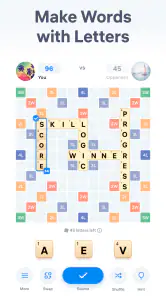
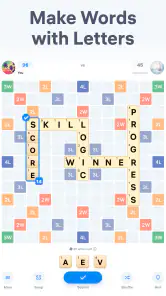
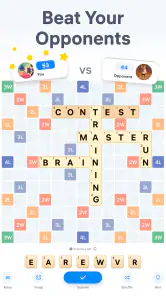
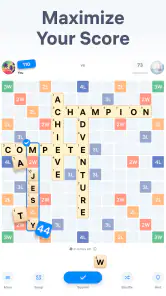
What makes a word game worth keeping on my phone is not a huge collection of modes; it’s whether a short session feels satisfying and whether I can see the point of the next move. Easy Words - Word Puzzle Games is built around forming words from letters while competing against an opponent, so its appeal is clearest when I want a quick vocabulary challenge with a little pressure. It is a focused idea rather than an all-purpose word-game collection, and that focus is both its strength and the main thing to consider before installing it.
Getting Started: A Smooth Introduction to Word Fun
First things first, I was really impressed with how easy it was to get started with Easy Words - Word Puzzle Games. The download and installation process was a breeze, and before I knew it, I was diving headfirst into a world of letters and puzzles. The interface is super user-friendly, with vibrant colors and a clean design that’s easy on the eyes.
The Gameplay: Challenging Yet Addictive
Alright, let’s talk gameplay. The app offers a variety of word puzzles that range from simple to brain-bendingly challenging. It’s like having a personal brain gym right in your pocket! Each level tests your vocabulary, spelling, and problem-solving skills. I found myself getting lost in the game for hours, always eager to tackle just one more level. And trust me, it’s a total confidence booster when you finally crack a tough puzzle!
What I really love about this app is that the difficulty ramps up gradually. It starts with easy peasy levels to get you warmed up, and then it throws in some real head-scratchers as you progress. Plus, there are daily challenges and special events that keep the game fresh and exciting. There’s always something new to look forward to!
What a Word Duel Is Best At
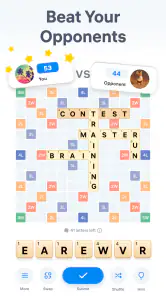
The versus setup changes how I approach each puzzle. In a solo word search, I can take my time and treat every clue as a quiet exercise; here, the opponent gives the task a competitive edge. That makes Easy Words a better fit for someone who enjoys comparing solutions than for a player who wants a completely solitary, unhurried puzzle. I like that distinction: a small contest can make familiar letter work feel more purposeful, but it can also make a relaxing game feel more demanding.
For a practical routine, I’d use it in the gaps that already exist in a day: a short break between tasks, a few minutes while waiting for someone, or a low-key challenge shared with a word-game friend. The useful habit is to notice how you form a guess, not just whether you win. When a promising word doesn’t fit, I try changing the starting letter or looking at a less obvious ending instead of repeatedly rearranging the same familiar letters. That small reset is a good way to keep the puzzle from turning into random tapping.
Features That Enhance the Experience
One of the standout features of this app is its hint system, which is a total lifesaver when you’re stuck. You can earn hints by completing levels or opt to purchase them if you’re in a hurry. Another cool feature is the ability to track your progress and see how you stack up against other players on the leaderboard.
Gaming Stories You May Enjoy

Dancing Road Turns Short Breaks Into a Test of Rhythm and Timing

Super Stylist Makes Every Outfit a Test of Taste and Patience

Dominoes on Your Terms: Who Should Play and Who Should Pass

Pokémon GO Makes the Familiar World Feel New

Chess.com Turns Rematches Into Rivalries, but Community Has Its Costs

Archery Battle 3D Review: Sharp Aiming, Unclear Feedback
I’d treat a hint as a nudge rather than an automatic shortcut. Before using one, I like to pause and scan the available letters for a word family: a common prefix, a plural ending, or a shorter word that may reveal a useful pattern. That makes hints more valuable because I’m still doing some of the solving myself. If I spend them as soon as a puzzle feels awkward, I lose the chance to build that pattern-spotting habit. On the other hand, using a hint when I’m genuinely stuck can preserve the pace and keep a brief session enjoyable.
Competition also affects how I’d use the progress and leaderboard elements. They can give a regular player a clear reason to return, but they aren’t the same as a personal vocabulary notebook or a structured lesson. I wouldn’t rely on the game to teach a language from scratch; it is more naturally suited to practicing word recognition and spelling through play. If your goal is deliberate study, a dedicated learning tool will offer a more systematic route. If you already enjoy word puzzles and want a little comparison with other players, the competitive layer makes more sense.
The app also supports multiple languages, which is fantastic for bilingual users or those looking to learn new words in different languages. It’s like getting a language lesson and a game all in one!
Who Should Pick It—and Who Might Prefer Something Else
I’d recommend it first to people who like forming words under a competitive prompt and want an accessible game they can revisit in short bursts. It should also suit bilingual players who enjoy switching their attention between languages, though I’d approach that as playful practice rather than a complete course. Someone who likes comparing progress may appreciate the leaderboard; someone who finds rankings stressful can focus instead on the puzzle itself, provided the competitive framing still feels comfortable.
It is less convincing for a player who wants a large, clearly differentiated set of solo modes, a crossword-style story, or a calm puzzle with no opponent in the picture. In those cases, a classic word search, crossword app, or single-player anagram game may be a better match. The trade-off is straightforward: Easy Words puts more emphasis on the word-forming contest, while those alternatives usually let you set the pace and play without that same head-to-head feeling. I’d choose based on whether competition motivates you or distracts you.
A realistic example: I might open it during a coffee break, play a round, and stop when the break ends rather than letting “one more” stretch into the next task. If a puzzle slows me down, I’ll make one deliberate pass through the letters, then decide whether I want to keep working or use a hint. That boundary matters for anyone who wants a casual phone game without letting it take over a spare moment. The game’s quick word focus is convenient, but the same easy-to-repeat loop can make it tempting to continue longer than planned.
Practical Details and Value
Easybrain develops the game, which is free to download and has an average rating of 4.5 from around 51,000 ratings, with over a million installs. It is rated Teen, so it is not presented as a children’s title for every age group. The current version is 2.1.0, and it requires Android 7.0 or later. Those details make it straightforward to judge basic compatibility before trying it, especially if you are installing it on an older Android phone.
The game also offers in-app purchases priced at $9.99 per item. I’d start with the free experience and decide whether any purchase would solve a real annoyance for me, rather than paying simply because a puzzle becomes difficult. Since hints can be earned by completing levels, patience is a reasonable alternative to spending when I hit a tough spot. This is a useful distinction for anyone who wants to keep a casual game within a set budget: the download costs nothing, but optional purchases are still part of the experience.
One question I’d ask before choosing it is whether the competitive format is essential to my enjoyment. If I mainly want quiet solo play, I’d choose a game designed around that. If I want an opponent to make familiar word construction feel like a challenge, this is closer to what I’m looking for. Another practical question is whether it will help me learn vocabulary: it can give me enjoyable exposure and practice, but I’d pair it with a language-learning app if I needed lessons, explanations, or a planned study path.
Wrapping It Up: A Must-Have for Word Game Lovers
So, would I recommend Easy Words - Word Puzzle Games? Absolutely! It’s a fantastic app that’s perfect for anyone who loves words and puzzles. Whether you’re a seasoned wordsmith or just looking to pass the time while keeping your brain active, this app has something for everyone. The combination of engaging gameplay, educational value, and user-friendly interface makes it a standout choice in the crowded world of word games.
Give it a try, and don’t be surprised if you find yourself saying, “Just one more level!” I promise, it’s worth every minute.
Easy Words - Word Puzzle Games Pros and Cons
Pros
- Engaging and addictive gameplay.
- Visually appealing interface.
- Wide range of word puzzles.
- Regular updates with new puzzles.
- Encourages vocabulary enhancement.
Cons
- Contains ads that can be distracting.
- In-app purchases can be pricey.
- Some puzzles can be too challenging.
- Requires internet for full features.
- Limited free hints available.
Frequently Asked Questions
What is Easy Words - Word Puzzle Games?
Easy Words - Word Puzzle Games is a fun and engaging mobile application designed to challenge your vocabulary skills through a variety of word puzzles. The app offers different levels of difficulty, making it suitable for both beginners and seasoned word enthusiasts. It provides a great way to improve your language skills while having fun.
How can I download Easy Words - Word Puzzle Games?
Easy Words - Word Puzzle Games is available for download on both Android and iOS platforms. You can find it in the Google Play Store for Android devices and the Apple App Store for iOS devices. Simply search for the app by name, and you can download and install it for free.
Are there any in-app purchases in Easy Words - Word Puzzle Games?
Yes, Easy Words - Word Puzzle Games does offer in-app purchases. While the app is free to download and play, users have the option to purchase additional features, hints, or ad-free experiences. These purchases can enhance gameplay but are entirely optional for those who wish to enjoy the game without spending money.
Is an internet connection required to play Easy Words - Word Puzzle Games?
Easy Words - Word Puzzle Games can be played offline, which is great for users who may not always have access to the internet. However, some features, like updates and in-app purchases, will require an internet connection. Playing offline doesn't limit access to the core gameplay, allowing you to enjoy word puzzles anytime, anywhere.
What age group is Easy Words - Word Puzzle Games suitable for?
Easy Words - Word Puzzle Games is suitable for a wide range of age groups, typically aimed at users aged 8 and above. The app’s adjustable difficulty settings make it accessible to children, teenagers, and adults alike. It's a family-friendly game that encourages learning and vocabulary development across different age demographics.


