

Drop Away: Color Puzzle
- Reviews
- 4.4
- Version
- 1.28.1
- Installs
- 1,000,000+

Screenshots
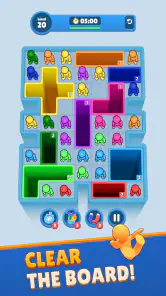


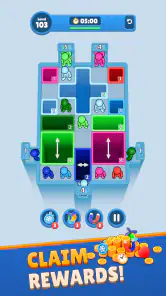


 Analysis by Frivlyz
I approached Drop Away: Color Puzzle as a quick, approachable puzzle game rather than something meant to replace a long evening with a console or a deep strategy title. Its central appeal is easy to understand: you work through color-based challenges, look for the right sequence of actions, and try to clear each board without turning a simple idea into unnecessary mental work. That makes it a natural fit for short breaks, especially when I want something more engaging than scrolling but less demanding than a competitive game.
The game is free to download and sits in the puzzle category, with an Everyone content rating. Rollic Games is the developer, and the game has reached over one million installs. Those figures make sense when you spend a little time with it: the presentation is designed to invite quick experimentation, and the basic premise is much easier to grasp than a puzzle game built around a large rulebook.
My main advice for a first-time player is not to rush past the opening boards. The early stages are useful practice for understanding how colors behave and how the game expects you to think. A first success feels more satisfying when you have noticed the relationship between the pieces instead of simply tapping until something works. The best way to begin is to treat each move as information, not just progress.
What the first few minutes are really like
When I start a session, I expect a compact puzzle loop: inspect the arrangement, decide what should happen first, make a move, and then adjust if the result is not what I intended. That rhythm is what gives the game its pick-up-and-play quality. You do not need to prepare a long strategy before touching the screen, but you also cannot rely entirely on random actions once the puzzles become less obvious.
The color theme is more than decoration. It is the visual language of the game, so the first meaningful skill is learning to read the board quickly. I found it helpful to pause for a moment before acting and identify which elements appear connected, which spaces look available, and which move might close off a useful route. This small habit prevents the most common beginner mistake: spending the first action on the most obvious object rather than the most useful one.
Because the game is free, it is easy to try without making a commitment. That also means the experience is likely to be more comfortable for players who accept that optional purchases may appear during play. In-app purchases range from under a dollar to amounts approaching one hundred dollars per item, so I would not hand the game to a child without checking the device’s purchase controls first. The Everyone rating describes the intended audience, but it does not remove the need for sensible spending safeguards.
The current version is 1.28.1 and requires Android 7.0 or later. For someone using an older phone or tablet, that requirement is worth checking before expecting to install it. On a compatible device, the game is best understood as a lightweight puzzle companion: something to open while waiting for an appointment, taking a short break, or winding down without committing to a large story or a long multiplayer match.
Gaming Stories You May Enjoy

Dancing Road Turns Short Breaks Into a Test of Rhythm and Timing

Super Stylist Makes Every Outfit a Test of Taste and Patience

Dominoes on Your Terms: Who Should Play and Who Should Pass

Pokémon GO Makes the Familiar World Feel New

Chess.com Turns Rematches Into Rivalries, but Community Has Its Costs

Archery Battle 3D Review: Sharp Aiming, Unclear Feedback
Starting without overthinking the board
My first useful routine is simple. I look at the complete arrangement before making a move, then choose one area that seems to control the most space or color interaction. I avoid tapping repeatedly just to see what happens. In a color puzzle, an early mistake can make the remaining layout harder to read, while a deliberate opening move often reveals the intended direction of the board.
This is also where the game differs from a basic matching title. In a conventional match-three game, the board often rewards quick scanning for combinations and immediate reactions. Here, I get more value from asking what the board will look like after the move. That extra moment of prediction is small, but it changes the experience from reflex play into a modest logic exercise.
If you are introducing the game to a younger player, I would play the first few puzzles together rather than explaining every rule in advance. Letting the player point out what they think will happen is more useful than giving them a solution. It encourages visual reasoning and makes the first successful action feel earned. Since the age rating is Everyone, the game is positioned for broad access, but individual patience and reading ability will still determine how comfortable the opening feels.
From installation to the first meaningful success
After installing, I would begin with a quiet, uninterrupted minute rather than opening the game while already distracted. The first boards are the right place to learn the visual cues. Pay attention to what changes after each action: which colors move, which spaces become available, and whether a successful interaction affects nearby pieces. You do not need to memorize a complicated system; you need to notice cause and effect.
My preferred first-session workflow is to solve one board slowly, then replay the next attempt with a little more confidence. The goal is not to finish as quickly as possible. It is to reach the point where you can look at a new arrangement and form a prediction before touching the screen. That is the first genuinely useful milestone because it means you are playing the puzzle rather than merely responding to it.
One practical tip is to use the edges of the board as reference points. When several colors look similar or the arrangement becomes busy, I mentally divide the puzzle into small zones and consider how one zone affects the next. This prevents the whole screen from becoming one confusing mass. It is especially helpful during a short phone session, when a notification or conversation has interrupted your concentration.
Another useful habit is to stop after a failed attempt and identify the exact moment the plan went wrong. Was the first action premature? Did it remove a useful option? Did I focus on a color while ignoring the surrounding spaces? This kind of quick review is more productive than immediately repeating the same sequence. It also keeps the game from becoming a frustrating cycle of guessing.
For an everyday example, imagine opening the game during a ten-minute commute or while waiting for a friend. I would play one or two boards, keeping the sound and attention level low enough that I could stop at any time. If a puzzle begins demanding full concentration, I would pause the session rather than force a solution. The game works well in short bursts precisely because it does not need to become the only thing happening around you.
How to recognize progress beyond simply clearing a board
A cleared puzzle is the obvious reward, but I found another form of progress more valuable: becoming faster at rejecting bad openings. At first, every move can look equally plausible. With practice, you begin to spot actions that leave too few options and actions that preserve flexibility. That is a transferable puzzle skill, and it gives the game more staying power than a sequence of completely disposable taps.
I also recommend separating “I understand the board” from “I can solve it immediately.” Those are different abilities. You may correctly see the relationship between the colors but still need several attempts to arrange the actions in the right order. Treating that as normal makes the difficulty feel fairer. It also helps you decide when to keep trying and when to take a break.
If you are considering purchases, my cautious approach would be to play long enough to decide whether the basic puzzle loop itself is enjoyable. A purchase should solve a specific annoyance for you, not be an automatic part of starting the game. Since individual items can cost anywhere from $0.99 to $99.99, purchase controls matter more here than they would in a completely paid app with no optional spending. I would never use a purchase as a substitute for learning the board.
Common confusion and the friction I noticed
The first source of confusion is visual: color-based puzzles can become difficult to read when several elements are close together or when the board changes after an action. My solution is to slow down and compare the whole arrangement before and after each move. If you are playing on a small screen, holding the device at a comfortable distance and avoiding hurried taps can make a real difference.
The second issue is psychological. A simple-looking puzzle can encourage overconfidence. I sometimes assumed that the most prominent color should be handled first, only to discover that the surrounding arrangement mattered more. The game rewards attention to relationships rather than attention to the loudest visual element. That is a subtle distinction, and new players may need a few boards before it becomes natural.
A third point is the difference between a puzzle that feels challenging and one that feels repetitive. If you enjoy gradually improving your planning, the compact format can remain satisfying. If you mainly want constant novelty, dramatic presentation, or a story connecting one stage to another, this may feel too focused. It is a color puzzle first, and its appeal depends heavily on whether you enjoy examining arrangements and refining sequences.
Compared with a traditional match-three game, this is a better choice for someone who wants less emphasis on speed and more on deliberate placement or ordering. Compared with a word puzzle, it asks for visual reasoning rather than vocabulary. Compared with a large logic game, it is easier to enter but may not offer the same sense of a long-form intellectual project. I would choose it for accessible, repeatable sessions, not for a complex campaign or a rich narrative experience.
There is also a practical limitation for people who dislike monetization in free games. The download price is zero, but optional purchases are part of the overall model. Even if you never buy anything, the presence of purchasable items can affect how comfortable the experience feels. Players who want a single upfront payment and no purchase decisions may prefer a paid puzzle alternative instead.
Another limitation is that the game is not ideal when I need a completely passive distraction. It asks for enough attention to notice patterns and anticipate consequences. That is a strength when I want to exercise my mind, but a weakness when I am tired, multitasking, or looking for something that can run in the background. In those moments, a simple arcade game or a relaxing visual app may be a better fit.
Who will enjoy it, and who should choose something else
I would recommend this game to first-time puzzle players who want a clear starting point and short sessions. It is also suitable for experienced players who enjoy testing their visual planning without learning a large collection of rules. The Everyone rating makes it broadly approachable, while the free entry point makes experimentation easy.
It is particularly useful for people who like small, repeatable challenges. A student taking a study break, a commuter waiting for a connection, or someone relaxing before bed can all find a natural use for it. I would keep the sessions intentional, though. The game is more rewarding when you focus on a board for a few minutes than when you tap through it absent-mindedly.
I would be less enthusiastic about recommending it to players who need competitive rankings, a substantial story, or highly varied genres in one package. I would also steer away from it for anyone who becomes irritated by retrying a puzzle or by optional purchase prompts. In those cases, a paid logic game with a fixed structure may offer a calmer experience, while a competitive puzzle title may better satisfy someone who wants pressure and comparison.
Families should also decide how they want to handle spending before letting children play independently. The content rating is Everyone, but the available purchase range means device-level restrictions are sensible. I would show a child how to recognize the difference between ordinary play and a purchase screen, then keep approval controls enabled. That small preparation removes an avoidable source of stress.
My next-step advice after the opening boards
Once the basic actions feel familiar, stop looking only for the move that works immediately. Start looking for moves that preserve several future options. This is where the game becomes more interesting for me. A move can be useful not because it solves a visible part of the board, but because it leaves the remaining colors easier to organize.
I would also create a personal stopping rule. For example, after several unsuccessful attempts, I take a short break and return with fresh eyes instead of treating persistence as proof that I am improving. Puzzle fatigue makes every arrangement look more complicated. A reset can be more effective than another hurried try, especially on a phone where attention is already divided.
If you want to make the game part of a daily routine, use it as a deliberate transition rather than an endless feed. One or two boards after lunch can provide a mental change of pace; a brief session before bed can work if the challenge does not leave you frustrated. The important point is to choose the length of the session yourself. The game is strongest when it remains a compact activity, not when it becomes something you play automatically.
My overall view is positive but measured. Drop Away: Color Puzzle succeeds because it makes visual puzzle solving approachable and gives a first-time player a clear path from curiosity to a real sense of control. I like the way a small pause before acting can improve the result, and I appreciate that the game can fit naturally into ordinary spare moments. At the same time, the experience will not satisfy everyone: players seeking a deep campaign, rich story, or purchase-free structure should look elsewhere.
With an average rating of 4.4 from around twenty-nine thousand ratings, the game has clearly found an audience, and I can understand why. My recommendation is to install it if you want a free, focused color puzzle that rewards observation more than frantic tapping. Start slowly, learn from the first failed sequence, keep spending controls in place, and judge the game by how much you enjoy solving its boards—not by how quickly you move through them.
Drop Away: Color Puzzle Pros and Cons
Pros
- Simple drag-and-drop controls are easy to learn.
- Short levels make it suitable for quick gaming sessions.
- Bright colors and clean visuals are pleasant to look at.
- Progressive challenges help keep the puzzle experience engaging.
- Works well for players who enjoy relaxing
- low-pressure games.
Cons
- Some puzzles may feel repetitive after extended play.
- Difficulty can fluctuate between levels.
- Hints or assistance may be limited on tougher puzzles.
- Ads may interrupt the game
- depending on the version.
- Replay value can be modest once the solutions are familiar.
This Game in Other Languages
Frequently Asked Questions
What is Drop Away: Color Puzzle, and how is it played?
Drop Away: Color Puzzle is a casual puzzle game centered on arranging and clearing colored pieces. After installing it, players can expect short levels with simple tap, drag, or placement-based controls, depending on the puzzle layout. The main challenge is to recognize color patterns, plan moves carefully, and complete each board efficiently. It is easy to understand, but later stages usually require more patience and strategic thinking.
Is Drop Away: Color Puzzle suitable for beginners and children?
Yes, the game is generally accessible to beginners because its core mechanics are straightforward and the early puzzles work as a gentle introduction. The colorful presentation and short rounds can also make it appealing to younger players. However, difficulty may increase as new layouts or restrictions appear, so children may occasionally need help. Parents should also review the app’s age rating, advertisements, and purchase settings before allowing unsupervised play.
Does Drop Away: Color Puzzle require an internet connection?
The basic puzzle experience may be playable without a constant internet connection, which is convenient when traveling or when mobile data is unavailable. Nevertheless, some features can depend on connectivity, including advertisements, analytics, cloud progress, updates, special events, or in-app purchases. Availability may vary by version and device, so it is best to test the game once offline rather than assuming every feature will work without internet access.
Are there advertisements or in-app purchases in Drop Away: Color Puzzle?
As with many free-to-download mobile puzzle games, Drop Away: Color Puzzle may include advertising and optional in-app purchases. Ads can appear between levels or when players request extra assistance, while purchases may remove advertising, provide hints, or unlock other conveniences. Before downloading, check the current Google Play or App Store listing for pricing and billing details, and consider enabling purchase restrictions if children will use the device.
What devices are compatible with Drop Away: Color Puzzle, and is progress saved?
Compatibility depends on the operating system version, hardware, and the current release published for Android or iOS. The game should run best on a reasonably modern phone or tablet with enough free storage and updated system software. Progress may be stored locally or linked to an account, depending on the version. If your progress matters, look for cloud-save or account options before changing devices or reinstalling the app.


