

DreamCraft City
- Reviews
- 3.4
- Version
- 1.20.1-build
- Installs
- 1,000,000+

Screenshots
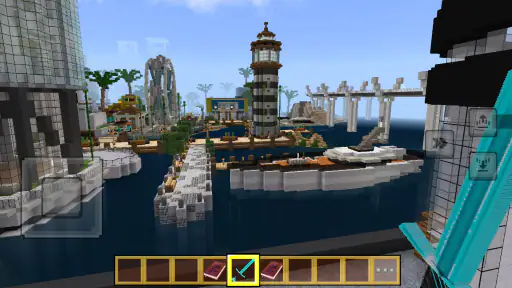
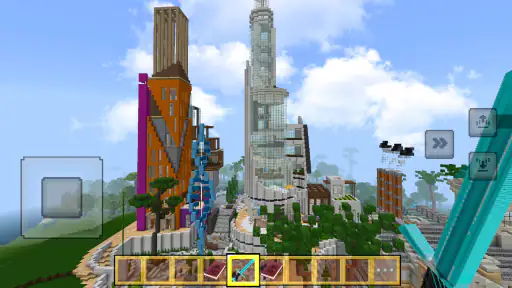
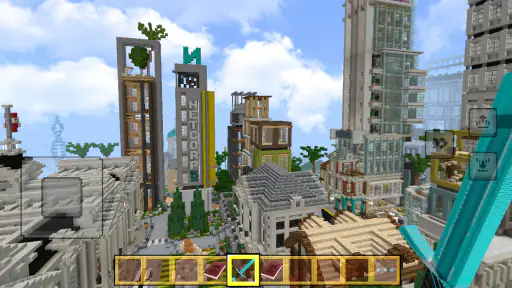
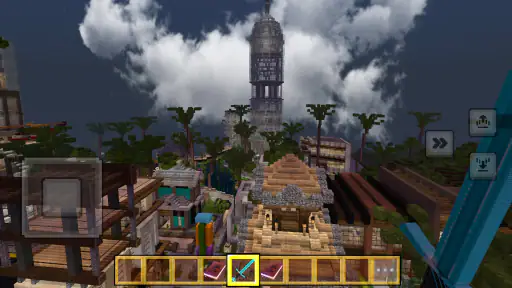
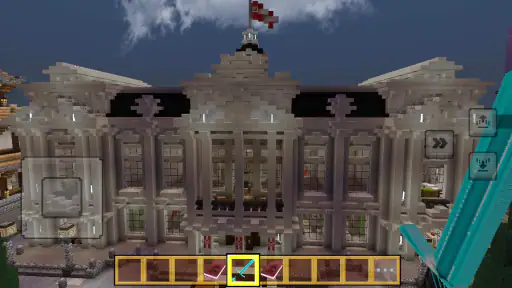
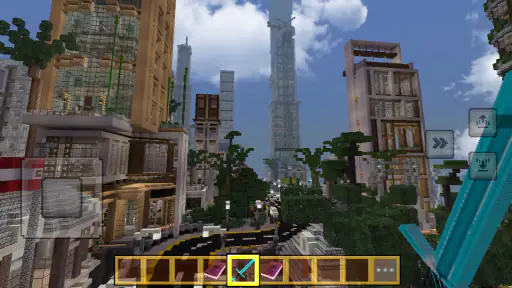
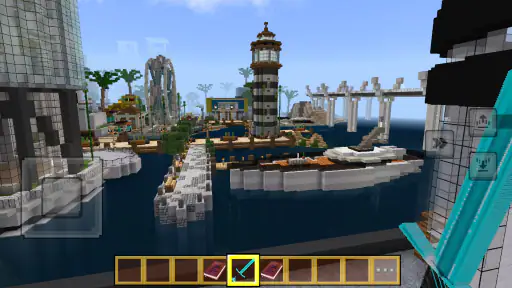
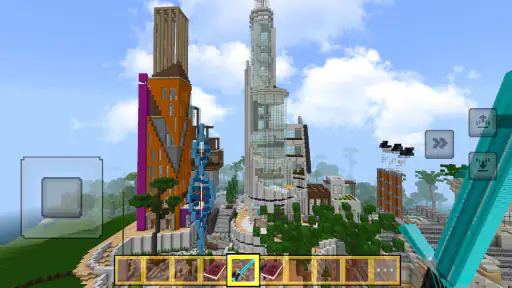
 Analysis by Frivlyz
When a tablet gets passed around at home, a city-building game can become a shared project: one person lays out a neighborhood, someone else suggests where a park should go, and the next player inherits the results. That is the kind of casual collaboration I can imagine enjoying in DreamCraft City, especially when everyone is happy to take turns rather than compete for control. Its block-based city theme gives the idea a playful feel, while the simulation format leaves room to think about how a place fits together.
One city, several ways to take part
For a household, the most useful way to share a city is to agree on a small goal before handing over the device. One person might focus on arranging streets, while another chooses where buildings or green spaces belong. That keeps a short session purposeful and helps avoid the familiar shared-tablet problem of one player undoing another’s work. I would treat the city as a joint craft project, not assume the game provides separate family profiles or a built-in turn-taking system.
This approach suits siblings or adults and children who enjoy talking through choices. It is less suitable if everyone expects a private, independently saved city on the same device. Before making the game a household activity, I would check how progress behaves when different people use it and whether the current device is tied to one player’s play. Those practical boundaries matter more than the theme when several people share a screen.
Setting expectations before play
DreamCraft City is free, and its age rating is Everyone, which makes it an easy candidate to consider for a family device. Still, an age label is not a substitute for a parent’s judgment about screen time, in-app prompts, or whether a child is ready to manage a game independently. I would look over the game together at the beginning and agree on simple household rules: who gets the device, when a session ends, and whether purchases or account changes need an adult’s help.
That is not a claim that the game includes parental controls; it is simply sensible shared-device practice. If a child plays, keeping the device’s account and any purchase decisions under an adult’s oversight is a clearer boundary than relying on assumptions about the game. For younger players, a brief first session together also lets an adult see whether the interface and pace are comfortable before leaving them to explore alone.
Keeping a shared project enjoyable
Coordination works best when the household treats each visit as a chance to add something rather than rebuild someone else’s plan. A quick verbal handoff—what was changed, what the next person wants to try, and what should stay untouched—can prevent frustration. It also gives the city a story that belongs to the group. If one person prefers careful layouts and another likes experimenting, agreeing on a small area for each style can preserve both approaches without turning every choice into a debate.
I would also keep expectations modest. A shared device can make it awkward to play at the same time, and the experience should not be mistaken for a dedicated cooperative mode. If your household wants direct multiplayer teamwork, clear individual profiles, or strict account separation, a game designed around those features is likely a better fit. Here, the reliable option is to coordinate outside the game and take turns with the device.
Gaming Stories You May Enjoy

Dancing Road Turns Short Breaks Into a Test of Rhythm and Timing

Super Stylist Makes Every Outfit a Test of Taste and Patience

Dominoes on Your Terms: Who Should Play and Who Should Pass

Pokémon GO Makes the Familiar World Feel New

Chess.com Turns Rematches Into Rivalries, but Community Has Its Costs

Archery Battle 3D Review: Sharp Aiming, Unclear Feedback
Getting Started with DreamCraft City
Upon downloading DreamCraft City, I was immediately impressed by its user-friendly interface. It's pretty intuitive, which means you don't have to be a tech wizard to get the hang of it. The tutorial is interactive and guides you through the basics of city-building, from laying down roads to constructing skyscrapers. I found myself quickly engrossed, eager to see what kind of metropolis I could create.
Design and Features
The design of the app is vibrant and colorful, which makes for an engaging visual experience. The graphics are stunning, and the attention to detail in the buildings and landscapes is noteworthy. One feature that I particularly enjoyed was the option to customize almost everything in your city. Whether it’s choosing the style of your residential buildings or the type of park you want to build, the possibilities are endless.
Another cool feature is the game's quest system, which keeps things interesting by giving you goals to achieve and challenges to overcome. Completing these quests not only rewards you with in-game currency but also keeps the gameplay fresh and exciting. It's like having a to-do list, but one that you actually want to complete!
Gameplay Experience
What really sets DreamCraft City apart from other city-building games is its seamless integration of strategy and creativity. The game requires you to think strategically about resource management and urban planning while also allowing for creative expression in your city designs. I loved planning the layout of my city, considering factors like traffic flow and environmental sustainability. It’s a delightful blend of brain-teasing puzzles and creative freedom.
Additionally, the community aspect of the game adds another layer of enjoyment. You can visit other players' cities to gather inspiration or participate in city-building contests. It's a fantastic way to connect with others who share your passion for city-building.
Choosing it over other city builders
As a simulation game, this is most appealing if you want to make a place of your own and enjoy shaping its layout. Compared with city builders that emphasize dense economic systems, long-term infrastructure planning, or technical realism, its colorful block-based approach sounds more inviting for relaxed creative play. If your favorite part of the genre is making a city look and feel personal, that balance may be a strength. If you want detailed control over every civic system, a more management-heavy alternative may suit you better.
A practical way to get more from a session is to pick one design question and work on that rather than changing the whole city at once. For example, decide where a neighborhood should connect to a road, or which buildings would make an area feel coherent. Then use quests as a source of direction when you are unsure what to do next, rather than treating every goal as an obligation. That keeps the creative side in front while still giving a short visit a satisfying endpoint.
The quest-and-currency loop also creates a trade-off: goals can help a new player avoid staring at a blank space, but players who prefer unrestricted building may find objectives distracting. I would alternate between following a task and simply arranging the city to suit my own taste. That makes it easier to tell whether the game’s structure is motivating or whether it is steering play away from the kind of city you want to make.
Who will get the most from it
I would recommend giving it a try if you like visual customization, enjoy gradual goals, or want a light city-building activity that can be picked up between other tasks. It can also work for someone new to the genre who wants an approachable starting point rather than a complicated management simulation. A short evening session is a natural fit: complete a goal, adjust a section of the city, then leave the next idea for another time. That is easier to share at home than a game that demands a long uninterrupted session.
On the other hand, I would skip it if you need a proven offline experience, robust household account separation, or a tightly specified multiplayer setup. I would also look elsewhere if you mainly want a realistic transport or economy simulator, since the appeal described here is creative city design rather than technical simulation. The game has a 3.4 average from 547 ratings, so I would approach it with measured expectations rather than assume that its style will work for every city-building fan.
Practical details and trust
The game is free, has an Everyone age rating, and is developed by funtab999. It was released on April 9, 2025, and its current version is 1.20.1-build; the listed minimum operating system is Android 5.0. It has passed one million installs, which suggests broad interest, but popularity alone cannot tell you whether its pacing or design choices will suit your household. I would check that the device meets the operating-system requirement and make sure there is enough time for a first look before deciding whether it belongs on a shared tablet.
For trust and age context, I would separate what the rating tells you from what it cannot decide for you. “Everyone” is a useful starting point, but it does not establish that every child will find every interaction appropriate or that a parent will be comfortable with every device prompt. Looking at the game together and setting purchase and screen-time expectations is a more dependable routine. The game has three written reviews, so the average rating and install count offer a broader signal than the small number of written comments; neither replaces trying it yourself.
One question many people have is whether it is better for solo play or family sharing. I see it as primarily a personal creative activity that can be shared by taking turns, provided everyone is comfortable using the same city and device. Another is whether a newcomer needs city-building experience: the interactive tutorial makes the opening more approachable, so prior expertise should not be necessary to begin. If you are deciding between this and a more elaborate simulator, the useful test is whether you want colorful building and guided goals or deeper systems and more demanding planning.
For an everyday household routine, I would make the first session a short, supervised trial: learn the basic controls, let each player make one small contribution, and agree on what the next person can change. If that feels enjoyable, the game can become a low-pressure shared project. If the handoff causes arguments or everyone wants separate progress, it is better to keep it as one person’s game or choose an alternative built for individual profiles. That distinction can save a promising game from becoming a source of friction.
Final Thoughts
In conclusion, DreamCraft City is a delightful escape into a world where your imagination is the only limit. Whether you're a seasoned city-builder or a newcomer to the genre, this app offers something for everyone. The engaging gameplay, stunning graphics, and community features make it a must-try for anyone looking to dive into the world of virtual city planning. I’ve genuinely enjoyed every minute spent crafting my dream city, and I bet you will too!
My household verdict is more specific: I would try it with someone who likes building, experimenting, and sharing ideas, while keeping device access and account expectations clear. Its appeal is the combination of city design, quests, and the chance to look at other players’ creations; its limitations are most important for people seeking realistic depth or clearly separated shared play. If those trade-offs sound acceptable, it is an inviting free place to start shaping a city together—or to enjoy quietly on your own.
DreamCraft City Pros and Cons
Pros
- User-friendly interface for easy navigation.
- Wide range of creative building tools.
- Engaging community with active members.
- Regular updates with new features.
- Supports collaborative building projects.
Cons
- Requires a stable internet connection.
- Limited offline functionality.
- In-app purchases can be expensive.
- Some features are hard to learn initially.
- Graphics may lag on older devices.
Frequently Asked Questions
What is DreamCraft City?
DreamCraft City is an engaging simulation game available on both Android and iOS platforms. It allows players to build and manage their own virtual city, offering a variety of customization options and interactive gameplay. Players can design infrastructures, manage resources, and interact with other players, creating a dynamic city-building experience.
Is DreamCraft City free to play?
Yes, DreamCraft City is free to download and play. However, it does offer in-app purchases that can enhance the gaming experience. These purchases can provide additional resources, unlock premium features, or speed up progress within the game. While they are optional, they can be beneficial for those looking to advance more quickly.
What age group is DreamCraft City suitable for?
DreamCraft City is designed for players aged 9 and above. The game incorporates strategic planning and social interaction elements, making it suitable for pre-teens, teenagers, and adults alike. It encourages creative thinking and problem-solving, providing a fun yet educational experience for a wide range of players.
Does DreamCraft City require an internet connection to play?
Yes, DreamCraft City requires an active internet connection. This is essential for accessing all the game's features, including updates, social interactions, and multiplayer options. An internet connection ensures that players can fully experience the dynamic and interactive elements of the game.
How can I contact support if I encounter issues in DreamCraft City?
If you encounter any issues while playing DreamCraft City, you can contact their support team through the app or the official website. The support section provides a detailed FAQ, troubleshooting tips, and contact options. Players can also reach out to support via email or social media channels for quick assistance.


