

Dot Link - Connect the Dots
- Reviews
- 4.8
- Version
- 2.1.0
- Installs
- 10,000,000+

Screenshots
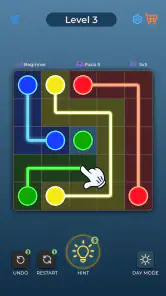
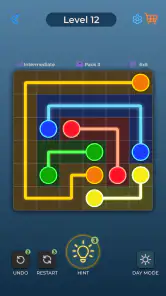
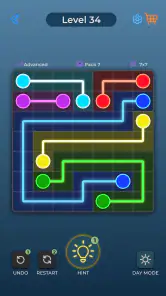


 Analysis by Frivlyz
I’m drawn to puzzle games that make sense within seconds: I want to open one, understand what it’s asking, and get a small, satisfying challenge without committing my evening. Dot Link - Connect the Dots fits that mood. Its central idea is easy to grasp, but a board can still make me pause and reconsider a route before I commit. That balance is the reason I’d reach for it during a quiet break rather than when I’m looking for a sprawling game to sink into.
A puzzle that gets to the point
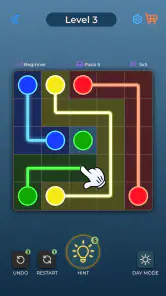
The pleasure here comes from turning a simple-looking arrangement into a path that works. You’re pairing dots by color, and the challenge is less about learning a pile of rules than about noticing how the connections fit together. I like that immediate clarity: the game gives me something to think about without a lengthy introduction or a complicated setup. It’s a good fit when I want a small mental reset, not a new hobby that demands a tutorial first.
That simplicity also sets expectations. This is a casual dot-connecting puzzle, not a story-led adventure or a competitive brain-training program. If you enjoy spotting patterns and testing a solution, the basic loop has an appealing little click to it. If you need characters, a narrative, or a large collection of mechanics to stay interested, the clean premise may feel too spare.
Short sessions with a natural stopping point
Each puzzle gives a session a clear shape: look over the board, try to work out the connections, then decide whether to keep going. I find that more convenient than games that rely on long rounds or make it difficult to stop mid-flow. It suits a coffee break, a wait for an appointment, or a few minutes before bed, especially when I’m in the mood to focus on one small problem rather than scroll through something passive.
The best way to keep it relaxing is to treat a tricky board as a chance to look again, not as a test of speed. I’ll scan for the connections that seem most constrained before drawing a route, then check whether that choice leaves room for the other colors. That small habit can save me from committing too quickly and having to mentally unwind a messy attempt. The game’s simple premise rewards patient observation more than frantic tapping.
Getting Started with Dot Link
Right off the bat, downloading Dot Link - Connect the Dots was a breeze. Available on both Android and iOS, it took no more than a couple of minutes before I was diving into my first puzzle. The interface is clean and intuitive, which made the initial learning curve almost non-existent. I was pleasantly surprised at how quickly I was able to grasp the basic mechanics of the game. The objective is clear: connect all the dots without retracing your steps. Simple, yet surprisingly challenging!
Gameplay and Features
After a few levels, I found myself completely engrossed. The game progressively gets more challenging, which keeps it interesting and engaging. Each level is like a mini puzzle that requires a bit of thought and strategy. What I particularly enjoyed was how each puzzle felt like a mini victory once solved. There’s something incredibly satisfying about finding the perfect path and watching all the dots light up in completion.
Gaming Stories You May Enjoy

Dancing Road Turns Short Breaks Into a Test of Rhythm and Timing

Super Stylist Makes Every Outfit a Test of Taste and Patience

Dominoes on Your Terms: Who Should Play and Who Should Pass

Pokémon GO Makes the Familiar World Feel New

Chess.com Turns Rematches Into Rivalries, but Community Has Its Costs

Archery Battle 3D Review: Sharp Aiming, Unclear Feedback
One feature that stood out to me was the hint system. At times when I was stuck, it was nice to have the option of using a hint. It didn’t feel like cheating but rather a gentle nudge in the right direction. And trust me, even the best of us get stuck sometimes! The game also offers a daily challenge that spices things up, encouraging players to come back every day for a fresh puzzle.
Keeping your place without making it a chore
For an everyday player, interruption tolerance matters as much as puzzle design. I can imagine opening a level while waiting for a kettle to boil, then being pulled away by a message or a doorbell. A good short-session puzzle should make returning feel uncomplicated, and this one’s focused board format helps keep the task legible when I come back. I’d still avoid starting a puzzle if I know I have only a few seconds: even a small grid can take a moment of attention, and rushing is where a relaxing break starts to feel like an obligation.
A practical approach is to pause after identifying one useful connection rather than trying to solve the entire board in your head. That gives you a clear next step if your attention is interrupted. When you return, inspect the remaining colors and open spaces instead of assuming your first idea was right. This is not a special mode or a guaranteed shortcut; it’s simply a way to make a visual logic puzzle easier to pick back up without turning a brief interruption into frustration.
Hints, independence, and the right kind of help
The hint option changes how I think about getting stuck. I’d use it after I’ve made a genuine attempt and can no longer see a sensible route, rather than tapping it at the first sign of uncertainty. That keeps the satisfaction of solving the board intact while giving me a nudge when I’m going in circles. If you’re the kind of player who wants every answer to come entirely from your own reasoning, you can choose to hold off; if a stubborn puzzle is spoiling a short break, accepting help may be the better trade-off.
There’s also a useful difference between being stuck and simply needing a moment. Before reaching for a hint, I’d scan the board from a different angle and look for colors with fewer plausible ways to connect. Starting with the most constrained route can make the rest easier to read. It’s a modest puzzle-solving habit, but it lets the game feel thoughtful rather than like a sequence of guesses. I wouldn’t expect every board to yield instantly, and that occasional pause is part of the appeal for players who like a little friction.
Visuals and Sound
The visuals are simple yet elegant. The dots are vibrantly colored against a minimalist backdrop, making it easy for players to focus on the task at hand. I particularly liked the soothing background music which added to the relaxing vibe of the game. It’s not too intrusive and perfectly complements the gameplay, making it a great way to unwind after a long day.
When the repetition helps—and when it doesn’t
Dot Link’s repeatable appeal is the compact cycle of looking, planning, connecting, and getting that small sense of completion. I enjoy that kind of repetition when I want a low-pressure activity that doesn’t ask me to remember a plot or manage a complicated system between sessions. The daily challenge gives returning players another reason to open the game, while the ordinary puzzles suit someone who would rather play at their own pace than build a rigid daily routine.
That same loop is also the main limitation. Once the act of tracing color connections stops feeling satisfying, the clean presentation alone may not be enough to hold your interest. Players who want a steady stream of new mechanics, a big strategic layer, or a strong competitive reason to replay may be better served by a more elaborate puzzle game. I see this as a focused option for small doses, not an endless source of novelty.
How it compares with other puzzle breaks
Compared with a word puzzle, this asks you to read spatial relationships rather than recall vocabulary. Compared with a jigsaw-style game, it keeps the task more abstract: you’re reasoning about routes instead of assembling a picture. That makes it a nice alternative if you want something visual and direct, but it also means it won’t scratch the same itch as a puzzle built around language, hidden objects, or a broader campaign.
For a commute or a waiting room, I’d choose it over a game that needs a long uninterrupted round, provided I’m comfortable concentrating on a small board. If I’m too tired to reason through a route, a passive video or a very simple arcade game is probably a better fit. The useful distinction is not that one kind of entertainment is better; it’s whether you want a brief, active problem to solve or something that asks less of your attention.
Who will get the most from it
I’d recommend it to someone who enjoys visual logic, likes a clear goal, and appreciates being able to stop after a compact challenge. It can also work well as a shared, low-key activity: one person can suggest a route while another checks whether it leaves enough space for the remaining connections. That turns a few quiet minutes into a small collaborative puzzle without needing a competitive score or a long explanation.
I’d be more cautious about recommending it to a player who dislikes repetition, wants a narrative payoff, or expects every level to introduce a dramatically different idea. It’s also not my first pick when I’m multitasking heavily. A puzzle that looks simple still needs enough attention to trace and verify connections, so playing while distracted can make an easy break feel needlessly fiddly.
What to know before installing
Playvalve’s puzzle game is free to install, is rated for Everyone, and has in-app purchases ranging from $0.99 to $17.99 per item. It runs on Android 7.0 or later, and the current version is 2.1.0. Its 4.8 average from around 422,000 ratings and more than 10 million installs suggest that the straightforward format has found a broad audience, though popularity by itself doesn’t tell you whether its particular rhythm will suit you.
If you’re wondering whether you need to pay to enjoy the core idea, I’d start with the free version and see how naturally the puzzles fit your routine before considering any purchase. The existence of optional purchases is worth knowing, especially if you’re installing a casual game for a younger player, but it doesn’t change my main advice: judge it by whether you enjoy the boards and want another one after finishing. For a short break, that is a more useful test than treating a high rating as a promise.
Why You’ll Love It
So, why should you download Dot Link? Well, if you enjoy puzzles and are looking for a casual game that’s both entertaining and mentally stimulating, this one’s for you. It's the ideal game for those short breaks during the day or even as a bedtime wind-down. Plus, it’s a great way to keep your mind sharp and engaged.
In conclusion, Dot Link - Connect the Dots is more than just a game; it’s a delightful mental escape. Whether you’re a puzzle enthusiast or a casual gamer, it offers something for everyone. Give it a try, and who knows, you might just find yourself lost in the world of dots, just like I did!
Dot Link - Connect the Dots Pros and Cons
Pros
- Intuitive and easy-to-use interface.
- Engaging levels that increase in difficulty.
- Minimalistic design with soothing colors.
- Offline mode available for uninterrupted play.
- Suitable for all age groups.
Cons
- Contains in-app advertisements.
- Limited free levels available.
- No multiplayer mode.
- Requires frequent updates.
- Some puzzles can be repetitive.
Frequently Asked Questions
What is Dot Link - Connect the Dots?
Dot Link - Connect the Dots is a puzzle game designed to stimulate your brain and improve your problem-solving skills. The game involves connecting a series of dots in a specific order to complete various shapes and patterns. It's a fun and engaging way to relax while also challenging your cognitive abilities. Ideal for players of all ages, it offers various difficulty levels to keep you entertained.
Is Dot Link - Connect the Dots free to download and play?
Yes, Dot Link - Connect the Dots is free to download and play. However, like many free apps, it offers in-app purchases that allow you to access premium features, additional levels, or remove ads. Be sure to check the app store for any specific details regarding in-app purchases before downloading.
What are the main features of Dot Link - Connect the Dots?
Dot Link - Connect the Dots offers a variety of features to enhance your gaming experience. These include multiple levels of difficulty, a wide range of dot patterns to complete, a user-friendly interface, and regular updates with new challenges. The game also provides a hint system to assist players when they get stuck, ensuring an enjoyable and frustration-free experience.
Can Dot Link - Connect the Dots be played offline?
Yes, Dot Link - Connect the Dots can be played offline, making it an excellent choice for players who want to enjoy the game without using data or Wi-Fi. This feature allows you to play anywhere, anytime, without worrying about connectivity issues. However, some features, such as in-game purchases or updates, may require an internet connection.
Is Dot Link - Connect the Dots suitable for children?
Dot Link - Connect the Dots is suitable for children as it is designed to be both educational and entertaining. The game helps improve hand-eye coordination, problem-solving skills, and concentration. However, parents should be aware of in-app purchases and ensure that children do not accidentally make purchases without supervision. Always check the app's age rating before downloading.


