

Domino Legends: Classic Game
- Reviews
- 4.8
- Version
- 1.6.1
- Installs
- 10,000,000+

Screenshots






 Analysis by Frivlyz
When a domino game feels slow or confusing, the first thing I check is whether I actually understand the rules of the mode I picked. That matters especially when switching between different styles of play: a move that seems obvious in one format may not be the right choice in another. I’d take a moment to read the on-screen guidance before a competitive round rather than assume every table works exactly like the dominoes I grew up playing.
Domino Legends: Classic Game is a free board game from Playvalve, and its appeal is easy to understand: it brings dominoes to a phone, where I can fit a quick match into a spare moment instead of arranging tiles on a table. The game has an Everyone age rating, and its 4.8 average from around 490,000 ratings suggests that many players enjoy the experience. That popularity is useful context, but it doesn’t guarantee that every part of the game will suit your play style.
Where a match can feel unfamiliar
The game’s short store summary points to three modes, so I’d treat it as more than a single fixed version of dominoes. If you’re new, the choice can be a small source of friction: it’s tempting to tap quickly and start playing, then discover that the mode’s pace or decisions aren’t what you expected. I’d begin with the option that feels closest to the rules I already know, then explore the others once I’m comfortable with the controls.
That approach also helps when a move appears unavailable or an opponent’s play seems surprising. Before assuming the game has misread a tap, check the tiles still in your hand and the way the current round is progressing. Dominoes asks you to track both what can connect and what you may want to hold back. A little pause to inspect the board is often more useful than repeatedly tapping the same tile.
Setup checks before you settle in
The game is listed for Android devices running version 7.0 or later. If it won’t install or open, I’d first check the operating-system version and make sure there is enough free space for an app installation. Then I’d close and reopen the game, and restart the device if it still behaves oddly. These are basic checks, but they can separate a temporary device hiccup from a problem with the game itself.
It is free to download, with optional in-app purchases priced from $1.99 to $59.99 per item. I’d keep that distinction in mind if I were installing it for a younger player or trying to avoid accidental spending: free to start does not mean every optional purchase is free. The game’s Everyone rating makes it broadly accessible, but I’d still review purchase settings on the device if spending needs to be restricted.
Recovering your rhythm after a distraction
Dominoes is easy to pause mentally, but a notification or interruption can make me lose track of what I was planning. When I return, I look at the open ends of the layout and reassess my available tiles rather than trying to remember a move from before the interruption. That simple reset is especially helpful in a game where a playable tile is not always the tile I most want to use.
Gaming Stories You May Enjoy

Dancing Road Turns Short Breaks Into a Test of Rhythm and Timing

Super Stylist Makes Every Outfit a Test of Taste and Patience

Dominoes on Your Terms: Who Should Play and Who Should Pass

Pokémon GO Makes the Familiar World Feel New

Chess.com Turns Rematches Into Rivalries, but Community Has Its Costs

Archery Battle 3D Review: Sharp Aiming, Unclear Feedback
If a round doesn’t load or an online interaction feels delayed, I’d avoid immediately making several rapid taps. Check whether the device is still connected, wait briefly, and then try a single action again. If the game has closed, reopen it and see whether the round returns to a usable state. I can’t promise every interrupted session will resume exactly as expected, so I wouldn’t start a match when I know I may need to leave at any moment.
A Blast from the Past
From the moment I launched Domino Legends: Classic Game, I was greeted with a simple and intuitive interface. It’s like the developers took the classic game we all know and love and gave it a digital makeover. The app captures the essence of traditional dominoes while offering a fresh, user-friendly experience. And let me tell you, the graphics are on point! The tiles are crisp, and the background music adds a touch of elegance without being overwhelming.
Gameplay That Hooks You In
So, what’s it like playing this game? Well, it’s incredibly engaging. Whether you’re a seasoned domino player or a newbie, the app caters to all skill levels. There’s a handy tutorial for beginners that guides you through the basics, ensuring you’re not left in the dark. For those who are more experienced, the app offers various modes to keep things interesting. You can play against AI opponents of varying difficulties, or if you’re feeling social, you can challenge your friends online. Trust me, nothing beats the thrill of outsmarting your buddies in a heated match!
Features That Stand Out
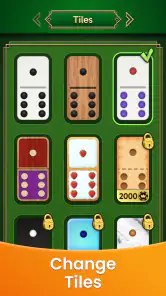
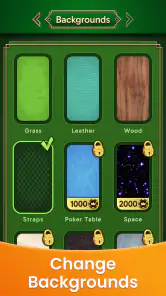
Aside from the standard gameplay, the app is packed with features that enhance the overall experience. One of my favorites is the customizable tile sets. You can switch up the design to suit your mood or aesthetic preference. Additionally, the app tracks your progress and stats, so you can see how you stack up against other players. It’s like having a personal domino coach right in your pocket!
Another cool feature is the leaderboard. It adds a competitive edge to the game, pushing you to improve and climb up the ranks. Plus, the app frequently updates with new challenges and events, ensuring you always have something fresh to look forward to.
Choosing the right moment to play
For me, the strongest use case is a short break when I want something more involving than a simple tap-and-wait game. A round gives me a reason to think ahead, but dominoes remains familiar enough that I don’t need to learn a complicated world or long sequence of controls. It can also work as a light social activity when friends are available, although I’d choose a face-to-face game instead if the point is conversation and shared time around a table.
The three-mode setup is a useful reason to return, but it also means the experience may not feel identical from one session to the next. I’d pick a mode based on the mood I’m in rather than treat every match as a test of rank. When I want a calmer game, I’d focus on making sensible plays; when I want more tension, I’d pay closer attention to which tiles have already appeared and what my opponent may be holding. That small change in attention can make familiar dominoes feel more thoughtful.
What it does better than a physical set—and what it doesn’t
Compared with a traditional domino set, a phone game is easier to carry and can make it simpler to start a match without finding a table or another person nearby. The app’s online play is an advantage when friends aren’t in the same room, while its AI option gives solo players a way to play without arranging a group. Those conveniences are the main reason I’d choose a digital version for a quick, independent session.
A physical set still wins when you want to read people across the table, chat between turns, or teach a child by pointing directly at the tiles. And if you prefer a purely offline pastime, an app built around online competition may not be your first choice. I’d also choose a dedicated puzzle game over this one if I wanted a campaign of authored challenges rather than matches built around domino play.
When the app may not be the cause
If a game seems unresponsive, it’s worth distinguishing a device or connection issue from a rules misunderstanding. A weak or interrupted connection can affect online play, while a low battery or a busy device can make any app feel sluggish. I’d test whether other apps are behaving normally, check the connection before starting another online match, and fully close and reopen the game if it has become stuck. If the problem repeats, updating to the current version, 1.6.1, is a sensible general check.
Playvalve’s game has passed 10 million installs, but scale alone doesn’t tell me whether I’ll enjoy its particular pace. Its usual alternatives are a physical domino set, another digital domino game, or a different casual board game. I’d pick this one when I want familiar tile strategy with the convenience of playing on a phone; I’d look elsewhere if I need a specific local rule set, prefer no online element, or want a broader collection of board games in one place.
Final Thoughts
In conclusion, Domino Legends: Classic Game is a must-try for anyone who loves dominoes or just enjoys a good strategic game. The app does a fantastic job of blending classic gameplay with modern features, providing hours of entertainment. So, if you’re looking for a game that’s both relaxing and challenging, give this one a download. You won’t regret it!
Whether you’re unwinding after a long day or competing with friends, this app delivers a delightful domino experience right at your fingertips. So go ahead, stack up those tiles and let the games begin!
My practical advice is to start with a familiar mode, take time to understand each move, and save online matches for moments when your connection is steady. The game is a good fit for casual domino fans who want accessible play and a little competition, but it isn’t a substitute for the social feel of a real table. If that trade-off sounds right to you, it’s an easy game to keep on your phone for the next spare few minutes.
Domino Legends: Classic Game Pros and Cons
Pros
- Engaging gameplay with strategic depth.
- High-quality graphics and smooth animations.
- Wide range of levels and challenges.
- User-friendly interface for easy navigation.
- Multiplayer mode with global competition.
Cons
- Contains in-app purchases.
- Requires internet connection for multiplayer.
- Ads can be intrusive at times.
- Limited customization options.
- Occasional bugs and glitches.
This Game in Other Languages
Frequently Asked Questions
What is Domino Legends: Classic Game?
Domino Legends: Classic Game is a digital version of the classic dominoes game available for Android and iOS devices. The app offers multiple game modes, allowing players to enjoy both traditional and innovative variations of dominoes. It features online multiplayer functionality, enabling users to compete with friends or players worldwide, making it a versatile and engaging option for domino enthusiasts.
Is Domino Legends: Classic Game free to play?
Yes, Domino Legends: Classic Game is free to download and play. However, the app may contain in-app purchases and advertisements. These allow players to buy additional features, remove ads, or obtain in-game currency to enhance the gaming experience. Users can enjoy the core features of the game without spending money, but optional purchases are available for those who want to enhance their gameplay.
What are the system requirements for Domino Legends: Classic Game?
To install Domino Legends: Classic Game, Android users need a device running at least Android 5.0, while iOS users require iOS 10.0 or later. The app is optimized for both smartphones and tablets, providing a smooth gaming experience across different devices. Ensure your device has enough storage space and a stable internet connection for optimal performance, especially during online multiplayer matches.
Can I play Domino Legends: Classic Game offline?
Domino Legends: Classic Game offers both online and offline gameplay options. Players can enjoy solo matches against AI opponents without an internet connection. However, to access multiplayer features and compete with other players globally, a stable internet connection is necessary. This flexibility allows players to enjoy the game anytime, whether they're offline or connected to the internet.
How do I improve my skills in Domino Legends: Classic Game?
Improving skills in Domino Legends: Classic Game involves practice and strategy. Players can start by playing against AI opponents to understand game mechanics and develop tactics. The app may offer tutorials and tips for beginners. Engaging in multiplayer matches can further hone skills by providing diverse challenges. Observing experienced players and learning from their strategies can also aid in becoming a more proficient player.


