

Domino Dot Counter
- Reviews
- 4.4
- Version
- 4.1
- Installs
- 5,000+

Screenshots
 Analysis by Frivlyz
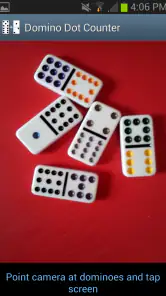
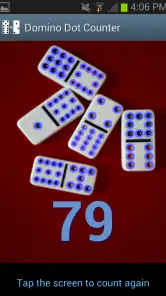
When a domino game is moving quickly, the score can become a distraction of its own. I like the idea behind Domino Dot Counter: point a phone camera at a group of tiles and let it total their dots, so the table can spend less time doing arithmetic and more time playing. It is a focused casual game utility rather than a digital domino game, and that distinction matters. Its appeal is practical, but the camera-based approach also gives it a particular role: it works best when the tiles are visible, the phone is close at hand, and everyone agrees that the app’s total is the number to use.
A tool for the table, not another domino game
I would reach for this when a friendly match is getting lively and nobody wants to stop to count each tile twice. Picture a family game after dinner: one person has just played a handful of dominoes, conversation is carrying on, and the group wants to settle the score without appointing a permanent scorekeeper. A quick camera-based count can keep the pause short and help avoid small disagreements over the dots. It is especially useful for players who enjoy dominoes but would rather not do repeated mental addition while also following the game.
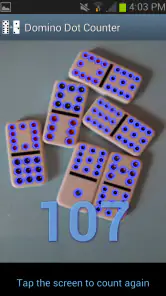
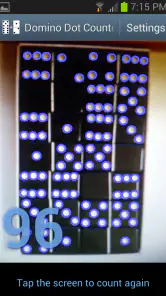
That convenience is not the same as automating every part of a match. The useful question is whether the tiles can be presented clearly enough for a camera to read them. For the smoothest count, I would spread the dominoes apart, keep them within the camera’s view, and avoid overlapping pieces or harsh reflections. That little bit of care is a sensible trade-off: the app can reduce arithmetic, but the player still has to give it a readable view of the tiles and check that the result makes sense.
Where the camera approach earns its place
Compared with keeping score on paper, the camera method saves the effort of adding dots by hand, which is its clearest advantage. A paper score sheet is still better if the group wants a written history that everyone can inspect at a glance, or if the phone needs to stay away from the playing area. A general calculator can handle arithmetic, but someone must first count the pips and enter the numbers. This app’s distinctive job is to bring those two steps closer together: it looks at the dominoes and helps total what is visible.
For a casual table, that narrow focus is a strength rather than a flaw. There is no need to turn a physical domino set into a screen-based game just to get help with scoring. On the other hand, players who want a full digital match, animated tiles, opponent play, or a broader collection of game modes should look for a dedicated domino game instead. This one makes most sense when the real tiles and the people around the table are already the main event.
Small habits that make a count more dependable
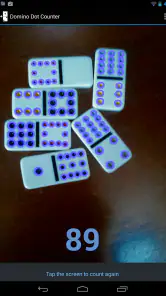
I would treat the camera result as a quick assistant, not an unquestionable referee. After a scan, a fast glance across the tiles is worthwhile, particularly if the pieces are crowded or someone has moved them while the phone is being aimed. If the displayed total does not match what the table expects, rearrange the tiles and try again rather than letting a doubtful count settle an argument. This is a practical habit, not a complicated setup: make the pips easy to see, then verify the answer before carrying on.
There is also a useful division of labour for a group. One player can hold the phone and capture the tiles while another reads the resulting total aloud, leaving the rest of the table free to follow the turn. If everyone takes a turn doing that, the device does not become one person’s private scorekeeping job. The app is most comfortable in that cooperative role; it supports the group’s rhythm instead of replacing the shared responsibility of keeping a fair game.
Gaming Stories You May Enjoy

Dancing Road Turns Short Breaks Into a Test of Rhythm and Timing

Super Stylist Makes Every Outfit a Test of Taste and Patience

Dominoes on Your Terms: Who Should Play and Who Should Pass

Pokémon GO Makes the Familiar World Feel New

Chess.com Turns Rematches Into Rivalries, but Community Has Its Costs

Archery Battle 3D Review: Sharp Aiming, Unclear Feedback
Who will appreciate it, and who may not
I can see this suiting people who play physical dominoes regularly, host relaxed games, or find mental dot-counting tiring. It may also help when a mixed-age group wants to keep a game moving without making arithmetic the centre of attention. The Everyone age rating makes it suitable for a broad audience, though the useful part is less about age than whether players are comfortable bringing a phone into the game and checking a camera-based count together.
I would skip it if I only played once in a while and already found paper scoring effortless, or if my games happened in dim, cramped spaces where laying out the tiles for a clear view would interrupt play. It is also not the right purchase for someone expecting a free, all-purpose domino companion: the game costs $2.99, so the value depends on how often the dot-counting task comes up. For a regular player, paying for a focused convenience may be reasonable; for an occasional game, a pencil or calculator could be enough.
Simplifying the Game
First things first, the Domino Dot Counter app is designed to make counting and managing scores during a game of dominoes a breeze. Gone are the days of miscounting or struggling to keep track of the dots. This app does it all for you with just a few taps. I’ve found it incredibly intuitive and user-friendly, which means you don’t have to be a tech whiz to navigate through it.
Getting Started
Downloading and setting up the app is a piece of cake. It’s available for both Android and iOS, so no one’s left out. Once you’ve got it on your device, you’ll be greeted by a clean and straightforward interface. One of the best parts is that it doesn’t bombard you with ads or unnecessary features. It’s just pure, uncomplicated dot counting.
Features That Stand Out
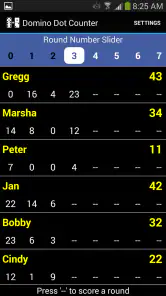
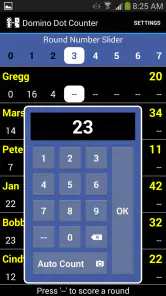
What sets this app apart is its ability to handle multiple players and keep track of scores simultaneously. Whether you’re playing a casual game with friends or in a heated tournament, this app has got you covered. I particularly love the feature where you can save game sessions. This means you can pause a game and resume it later without any hassle.
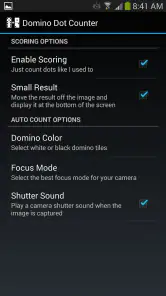
Another highlight is its customization options. You can personalize the app to suit your preferences, whether it’s changing the theme or adjusting the settings to match your style of play. This flexibility makes it a joy to use every single time.
Why It’s a Must-Have
In my opinion, the Domino Dot Counter is an essential tool for anyone who enjoys playing dominoes. It takes the stress out of scorekeeping and lets you focus on what really matters: having fun and strategizing your next move. Plus, it’s lightweight and doesn’t drain your battery, which is always a bonus.
If you’re someone who plays dominoes regularly, this is one app you’ll want in your arsenal. Its efficiency and ease of use make it a standout choice. So, next time you gather around for a game, give the Domino Dot Counter a whirl, and I promise, you won’t look back!
Its look and feel at the table
The mood here comes from the contrast between a tactile tabletop game and a phone doing one narrow job. There is no elaborate fictional setting to pull attention away from the tiles; the setting is the table itself, with familiar pieces, conversation, and turns. I find that restraint appropriate. A scoring helper should not compete with the game it is helping, and a simple visual presentation can make it easier to return attention to the board.
Sound is not the reason I would choose this app. The important feedback is the count and the shared agreement around it, rather than a soundtrack or a dramatic audio cue. That keeps the experience unobtrusive during conversation, though it also means the atmosphere depends on the players and their domino set. If you want an audio-rich game with a designed world and a more pronounced pace, this is not trying to provide that; its rhythm is the rhythm of your real match.
Fit, compatibility, and value
Cyborg Kitten LLC develops this casual title, which was released on June 16, 2013. It is currently at version 4.1, and it requires Android 7.0 or later. Those details are useful to check before buying: an older phone that cannot meet the minimum system requirement will not be a good fit, and a shared game needs a compatible device available at the table. The app is rated Everyone, so its subject matter is suitable for a broad audience.
Its audience is modest but established: it has 5K+ installs and a 4.4 average from 180 ratings, alongside 92 written reviews. I take those figures as context rather than a guarantee that every camera scan will suit every table. The more important decision is whether I would use the core task often enough to justify the $2.99 price. Regular domino players who repeatedly count groups of tiles have a clearer reason to pay than someone who rarely plays or prefers a paper tally.
A sensible routine for longer games
For a session that pauses and resumes, I would make a quick note of the current score as a backup before putting the phone away. The original appeal of saved sessions is convenience, but a simple written checkpoint also protects the group from losing its place if the device is passed around or the game is interrupted. That is not extra work for every turn; it is a low-effort safeguard for the moment when people need to leave the table and come back later.
Likewise, agree on what is being counted before scanning. A camera total can help add visible pips, but the players still need a shared understanding of which tiles belong in that count and how their particular game handles scoring. Settling that rule at the start is more effective than trying to resolve it after a close hand. This is one reason I see the app as a counting aid, not a substitute for knowing the rules of the domino game being played.
Final atmosphere verdict
Overall, I like the app’s best quality precisely because it stays in the background: it can take a repetitive bit of arithmetic off the table without turning a social game into a phone session. The camera-based approach rewards a clear layout, and the narrow purpose means it cannot replace a written score sheet for every group or a full digital domino game for players seeking broader entertainment. But for a real set, a relaxed table, and people who want to keep the match moving, that focused role feels coherent and useful.
I would recommend it to someone who plays often enough to value faster dot-counting and is happy to make the phone part of the table routine. I would point occasional players toward paper or a basic calculator if those already work for them. That is the honest dividing line: this is a specialized helper whose value grows with repeated use, not a must-have for every person who owns dominoes. When it fits your habits, it can make the pauses feel smaller and leave more room for the game itself.
Domino Dot Counter Pros and Cons
Pros
- Accurately counts dots on dominoes for quick gameplay.
- User-friendly interface for easy navigation.
- Compatible with both Android and iOS devices.
- Provides instant results without delays.
- No internet connection required for use.
Cons
- Limited to counting dots on dominoes only.
- May not support all domino game variations.
- Occasional minor bugs may occur.
- Ads can be intrusive at times.
- Lacks advanced features for expert players.
Frequently Asked Questions
What is Domino Dot Counter and how does it work?
Domino Dot Counter is a convenient application designed to help users easily count and keep track of domino dots during gameplay. Once you install the app, simply take a picture of your domino tiles, and the app will automatically calculate the total dot count for each piece, ensuring accuracy and saving you time during your game sessions.
Is Domino Dot Counter available for both Android and iOS devices?
Yes, Domino Dot Counter is available for download on both Android and iOS platforms. You can find it on the Google Play Store for Android devices and the Apple App Store for iOS devices, ensuring compatibility across a wide range of smartphones and tablets. This accessibility allows users to enjoy the app's features regardless of their preferred operating system.
Does the app require an internet connection to function?
No, Domino Dot Counter does not require an internet connection to function. The app operates offline, allowing users to utilize its features without the need for Wi-Fi or mobile data. This is particularly useful during game nights where internet access might not be readily available, ensuring uninterrupted gameplay and dot counting.
Are there any in-app purchases or ads in Domino Dot Counter?
Domino Dot Counter is designed to offer a seamless user experience without any in-app purchases or ads. The app is free to use and provides all its features without the need for additional payments. This ad-free environment ensures users can focus on their game without distractions, making it a reliable tool for domino enthusiasts.
How user-friendly is Domino Dot Counter for beginners?
Domino Dot Counter is extremely user-friendly, even for beginners. The app features an intuitive interface with clear instructions, making it easy to navigate and use. New users can quickly learn how to take pictures and count domino dots without any prior experience. The simplicity of the app ensures that anyone can start using it effectively right away.


