

Design Home™: House Makeover
- Reviews
- 4.3
- Version
- 1.128.079
- Installs
- 50,000,000+

Screenshots






 Analysis by Frivlyz
I like the idea of a design game that can be enjoyed in short bursts rather than requiring a long session. Design Home™: House Makeover is a decorating simulation from Crowdstar Inc, and its appeal is easy to understand: it gives me a room to work with and lets me make a series of visual choices. I’d treat it as a playful place to test style combinations, not as a substitute for planning a real renovation. That distinction matters if you’re thinking of sharing it at home, where people may have very different expectations about what a game should offer.
A game that can become a shared activity
In a household, the most natural way to share the experience is to take turns discussing a room and choosing how it should look. One person might prefer a restrained palette, while another gravitates toward bolder furniture; comparing those instincts can be as enjoyable as finishing the design. I find that this works best when everyone treats the result as a creative prompt rather than a vote on who has better taste.
A practical routine is to agree on one challenge, let each person suggest a different direction, and then have the person using the device make the final selections. That keeps the activity light and avoids turning every choice into a negotiation. It can also give a child and an adult something specific to talk about—color, balance, or whether a room feels welcoming—without pretending that the game teaches formal design rules.
Decide who is using the device
Before handing over a phone or tablet, I’d decide whether the game is a personal pastime or a shared household activity. That simple boundary helps prevent confusion over who is making choices and whether a purchase is intended. If several people take turns on one device, it’s sensible for the account holder to remain responsible for any spending decisions and to check the device’s purchase settings before play.
The game is free to download, but its in-app purchases range from $0.99 to $199.99 per item. Those are optional purchases, not a reason to assume that every player needs to spend. I’d explain that distinction before a younger player starts, and I would not leave purchasing decisions to a child simply because the game itself looks like a decorating activity.
How to coordinate without taking over
When friends or family members have different styles, a useful approach is to give each person one part of the decision: one chooses the mood, another considers the color balance, and the person holding the device settles the final arrangement. This makes collaboration concrete without requiring everyone to agree on every item. It also suits casual play better than trying to turn each challenge into a detailed group project.
I would avoid treating a result or a rating as a definitive judgment about anyone’s taste. The satisfaction here comes from trying combinations and seeing how a room comes together, not from proving that one household member has the right answer. If your group wants a tool for shared floor plans, precise room measurements, or a collaborative renovation checklist, a dedicated planning app will be a better fit.
Gaming Stories You May Enjoy

Dancing Road Turns Short Breaks Into a Test of Rhythm and Timing

Super Stylist Makes Every Outfit a Test of Taste and Patience

Dominoes on Your Terms: Who Should Play and Who Should Pass

Pokémon GO Makes the Familiar World Feel New

Chess.com Turns Rematches Into Rivalries, but Community Has Its Costs

Archery Battle 3D Review: Sharp Aiming, Unclear Feedback
Age context and expectations
The game is rated Everyone, which makes its general presentation suitable for a broad audience, but an age label is not a substitute for household rules. I’d still consider whether a child is ready to use a device responsibly and understand optional purchases. For younger players, taking turns with an adult nearby can keep the focus on the creative choices and make spending expectations clear.
Its scale also helps set expectations: this is a simulation game centered on decorating, not a home-improvement guide. I wouldn’t rely on it for advice about furniture dimensions, safety, budgets, or whether a real layout will work. If someone in your household wants practical renovation instructions, a specialized design or project-planning tool is more appropriate; if they simply enjoy arranging a room around a theme, this game has a clearer purpose.
Living with the design challenges
When I first opened the app, I was greeted by a sleek and user-friendly interface. It’s like stepping into a designer’s paradise. The layout is intuitive, making it super easy to navigate through various design challenges. You're quickly introduced to your first project, and let me tell you, it’s addictive right from the get-go.
The Design Challenges
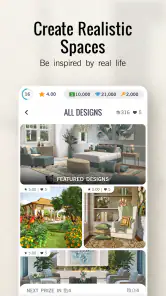
Each design challenge is like a puzzle waiting to be solved. You’re given a room and a theme, and it’s up to you to bring it to life. The app offers a wide range of furniture and decor options, all from real-life brands. This feature is a game-changer because you’re not just playing a game; you’re getting a taste of real-world interior design.
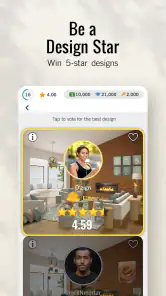
What I found particularly engaging is the voting system. After completing a design, you can submit it for other players to rate. This adds a social element that keeps you coming back. Plus, who doesn’t love a bit of friendly competition?
Customization Options
The customization options in Design Home™: House Makeover are endless. Whether you’re into minimalist designs or prefer something more extravagant, you’ll find what you need. The app constantly updates its inventory, so there’s always something new to explore. As someone who loves to experiment with different styles, this keeps the game fresh and exciting.
In-App Purchases
Now, let's talk about the elephant in the room: in-app purchases. While the app is free to download, there are options to buy additional furniture and decor. It can be tempting, especially when you want that perfect piece to complete your design. However, I found that you can still enjoy the game without spending a dime, though patience is key if you’re playing for free.
User Experience
The overall user experience is quite smooth. The app runs without glitches on both Android and iOS, and the graphics are top-notch. It’s visually appealing, which makes the design process even more enjoyable. I also appreciate how the app provides design tips and tricks, making it not just a game, but a learning experience as well.
Community and Social Features
The community aspect of this app is one of its strongest features. You can connect with other design enthusiasts, share your creations, and gather inspiration from others. The community is vibrant and full of creative minds, which makes it a great platform for anyone looking to dive deeper into the world of interior design.
Additionally, the social media integration allows you to showcase your designs to a broader audience. Whether you’re looking for feedback or just want to flaunt your latest creation, it’s all possible with a few taps.
Making the most of a short session
For an everyday use case, I’d open it while winding down after dinner, complete or work on a single room, and then put the device away. That small goal makes the game easier to enjoy without letting it take over an evening. If I’m playing with someone else, we can talk through the choices first and then see how the finished room feels as a whole.
One useful habit is to decide on the room’s overall mood before picking individual pieces. Starting with a clear direction—calm, bright, or more dramatic—helps keep the choices coherent and makes experimentation feel purposeful. I’d also take a moment to compare the finished arrangement with the original challenge rather than changing items simply because another option is available. The point is to make a room that feels intentional, not to use every possibility.
What kind of design game is it?
Compared with open-ended decorating sandboxes, Design Home gives the experience a more guided, challenge-based shape. That structure is helpful when I want a prompt instead of a blank canvas, and the voting element gives the finished work a social destination. The trade-off is that a challenge is not the same as unrestricted room planning: someone who wants to build a whole home from scratch or place furniture according to exact real-world measurements should look for a different kind of tool or game.
It also differs from practical interior-design software. The branded furniture and decor can make the choices feel connected to familiar products, but I would use the game for inspiration and visual play rather than as a shopping list or a reliable preview of a real room. Screen presentation, actual dimensions, and the conditions of a home are different things. That makes it best for people who enjoy styling, collecting ideas, and responding to a theme—not anyone expecting professional planning guidance.
Progress, patience, and spending
The free-to-play option is a meaningful advantage if you want to try the basic experience before deciding whether it suits you. At the same time, the purchase range is broad, so I’d be careful not to treat a desired decor item as something essential to enjoying a challenge. A good personal rule is to play with the options already available and only consider spending when you have a clear reason, rather than making a purchase in the heat of trying to perfect one room.
That patience is especially useful in a shared household. Agree beforehand that one person is not authorized to buy something just because another person suggested it, and keep the account holder involved in any transaction. If you prefer games with no optional spending at all, or you know purchase prompts create friction at home, this may not be the most comfortable choice even though downloading it costs nothing.
Who will enjoy it—and who may not
I’d recommend it to someone who likes interiors, enjoys comparing colors and furnishings, and wants a low-pressure creative activity with a clear prompt. It can also work well as a casual conversation starter among people sharing a device, provided they agree on turns and spending boundaries. The game’s simulation format makes it more about making visual decisions than mastering fast controls, which is part of its appeal for relaxed play.
I’d suggest skipping it if you want a realistic renovation simulator, a collaborative household planner, or a game where progress depends mainly on building and managing a full property. It may also frustrate players who dislike guided briefs, social ratings, or the temptation of optional purchases. For those needs, a dedicated room-planning app, a more open-ended building game, or a completely purchase-free pastime is a better match.
Where the game stands
Design Home is listed in the simulation category, has a 4.3 average from around 1.2 million ratings, and has passed 50 million installs. Those figures suggest that its decorating loop has broad appeal, but they don’t tell me whether a particular player will enjoy the pace or the spending choices. Crowdstar Inc released it on November 16, 2016; the current version is 1.128.079, and the minimum operating-system requirement is 7.0. It is free to play, with optional in-app purchases, and carries an Everyone age rating.
For me, the strongest reason to try it is the combination of a specific room brief, a broad range of visual choices, and the chance to see how other players respond. Its limits are just as clear: it is not a substitute for real-world design tools, and its purchase options call for sensible boundaries. If you enjoy decorating as a relaxing hobby and are happy to approach each challenge as a creative exercise, I think it is worth exploring. If your household wants precise planning or a completely spending-free experience, I’d choose something better suited to that need.
Final Thoughts
In conclusion, Design Home™: House Makeover is a compelling app for anyone with a passion for interior design. It’s more than just a game; it’s a creative outlet that lets you explore and express your style. While the in-app purchases can be a downside for some, the overall experience is worth checking out. So, if you're ready to unleash your inner designer, download the app and start creating your dream spaces today!
Design Home™: House Makeover Pros and Cons
Pros
- Intuitive and easy-to-use interface.
- Wide variety of decor styles available.
- Real furniture brands featured.
- Frequent updates with new challenges.
- Community voting enhances engagement.
Cons
- In-app purchases can be expensive.
- Limited free resources available daily.
- Requires internet connection to play.
- Occasional glitches in item placement.
- Advertisements can be intrusive.
This Game in Other Languages
Frequently Asked Questions
What is Design Home™: House Makeover?
Design Home™: House Makeover is a mobile game that allows users to design and decorate virtual spaces. Players can choose from a variety of furniture and decor items to create stylish rooms. The game also features real-world brands, providing an authentic interior design experience.
Is Design Home™ free to play?
Yes, Design Home™ is free to download and play. However, it offers in-app purchases that allow players to buy premium furniture, decor items, and other game advantages. While you can enjoy the game without spending money, some features and items are accessible only through purchases.
What platforms is Design Home™ available on?
Design Home™ is available for both Android and iOS platforms. Users can download it from the Google Play Store for Android devices and the App Store for iOS devices. Ensure your device meets the necessary system requirements for optimal performance.
Can I play Design Home™ offline?
No, Design Home™ requires an internet connection to play. The game needs to access online content, including new challenges, furniture updates, and community features. Therefore, make sure you have a stable internet connection to enjoy the full experience.
How does the game’s community feature work?
Design Home™ includes a community feature where players can enter design challenges and vote on each other’s designs. This social aspect allows users to gain inspiration from others, improve their design skills, and earn rewards. Engaging with the community enhances the overall gameplay experience.


