

Decked Builder
- Reviews
- 3.3
- Version
- Varies with device
- Installs
- 50,000+

Screenshots

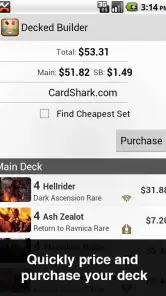
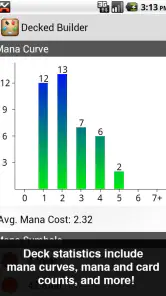

 Analysis by Frivlyz
Ever found yourself lost among piles of cards, trying to build the perfect deck for your favorite card game? Well, say goodbye to those days of chaos and confusion! Let me introduce you to the amazing world of Decked Builder. This app is nothing short of a life-saver for card game enthusiasts like me who are always on the hunt for that perfect deck combination.
Getting Started with Decked Builder
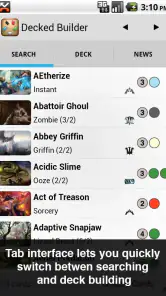
The first thing that caught my attention about Decked Builder was its user-friendly interface. You don’t need to be a tech wizard to navigate through its features. As soon as you open the app, it greets you with a sleek, intuitive design that makes deck building a breeze. And trust me, when you’re knee-deep in card combinations, the last thing you want is a complicated interface.
Features That Make It Stand Out
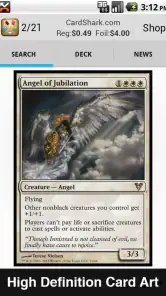
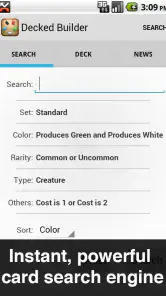
One of the coolest features is the comprehensive card database. Whether you’re a fan of the classics or more into modern card games, this app has got you covered. The search functionality is pretty robust, allowing you to filter cards based on various attributes like type, color, and cost. It’s like having a personal card encyclopedia at your fingertips!
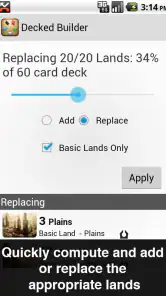
Another fantastic aspect is the deck simulation feature. Before you commit to a deck in real life, you can test it out virtually. This feature saves a ton of time and resources, not to mention the frustration of realizing a deck doesn’t work after you’ve already assembled it physically.
Why You Should Try It
Besides its functionality, what truly sets Decked Builder apart is its commitment to the community. The app is frequently updated with the latest cards and strategies, ensuring you’re always ahead of the game. Plus, the developers are quite responsive to feedback, constantly tweaking the app to better meet user needs.
If you’re competitive like me, you’ll appreciate the net-decking feature. It lets you browse decks used by top players and incorporate their strategies into your own games. It’s like having a sneak peek into the minds of the pros!
Gaming Stories You May Enjoy

Dancing Road Turns Short Breaks Into a Test of Rhythm and Timing

Super Stylist Makes Every Outfit a Test of Taste and Patience

Dominoes on Your Terms: Who Should Play and Who Should Pass

Pokémon GO Makes the Familiar World Feel New

Chess.com Turns Rematches Into Rivalries, but Community Has Its Costs

Archery Battle 3D Review: Sharp Aiming, Unclear Feedback
In conclusion, whether you’re a seasoned player or just starting out, Decked Builder is an essential tool in your card game arsenal. It’s not just an app; it’s a companion that helps you refine your strategies and enhance your gameplay. So, what are you waiting for? Dive into the world of deck building with confidence and let Decked Builder guide your way to victory!
Decked Builder Pros and Cons
Pros
- Comprehensive card database
- User-friendly interface
- Fast search functionality
- Regular updates
- Offline access available
Cons
- Interface may feel outdated
- Limited free features
- Occasional bugs
- Requires storage space
- No social features
Frequently Asked Questions
What is Decked Builder and what platforms is it available on?
Decked Builder is a comprehensive deck building app designed for Magic: The Gathering players. It allows users to construct decks, research cards, and analyze strategies. The app is available on multiple platforms, including iOS, Android, and desktop (Windows and macOS), making it accessible for users across different devices.
How does Decked Builder improve my Magic: The Gathering experience?
Decked Builder enhances your Magic: The Gathering experience by providing tools to build and manage decks efficiently. It features an extensive database of cards, advanced search options, and integration with online stores for price checking. The app also offers deck statistics and analysis, helping both novice and experienced players refine their strategies and improve gameplay.
Can I import and export decks in Decked Builder?
Yes, Decked Builder allows you to import and export decks seamlessly. Users can import decks from various formats, including text files and existing digital decks. Additionally, the app supports exporting decks to share with friends or for tournament submissions, making it a versatile tool for managing your Magic: The Gathering collections.
Does Decked Builder offer any card pricing tools?
Decked Builder includes robust card pricing tools that let users check current market prices for cards from major online retailers. This feature helps players make informed purchasing decisions and stay updated on the value of their collections. The app can display price trends and comparisons, ensuring users always get the best deals.
Is there a community or support available for Decked Builder users?
Decked Builder has a supportive community and offers customer support for its users. There are online forums and groups where players can share tips, ask questions, and discuss strategies. Additionally, the app provides comprehensive support documentation and responsive customer service to assist users with any technical issues or inquiries they might have.


