

Crossword Go!
- Reviews
- 4.9
- Version
- 1.46.0
- Installs
- 1,000,000+

Screenshots
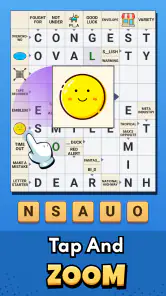
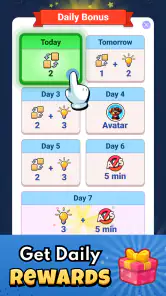

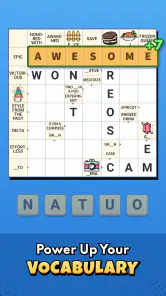
 Analysis by Frivlyz
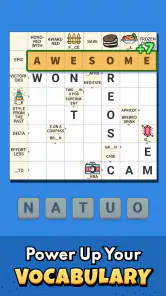
I’m drawn to word games that let me think for a few minutes without making me learn a complicated system first. Crossword Go! is built around that kind of quick entry: clues lead you through a crossword, and the familiar format makes it easy to begin even if you have not played one in a while. I see its strongest appeal in combining a recognizable puzzle routine with a social angle, rather than trying to reinvent what a crossword is.
Who will feel at home here
I’d point this game toward people who enjoy clue-solving but want something more casual than a newspaper puzzle or a dedicated crossword app. The quick-to-grasp format suits a short break, while the option to play with others can make solving feel less solitary. If you usually like to work through clues at your own pace, that social layer is a bonus rather than a requirement.
It may be less satisfying for someone seeking a strictly traditional crossword experience, a large set of specialist puzzle controls, or a quiet, uninterrupted session. The appeal here is approachable play and competition, not necessarily the depth or editorial style of a serious crossword collection. I’d decide based on whether that lighter, more social balance sounds enjoyable to you.
Reading clues and finding your way
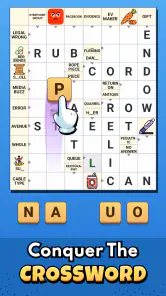
The screen is straightforward enough that I can focus on the grid and clues instead of hunting through menus. That matters in a word game: when the controls are easy to understand, I can spend my attention on interpreting a clue, checking crossings, and deciding whether a tentative answer fits. The familiar crossword layout also lowers the learning curve for anyone who already knows the basics.
In practice, clue readability is not only about the size of the text. A cramped screen, glare, or a long clue can all make a puzzle harder to follow, especially during a quick session away from home. I’d try the game in the setting where I expect to use it and see whether I can comfortably scan between clue and grid without losing my place. That small check is more useful than assuming one interface works equally well for every reader.
Playing with different abilities and contexts
Crosswords can be welcoming because there is no need for fast reflexes: I can take time to read, reason, and revise. That makes this style of game a reasonable fit for a relaxed solo break or for solving alongside another person who enjoys talking through possible answers. Sharing ideas can also help a newer player feel involved without needing to know every answer immediately.
Touch-based entry still asks for accurate taps, and a puzzle can be less comfortable if someone has difficulty distinguishing small on-screen details or making precise selections. I would not treat the game as automatically accessible for every need. If touch accuracy is a concern, a calmer setting and a device position that feels steady may help, but the best test is whether the actual grid and controls feel manageable to the person playing.
Gaming Stories You May Enjoy

Dancing Road Turns Short Breaks Into a Test of Rhythm and Timing

Super Stylist Makes Every Outfit a Test of Taste and Patience

Dominoes on Your Terms: Who Should Play and Who Should Pass

Pokémon GO Makes the Familiar World Feel New

Chess.com Turns Rematches Into Rivalries, but Community Has Its Costs

Archery Battle 3D Review: Sharp Aiming, Unclear Feedback
A realistic way to fit it into the day
Imagine waiting for a ride or taking a short break between tasks. I’d open a puzzle, solve the clues that come readily, and leave the tougher entries for another moment rather than turning the session into a test of speed. That approach suits crosswords particularly well: one solved answer can reveal letters for several others, so a small amount of progress can still feel rewarding.
When playing with a friend, I’d suggest taking turns choosing a clue or reading out possible answers instead of racing to fill the grid. It gives both people a clear role and keeps the game conversational. For solo play, I’d avoid using a hint the instant I hesitate; first I’d check the crossing letters and revisit the clue wording. That simple habit preserves the satisfaction of solving while keeping a nudge available when I am genuinely stuck.
Getting Started with Crossword Go!
First things first, let's talk about the setup. Downloading Crossword Go! is a breeze. It's available on both Android and iOS, so no one's left out of the fun. Once you're in, the app greets you with a clean and intuitive interface. No clutter, no unnecessary bells and whistles, just pure crossword goodness. The design is straightforward, which makes navigation a piece of cake.
Features That Stand Out
One of the standout features of this app is the variety of puzzles it offers. Whether you're a beginner or a seasoned pro, there's something for everyone. The app has daily challenges to keep you coming back, and trust me, they're addictive! The puzzles range in difficulty, so you can pick the level that suits your mood or skill level.
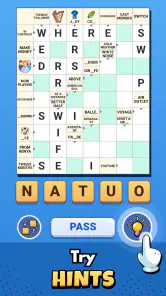
I particularly love the hint system. We all get stuck sometimes, and having a little nudge in the right direction without spoiling the whole puzzle is a lifesaver. The hints are well-balanced—not too revealing, just enough to keep you moving forward.
Multiplayer Mode
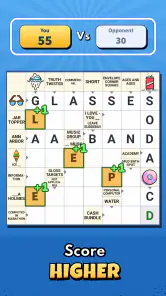
Crossword puzzles are often a solitary affair, but Crossword Go! shakes things up with its multiplayer mode. You can challenge friends or random players from around the world. It's a fantastic way to test your skills against others and adds a social element that I didn't know I was missing in my crossword life.
User Experience and Interface
The user experience in Crossword Go! is smooth as butter. The touch controls are responsive, and the app rarely lags, which is crucial when you're in the zone and don't want any distractions. The visual design is easy on the eyes, with adjustable settings for font size, perfect for those late-night puzzle sessions.
Another neat feature is the ability to track your progress. The app keeps tabs on your completed puzzles, time taken, and even your accuracy. It's a great way to see how you're improving over time and gives you that extra push to beat your personal bests.
Beyond the familiar crossword routine
Compared with a paper crossword, this format removes the need to carry a pencil and lets me revise an answer without making a mess of the page. The trade-off is that solving depends on a screen and touch input, which may be less comfortable than print for someone who prefers paper or needs a larger, fixed puzzle surface. Compared with a general word-search game, the clue-and-crossing format asks for more inference: answers connect, and one uncertain entry can affect how I read another clue.
That makes the hint option useful as a deliberate tool rather than a shortcut. If I am stuck, I first look for a crossing that could confirm or rule out a letter; only then do I consider a hint. It keeps me engaged with the clue instead of tapping through whenever progress slows. For a beginner, the same approach can turn a hint into a learning aid: notice what kind of nudge helped, then try to spot that pattern in later clues.
Social play, at your own pace
The multiplayer element changes the mood more than the basic solving task. Playing against another person can add a reason to return, but competition is not automatically relaxing for everyone. If I want a quiet wind-down, I’d choose a solo puzzle and ignore the urge to compare speed. If a friend enjoys a little rivalry, a shared challenge gives the crossword a conversational purpose that a paper puzzle usually does not.
There is also a useful middle ground: solve independently, then talk through the clues you found tricky. That works for mixed experience levels because the newer player can contribute through reasoning even when they do not know a particular word. I would not recommend the competitive side to someone who finds timed or comparative play stressful; the central pleasure of a crossword is still working out the answers, and it is fine to keep that pleasure personal.
Free to try, with spending to consider
The game is free to play, while optional in-app purchases range from $0.99 to $49.99 per item. That spread is worth keeping in mind before buying anything: I would start with the free experience and decide whether I play often enough to justify a purchase. A low-cost item can still add up if I buy repeatedly, so setting a personal limit is sensible when a game offers extras.
Its 4.9 average from around 31,000 ratings, along with more than 1 million installs, suggests that many players have found something to like. Those figures are context, not a guarantee that every puzzle style or control will suit me. It is rated for Everyone, and PlaySimple Games is the developer. The game was released on April 16, 2025, and version 1.46.0 requires Android 8.0 or later. I’d check that requirement before installing on an older Android device; iOS players should use the requirements shown for their device before downloading.
In-App Purchases and Ads
Now, let's talk about the inevitable—ads and in-app purchases. Crossword Go! is free to download, but like many apps, it comes with ads. The good news? They're not intrusive. You can upgrade to a premium version to remove them if they really bug you. The premium version also offers extra puzzles and some exclusive features, so it's worth considering if you become a regular user.
When I’d choose something else
If my priority were a print-style crossword with no screen interaction, I’d reach for a paper puzzle instead. If I wanted a broad collection of word formats rather than clue-led grids, a general word-game app would be a better match. And if I needed controls tailored to a particular motor or visual requirement, I would test the actual experience before committing rather than assume this game covers that need.
The same caution applies to playing in difficult conditions. Bright sunlight, a moving vehicle, or a noisy waiting area can make reading and concentrating harder, even when navigation is simple. I find this kind of puzzle best when I can give it a little attention and comfortably see the grid. It can fill a spare moment, but it is not ideal when I am trying to split focus between the puzzle and something that needs my immediate attention.
In-App Purchases and Ads
Now, let's talk about the inevitable—ads and in-app purchases. Crossword Go! is free to download, but like many apps, it comes with ads. The good news? They're not intrusive. You can upgrade to a premium version to remove them if they really bug you. The premium version also offers extra puzzles and some exclusive features, so it's worth considering if you become a regular user.
Final Thoughts
Overall, Crossword Go! is a fantastic app for anyone who loves crosswords, whether you're a newbie or a veteran. It's user-friendly, packed with features, and offers just the right amount of challenge. The multiplayer mode is a unique twist that adds a layer of fun and competition.
If you've been looking for a way to keep your brain sharp or just need a new hobby to pass the time, give Crossword Go! a try. It's a great addition to any puzzle enthusiast's toolkit. Happy puzzling!
My inclusive verdict
I see Crossword Go! as an approachable option for crossword fans who like a clear starting point, hints when they hit a wall, and the possibility of solving with other people. The low-pressure format can work well for short breaks, and the combination of clues, crossings, and social play gives it more texture than simply filling in words alone.
Its accessibility is practical rather than something I would assume from a label: readable clues, comfortable touch targets, and a suitable playing environment matter to each person differently. I’d recommend trying a short session first, then deciding whether the display and tapping feel comfortable. If they do, it is an enjoyable way to keep a crossword habit close at hand; if not, print or a different word-game format may be a kinder fit.
Crossword Go! Pros and Cons
Pros
- User-friendly interface enhances gameplay.
- Variety of difficulty levels for all players.
- Daily challenges keep you engaged.
- Offline mode available for on-the-go play.
- Hints and tips help improve skills.
Cons
- In-app purchases can be pricey.
- Occasional ads interrupt gameplay.
- Limited themes for customization.
- Requires frequent updates for new content.
- No multiplayer mode available.
This Game in Other Languages
Frequently Asked Questions
What is Crossword Go! and how does it work?
Crossword Go! is a mobile app designed for enthusiasts of word puzzles. It offers a variety of crossword puzzles ranging from easy to challenging levels. Users can select a puzzle, fill in the grid with correct words, and use hints if needed. The app tracks your progress and even allows you to compete with friends or other players globally.
Is Crossword Go! available for both Android and iOS devices?
Yes, Crossword Go! is available for download on both Android and iOS platforms. You can find it on the Google Play Store for Android devices and the Apple App Store for iOS devices. Ensure your device meets the minimum system requirements for a smooth gaming experience.
Does Crossword Go! offer any in-app purchases or subscriptions?
Crossword Go! offers a free version with limited features and puzzles. For an enhanced experience, users can opt for in-app purchases to unlock additional puzzles and features. There are also subscription options available for those who want to access premium content, ad-free gameplay, and exclusive puzzle packs.
Can I play Crossword Go! without an internet connection?
Yes, Crossword Go! can be played offline. Once you have downloaded the puzzles, you can enjoy solving them without needing an active internet connection. However, to access new puzzles, updates, or multiplayer features, you will need to connect to the internet.
How does Crossword Go! handle user data and privacy?
Crossword Go! takes user privacy seriously. The app collects minimal data required to enhance your gaming experience, such as progress tracking and leaderboard status. It complies with privacy regulations and provides users with clear options to manage their data within the app settings. Always review the app’s privacy policy for detailed information.


