

Crossword Deluxe: Word Puzzles
- Reviews
- 4.7
- Version
- 1.7.0
- Installs
- 100,000+

Screenshots
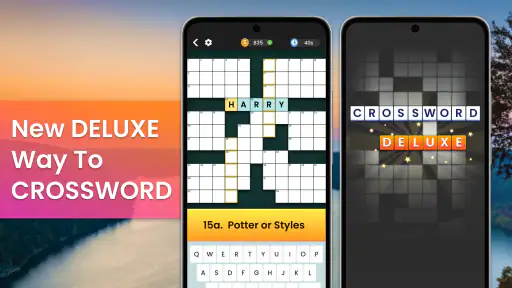
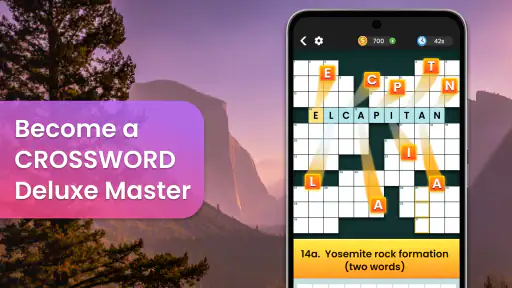
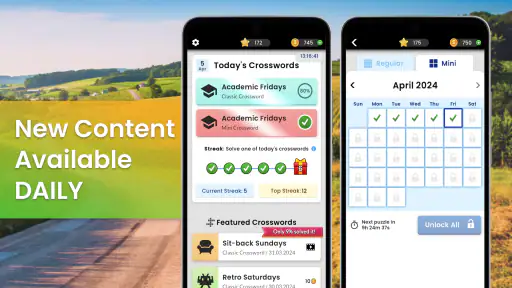
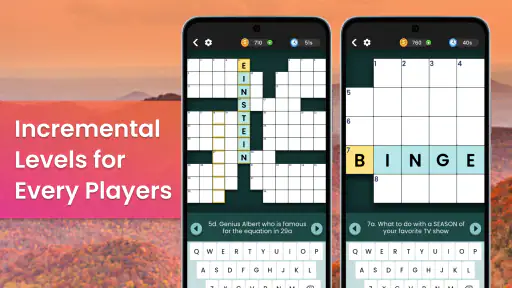
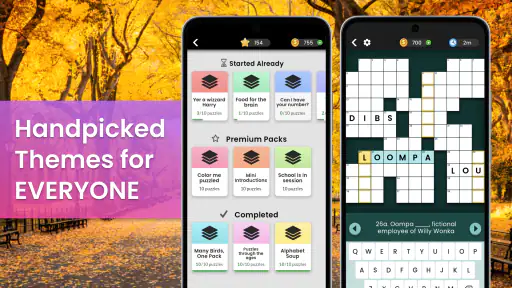
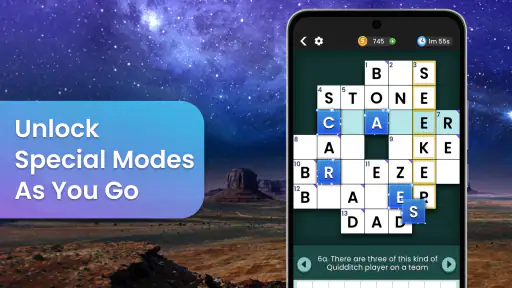
 Analysis by Frivlyz
I reach for a crossword when I want something more absorbing than scrolling but less demanding than starting a long game. Crossword Deluxe: Word Puzzles is aimed squarely at that kind of break: a word game from Playvalve built around themed crossword puzzles and English vocabulary. Its appeal is easy to understand, though the experience suits people who enjoy filling a grid more than players looking for a broad collection of unrelated game modes.
What the current version is best suited for
The game is free to install and is rated for Everyone, so it can be an approachable choice for casual play at home or in a spare moment. It has a 4.7 average from around 5,100 ratings, with more than 100,000 installs. Those figures suggest that many players have found an audience for this style of word challenge, but they do not tell me whether its particular puzzle format will click for you. I would treat it as a focused crossword option, not as a substitute for every kind of word game.
The daily, themed format gives a session a natural shape: choose a puzzle, work through the clues, and stop when you have had enough. That makes it easier to fit into a short pause than a game built around long levels or a continuing story. If you enjoy English clues and the satisfaction of crossing answers off a grid, this is the central draw. If you prefer word searches, anagrams, or competitive rounds, the crossword focus may feel narrow rather than relaxing.
How to make the puzzles work for you
I find crosswords most enjoyable when I avoid treating every blank as a separate test. A useful approach is to answer the clues that come readily first, then use the crossing letters to reconsider the harder ones. With themed puzzles, the shared subject can also help narrow down possibilities, but it can sometimes send you toward an answer that fits the theme while not fitting the clue. Checking the crossings before committing is a simple way to catch that mistake.
Hints are there for moments when progress stalls, and I like using them as a nudge rather than a shortcut. Before spending one, I would reread the clue, check the letters already supplied by intersecting answers, and consider whether the wording points to a synonym or a different form of a word. This keeps the solving satisfying and can help you learn from the clue instead of simply clearing it. Players who prefer to solve unaided can leave hints alone; those who dislike getting stuck may appreciate having some assistance.
Where it fits in a daily routine
A realistic use is to open a puzzle during a coffee break, solve the clues you can, and return to the tougher corners later. That makes the game more forgiving than a timed quiz: you can approach it as a small mental exercise rather than a performance. I would also use it when travelling or waiting, provided I had a comfortable moment to focus on the clues. Crossword solving needs more attention than a quick tap game, so it is not ideal when you are repeatedly interrupted or trying to watch something else at the same time.
For a household, the English vocabulary angle can make solving together enjoyable: one person may recognize a subject clue while another spots a useful crossing. I would keep that casual, though. The game is a better fit for shared discussion than for assuming everyone has the same vocabulary or knowledge of a theme. Younger players can enjoy word challenges, but the clues may be more satisfying when a player is comfortable reading English independently.
Gaming Stories You May Enjoy

Dancing Road Turns Short Breaks Into a Test of Rhythm and Timing

Super Stylist Makes Every Outfit a Test of Taste and Patience

Dominoes on Your Terms: Who Should Play and Who Should Pass

Pokémon GO Makes the Familiar World Feel New

Chess.com Turns Rematches Into Rivalries, but Community Has Its Costs

Archery Battle 3D Review: Sharp Aiming, Unclear Feedback
Unraveling the Gameplay
Alright, let’s talk about what you’re here for — the gameplay. Crossword Deluxe is not your run-of-the-mill word puzzle game. The app offers a variety of puzzles that range from easy to brain-bending. Whether you’re a newbie or a seasoned wordsmith, there’s something here for everyone. The interface is clean and intuitive, making it easy to jump right into a puzzle without any fuss.
Features You’ll Love
What sets this app apart from others in its category? For starters, the sheer variety of puzzles is impressive. You can choose from daily challenges, themed puzzles, or even create your own! Yes, you heard that right. The app allows you to design your own puzzles and share them with friends. Imagine the fun you can have crafting a puzzle that’s all inside jokes and personal trivia for your buddies to solve.
Another feature worth mentioning is the hint system. Let’s face it, sometimes we all get stuck, and having a nudge in the right direction can be a lifesaver. The hint system in Crossword Deluxe is well-balanced — it’s helpful without giving away too much.
A Few Personal Thoughts
Now, I’ve spent a fair amount of time with this app, and I must say, it’s been a blast. The puzzles are engaging, and I love that I can pick a quick puzzle for a short break or dive into a more challenging one when I have more time. The ability to create and solve custom puzzles is a standout feature for me. It adds a personal touch that I haven’t found in many other apps.
While the app is mostly a smooth experience, I did notice that it sometimes takes a moment to load larger puzzles. But hey, a little patience never hurt anyone, right?
A practical comparison and a few trade-offs
Compared with a paper crossword, the app is easier to pick up and put down, and the hint option can rescue a session that would otherwise end in frustration. Paper still has the edge if you like working across a large printed grid, scribbling alternatives, or solving without a screen. Compared with word-search games, this asks for more clue interpretation and vocabulary recall; compared with anagram games, it rewards linking answers through crossing letters rather than rapidly rearranging a small set of tiles. I would choose it when I want a quieter, more deliberate puzzle, not when I want fast feedback.
There is also a difference between a themed crossword and a general-purpose word-game bundle. A theme can make clues feel connected and give you a helpful line of thought, but it can be a disadvantage if that subject is unfamiliar. When I hit that kind of wall, I find it better to switch to another clue or pause than to keep forcing a guess based on the theme alone. That small change of approach can make a puzzle feel fairer without using a hint immediately.
Custom puzzles: a creative option with a purpose
The custom-puzzle option is most useful when you have a specific audience in mind. I would build a small set of clues around a shared trip, a family tradition, or harmless workplace in-jokes, then let friends solve it together. The trade-off is that making a good puzzle takes more thought than simply opening a daily one: clues need to be clear enough to solve and answers need to intersect sensibly. It is a feature for people who enjoy creating as much as solving, rather than a reason every player should expect to spend time designing grids.
For a first attempt, I would keep the subject narrow and use clues with answers your intended solvers are likely to know. Avoid clues that only make sense to the person who wrote them. That is a practical way to turn the editor into a social activity instead of an exercise in guessing what the creator meant. If you mainly want a ready-made puzzle, you can ignore this creative side and stick with the ordinary solving experience.
Choosing when to use hints
Hints can keep a session moving, but I would save them for a genuine dead end rather than spend one whenever a clue takes a few seconds. First, look for an answer you know with confidence, fill it, and see whether its letters clarify the uncertain clue. Next, check whether the clue may be asking for a plural, a different tense, or a less obvious meaning. If you still cannot make progress, a hint can be a reasonable way to preserve the fun. This is a better fit for relaxed play than setting yourself a strict no-help rule that turns a casual puzzle into a test.
One useful trade-off is that assistance can reduce frustration while also reducing the satisfaction of solving unaided. I would adjust its use to the kind of session I want: minimal help when I have time to think, more help when I am winding down and do not want a single stubborn clue to dominate the break. Players who want every answer to be earned entirely on their own may find the option unnecessary, while newer solvers may welcome a gentle way past a sticking point.
Who may want a different kind of word game
This is a good match for someone who already likes crosswords, wants English vocabulary practice woven into play, or enjoys solving with another person. It is less suitable if you want a competitive leaderboard experience, rapid rounds, or a wide range of unrelated puzzles; I would look for a game built around those priorities instead. It may also frustrate players who are still learning English, since clue interpretation can depend on shades of meaning as well as spelling.
It is free to start, but it includes optional in-app purchases ranging from $3.49 to $59.99 per item. I would check the purchase details in the app before deciding to spend, and treat payment as optional rather than necessary to judge whether the core crossword style suits me. The game is at version 1.7.0, and it first arrived on August 15, 2023. That gives existing players a concrete version reference, but I would not assume a particular feature change or future roadmap from a version number alone.
What existing players and newcomers should keep in mind
If you already play, the best reason to keep it installed is the routine of returning to a themed or daily crossword when you want a familiar kind of challenge. If you are new, try a straightforward puzzle first and see whether the clue style feels enjoyable before making custom puzzles or relying on hints. The game’s 370 written reviews offer additional player perspectives, but I would still weigh your own first few sessions most heavily: crossword difficulty is personal, and a clue that feels obvious to one solver can be opaque to another.
For device compatibility, the listed minimum operating-system requirement is Android 7.0. That can help Android users decide whether their device is in range; iOS players should check the requirements shown for their own device before installing. I would also keep expectations focused on the actual appeal here: themed English crosswords and a way to make custom puzzles, rather than assuming every common feature from other word-game apps is included.
What I would watch as it continues
For a crossword game, the most meaningful signs of continued care are practical ones: whether new puzzles remain enjoyable, whether the daily routine stays easy to return to, and whether the interface continues to make solving straightforward. I would also pay attention to how the custom-puzzle tools feel in ordinary use, since that option is more valuable when creating and sharing is clear and uncomplicated. Those are things players can judge through their own experience; a version label by itself cannot tell you how the puzzle selection or solving flow has changed.
My main caveat remains the occasional wait when a larger puzzle loads, along with the fact that a focused crossword format will not satisfy everyone. If you want quick, nearly automatic play, choose something lighter. If you want to sit with clues, test possible answers against crossings, and sometimes build a puzzle for friends, this has a clearer reason to earn a place on your phone.
Final Thoughts
If you’re a fan of word puzzles or just looking for a fun and educational way to pass the time, I’d highly recommend giving Crossword Deluxe: Word Puzzles a try. It’s perfect for those quiet moments when you want to relax and challenge your mind. Plus, it’s a great way to expand your vocabulary without feeling like you’re studying.
Ready to dive into a world of words? Download the app and start puzzling away. You might just find it as addictive as I did!
Crossword Deluxe: Word Puzzles Pros and Cons
Pros
- Engaging puzzles keep your mind active.
- Variety of difficulty levels.
- Intuitive user interface.
- Frequent updates with new puzzles.
- Offline mode available.
Cons
- Contains ads in free version.
- In-app purchases can be pricey.
- Limited hints without purchase.
- Some puzzles repeat.
- Requires internet for updates.
Frequently Asked Questions
What features does Crossword Deluxe: Word Puzzles offer?
Crossword Deluxe: Word Puzzles offers a rich variety of features including daily challenges, multiple difficulty levels, and a vast library of word puzzles. Users can also enjoy hints and tips to help solve puzzles and track their progress over time. The app's intuitive interface makes it user-friendly for all ages.
Is Crossword Deluxe: Word Puzzles available offline?
Yes, Crossword Deluxe: Word Puzzles can be played offline, allowing users to enjoy puzzles without the need for an internet connection. This makes it a perfect companion for those who travel frequently or have limited access to Wi-Fi or data services.
Are there in-app purchases in Crossword Deluxe: Word Puzzles?
Crossword Deluxe: Word Puzzles does offer in-app purchases. These can include additional puzzle packs, hints, or ad-free experiences. However, the game provides plenty of free content to enjoy without requiring any purchases to progress or enjoy the game.
How can I track my progress in Crossword Deluxe: Word Puzzles?
The app includes a built-in progress tracker that logs completed puzzles, accuracy, and time taken to solve each puzzle. Users can view their statistics and compare their performance over time, making it easy to track improvements and set personal goals.
Is Crossword Deluxe: Word Puzzles suitable for all ages?
Crossword Deluxe: Word Puzzles is designed to be suitable for all ages. With adjustable difficulty levels and a wide range of puzzles, it is perfect for both beginners and seasoned crossword enthusiasts. Parental controls can be set to limit access to certain features if needed.


