

Craft World - Building Craft
- Reviews
- 3.6
- Version
- 7.0
- Installs
- 10,000,000+

Screenshots
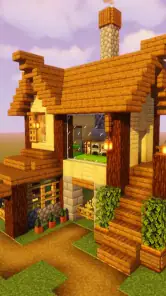
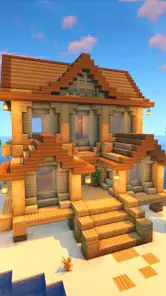
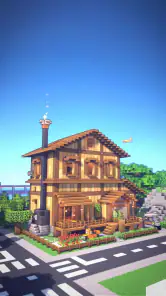
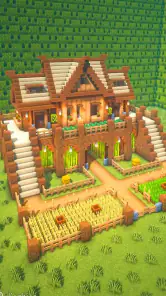
 Analysis by Frivlyz
When I judge a building game, I first ask what I want from a play session: a quiet place to experiment, a world that pushes me to explore, or a structured challenge with clear goals. Craft World - Building Craft is a simulation game aimed at players drawn to adventure and creative construction, so it makes most sense if you enjoy shaping a place at your own pace. I would not choose it expecting a tightly guided campaign; the appeal is the room to make and explore rather than a prescribed sequence of tasks.
That distinction matters if you are choosing between a sandbox, a survival-focused crafting game, or a more conventional building simulator. In a sandbox, the fun often comes from deciding what to do next. A survival alternative may put more pressure on gathering and staying safe, while a management-style simulator may emphasize budgets, schedules, or optimization. I find Craft World most appealing when I want the freedom to set a small personal goal and enjoy working toward it without turning a short break into a complicated project.
A useful fit for short, self-directed sessions
A realistic way to approach the game is to pick one modest build before opening it: a simple shelter, a path through an area, or a small cluster of buildings with a clear purpose. That gives a session direction without requiring a long plan. If I only have a little spare time, I can focus on one section, stop when it feels finished, and return later with a fresh idea. The key is to treat the project as an ongoing creative exercise, not a race to complete a checklist.
For instance, after school or work, I might decide to make a welcoming entrance for a small village rather than trying to build the whole village at once. I can think about how the route leads into the space, where a building should sit, and what detail would make the entrance feel intentional. This kind of self-set task is useful for players who enjoy visual problem-solving. It also helps avoid the common sandbox problem of opening a large world, feeling overwhelmed by possibilities, and quitting without making anything that feels complete.
Where its building appeal has an edge
The game is developed by Craft world Studio, and its central attraction is easy to understand: it puts creative construction in an accessible mobile format. It is free to start, has an Everyone 10+ content rating, and has been available since September 26, 2020. Its version 7.0 is listed for devices running Android 6.0 or later. The audience figures suggest it has reached a broad group of players, while its average score of 3.6 from around 24,000 ratings points to a more mixed response than an automatic recommendation would imply.
That balance is worth keeping in mind. A large player base can make a game easy to discover, but popularity alone does not guarantee that its style suits you. I would focus less on the headline appeal of “building” and more on whether you like making your own goals. If the best part of a game for you is a carefully directed story or a steady stream of explicit objectives, a more mission-led alternative will probably be a better fit. If you enjoy tinkering with a design until it feels right, the open-ended approach is a stronger reason to try this one.
When another kind of game may be better
Compared with highly technical construction games, Craft World is better approached as a casual creative space than as a precision engineering tool. Players who want detailed planning systems, elaborate automation, or strict survival pressure should look at games built around those priorities. Likewise, if you mainly want quick competitive matches, a building sandbox may feel slow: much of its satisfaction comes from the choices you make while constructing, not from beating another player.
Gaming Stories You May Enjoy

Dancing Road Turns Short Breaks Into a Test of Rhythm and Timing

Super Stylist Makes Every Outfit a Test of Taste and Patience

Dominoes on Your Terms: Who Should Play and Who Should Pass

Pokémon GO Makes the Familiar World Feel New

Chess.com Turns Rematches Into Rivalries, but Community Has Its Costs

Archery Battle 3D Review: Sharp Aiming, Unclear Feedback
There is also a trade-off to the freedom. A blank or loosely directed experience can be relaxing, but it asks you to supply your own reason to continue. I recommend keeping a short list of ideas outside the game—three small builds, for example—so you can choose one whenever you return. This is more practical than beginning with an enormous plan, and it gives you a visible sense of progress even if you play in brief sessions. The game is less suitable for someone who wants the app itself to organize every session.
Deciding whether to invest time or money
Because the game is free, trying it does not require an upfront purchase, although optional in-app purchases are listed at $4.99 per item. I would begin by exploring the free experience and deciding whether the basic building loop holds my attention before spending anything. A useful personal test is to see whether I naturally come up with a second project after finishing the first. If I do, that is a better sign of lasting appeal than simply enjoying the novelty of a new game.
Before switching from another building game, think about what you would be leaving behind: a familiar control scheme, a long-running project, or a play style that already fits your routine. Moving to a different sandbox can refresh your ideas, but it can also mean rebuilding habits and learning how this particular game feels on your device. I would make the change for a clear reason, such as wanting a more casual construction break, rather than because every building game promises the same kind of creativity. If you prefer not to make optional purchases, you can still make your decision based on whether the free starting experience is enjoyable.
Unleashing Creativity
One of the standout features of Craft World - Building Craft is its expansive sandbox environment. You’re dropped into a world that you can mold and shape to your heart’s desire. Whether you’re interested in constructing a towering skyscraper or a quaint little village, this game provides all the tools you need. The controls are intuitive, making it easy for players of all ages to pick up and start building.
Gameplay Mechanics
The game mechanics are straightforward yet engaging. You start with basic materials, and as you explore the world, you gather resources to create more complex structures. The crafting system is robust, allowing for intricate designs and detailed construction. I found myself losing track of time as I meticulously placed each block to create the perfect structure.
What truly sets this game apart is the level of detail available in the crafting options. From the texture of the blocks to the way the light reflects off surfaces, every element is designed to enhance the building experience. It’s clear that a lot of thought has gone into making the game both visually appealing and functional for builders.
Community and Sharing
Another fantastic aspect of Craft World is the community feature. Players can share their creations with others, offering inspiration and ideas. I particularly enjoyed browsing through other players’ worlds and seeing the incredible creativity on display. It’s like social media for builders, where you can like and comment on creations, fostering a sense of community and camaraderie among players.
Moreover, there are regular updates and events that keep the gameplay fresh and exciting. Whether it's a new theme or a building challenge, there’s always something new to look forward to, keeping players engaged and coming back for more.
Getting more from a build session
I get better results when I settle the shape and scale of a project before I start placing details. A simple outline can prevent a common creative snag: decorating one corner carefully, then realizing the overall layout has no room for the rest of the idea. I would begin with the footprint, leave space for paths or open areas, and only then add the finishing touches. This is a low-effort habit, but it makes an ambitious build easier to revise and helps each session feel purposeful.
It is also worth treating exploration as part of the design process rather than a detour. In a crafting world, looking around can help you decide what kind of structure belongs in a particular space. I would take a moment to choose a location before committing to a detailed build, especially if the plan depends on its surroundings. The trade-off is that gathering and exploring can take attention away from construction, so players who want instant access to every building choice may prefer a purely creative tool with fewer resource-oriented steps.
For a younger player or a family considering the game, the Everyone 10+ rating is a practical point to check alongside the child’s own preferences. The open-ended style can be a good match for someone who likes making things without needing a strict win condition, while a player who gets frustrated by self-directed tasks may be happier with levels and clearly stated goals. I would also suggest agreeing on a small project together—such as planning a shared-looking village layout—rather than leaving a new player with an unlimited world and no starting idea.
What to expect from the social side
Sharing can be a useful source of inspiration, but I would approach other players’ creations as prompts rather than blueprints to copy. Look for one detail that catches your eye—a shape, a layout choice, or a way of using space—and then adapt the idea to your own build. That keeps browsing from replacing the hands-on part of the game. It also gives a new player a concrete next step when the open canvas feels intimidating.
The social layer will matter more to someone who enjoys showing work and seeing how others solve the same creative problem. If you prefer to build privately, the construction appeal can still stand on its own; sharing is an extra reason to return, not the only way to get value from a session. I would also avoid treating community activity as a substitute for a personal goal. A small project of your own gives you a reason to play even when you are not in the mood to browse or interact.
Practical expectations before installing
The game has more than ten million installs, but I would use that as context rather than proof that it will suit every player. Its 801 written reviews and mixed average show why it is sensible to approach it with clear expectations: this is a casual building game, not automatically the best choice for every kind of simulation fan. The Android minimum is version 6.0, so checking the device’s software before installing is a straightforward first step. On iOS, I would check the relevant store page and device requirements before downloading.
One question many players have is whether they need to pay to enjoy the core idea. Since the game is free and purchases are optional, I would first see how satisfying ordinary building feels before considering any item. Another practical question is whether it works for a quick daily visit: it can, if you arrive with a manageable task, but open-ended play can become aimless when you have no plan. A third is whether it suits someone who wants a polished, structured progression; I would point that player toward a goal-driven builder instead.
Conclusion
In a world where creativity is often limited by boundaries, Craft World - Building Craft offers a refreshing escape. The game encourages exploration and creativity, making it a standout choice for anyone looking to unleash their inner architect. With its stunning visuals, engaging gameplay, and vibrant community, it’s no wonder this app is a favorite among sandbox enthusiasts.
So, if you’re ready to embark on a creative journey and build the world of your dreams, download Craft World - Building Craft today and let your imagination soar!
My recommendation is to try it if you like building for its own sake, enjoy deciding your own next step, and want a free starting point for casual creative play. I would skip it if you need firm objectives, competition, or a technical construction system to keep every session focused. Craft World is at its best when I give it a small idea and let the building process take over; that is a more realistic promise than expecting it to replace every other kind of simulation game.
Craft World - Building Craft Pros and Cons
Pros
- Vast world to explore and build.
- Intuitive controls and interface.
- Regular updates with new features.
- Offline play without internet.
- Creative mode boosts imagination.
Cons
- Graphics lack high-end details.
- Can be resource-intensive on devices.
- Limited multiplayer capabilities.
- In-app purchases can be pricey.
- Occasional bugs disrupt gameplay.
Frequently Asked Questions
What is Craft World - Building Craft all about?
Craft World - Building Craft is a sandbox game that allows players to unleash their creativity by building and exploring a vast, open world. Players can construct various structures using different types of blocks and materials, similar to games like Minecraft. The game offers a creative mode where you can focus on building without limitations, as well as a survival mode where resource gathering and strategy come into play. It's perfect for those who enjoy creating their own virtual worlds.
How can I download Craft World - Building Craft on my device?
Craft World - Building Craft is available for download on both Android and iOS platforms. You can find it on the Google Play Store for Android devices and the Apple App Store for iOS devices. Simply search for "Craft World - Building Craft" in the respective app store, and click on the download or install button to add it to your device. Ensure your device meets the minimum system requirements for a smooth gaming experience.
Is Craft World - Building Craft free to play?
Yes, Craft World - Building Craft is free to download and play. However, like many free games, it may offer in-app purchases that enhance the gameplay experience. These could include purchasing additional resources, skins, or other premium features. While these purchases are optional, they can provide players with shortcuts or enhanced customization options. Always manage your in-app purchases carefully to avoid unintended spending.
Can I play Craft World - Building Craft offline?
Craft World - Building Craft offers the flexibility of both online and offline gameplay. This means you can enjoy building and exploring your world even when you don't have an internet connection. However, some features, such as certain updates or community sharing options, may require an internet connection. Playing offline is particularly useful for those who travel frequently or have limited internet access.
What age group is Craft World - Building Craft suitable for?
Craft World - Building Craft is generally suitable for players aged 10 and up. The game is designed to be family-friendly, with no explicit content, making it a great option for younger audiences interested in creative and strategic gameplay. However, due to some in-game purchasing options and the strategic elements of survival mode, parental guidance is recommended for younger players to ensure they understand the game's mechanics and manage in-app purchases responsibly.


