

Colors & Shapes: Coloring game
- Reviews
- 4.5
- Version
- Varies with device
- Installs
- 10,000,000+

Screenshots



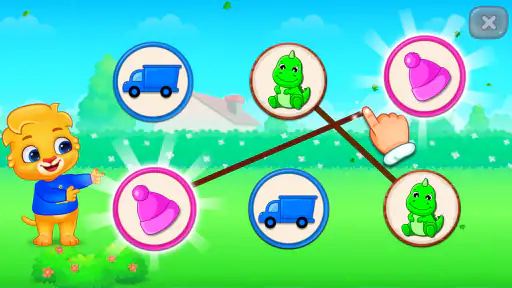
 Analysis by Frivlyz
Colors & Shapes: Coloring game is the kind of children’s app I would keep ready for a quiet afternoon, a restaurant wait, or a short learning break. It takes two ideas that young children meet constantly—basic colors and familiar shapes—and turns them into simple touch activities rather than a worksheet. My overall view is positive: it is approachable, free, and easy for a child to understand without much reading. Its limits are just as clear, though. This is an introductory learning game, not a complete early-years curriculum or a deep creative drawing studio.
What makes it useful is the low barrier to entry. A child can explore the subject through coloring and game-like interaction instead of being asked to memorize definitions first. That gives parents a practical way to reinforce early recognition while keeping the mood relaxed. I would recommend it most to families looking for a gentle first step into educational coloring games, especially when the child enjoys tapping, choosing, and filling pictures more than sitting through formal instruction.
How the learning experience works in everyday use
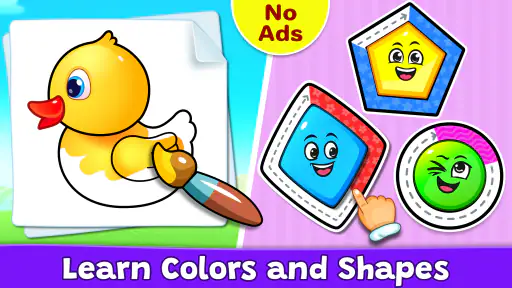
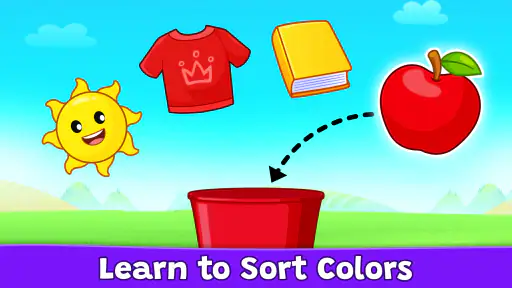
The app comes from RV AppStudios and belongs to the educational game category. Its central focus is clear from the name: children learn about colors and shapes while working through coloring activities. In my experience, that combination matters because it gives each concept a visual context. A color is not presented as an isolated word, and a shape is not only something to repeat aloud; both are connected to an image that the child can interact with.
I found the simple format especially suitable for children who are still developing confidence with mobile controls. A young player does not need to understand a complicated menu or manage a character through a large virtual world. The appeal comes from making a choice, seeing the result, and trying another activity. That short feedback loop can make practice feel like play, which is often more effective than asking a child to repeat the same lesson on command.
The coloring side also gives the experience a calmer rhythm than many fast-paced children’s games. Instead of relying on competition or a countdown, the child can focus on recognizing visual differences and completing an image. That makes it a reasonable option for a wind-down period. I would still supervise younger children, not because the activities are difficult, but because a parent can turn passive tapping into a useful conversation: “Which color did you choose?” or “Can you find another shape like that?”
One practical strength is that the app can fit into very short sessions. If I had only a few minutes before leaving the house, I could offer one activity rather than setting up a full lesson. On a longer day, a child could return to another picture or mode without needing a separate explanation. This flexibility is more valuable than it sounds for preschool routines, where attention can change quickly and adults rarely have time to prepare materials.
The app is free, which removes an important obstacle for families who want to test the format before committing to a paid learning product. It is rated for Everyone, so its intended audience is broad in age suitability, though the actual benefit will depend on the child’s developmental stage and ability to use a touchscreen. It supports devices running Android 6.0 or later, making it accessible on many older phones and tablets still used as children’s secondary devices.
Gaming Stories You May Enjoy

Dancing Road Turns Short Breaks Into a Test of Rhythm and Timing

Super Stylist Makes Every Outfit a Test of Taste and Patience

Dominoes on Your Terms: Who Should Play and Who Should Pass

Pokémon GO Makes the Familiar World Feel New

Chess.com Turns Rematches Into Rivalries, but Community Has Its Costs

Archery Battle 3D Review: Sharp Aiming, Unclear Feedback
What the strongest parts get right
The biggest success is the pairing of recognition with action. A child is not merely looking at a colored picture; the child is participating in its completion. That small sense of control can help maintain attention, particularly for learners who lose interest when an educational app feels too much like a test.
I also like the way the concept can support language development without pretending to replace it. An adult can name a color, ask the child to repeat it, then connect it to something in the room. The same approach works with shapes: after an activity, you can look for circles, squares, or other familiar forms around the home. In that role, the app becomes a starting point for offline learning rather than a self-contained babysitter.
Another useful insight is that the coloring format can reveal what a child understands without creating a formal quiz atmosphere. If the child repeatedly chooses a similar color for every picture, hesitates between shapes, or needs help finding the right option, that gives a parent a natural clue about where support is needed. I would use those moments to guide gently rather than correct every tap. The goal is confidence and recognition, not perfect performance on the first attempt.
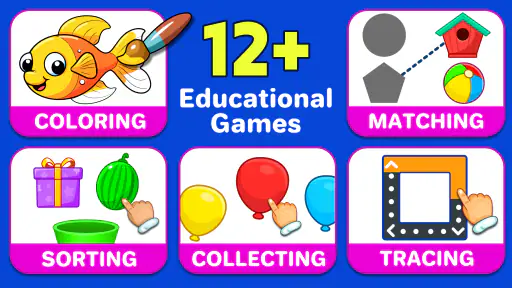
The different game modes also help prevent the whole experience from feeling like one repeated coloring screen. Even when the subject stays narrow, changing the way a child interacts with it can make practice feel fresher. This is a useful trade-off: the app does not need a huge subject list if the child is still building basic visual vocabulary, but variety within that small subject area helps maintain interest.
Its popularity suggests that the format has reached a substantial audience. The app has an average rating of 4.5 from around 21 thousand ratings, and it has passed 10 million installs. I would not treat those figures as proof that every child will enjoy it, but they do indicate that this is an established choice rather than an obscure experiment. The release date of September 6, 2017, also places it among the longer-standing children’s learning games, which may appeal to parents who prefer a familiar, proven format over a brand-new app.
Where it fits better than ordinary alternatives
Compared with paper coloring sheets, the app is more interactive and easier to repeat. There is no need to prepare crayons, print a page, or clean up after each attempt. That is convenient during travel or when a child wants an activity immediately. Paper still wins for fine-motor practice, tactile feedback, and open-ended creativity, so I would not replace physical coloring with this game. I would use both, with the app handling quick recognition practice and paper offering slower, more expressive work.
Compared with broad preschool suites, this game is more focused. A large educational package might cover letters, numbers, music, puzzles, and stories in one place, which is better for families seeking a single all-purpose learning hub. The trade-off is that those suites can feel crowded or distracting. Colors & Shapes: Coloring game is easier to introduce when the specific goal is recognizing basic visual concepts and the child does not need a large catalog of lessons.
It also differs from a conventional drawing app. A drawing studio usually gives children a blank canvas and many tools, while this experience is structured around learning themes. That structure is a strength for a beginner who needs guidance, but it can become restrictive for an older child who wants to invent scenes, mix techniques, or draw without prompts. Knowing that distinction before installing it will prevent disappointment.
The meaningful limitations parents should consider
The narrow subject focus is the clearest weakness. Once a child has confidently learned the main colors and shapes presented through the activities, the educational challenge may feel limited. I would not choose it as the only learning app for a child who is ready for reading, counting, pattern work, or more demanding problem-solving. It works best as one small tool in a wider routine.
The simplicity can also be a drawback for children who already have strong tablet skills. A child accustomed to story-driven games, construction activities, or open-ended art may move through the experience quickly and then ask for something more complex. In that situation, a richer creative app or a broader preschool platform may offer better long-term engagement.
Another limitation is that screen interaction can make a child appear to understand a concept when the recognition has not transferred beyond the device. A child might complete an activity through visual guessing or repeated tapping without being able to identify the same shape on a real object. I would therefore treat the game as practice, not assessment. After a session, ask the child to find a matching color on clothing, toys, food, or household objects. That simple follow-up turns a possible weakness into a useful learning check.
Parents should also pay attention to the child’s behavior rather than assuming that an educational label makes unlimited screen time appropriate. If the child becomes frustrated, taps without looking, or keeps returning only for stimulation, I would end the session and switch to a physical activity. The game is most effective when used with a clear purpose and a natural stopping point.
A realistic family routine
Imagine a parent preparing dinner while a preschooler needs a short, quiet activity nearby. I would open the game, choose a coloring activity, and sit with the child for the first few minutes. Instead of simply handing over the device, I would ask the child to name the color before selecting it and then point to a shape in the finished image. After dinner, we could look for that shape in the kitchen. The entire routine would take little preparation, yet it would connect the digital activity with real-world observation.
For travel, I would use it differently. A few activities could fill an awkward wait without requiring loose crayons or a table. However, I would keep expectations modest: it is suitable for a short distraction and learning refresh, not necessarily for occupying a child through an entire journey. Bringing a physical coloring book alongside it would provide variety and reduce dependence on the screen.
For a child who is learning English as an additional language, the visual subject matter may provide a helpful prompt for practicing basic vocabulary with an adult. The app alone should not be expected to teach pronunciation or conversation, but a parent or teacher can use each image as a reason to say the word, repeat it, and connect it to a familiar object. That is one of the better ways to get more value from a simple activity.
Who should install it, and who should skip it
I think it is a good match for preschool-aged children who are beginning to recognize common colors and shapes, enjoy coloring, and benefit from short guided activities. It is also suitable for parents who want a free starting point before buying a larger educational package. Teachers or caregivers could use it as a brief transition activity, provided they remain involved and do not treat it as a complete lesson.
I would be less likely to recommend it to an older child seeking advanced puzzles, storytelling, or unrestricted drawing. It is also not the right choice for a family specifically looking for handwriting practice, number lessons, phonics, or a broad curriculum. In those cases, a specialized learning app or a more comprehensive suite would be a better investment of the child’s attention.
Device compatibility is worth checking before installation: the Android requirement is version 6.0 or newer. The game is free and carries an Everyone content rating, so the basic decision is less about cost and more about whether the focused subject matter matches the child’s current needs. I would install it when the goal is simple color-and-shape practice, not when I need a complete educational plan.
My final recommendation
After using Colors & Shapes: Coloring game as a focused learning activity, I see it as a dependable beginner option with a clear purpose. Its best qualities are its accessible controls, calm coloring approach, and ability to turn basic recognition into something a child can actively do. RV AppStudios has kept the idea straightforward, and that restraint is helpful for young learners who can be overwhelmed by busy educational platforms.
The honest compromise is that the same simplicity limits its lifespan. Children who master the basics or want open-ended creativity will eventually need something else. I would not criticize the app for failing to be a different kind of product, but I would be clear about its role: it is a supporting activity, not a full replacement for conversation, physical play, books, or hands-on art.
My recommendation is to try it when you want a free, low-pressure introduction to colors and shapes, then build on each session away from the screen. Used that way, it earns its place as a practical little game for early learning. If your child needs deeper challenges or a wider range of subjects, choose a broader alternative instead. For the right age and purpose, though, this is a friendly and useful starting point.
Colors & Shapes: Coloring game Pros and Cons
Pros
- Simple controls make it easy for young children to color independently.
- Bright illustrations help keep short play sessions engaging.
- Works well as a quiet activity for travel or waiting rooms.
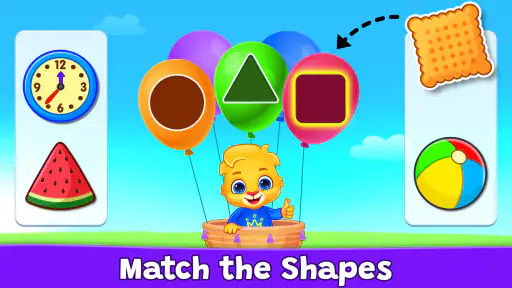
- Shape-based pages can support early recognition and matching skills.
- Suitable for children who are just beginning to use touchscreens.
Cons
- Some content may feel repetitive after several play sessions.
- Small interface elements can be difficult for younger users to tap accurately.
- Limited challenge may not satisfy older children looking for deeper gameplay.
- Accidental taps can interrupt coloring or switch activities.
- Parents may want more options for controlling sound and screen time.
Frequently Asked Questions
What is Colors & Shapes: Coloring game?
Colors & Shapes: Coloring game is a relaxing, child-friendly coloring app built around simple shapes, bright colors, and creative play. It allows children to choose an illustration or geometric figure, select colors, and fill different areas directly on the screen. The straightforward design makes it suitable for young users who are beginning to explore digital drawing and basic color recognition.
Is Colors & Shapes: Coloring game suitable for children?
Yes, the game is primarily designed for children, especially preschool and early-school-age users. Its simple controls, recognizable shapes, and coloring activities are easy to understand without extensive reading. Parents should still review the app’s age rating, advertising settings, and any available parental controls before allowing independent use, since the exact content and features may vary between versions or devices.
Does the game help children learn while they play?
Colors & Shapes: Coloring game can support early learning by helping children recognize colors, identify basic shapes, practice hand-eye coordination, and improve their ability to interact with touch controls. It is best viewed as a creative educational supplement rather than a complete learning program. Younger children may benefit most when an adult names the colors and shapes during play.
Does Colors & Shapes: Coloring game require an internet connection?
Many coloring activities in this type of app can usually be accessed offline after installation, which is convenient for travel or use without mobile data. However, features such as advertisements, additional content, updates, or external links may require an internet connection. Because offline availability can differ by platform and release, it is advisable to test the app once before relying on it away from Wi-Fi.
Is Colors & Shapes: Coloring game free to download and safe for children?
The app may be available as a free download, but the overall experience can depend on advertising, optional purchases, or additional content offered inside the application. Before handing the device to a child, parents should check the store listing, privacy information, permissions, and in-app purchase settings. Using parental controls and disabling unauthorized purchases is recommended for a safer experience.


