

Color Master - Color by Number
- Reviews
- 4.7
- Version
- 2.14.16
- Installs
- 5,000,000+

Screenshots




 Analysis by Frivlyz
I like Color Master - Color by Number most as a low-pressure way to settle into a short break: it gives your hands a simple task and your attention a clear place to land. It is a board game built around coloring numbered spaces rather than competing for points or making strategic moves. That makes it an easy fit for a quiet evening or a few spare minutes, though it won’t satisfy someone looking for freehand drawing or a demanding puzzle.
A gentle game with a clear routine
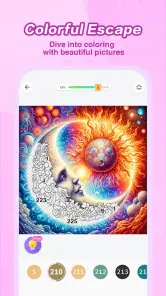
The central appeal is the small, repeatable loop: choose a picture, find the numbered areas, and fill them with the matching colors. I find that structure useful when I want to relax without having to invent an idea or make many decisions. You can focus on a single section at a time, so it’s also simple to pause and return later rather than needing a long, uninterrupted session.
That guidance is both the pleasure and the limit. It helps beginners produce a finished image without drawing skill, but the numbers do much of the creative work. If what you enjoy about coloring is choosing your own palette, changing shapes, or sketching from scratch, a drawing app or a traditional coloring book will offer more control. Here, the reward comes from completing the picture and watching its details emerge, not from designing the image yourself.
When the numbered format works best
I’d reach for this kind of coloring during a quiet commute, while listening to a podcast, or after work when I want something calmer than a fast-paced game. A practical tip is to treat each session as a stopping point rather than a task to finish: color a few areas, then leave the rest for later. That keeps the activity relaxing instead of turning completion into another obligation.
The numbered prompts also make the game approachable for someone who feels unsure about making art. They reduce the pressure of choosing colors and provide a clear next step. On the other hand, that guidance can feel repetitive if you prefer games where each move changes the outcome. This is best thought of as a quiet, guided pastime, not a strategy challenge or a substitute for learning to draw.
A closer look at the coloring experience
Ever had one of those days when you just need to unwind and let your mind wander into a world of colors? That's where Color Master - Color by Number comes into play. This app is like a digital coloring book, but with a twist. It’s all about filling in those little numbered sections with the perfect hue, and trust me, it's more satisfying than it sounds!
Dive into a World of Colors
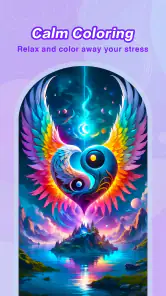
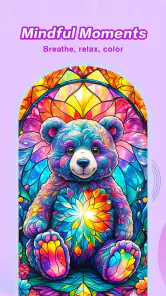
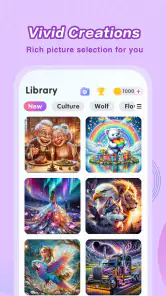
When I first opened Color Master - Color by Number, I was greeted with a vibrant palette and a library full of intricate designs waiting to be colored. From mandalas and landscapes to cute animals and abstract art, there’s something for every mood and preference. The best part? You don’t have to be an artist to make something beautiful. Just follow the numbers, and voila, you’ve got a masterpiece!
Gaming Stories You May Enjoy

Dancing Road Turns Short Breaks Into a Test of Rhythm and Timing

Super Stylist Makes Every Outfit a Test of Taste and Patience

Dominoes on Your Terms: Who Should Play and Who Should Pass

Pokémon GO Makes the Familiar World Feel New

Chess.com Turns Rematches Into Rivalries, but Community Has Its Costs

Archery Battle 3D Review: Sharp Aiming, Unclear Feedback
Easy Peasy Lemon Squeezy
One thing I absolutely love about this app is how user-friendly it is. You don't need any prior experience or creative flair; the app guides you every step of the way. The interface is smooth and intuitive, making it easy for anyone to pick up and start coloring. Plus, if you make a mistake, you can easily undo it without any hassle. It’s like having an endless supply of coloring pages at your fingertips.
For a less fragmented picture, I find it helps to choose an image that suits the time I have and the attention I can give. A detailed design can be satisfying when I’m settled in, but a quick session is easier if I work through a few obvious areas and stop before I start chasing every last section. This is a small choice, but it makes the game feel more like a break and less like a checklist.
Color Your Stress Away
Life can be stressful, and sometimes we all need a little escape. Coloring by number is incredibly therapeutic. As you fill in each section, you’ll find your stress melting away and your mind entering a state of zen. It’s a fantastic way to relax after a long day or to keep your hands busy while you’re watching TV or listening to music.
I’d describe the calming effect more modestly: the activity can give me a quiet focus, but it won’t erase a difficult day for everyone. If the small numbered spaces feel fiddly, or if you’re already tired of screen time, it may be more soothing to put the phone down or use paper and pencils. The best test is whether following the color prompts feels pleasant to you; if it becomes a chore, there’s no reason to push through just to finish a picture.
Moreover, the app offers a sense of accomplishment. Completing a picture feels rewarding, and you can even share your creations with friends and family. Trust me, they’ll be impressed by your newfound artistic skills!
Small choices that shape a session
One useful way to keep the experience comfortable is to decide what you want from a session before opening a picture. If you want to unwind, pick a design that feels inviting and let progress happen gradually. If you want a little challenge, the option to color without numbers changes the feel: there’s less guidance, so it asks for more attention and is less suitable when you’re multitasking.
Sharing can make a completed image feel more personal, but I’d treat it as an optional extra rather than the main reason to play. The strongest part is the private, steady process of filling in the picture; the finished result is a pleasant payoff. If you mainly want a social game with shared turns or direct competition, this isn’t the same kind of experience.
A Few Little Extras
While the main attraction is the coloring itself, the app also includes some nifty features. There’s a daily challenge that keeps things fresh, offering new pictures to color every day. If you're feeling adventurous, you can even try coloring without the numbers for a real challenge!
The daily challenge gives me a simple reason to return, but I wouldn’t treat it as a requirement or a streak to maintain. It works better as a prompt for days when I want an image chosen for me. If I’m short on time, I can skip it without losing the basic appeal of picking a picture and coloring at my own pace.
Who I’d recommend it to
Coloring Game Studio@RabiGame develops this free-to-download board game, and its 4.7 average across around 44,000 ratings suggests that many players enjoy the format. It has been installed over five million times, is rated for Everyone, and version 2.14.16 runs on Android 5.0 or later. Those details make it straightforward to consider for a broad audience, including beginners who want a guided creative activity. I would still keep the intended player in mind: anyone who dislikes repetitive tapping or wants full artistic control should look elsewhere.
It also suits someone who wants an activity that can share attention with a familiar show or music, though I find intricate coloring harder to combine with anything that demands concentration. A useful compromise is to save detailed pictures for focused sessions and choose a simpler-feeling moment for background entertainment. For a child or family member, the Everyone rating is reassuring, but I’d still decide whether a screen-based activity is appropriate for that person rather than assuming the rating answers every household question.
Free to start, with a spending choice
The game is free to download, while optional in-app purchases range from $0.49 to $69.99 per item. I’d begin without buying anything and see whether the available coloring routine is enough for you. If a purchase prompt appears, take a moment to check what it offers and whether you actually want it; don’t spend just because you’re already partway through a picture. That simple boundary helps keep a relaxing hobby from becoming an impulse purchase.
Compared with a paper coloring book, this format is neater and more guided: there’s no need to gather supplies, and numbered sections take away the guesswork. Paper is the better choice if you want tactile materials, a break from screens, or freedom to blend and alter colors. Compared with a conventional board game, this one asks for no opponent and little planning, but it also lacks the lively back-and-forth that makes playing with friends fun. The right alternative depends on whether you want calm completion, hands-on art, or social strategy.
My verdict on the trade-offs
Version 2.14.16 is the current version, and the game has been available since November 20, 2020. It has around 3,900 written reviews, alongside its broader rating total, which gives prospective players a substantial pool of public feedback to consult. I’d focus less on popularity than on the format itself: the key question is whether you enjoy completing guided images. That is the part that will determine whether this becomes a welcome little ritual or a repetitive tapping game you quickly abandon.
There are a few practical expectations worth setting. A completed picture can feel satisfying, but the act of coloring is still the main event, so someone who wants a rich story, complex objectives, or a changing board state may find little to hold their attention. Likewise, if you need a fully customizable art canvas, the numbered approach is intentionally narrower. Those aren’t flaws for the right player; they are clear boundaries that help explain why the game is relaxing to some and monotonous to others.
Oh, and did I mention the app is free to download? There are some in-app purchases, but you can have a great experience without spending a dime.
In conclusion, Color Master - Color by Number isn’t just an app; it’s a delightful journey into a world of colors and creativity. Whether you’re a seasoned colorist or a newbie looking to dip your toes into the world of digital art, this app has something for everyone. So, go ahead, download it, and let your creativity flow!
Color Master - Color by Number Pros and Cons
Pros
- Wide range of coloring pages.
- User-friendly interface.
- Regular content updates.
- Offline mode available.
- Promotes relaxation and creativity.
Cons
- Ads can be intrusive.
- Limited free content.
- Some colors difficult to distinguish.
- Occasional app crashes.
- No option to import personal images.
This Game in Other Languages
Frequently Asked Questions
What is Color Master - Color by Number and how does it work?
Color Master - Color by Number is a digital coloring app that allows users to color intricate designs by following a number-coded system. The app provides a wide variety of images that are segmented into numbered sections. Users select colors from a palette and fill in sections based on the numbers, creating beautifully colored images without needing any prior artistic skills.
Is Color Master - Color by Number free to use?
Color Master - Color by Number is free to download and use. However, it offers in-app purchases and subscriptions to access premium features, such as exclusive images, ad-free experience, and additional color palettes. While the free version provides a solid experience, purchasing the premium options enhances the overall functionality and variety of available content.
What are the main features of Color Master - Color by Number?
The main features of Color Master - Color by Number include an extensive library of images across different categories, seamless color filling mechanics, daily updates with new images, and a relaxing, user-friendly interface. The app also offers advanced features like time-lapse videos of your coloring process and sharing options to showcase your creations on social media platforms.
Can I use Color Master - Color by Number offline?
Color Master - Color by Number requires an internet connection to download new images and access certain features. However, once images are downloaded, users can color them offline. This makes the app convenient for users who want to use it without being constantly connected to the internet, although some features like daily updates won't be accessible offline.
Is Color Master - Color by Number suitable for all ages?
Yes, Color Master - Color by Number is designed to be suitable for all ages. Its intuitive interface and simple mechanics make it easy for children to use, while the wide range of intricate designs also provides a satisfying experience for adults. Parents can use this app to engage with their children in a creative activity, ensuring a fun and educational experience for the whole family.


