

Classic Words Plus
- Reviews
- 4.5
- Version
- 2.9.2-Plus
- Installs
- 100,000+

Screenshots


 Analysis by Frivlyz
When I want a word game that gives me a clear little goal without asking me to learn a complicated ruleset, I reach for Classic Words Plus. A turn is easy to understand: make a word from your tiles, place it on the board, and try to score well. What keeps that simple loop interesting is the choice behind each move. I can play a safe word to use awkward letters, or hold out for a better placement and risk giving up an opportunity.
Small goals that make each turn count
The early goal is refreshingly immediate: find a legal word and decide where it belongs. I don’t need to work through a long tutorial or chase a sequence of unlocks before the game becomes playable. That makes it a good fit for a spare few minutes, especially if I want a puzzle that starts quickly and still asks me to think.
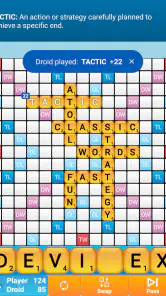
As I get comfortable, the goal shifts from simply using tiles to weighing their value against the board. A short word can be useful if it makes the most of a scoring space; a longer one is not automatically better if it leaves a strong reply open. My practical tip is to pause before placing a promising word and check the neighboring spaces, rather than judging a move only by its immediate points. That little habit makes each turn feel more deliberate.
How progress feels without unlock chasing
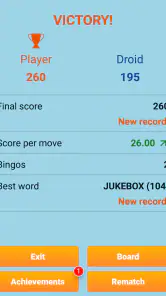
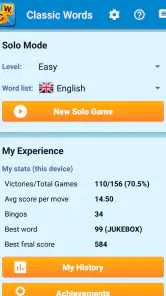
The game’s progress signals are about play rather than a parade of rewards. The original review notes that it tracks stats such as average score and best word, which gives me something concrete to look back on. I find that more useful than a vague sense of improvement: after several sessions, I can notice whether I’m finding better words or making more of my turns count.
There is a trade-off here. Players who enjoy collecting characters, opening stages, or earning frequent cosmetic prizes may find this kind of progress understated. The satisfaction comes from improving my choices and seeing a personal record change, not from unlocking a new layer of content. If I want a game that constantly hands me a fresh objective, a level-based word puzzler may suit me better.
A difficulty curve I can choose
Classic Words Plus offers six difficulty levels, so I can start gently and raise the challenge when the computer stops making me think. The AI is the main opponent, and that gives the game a focused, head-to-head rhythm. I don’t have to coordinate a match with another person, which is handy when I have an unpredictable break or simply want to play alone.
That setup also defines the limit. Someone looking for lively social play, a changing cast of opponents, or a story wrapped around the puzzles should look elsewhere. Here, the challenge comes from trying to outplay the computer with the same basic word-building rules. I’d treat the difficulty setting as a way to tune the pressure: if I’m learning, I can keep it comfortable; if I’m planning moves carefully, I can choose a stronger test.
Gaming Stories You May Enjoy

Dancing Road Turns Short Breaks Into a Test of Rhythm and Timing

Super Stylist Makes Every Outfit a Test of Taste and Patience

Dominoes on Your Terms: Who Should Play and Who Should Pass

Pokémon GO Makes the Familiar World Feel New

Chess.com Turns Rematches Into Rivalries, but Community Has Its Costs

Archery Battle 3D Review: Sharp Aiming, Unclear Feedback
Good pacing, little pressure
One of the reasons I find the game easy to return to is that it doesn’t depend on a daily streak or a timed event to make a session feel worthwhile. I can play one game, stop, and come back when I have time. Offline play is especially useful for that kind of flexible routine: a commute, a waiting room, or a journey with patchy reception can all become a chance to play without needing a connection.
For example, on a train ride I might play a round, check the built-in dictionary when I’m unsure about a word, and then finish the trip without having to switch to another app to settle the question. The dictionary is more than a convenience: it can help me learn why a move is valid, though I still need to judge whether that word is strategically worthwhile. I wouldn’t use the game as a substitute for a full language course, but it can make casual practice feel less like studying.
Who will enjoy this particular format
This is a strong match for people who already like tile-based word games and want a solo option they can pick up quickly. It also works for beginners who prefer learning by trying words and checking them, rather than facing a human opponent from the first move. Parents can use it as a relaxed way to invite children to experiment with vocabulary, while keeping expectations sensible: the fun is in playing together and exploring words, not in treating every session as a lesson.
I’d skip it if I need multiplayer as the main attraction, a constantly changing puzzle format, or a big progression system with stages and unlocks. It is also less suited to someone who dislikes deliberate turns and prefers fast reactions. Compared with word-search games, which mainly ask me to spot words already hidden in a grid, this asks me to build words and think about placement. Compared with other Scrabble-style options, its appeal is the convenience of solo play against adjustable computer opposition, not a promise of social competition.
Unpacking the Game
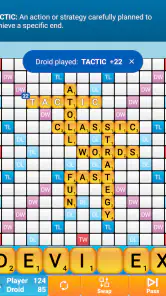
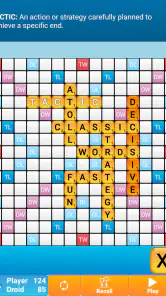
First things first, Classic Words Plus is all about wordplay. The objective is simple: build words from the tiles you have and score maximum points. It’s just like Scrabble but with a digital twist. The app lets you play against the computer, which, by the way, can be quite challenging if you ramp up the difficulty level. The AI is designed to give you a run for your money, which makes the game engaging and competitive.
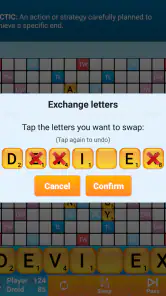
You can choose from six levels of difficulty, which is great for everyone, from beginners to word mavens. The interface is clean and intuitive, making it easy to navigate even if you’re new to word games. Plus, there’s a handy dictionary feature. If you’re ever stuck wondering if "quixotry" is a real word, the app has got you covered.
Features that Stand Out
One of the standout features of Classic Words Plus is its offline mode. Whether you're on a plane or in a remote area with no internet, you can still enjoy a game or two. That’s a huge plus for me because, let’s face it, reliable internet isn’t always at our fingertips.
The app also tracks your progress and stats, which is a neat addition if you’re keen on improving your word-building skills. You get to see your average score, best word, and other cool stats that help you gauge your growth over time. It’s like your personal scoreboard that’s always cheering you on.
Why It’s Worth Your Time
So why should you give Classic Words Plus a shot? Well, if you enjoy flexing your mental muscles with minimal setup, this app is a gem. It’s perfect for those short breaks during the day or those long commutes. The joy of forming a high-scoring word and watching it light up on the screen is oddly satisfying.
Plus, the app’s design is easy on the eyes. The colors are not too jarring, and the layout is simple yet effective, ensuring you’re focused more on the gameplay than anything else. Also, it’s a fantastic way to introduce kids to new words and enhance their vocabulary in a fun way.
In conclusion, Classic Words Plus is like that old book you picked up once and couldn’t put down. It’s that blend of nostalgia with a modern touch that keeps you coming back for more. So, if you’re on the hunt for a game that’s both entertaining and educational, this might just be the app for you.
What to know before installing
Lulo Apps makes this a paid word game, listed at $4.99, rather than a free download supported by optional purchases. I’d weigh that against how often I expect to play: if I enjoy solo tile games and will return to them during commutes or quiet evenings, a one-time purchase can make sense. If I only want an occasional word puzzle, a free word-search or daily-challenge game may be an easier choice. The game is rated Everyone, and the listed minimum operating-system requirement is version 6.0, so I’d check that my device meets it before deciding.
Its history and current build also help set expectations without changing the basic appeal. It first appeared on July 17, 2012, and the current version is 2.9.2-Plus. The game has a 4.5 average from around 9,300 ratings, with about 1,300 written reviews and over 100,000 installs. Those figures suggest an established audience, but I’d still judge it by the particular format: a straightforward board-and-tiles game rather than a stream of new modes.
Useful habits for getting more from a session
When I’m learning, I try not to treat the dictionary as a shortcut to a high score. I use it to settle a word question, then think about why I placed that word where I did. This separates vocabulary discovery from board strategy and keeps the built-in reference useful without letting it make every decision for me. If I’m playing with a child, I’d make the same distinction: checking a word can spark a conversation, while choosing the move remains part of the game.
I also find it helps to set a small personal aim for a session rather than expecting a new reward from the app. I might focus on using an awkward tile, protecting a good scoring opportunity, or simply playing a complete round without rushing. The stats can then serve as a record, not a verdict. A single score depends on the letters and board situation; a pattern across several games is a fairer way to notice whether my decisions are improving.
How it fits into a word-game routine
Among mobile word games, this is the option I’d choose when I want the feel of a shared-board tile game but don’t have another player available. A word-search is better for a very quick visual hunt, and a crossword-style puzzle is better when I want clues to guide every answer. Classic Words Plus instead gives me a hand of letters and asks me to make the plan. That makes it more open-ended, but also means a quiet stretch of play can feel similar from one session to the next.
That repetition is not necessarily a flaw. If I enjoy refining a familiar skill, the same core rules are part of the appeal; I can concentrate on vocabulary and placement instead of relearning a new mode. But I wouldn’t recommend it as my only game if novelty is what keeps me engaged. Its retention comes from the satisfaction of a well-planned move and the option to return at my own pace, not from pressure to keep a streak alive.
My progression verdict
For me, the goals, challenge, and pacing work best when I’m in the mood to get better at one clear activity. The first useful target is simply making sensible words; later, the challenge becomes using the board more thoughtfully and testing myself against stronger computer play. Progress is visible through the recorded stats and my own decisions, while the absence of elaborate unlock chasing keeps the experience calm. That is a focused design choice, though players who need frequent new content may find it too restrained.
Overall, I’d recommend it to someone who wants an offline-friendly, solo word game with adjustable opposition, a built-in way to check words, and enough strategic choice to make a short break engaging. I’d point a multiplayer-first player or someone seeking a rapid sequence of fresh puzzles toward another kind of game. If the simple tile-and-board loop is exactly what you want, this remains an easy one to understand and a satisfying one to revisit.
Classic Words Plus Pros and Cons
Pros
- Extensive word database.
- Offline play available.
- Multiple difficulty levels.
- No ads in paid version.
- Supports multiple languages.
Cons
- Limited graphics.
- No multiplayer mode.
- Infrequent updates.
- Limited customizability.
- Might be too challenging for beginners.
This Game in Other Languages
Frequently Asked Questions
What is Classic Words Plus and how does it differ from other word games?
Classic Words Plus is a popular word game available on Android and iOS platforms that allows players to challenge themselves against AI opponents. Unlike other word games, Classic Words Plus offers an offline experience, meaning you don't need an internet connection to play. It features multiple difficulty levels, making it suitable for both beginners and advanced players. Additionally, it provides users with a detailed scoring breakdown, helping them improve their wordplay skills.
Does Classic Words Plus require an internet connection to play?
No, Classic Words Plus does not require an internet connection to play. One of its standout features is its offline capability, allowing users to enjoy the game anywhere, anytime without worrying about connectivity issues. This makes it particularly convenient for players who travel frequently or have limited access to Wi-Fi or mobile data.
Are there any in-app purchases in Classic Words Plus?
Classic Words Plus is a paid app, so once you purchase it, you gain full access to all its features without the need for additional in-app purchases. This means you can enjoy the game to its fullest without encountering any ads or paywalls. It provides a seamless gaming experience right from the start, ensuring value for your money.
How does the AI difficulty work in Classic Words Plus?
Classic Words Plus offers multiple AI difficulty levels, ranging from beginner to expert, allowing players to choose a suitable challenge based on their skill level. The AI is designed to simulate real opponents, making strategic and competitive plays. This feature helps players improve their vocabulary and strategic thinking over time, providing a robust and educational gaming experience.
Can I play Classic Words Plus with friends or is it solely against the AI?
Classic Words Plus is primarily designed for single-player gameplay against AI opponents. However, players looking for a multiplayer experience may need to consider other platforms or games for online play with friends. The focus on AI opponents allows for uninterrupted play without the need for coordinating with other players, making it perfect for solo gaming sessions.


