

Classic Solitaire: Regal Card
- Reviews
- 4.6
- Version
- 1.2.5
- Installs
- 1,000,000+

Screenshots
 Analysis by Frivlyz
When I want a quick card game that asks for my attention but not a long commitment, solitaire is an easy choice. Classic Solitaire: Regal Card keeps that familiar appeal at the center: it is a straightforward digital take on a card-table classic, suited to a short pause or a quieter stretch of downtime. Its mood is more about settling into a routine than chasing a dramatic payoff, which is exactly what I want from this kind of game.
A familiar table, shaped for a phone
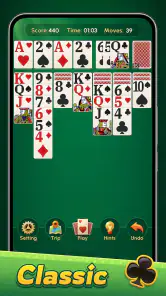
The presentation leans into a tidy, traditional feel rather than building a larger fantasy setting around the cards. That restraint makes sense for Klondike: the layout itself is the world, and the visual job is to keep the tableau, waste pile, and foundations easy to read. I like games that let the card decisions stay in the foreground, and this one’s uncluttered look supports that kind of focus.
At the same time, a clean table is not automatically the right table for everyone. Players who enjoy elaborate themes, collectible cards, or a strong sense of progression may find the atmosphere modest. I see the visual simplicity as a practical choice, not a major spectacle. It helps the game feel familiar, but it also means the appeal depends mostly on whether you enjoy the underlying puzzle.
The card and background customization gives you some room to make the table feel more comfortable. My useful tip is to choose contrast for readability before choosing a look for style: a patterned background can be attractive, but distinct card faces matter more when you are scanning several columns quickly. A calmer setup also helps during longer sessions, when decorative detail can become visual noise rather than a pleasure.
Small pauses, steady rhythm
Solitaire works best for me when I can stop and think without feeling rushed. The game’s unhurried pace suits a coffee break, a few minutes in a waiting room, or a quiet moment before bed. It is also easy to put down between moves; there is no need to remember a complicated plot or coordinate with other players when I return.
That gentle rhythm has a trade-off. If you are looking for rapid rounds, competitive pressure, or a steady stream of new goals, Klondike can feel repetitive. The satisfaction comes from spotting a useful move, uncovering a card, and gradually opening the board—not from constant novelty. I would choose a multiplayer card game or a more varied puzzle collection when I want social interaction or frequent changes of pace.
In an everyday scenario, I might open a game while waiting for a delayed appointment. Rather than scrolling through several apps, I can make a few deliberate moves, pause when my name is called, and return later without needing to catch up on anything. Offline play is especially useful in that situation, as well as on a flight or in a place with unreliable Wi-Fi. I would still avoid assuming that every feature behaves identically without a connection; the core card play is the reason to use it offline.
Gaming Stories You May Enjoy

Dancing Road Turns Short Breaks Into a Test of Rhythm and Timing

Super Stylist Makes Every Outfit a Test of Taste and Patience

Dominoes on Your Terms: Who Should Play and Who Should Pass

Pokémon GO Makes the Familiar World Feel New

Chess.com Turns Rematches Into Rivalries, but Community Has Its Costs

Archery Battle 3D Review: Sharp Aiming, Unclear Feedback
Making the moves count
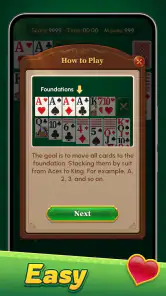
The basic aim is familiar: build the foundation piles by suit and ascending rank while arranging the tableau in descending order with alternating colors. The rules are simple to learn, but a good run still rewards patience. When I have a choice between moving a visible card to a foundation and using it to uncover or reorganize the tableau, I consider whether that move could block a later sequence. Advancing a foundation feels productive, but keeping a useful card in play can sometimes preserve more options.
The hint system is helpful when I lose track of the board, though I would treat a suggestion as a prompt to inspect the position rather than a strategy to follow automatically. A hint can point out a legal move, but the larger question is whether that move helps reveal cards or improve the tableau. For someone learning the game, a good routine is to check for moves that expose a face-down card before committing to a move that merely shifts an already visible card.
Another practical habit is to slow down when several columns are open. A quick tap can tidy the board while quietly removing flexibility, especially if a king or a sequence has limited places to go. I find that taking a moment to compare the available columns is more useful than trying to beat a personal time every session. If speed is the fun part for you, the stats can add a reason to replay; if not, there is no need to turn every hand into a race.
Who will enjoy this version
This is a good fit for players who already know Klondike, people returning to solitaire after a long break, and anyone who wants a low-pressure single-player game. The hint option can make the first sessions less intimidating, while the familiar rules mean experienced players can get started without studying a new system. The age rating is Everyone, and the game is free, so it is easy to consider as a casual option for a broad range of players.
I would suggest skipping it if your main reason for downloading a card game is to compete against friends, collect elaborate rewards, or explore several rule variants. This is a focused solitaire experience, and its strongest use case is playing alone at your own pace. Compared with a physical deck, it removes setup and shuffling and makes it convenient to play in small spaces; compared with a broad card-game app, it offers less variety but also fewer distractions from the Klondike puzzle.
The progress statistics can help you notice patterns, but I would use them as a personal reference rather than a verdict on skill. A win/loss ratio or best time may shift with the hands you encounter and the way you choose to play. If you want to improve, pay attention to whether you reveal hidden cards, preserve useful tableau options, and avoid moving cards just because the move is available. Those observations are more actionable than chasing a single number.
There is also a small decision to make about how you use hints. Rely on them whenever the board stalls and you may finish more hands without learning why one move is stronger than another. Ignore them entirely and a new player can spend too long overlooking an obvious option. I would use a hint when genuinely stuck, then inspect the board to understand what it revealed. That keeps the tool useful without letting it make every decision for you.
A modest game with a clear purpose
Made by Ulpha Deep Labs, this card game has a 4.6 average from around 17 thousand ratings and has passed a million installs. Those figures suggest that its straightforward approach has found an audience, but they do not change what I would judge it on: whether the cards are comfortable to read, whether the controls feel natural, and whether a session fits the kind of break I actually have.
The release date is September 20, 2024, and the current version is 1.2.5, with Android 5.0 or later required. Those details are useful if you are checking whether an older Android phone can run it. The game is also available for iOS, so it can suit players who switch between the two mobile platforms, though I would check the relevant device’s store page before installing to confirm compatibility for that particular device.
For a relaxed session, I would start with a simple card design, use hints sparingly, and treat the stats as a way to notice habits rather than a score to obsess over. If I have only a minute, I can still make a few moves; if I have longer, I can take more care with the tableau. That flexibility is a stronger reason to keep a solitaire game nearby than any promise of endless excitement.
My overall impression is of a traditional card puzzle presented in a clean, accessible form. It is not the choice I would make when I want a story, social play, or a lot of variety, and the familiar format can become samey if I play for too long. But for a quiet, portable round of Klondike—with offline convenience, helpful prompts, and a little room to personalize the table—it does what I want without asking for more attention than the game earns.
Simple Yet Addictive Gameplay
Once you fire up the app, you're greeted with a straightforward interface. No confusing menus or overwhelming options. Just tap 'Start' and you're off to the races. The game follows the traditional rules of Klondike solitaire, where the goal is to move all cards to the foundation piles, sorted by suit and in ascending order. Easy to understand, yet challenging enough to keep you hooked.
The controls are intuitive, allowing you to drag and drop cards with ease. If you're new to solitaire, there's a handy hint system that can offer suggestions. But fair warning, it's a slippery slope—the more you play, the more you'll want to improve your strategy and beat your best time.
Visually Pleasing and Customizable
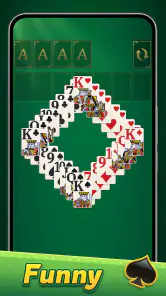
One thing I really appreciate about Classic Solitaire: Regal Card is its clean and elegant design. The graphics are crisp, and the card animations are smooth. You can choose from a variety of backgrounds and card designs to personalize your game space. Whether you prefer a minimalist look or something more vibrant, there's an option for you.
Plus, the app doesn't bombard you with ads. It's a refreshing change from other mobile games where you spend more time watching ads than actually playing.
Offline Play and Accessibility
Another standout feature is the ability to play offline. Whether you're on a long flight or in an area with spotty Wi-Fi, you can still enjoy a game of solitaire without any interruptions. The app is lightweight and runs smoothly on both Android and iOS devices, so you don't have to worry about it hogging your phone's resources.
For those who like to keep track of their progress, the app includes a stats page where you can view your win/loss ratio, best times, and other metrics. It’s a great way to see how you’ve improved over time.
In conclusion, Classic Solitaire: Regal Card is a delightful throwback to simpler times. It's perfect for anyone looking to relax with a classic game that doesn't try to do too much. So, if you're ready to indulge in some old-school fun, give this app a try. You won't regret it!
Classic Solitaire: Regal Card Pros and Cons
Pros
- Easy to navigate interface
- Multiple card deck designs
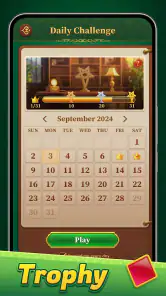
- Daily challenges available
- Offline play supported
- Quick loading times
Cons
- Contains ads
- Limited free themes
- Requires frequent updates
- No multiplayer option
- In-app purchases needed for extras
Frequently Asked Questions
What are the main features of Classic Solitaire: Regal Card?
Classic Solitaire: Regal Card offers a traditional Solitaire experience with a regal twist. It features elegant graphics and smooth animations, providing a refreshing take on the classic card game. Players can enjoy varying levels of difficulty, daily challenges, and customizable card decks and backgrounds, making it suitable for both beginners and seasoned players.
Is Classic Solitaire: Regal Card available on both Android and iOS platforms?
Yes, Classic Solitaire: Regal Card is available for download on both Android and iOS platforms. Players can find the app on the Google Play Store for Android devices and the Apple App Store for iOS devices, ensuring a seamless gaming experience across multiple devices.
Does Classic Solitaire: Regal Card require an internet connection to play?
No, Classic Solitaire: Regal Card does not require an internet connection for gameplay. This means you can enjoy your favorite Solitaire game anytime, anywhere, without worrying about data usage or connectivity issues. However, certain features like daily challenges might need internet access for updates.
Are there any in-app purchases in Classic Solitaire: Regal Card?
Classic Solitaire: Regal Card offers in-app purchases that enhance the gaming experience. While the core game is free, players can choose to buy additional themes, card backs, or remove ads for a more personalized and uninterrupted gaming session. These purchases are optional and not necessary to enjoy the game.
Is Classic Solitaire: Regal Card suitable for all ages?
Yes, Classic Solitaire: Regal Card is suitable for players of all ages. The game offers simple and intuitive controls, making it accessible for younger players, while its strategic elements provide a challenge for older players. It's a family-friendly game that can be enjoyed by everyone, regardless of age.


