

Classic Solitaire : Card Games
- Reviews
- 4.6
- Version
- 1.8.0
- Installs
- 1,000,000+

Screenshots
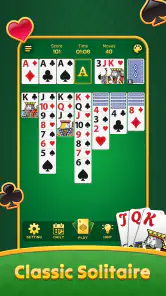
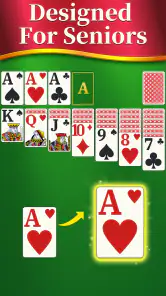
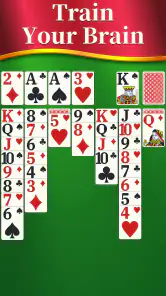


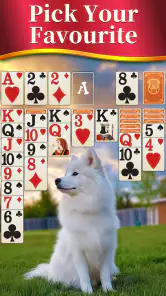


 Analysis by Frivlyz
I like to know what a card game asks of me before I install it: is it a quick way to fill a pause, or does it expect regular attention and a learning curve? Classic Solitaire: Card Games is built around the familiar patience of arranging cards, so the appeal is immediate if you already enjoy solitaire. It is a free card game from Gimi Play, rated for Everyone, and its straightforward premise makes it approachable for a first-time player as well as someone returning to the game after a long break.
What to expect from a familiar card game
The first thing I would expect here is a calm, self-contained activity rather than a competitive card table. Solitaire is played against the layout, not against another person, which makes it easy to start and stop on your own terms. That is useful when I have a few minutes to spare and do not want to coordinate a match, learn a new rule set, or keep track of a group conversation.
The game’s store details identify it as a classic Solitaire experience, and the title makes that focus clear. It has a 4.6 average from around 3,200 ratings, while more than a million people have installed it. Those figures suggest a well-used option in a familiar genre, but they do not tell me whether every deal will suit my taste. The better question is whether I want a quiet card puzzle I can revisit at my own pace.
That distinction matters if you are choosing among card games. A multiplayer card app is a better fit when the point is to challenge friends or meet opponents; a collection of different card games is better if variety is your priority. This one is most appealing when you want Solitaire itself, without making social play or a rotating set of modes the reason to open the app.
Getting started without overthinking the setup
After installing, I would keep the first session simple: open a game, look over the layout, and tap or move a card only after checking where it can go. The game is intended to be approachable, so a new player does not need to study a long set of instructions before trying a move. If you already know the basic aim of Solitaire, you can start immediately; if you do not, treat the opening round as practice rather than a test of how quickly you can finish.
A practical first-session habit is to pause before moving a card from a visible stack. A move can reveal another card, but it can also use a space you may need for a more useful play later. I find that checking the whole layout before committing helps make the game feel thoughtful instead of like a string of random taps. If a move does not work out, use the experience to notice which choices opened up options and which ones narrowed them.
Version 1.8.0 supports Android 5.0 and later, making it an option for many older Android devices as well as newer ones. The game is free to install, so it is easy to try before deciding whether its particular style of Solitaire deserves a place on your home screen. I would still check that my device has enough room and that the game runs comfortably on it, especially if I use an older phone, rather than assume that a minimum operating-system requirement guarantees the same experience on every device.
Gaming Stories You May Enjoy

Dancing Road Turns Short Breaks Into a Test of Rhythm and Timing

Super Stylist Makes Every Outfit a Test of Taste and Patience

Dominoes on Your Terms: Who Should Play and Who Should Pass

Pokémon GO Makes the Familiar World Feel New

Chess.com Turns Rematches Into Rivalries, but Community Has Its Costs

Archery Battle 3D Review: Sharp Aiming, Unclear Feedback
Your first small win, and what to do next
For a first meaningful success, I would aim for one deliberate sequence rather than a fast finish: make a move that reveals a hidden card or creates a useful opening, then follow the new information it gives you. That is a satisfying early goal because it shows how a single choice can change the board. Completing a whole game is rewarding, of course, but it is not the only way to tell that you are learning.
When a layout feels stuck, resist the urge to tap through every available move without a plan. Instead, look for the action that exposes the most useful new information, and consider whether moving a card would block a space you may need. This small pause is particularly helpful on a phone, where quick taps can make a deliberate puzzle feel hurried. Solitaire has an element of chance, so a difficult deal is not proof that you played badly; sometimes the useful response is simply to start another round.
One everyday use case is a short wait before an appointment. I can begin a deal, make a few considered moves, and put the phone away when it is time to go. That makes the game more flexible than a long online match, where leaving early could affect someone else. If I have a longer break, I can stay with a board and think through the available choices. The same game can serve both moments, as long as I am comfortable leaving a round unfinished when real life interrupts.
The Timeless Appeal
For those who might not know, Solitaire is not just any card game; it’s a classic. Known for its simple yet addictive gameplay, it’s the perfect pastime to help you relax or pass the time. The app Classic Solitaire: Card Games manages to capture this essence beautifully. Whether you’re on a quick coffee break or waiting for the train, this app is your go-to companion.
Features That Stand Out
What’s really cool about this app is how it brings the traditional game to your fingertips without losing its charm. The graphics are clean and crisp, just like a fresh deck of cards. You have various themes to choose from, which is great if you want to spice things up a bit. Not to mention, the animations are smooth, giving you that satisfying feeling whenever you complete a game or shuffle the deck.
The app also spices things up with daily challenges. Yes, you heard it right! There are daily puzzles that keep things fresh and exciting. It’s like having a new game every day, which is a fantastic way to keep your brain engaged.
Usability and Interface
Now, let’s talk about the interface because, let’s be honest, no one likes a clunky app. The developers have nailed it with a user-friendly interface. Everything is intuitive, from the menu options to the game controls. Even if you’re new to Solitaire, the app is so easy to navigate that you’ll be playing like a pro in no time.
I also appreciate the customization options. You can change the card backs and the background to suit your style. Whether you’re feeling mellow with pastel shades or vibrant with bold colors, there’s something for everyone.
Making it fit your routine
The short-session nature of Solitaire is a strength, but it comes with a small trade-off: an interrupted round may be harder to pick up mentally than a game with a clear turn timer or match history. Before closing the app, I try to notice the open columns and the next likely move. That quick mental bookmark makes it easier to return without restarting just because I have forgotten what I was considering.
For a first-time player, the most useful next step is not to chase a perfect strategy. I would play several rounds slowly, pay attention to which moves uncover cards, and only then decide whether I want a more challenging pace. A familiar layout can become repetitive if I am looking for constant novelty, so I would treat a daily challenge as a change of focus rather than expect every session to feel radically different.
Who will enjoy it, and who may prefer another game
I would recommend this app to someone who wants a recognizable solo card game, appreciates being able to play in short bursts, and would rather think through a board than compete in real time. It also suits a returning Solitaire player who wants a convenient digital version instead of setting up a physical deck. Gimi Play is the developer, and the game’s Everyone age rating makes its basic card-play concept broadly accessible to families, though individual preferences about screen time still matter.
I would look elsewhere if I wanted conversation, head-to-head competition, or a steady stream of different card rules. A multiplayer game gives each round a human opponent and the unpredictability of another person’s choices; a broader card-game collection gives more variety when I tire of one format. A paper deck is still preferable when I want to be away from a screen or enjoy handling physical cards. This app’s appeal is narrower but clear: it is for the person who wants Solitaire ready to play on a phone.
There is also a difference between a relaxing puzzle and a guaranteed wind-down. If I am already impatient, repeatedly reconsidering a difficult board can feel more irritating than soothing. In that mood, I would choose something with less decision-making or simply stop after a round. Solitaire can occupy the mind, but it cannot make every moment feel restful by itself.
Small habits that make play smoother
One useful approach is to avoid treating every available move as equally valuable. I first look for moves that reveal a face-down card or open a column, then compare those with moves that merely shift cards already visible. This is not a promise that a deal can be won; it is a way to make choices easier to explain to myself and to learn from outcomes. When two options seem similar, I prefer the one that leaves more room to adjust later.
Another practical tip is to set a natural stopping point before starting: one round while waiting, or a few rounds during a longer break. Solitaire has no opponent who needs me to finish on schedule, which is convenient, but that can also make it easy to keep going longer than intended. A simple limit keeps a casual game casual, particularly when I opened it to fill a brief pause rather than to spend the evening playing.
Visual comfort is worth considering during longer sessions. The existing review notes clean graphics, smooth animations, and options for themes, card backs, and backgrounds. I would choose a combination that makes the card faces easy for me to distinguish, not merely one that looks attractive. A subdued background may help me focus, while a stronger contrast can be useful if the cards blend into the table on my screen. Personalizing the look is most valuable when it improves readability.
How to judge whether it is the right fit
A useful test is to notice what you want after a few sessions. If you look forward to studying the layout and making one more thoughtful move, this is probably the kind of simple card game you were seeking. If you keep wishing for opponents, more game modes, or a deeper progression system, that is a sign to choose a different kind of card app rather than expect this one to become something it is not.
The game has 494 written reviews alongside its ratings, and its free price removes the need to commit money before trying it. I would still judge it by the actual feel of play on my own phone: whether the cards are comfortable to read, whether the controls suit my habits, and whether a short round is a welcome pause rather than another distraction. Those personal details matter more than popularity when deciding whether to keep any casual game installed.
Final Thoughts
In conclusion, Classic Solitaire: Card Games delivers what it promises: a classic gaming experience with a modern twist. It’s perfect for those looking to unwind while still keeping their mind sharp. Plus, the app is lightweight, so it won’t hog your phone’s resources.
So, if you’re in the mood for some good old-fashioned card game fun, give this app a whirl. You might just find yourself getting lost in the delightful world of solitaire, one card at a time.
Classic Solitaire : Card Games Pros and Cons
Pros
- Intuitive interface
- easy to navigate
- Smooth gameplay with responsive controls
- Variety of card designs and themes
- No internet required for gameplay
- Suitable for all age groups
Cons
- Ads can be intrusive at times
- Limited customization options
- Occasional in-app purchase prompts
- May drain battery quickly
- No multiplayer features available
Frequently Asked Questions
What is Classic Solitaire: Card Games?
Classic Solitaire: Card Games is a mobile adaptation of the timeless card game Solitaire, designed for both Android and iOS devices. This app allows users to enjoy the classic Klondike Solitaire experience with intuitive touch controls, customizable themes, and a range of difficulty levels. It's perfect for both casual players and Solitaire enthusiasts looking for a nostalgic card game experience on their mobile devices.
Is Classic Solitaire: Card Games free to download and play?
Yes, Classic Solitaire: Card Games is free to download and play on both Android and iOS platforms. While the core gameplay is free, the app may offer in-app purchases or ads to enhance the gaming experience. These could include additional themes, power-ups, or an ad-free experience. Users can enjoy the full game without spending any money, but optional purchases are available for those interested.
What features does Classic Solitaire: Card Games offer?
Classic Solitaire: Card Games offers a variety of features to enhance the player experience. These include customizable card designs and backgrounds, daily challenges, and varying levels of difficulty to suit all players. The app also supports both portrait and landscape modes, and offers an undo function, hints, and a statistics tracker to monitor your progress and improve your skills over time.
Can I play Classic Solitaire: Card Games offline?
Yes, Classic Solitaire: Card Games can be played offline, making it perfect for users who wish to enjoy the game without an internet connection. This feature ensures that players can have a seamless gaming experience anytime and anywhere, whether they're on a commute, traveling, or simply in an area with poor connectivity.
How can I customize my gaming experience in Classic Solitaire: Card Games?
Classic Solitaire: Card Games allows players to personalize their gaming experience with a variety of customization options. Users can choose from different card designs and backgrounds to suit their preferences. The app also offers settings to adjust game difficulty and toggle sound effects, ensuring that players can tailor the game to their liking and enjoy a unique Solitaire experience each time they play.


