

Budge World: Learning & Fun
- Reviews
- 4.2
- Version
- 2026.3.0
- Installs
- 10,000,000+

Screenshots







 Analysis by Frivlyz
My first impression of Budge World: Learning & Fun is that it treats a child’s screen time as a little visit to a familiar, colorful play space rather than a lesson dressed up as an app. That distinction matters: young children are often more willing to try a puzzle or drawing activity when a recognizable character makes the invitation feel comfortable. I’d think of it as a shared option for short play sessions, not as a replacement for books, toys, or time with an adult.
It’s an educational game from Budge Studios, and its appeal comes from bringing several well-known children’s worlds together. Barbie, Thomas & Friends, Hello Kitty, and Crayola give the experience an immediately recognizable visual language. The game is free to download and is rated for Everyone; it has a 4.2 average from around 33,000 ratings, with over 10 million installs. Those figures suggest broad reach, but I’d still judge it by whether its activities suit a particular child, not by popularity alone.
A familiar play space with learning woven in
The art direction is deliberately bright and friendly, with characters doing much of the work of making each activity inviting. That can be a genuine advantage for a child who is hesitant about unfamiliar games. The trade-off is that the screen can feel busy to children who prefer a quieter, more focused activity. I’d start by sitting with a child and noticing whether they settle into one task or keep hopping between character-led choices.
First impressions and the worlds on screen
At first glance, Budge World: Learning & Fun is like a candy store for kids. It’s bursting with vibrant colors and animated characters that immediately capture their attention. The app offers an extensive range of activities and games featuring popular characters from brands like Barbie, Thomas & Friends, and Hello Kitty. It’s like having a mini-theme park right on your phone.
That mix of familiar faces is more than decoration: it can help a child understand the mood of an activity before an adult explains it. A train-loving child may be drawn in by Thomas, while another might gravitate toward drawing and the Crayola identity. I’d use that preference as a gentle starting point, then encourage the child to try a different activity rather than letting the most familiar character dictate every session.
The setting also shapes how I’d use the game at home. It feels best suited to a brief, supervised pause—waiting for a meal, winding down after an outing, or sharing a quiet moment while an adult is nearby. It is less convincing as a way to occupy a child for a long stretch without interaction. The characters can attract attention, but a parent’s occasional question—“What are you making?” or “How did you fit that piece?”—is what turns tapping into a more thoughtful experience.
Activities, learning, and a useful adult role
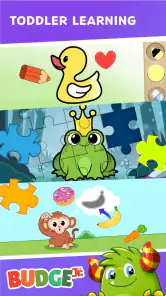
One of the standout features of the app is the sheer variety of games available. Each game is designed to be both entertaining and educational. My kids particularly loved the puzzles and drawing activities. There’s something truly magical about watching them solve a puzzle while learning about shapes and colors, all the while laughing with their favorite characters.
Gaming Stories You May Enjoy

Dancing Road Turns Short Breaks Into a Test of Rhythm and Timing

Super Stylist Makes Every Outfit a Test of Taste and Patience

Dominoes on Your Terms: Who Should Play and Who Should Pass

Pokémon GO Makes the Familiar World Feel New

Chess.com Turns Rematches Into Rivalries, but Community Has Its Costs

Archery Battle 3D Review: Sharp Aiming, Unclear Feedback
For a practical routine, I’d let a child choose one activity, stay with it long enough to finish, and then talk about what they noticed. A puzzle can prompt discussion about matching or shapes; a drawing activity gives a child a chance to explain their choices. This is a better fit for shared play than treating the app as a formal curriculum. The learning is folded into play, so adults should not expect a structured lesson plan or assume that screen activity alone proves a child has mastered a skill.
The game has a 2026.3.0 version and requires Android 5.1 or later. Families choosing between devices should check that their Android phone or tablet meets that minimum before planning to use it. The version information is useful context, but the more important decision is whether the child can comfortably see and tap the activities on the device available at home.
There is also a meaningful difference between this kind of branded activity collection and a single-purpose learning app. A focused counting or phonics tool may be a better fit when a family wants practice in one specific area. Budge World is more appealing when the goal is variety, character familiarity, and a relaxed mix of activities. That breadth is a strength for keeping choices fresh, but it can make the experience feel less like a consistent step-by-step course.
Sound, pacing, and small rewards
The overall mood is designed to keep play cheerful and approachable. Characters, colors, and animated presentation create an upbeat setting, while short activities give a child a natural chance to move on when attention shifts. I’d still pay attention to how a particular child reacts: lively presentation can be motivating for one child and distracting for another. If the child is becoming restless rather than engaged, stopping is a better choice than trying to extend the session.
Additionally, the app has a rewards system that keeps children motivated. As they complete tasks, they earn stickers and badges. Trust me, the joy on their faces when they unlock a new sticker is priceless!
Those rewards can be useful as a small finish line: I’d praise the effort involved in completing an activity rather than making the sticker the main goal. That distinction matters if a child starts rushing through tasks just to collect something. A simple approach is to agree on one activity at a time and treat the reward as a pleasant extra, not a promise of a longer session or a reason to keep tapping.
Sound and pacing are part of the same balance. A game aimed at young children needs to feel welcoming, but adults may want to keep the surrounding environment calm, especially near bedtime or during a quiet break. I’d test the app during an ordinary daytime moment first, then decide whether its energy suits other parts of the family’s routine. The best use is not necessarily the longest one; a short, satisfying activity can be enough.
Ease of use, setup, and spending
The app is quite intuitive. Navigation is straightforward, and even my youngest could easily find her favorite games without needing help. The graphics are top-notch, and the animations are smooth, which keeps the experience engaging and fun. Plus, the app regularly introduces new content, so there’s always something fresh to explore.
However, like any app, it does have its learning curve. The initial setup took a bit of time, and there are some in-app purchases that I had to keep an eye on. But once we got past that, it was smooth sailing.
It’s free to start, but in-app purchases range from $6.99 to $47.99 per item. I’d check the purchase options before handing a device to a child, then set clear expectations about what is included and what costs extra. This is especially important if the child is accustomed to freely exploring every visible button. Adults who want a wholly no-cost experience should decide in advance whether the available free play is enough for their household rather than assuming every activity is included.
Setup is another reason I’d introduce the game while an adult has a few unhurried minutes, not when a child is already impatient to play. Once the child knows where to find a preferred activity, independent navigation may be easier. For the first session, I’d explore together, note which choices are accessible without extra spending, and agree that any purchase decisions belong to the adult. That small bit of preparation can prevent a pleasant play break from turning into a negotiation.
The game’s Everyone age rating makes it broadly suitable from a content-rating perspective, but that does not mean every activity will match every child’s skills or attention span. A toddler may need help choosing and understanding what to do, while an older child may want more challenge than a casual activity collection provides. I’d use the child’s response—not the rating by itself—to decide whether to stay involved or look for a more age-targeted learning tool.
Who will enjoy it, and when another option fits better
In an everyday scenario, I can see a parent bringing it out during a short wait: the child chooses a familiar character, tries a puzzle, then shows an adult the result before moving on. That works best when the device is already set up and the adult has time to stay nearby. It is a poor match for a family looking for a completely hands-off babysitter, a quiet app with minimal visual stimulation, or a tightly sequenced program for mastering one school skill.
Compared with standalone puzzle games, this collection offers a broader character-led setting and more kinds of play, but a single puzzle app may provide a cleaner, more focused experience. Compared with paper coloring or physical puzzles, it is easier to switch activities on a phone or tablet, yet it cannot offer the same tactile experience. I’d choose based on the moment: digital variety for a short shared break, physical materials when the goal is hands-on play, and a dedicated learning app when practice in a specific subject matters most.
Parents may also wonder whether they need to play alongside a child every time. Once a child recognizes the navigation and knows which activity they enjoy, some exploration may be possible independently, but I’d remain close enough to help and keep an eye on purchase prompts. If the child is very young, unfamiliar with touchscreens, or easily frustrated, playing together is the more realistic starting point.
Another sensible question is whether it is worth trying before committing to paid content. Since the game is free to download, a parent can first see whether the child likes its style and activities, then decide if any additional spending makes sense. I would not buy anything just to keep a child interested; if the free experience does not hold their attention, that is useful information and a reason to try a different kind of play.
My verdict on its atmosphere and fit
Now, let’s talk about the educational aspect. The app seamlessly integrates learning into its games. Whether it’s basic math, reading, or understanding patterns, Budge World ensures that kids are learning without even realizing it. It’s designed to cater to various age groups, so whether your child is a toddler or a bit older, there’s something here for them.
One of the features I appreciated was the parent dashboard. It offers insights into what my children are learning and their progress. It’s like having a mini report card that allows me to see which areas they excel in and where they might need a little extra help.
I’d treat any progress view as a conversation starter rather than a formal assessment. If a child enjoys one activity more than another, that preference can help an adult choose what to do together next. It should not replace observing the child directly or practicing a skill away from the screen. The strongest use of the game is as one small part of a varied routine, not as a measure of a child’s overall learning.
For me, the clearest strength is how recognizable characters and playful presentation can lower the barrier to starting an activity. Its main compromise is that an energetic, varied collection may not deliver the calm focus or systematic instruction every family wants. Budge Studios has made an accessible option for children who respond to familiar characters and short playful tasks, while adults still need to guide the session and manage spending.
Here’s the bottom line: Budge World: Learning & Fun is a fantastic tool for parents who want to combine fun with education. It offers a safe and engaging environment for children to play and learn. While there are some in-app purchases, the free content is substantial enough to keep kids entertained for hours.
So, if you’re looking for an app that will keep your kids occupied while also enriching their minds, this might just be the perfect choice. Give it a try, and you might find yourself wanting to join in on the fun!
Budge World: Learning & Fun Pros and Cons
Pros
- Engaging mini-games for all ages.
- Colorful and intuitive interface.
- Regular updates with new content.
- Parental controls for safe play.
- Encourages creativity and learning.
Cons
- Some content requires in-app purchases.
- Ads can interrupt gameplay.
- Limited free access without subscription.
- Occasional loading delays.
- Requires internet for full functionality.
Frequently Asked Questions
What age group is Budge World: Learning & Fun suitable for?
Budge World: Learning & Fun is designed for children aged 3 to 8 years old. The app provides age-appropriate games and activities that are both educational and entertaining, ensuring that young users not only have fun but also learn valuable skills in a safe and engaging environment.
Is Budge World: Learning & Fun available on both Android and iOS?
Yes, Budge World: Learning & Fun is available for download on both Android and iOS devices. You can find it on the Google Play Store for Android users and the Apple App Store for iOS users, making it accessible to a wide range of mobile devices.
Does Budge World: Learning & Fun require an internet connection?
While some features of Budge World: Learning & Fun may require an internet connection, many of the games and activities can be enjoyed offline. This makes it convenient for children to play and learn during travel or in areas with limited connectivity.
Are there in-app purchases or ads in Budge World: Learning & Fun?
Budge World: Learning & Fun offers a mix of free and premium content. There are in-app purchases available for additional features and content, but the app is designed to be child-friendly, with minimal ads and parental controls to manage purchases and screen time.
What educational benefits does Budge World: Learning & Fun offer?
Budge World: Learning & Fun provides a variety of educational games that focus on developing critical skills such as math, reading, and problem-solving. The app is crafted to enhance cognitive abilities while promoting creativity and imagination through interactive and colorful gameplay.


