

Bowling Crew — 3D bowling game
- Reviews
- 4.6
- Version
- 1.76.1
- Installs
- 10,000,000+

Screenshots



 Analysis by Frivlyz
If you’re opening a bowling game for the first time, I’d approach Bowling Crew as a quick skill game rather than a full simulation of a night at a real alley. Its appeal is the immediate rhythm of aiming, adding spin, and sending a ball down a lane, with competition and progression giving you reasons to return. I like that the basic idea is easy to grasp, but there is enough room to improve your shots instead of relying on a single tap.
What to expect from a mobile bowling match
This is a sports game from Levitating Pot Limited, built around short, focused bowling sessions. The presentation is colorful and distinctly arcade-like, while aiming and release timing give each throw a small test of control. If you want a detailed recreation of every part of bowling, this may feel streamlined; if you want a match you can pick up between other tasks, that focus is a strength.
The game has a 4.6 average from around 421,000 ratings, and it has passed 10 million installs. Those figures suggest a large audience, but they don’t guarantee that its competitive style will suit everyone. I’d choose it for the pleasure of trying to place a better shot, not because I expect a quiet, offline lane simulation.
Starting well without overthinking the controls
The first useful step is to treat the tutorial as practice, not something to rush through. Swipe to aim, make a deliberate adjustment to your spin, then release with a controlled movement. I found it more useful to notice how a small change affects the path than to make several adjustments at once. That gives you a clearer sense of what you did differently when a throw misses.
For a first meaningful success, aim for a repeatable shot rather than a spectacular one. Get comfortable lining up, make one modest spin adjustment, and watch the ball’s path all the way to the pins. If the result is not what you wanted, change just one part of the next attempt. This simple routine makes the controls easier to learn and turns early play into useful feedback rather than guesswork.
How to make progression work for you
After the basic throw feels comfortable, upgrades and ball choices become more important. Balls have different stats, so an upgrade is not merely a visual change: it can affect how a ball performs. I’d avoid treating every new option as an automatic improvement. Keep track of the kind of control you prefer, and compare a new choice with what you already understand before changing your approach.
Progression also gives you a reason to come back, but it can make the game feel less even when you are still learning. A useful habit is to work on your aim and release separately from chasing the next rank or arena. That way, a win feels like evidence of better play, while a loss is still a chance to learn how your adjustments behave.
Gaming Stories You May Enjoy

Dancing Road Turns Short Breaks Into a Test of Rhythm and Timing

Super Stylist Makes Every Outfit a Test of Taste and Patience

Dominoes on Your Terms: Who Should Play and Who Should Pass

Pokémon GO Makes the Familiar World Feel New

Chess.com Turns Rematches Into Rivalries, but Community Has Its Costs

Archery Battle 3D Review: Sharp Aiming, Unclear Feedback
I’d recommend it most to casual players who enjoy improving a simple action, and to friends who like a bit of head-to-head competition. It is less suitable if you want a slow, realistic bowling experience, or if online competition and ongoing upgrades sound like pressure rather than motivation. Compared with a basic solo bowling game, this one puts more emphasis on progression and competing; compared with bowling in person, it is far more convenient but cannot reproduce the feel of a real lane and ball.
A realistic way to fit it into a day is to play a match during a short break, then stop when you have time to think about your last throw. If you keep playing while distracted, it is easy to make rushed adjustments and blame the controls for a shot you barely lined up. I’d also try the available challenges or events once the controls feel familiar, rather than using them as the first test of whether the game clicks.
One point that can confuse new players is the difference between a ball’s appearance and its performance. Since stats and upgrades can influence a throw, changing equipment may change the result even if your swipe feels similar. Another is the role of spin: it is an adjustment to learn gradually, not a guaranteed shortcut to a strike. If your shots are inconsistent, return to a simpler line and add spin only when you can judge what it changes.
Get Ready to Strike!
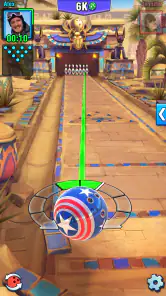
When I first downloaded Bowling Crew, I was expecting the usual run-of-the-mill bowling game. Boy, was I wrong! The app starts with a quick tutorial that gets you acquainted with the controls. Trust me, it's as easy as pie. Swipe to aim, adjust the spin, and release – it's all about timing and precision. The game mechanics are intuitive, making it accessible for both newbies and seasoned bowlers.
Graphics and Gameplay
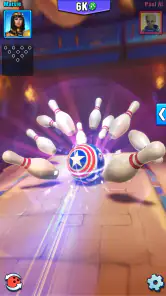
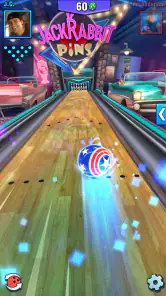
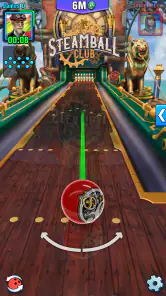
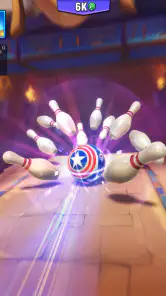
Let's talk about the visuals. The 3D graphics are absolutely stunning, bringing each bowling alley to life. From the neon lights to the intricate details in the lanes, everything looks crisp and vibrant. Plus, each alley has its own unique theme which keeps things fresh and exciting.
As for the gameplay, it's not just about throwing the ball down the lane. You've got challenges, tournaments, and even special events to keep you on your toes. The more you play, the more you unlock – and believe me, there are a ton of balls and lanes to discover. The competitive edge is real, especially when you're pitted against players from around the world in real-time matches.
Level Up and Customize
One of the standout features of Bowling Crew is the customization. You can upgrade your bowling balls, each with its own unique stats. It’s not just about aesthetics; these upgrades can genuinely affect your performance. Whether you want a ball that gives you more spin or one that knocks pins like a hurricane, there's something for everyone.
And let’s not forget the leveling system. As you progress, you gain experience points which help you climb the ranks. It’s this constant progression that keeps you coming back for more, aiming for that next big upgrade or the next exciting arena.
A fair look at the trade-offs
The bright presentation and quick controls make a strong first impression, but the competitive structure is not the same as a relaxed solo game. When another player is involved, a miss can feel more frustrating than it would in a private practice session. I’d give myself room to learn the swipe and spin before judging my ability by match results. The game’s pace is best for someone who enjoys a little pressure; players who want to bowl at their own speed may prefer a simpler, single-player alternative.
There is also a choice between chasing progression and simply enjoying a few throws. New balls, upgrades, ranks, and arenas can be motivating, yet they can pull attention away from the basic skill of aiming. I’d set a small personal goal for a session—such as making my release more consistent—rather than measuring every visit by what I unlock. This keeps the game satisfying even when a match does not go my way.
It is free to download, with in-app purchases ranging from $0.99 to $149.99 per item. That makes it worth deciding early whether you are comfortable with optional spending. I’d start by learning the controls and seeing how the free experience feels before buying anything; paid upgrades should not be mistaken for a substitute for practice. The game is rated for Everyone, and its current version is 1.76.1, with Android support starting at version 7.0.
Who will enjoy it—and who may not
I think it works best for someone who likes competitive mobile games but wants a more tactile action than tapping through menus. It also suits friends looking for a quick contest: the bowling theme is familiar, and the swipe controls are easy to explain. The game’s 3D lanes add atmosphere without asking you to learn the rules of a complicated sports title first.
I would skip it if your main goal is to recreate the full rhythm of bowling with friends at a physical alley, or if you dislike upgrading equipment and competing against other players. A traditional bowling outing offers the social setting and physical feel this game cannot provide. A pared-back bowling app may also be a better fit if you only want solo throws without ranks, events, or equipment choices.
For a first session, I’d keep the plan simple: finish the tutorial, practice a few controlled shots, then try a match when you understand how aiming and spin affect the lane. If the first result is poor, don’t immediately change balls, spin, and aim together. Keep most of the setup steady and adjust one thing at a time; that makes it easier to tell whether the change helped.
Where it fits into an ordinary day
Imagine having a few minutes free while waiting for a ride or taking a break. You can open the game, focus on a short bowling session, and leave with one practical takeaway—perhaps that a lighter spin adjustment was easier to control. That kind of small improvement is more rewarding than trying to squeeze in a long grind when you are distracted. If you want a game to fill a quiet stretch without much planning, this is a natural use for it.
For a more deliberate session, I’d play when I can pay attention to the release and the result. Challenges, tournaments, and special events give you alternatives to simply repeating the same kind of match, but they make more sense once the controls feel familiar. I’d treat each mode as a chance to apply what you’ve learned, not as proof that you need to master everything at once.
Practical questions before you install
Is it beginner-friendly? The tutorial and swipe-based controls make the basic action approachable, and you do not need real bowling experience to understand the goal. Is it only about visuals? No: ball stats and upgrades can change performance, so choices matter beyond appearance. Can you play casually? Yes, but the competitive and progression elements mean it may suit you better if you enjoy having a goal to work toward.
Does it replace real bowling? Not for me. It offers convenient, quick competition and a polished 3D setting, but it cannot recreate the physical motion or social atmosphere of visiting a bowling alley. Is it worth trying before spending? I’d say so: the game is free to download, and you can first decide whether its aiming, spin, and match style are enjoyable for you.
Final Thoughts
In a nutshell, Bowling Crew is a fantastic app for anyone looking to dive into the world of virtual bowling. With its stunning graphics, addictive gameplay, and endless customization options, it’s a strike in my book. Whether you're looking to kill some time or compete with the best, this game has got you covered. So, what are you waiting for? Lace up those virtual bowling shoes and get rolling!
My recommendation is to give it a try if you enjoy quick sports matches and the satisfaction of refining a shot. I would not choose it as a substitute for a realistic bowling simulator or a real-world game night, but as a portable, competitive take on bowling, it has a clear appeal. Start with controlled throws, learn what your ball choices do, and let the progression be a bonus rather than the whole point.
Bowling Crew — 3D bowling game Pros and Cons
Pros
- Realistic 3D graphics enhance gameplay.
- Intuitive controls make it easy to play.
- Varied locations keep the game exciting.
- Multiplayer mode for competitive fun.
- Frequent updates with new content.
Cons
- Requires internet for multiplayer mode.
- In-app purchases can be expensive.
- Limited offline gameplay options.
- Some ads can be intrusive.
- Progression can feel slow without purchases.
This Game in Other Languages
Frequently Asked Questions
What devices are compatible with Bowling Crew — 3D Bowling Game?
Bowling Crew — 3D Bowling Game is compatible with both Android and iOS devices. To ensure the best experience, your device should be running Android version 5.0 or higher, or iOS 10.0 or later. It's recommended to have a stable internet connection for seamless gameplay, as the game features real-time multiplayer matches.
Is Bowling Crew — 3D Bowling Game free to play?
Yes, Bowling Crew — 3D Bowling Game is free to download and play. However, it does offer in-app purchases that can enhance your gaming experience. These purchases include new bowling balls, skins, and other customization options. While they are optional, they may provide a competitive edge in multiplayer matches.
How does the multiplayer feature work in Bowling Crew?
The multiplayer feature in Bowling Crew allows players to compete against others in real-time. You can either challenge your friends or get matched with players of similar skill levels globally. The game uses a sophisticated matchmaking system to ensure fair competition. Winning matches will help you climb the leaderboards and earn rewards.
What are some tips for beginners in Bowling Crew?
For beginners in Bowling Crew, it's important to practice your bowling skills by playing solo matches initially. Focus on mastering the controls and understanding the different ball dynamics. Pay attention to lane conditions and adjust your aim and power accordingly. Additionally, experimenting with various balls and upgrades can improve your gameplay strategy.
Are there any special events or updates in Bowling Crew?
Yes, Bowling Crew frequently hosts special events and updates to keep the game exciting and engaging. These events often include limited-time challenges, new bowling balls, and exclusive rewards. The developers actively update the game to introduce new features and fix any bugs, ensuring a smooth and enjoyable experience for all players.


