

Bingo Pop: Play Live Online
- Reviews
- 4.6
- Version
- 11.8.8
- Installs
- 10,000,000+

Screenshots




 Analysis by Frivlyz
I like that Bingo Pop: Play Live Online has a clear, familiar premise: mark called numbers, keep an eye on the round, and enjoy the small rush when a card comes together. It is a mobile board game from Jam City, Inc., built around bingo rather than a broad collection of unrelated activities. That focus makes it easy to understand, though it also means the appeal depends on whether you enjoy repeating the central bingo loop.
What the free download does—and doesn’t—tell you
The game is free to download, so you can try it without paying upfront. In-app purchases are offered, with listed item prices ranging from $0.99 to $399.99. That wide range is worth noticing before you play: free access and optional spending are different things, and the price range alone does not tell you what any purchase contains or whether it will suit your play style. I would begin with the free version and decide whether the game is holding my attention before considering a purchase.
For a casual player, the practical question is not simply whether the game costs nothing to install. It is whether the free experience feels enjoyable at the pace you want, and whether you are comfortable with optional purchases being part of the game. If you prefer to keep mobile gaming completely purchase-free, you can still approach it as a free download, but it is sensible to avoid treating an in-game offer as necessary just because it appears while you play.
Where its value comes from
The strongest value here is convenience. Bingo is easy to pick up, and short rounds suit the little gaps in a day: a break between tasks, a quiet wait, or a few minutes winding down in the evening. You do not need to learn a complicated rule set before you can take part. The app has an average rating of 4.6 from around 296,000 ratings, and it has been installed over 10 million times, which suggests it has found a substantial audience. Those figures are useful context, but they cannot tell you whether its pace or style is right for you.
It is also a more social take on a familiar board-game idea than playing bingo alone with paper cards. The live-opponent setup gives each round a shared, competitive atmosphere, while the themed rooms offer variety in presentation. I would think of that as a change of mood rather than a completely different game: the basic appeal remains watching numbers and reacting quickly, not learning a new strategy system every time you enter a room.
Gameplay That Keeps You Hooked
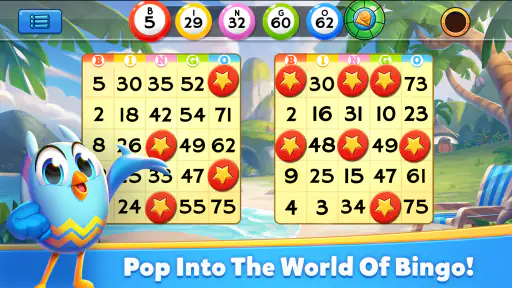
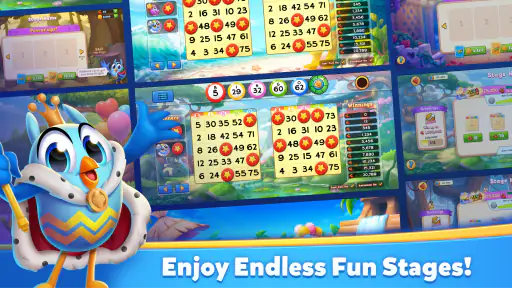
The moment you launch Bingo Pop: Play Live Online, you’re greeted with vibrant colors and an easy-to-navigate interface. The game offers multiple bingo rooms, each with its own unique theme and prize structure. From classic bingo to themed rooms that transport you to exotic locations, there’s always something new to explore.
What I love about this app is how it manages to keep the excitement going. The rounds are quick, and the interface is super intuitive, making it easy even for bingo novices to jump right in. Plus, the real-time play with live opponents adds a competitive edge that’s hard to resist.
Gaming Stories You May Enjoy

Dancing Road Turns Short Breaks Into a Test of Rhythm and Timing

Super Stylist Makes Every Outfit a Test of Taste and Patience

Dominoes on Your Terms: Who Should Play and Who Should Pass

Pokémon GO Makes the Familiar World Feel New

Chess.com Turns Rematches Into Rivalries, but Community Has Its Costs

Archery Battle 3D Review: Sharp Aiming, Unclear Feedback
Features That Stand Out
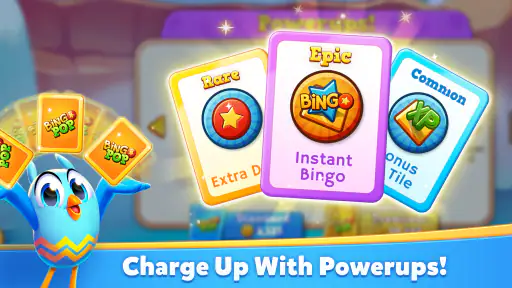
One feature that really caught my attention is the ability to play multiple cards at once. This not only increases your chances of winning but also keeps the adrenaline pumping as you track numbers across different boards. Another cool feature is the power-ups. These little boosters can make a huge difference, helping you daub faster or get extra coins.
Playing more than one card changes the experience in a way that is easy to underestimate. It can make a round feel livelier, but it also asks more of your attention: you need to scan several boards and react to called numbers instead of settling into a relaxed, one-card pace. I would treat extra cards as a deliberate difficulty and focus choice, not as an automatic upgrade. If you are new to the game or playing while distracted, starting with fewer cards makes it easier to learn the rhythm and notice how quickly the calls move.
Power-ups add another decision layer. They can help with faster daubing or provide extra coins, but they do not remove the need to follow the numbers. I find it useful to think of them as support for a round rather than a substitute for paying attention. When you are still getting used to the interface, concentrating on the calls is more valuable than trying to manage every booster at once. Once the basic flow feels natural, you can judge whether using a power-up improves your enjoyment enough to be worth it.
The social aspect of the game is also a big draw. You can connect with friends or make new ones as you play, adding a fun, social layer to the game. The chat feature is smooth and doesn’t interrupt the gameplay, which is a big plus in my book.
How it fits into an ordinary day
Imagine opening the game while waiting for a takeout order or sitting through a short pause between errands. A quick round can fill that gap without asking you to remember a story or plan a long session. If you want to keep the break genuinely restful, I would stick to one card and leave chat or extra features for another time; if you have settled somewhere comfortable and want a more active challenge, managing several cards makes more sense. The best use case is a brief, focused session, not playing while you need to listen closely to someone or do another task that competes for attention.
That distinction also helps answer whether it works well for beginners. The familiar bingo rules lower the barrier, but a fast round and multiple cards can make the screen busy. New players can ease in by taking one round at a time and learning where the called numbers and card marks appear before adding more to track. If you already know bingo, the interface should feel intuitive, while the live competition and boosters provide extra activity around the familiar core.
How it compares with other bingo choices
Compared with a traditional bingo hall or a paper-card game, this version is more convenient and visually lively, and it brings opponents and chat onto the screen. The trade-off is that a phone game cannot reproduce the same in-person atmosphere or the tactile routine of handling cards. Against a basic digital bingo game, its themed rooms, social layer, multiple cards, and power-ups give you more to engage with, but also more to keep track of. If you want quiet, no-frills number calling, a simpler bingo app or physical cards may be a better fit; if you enjoy a busier, competitive presentation, this one has a clearer case.
There is also a difference between social features being available and wanting to use them. Chat can make a round feel less solitary, especially if you enjoy meeting other players, but it is not essential to the core activity. I would treat it as an optional layer: use it when the social side adds something, and ignore it when you simply want to concentrate on the cards. That flexibility matters because players looking for a private, low-distraction game may prefer to keep their sessions focused on the board itself.
Trade-offs to keep in mind
The quick pace is part of the appeal, but it can also be tiring if you want a slow, meditative game. Live opponents make each round feel more immediate, yet the competitive framing may not suit someone who prefers to take their time. Likewise, the visual effects and sound add atmosphere, but players who want a very quiet or understated experience may find a simpler option more comfortable. I would try a short session first and see whether the tempo feels exciting or simply hurried.
Another practical consideration is attention. Bingo looks straightforward, but juggling several cards means following calls and scanning more than one board in real time. That is fun when you are ready to focus, and less convenient if you are trying to play during a conversation, while walking, or while doing another task. I would use it in a safe, settled moment rather than treating it as a game to play everywhere just because it is on a phone.
The game is rated Teen, so it is not presented as a young-child title. That makes it sensible for families to check whether its competitive and social style suits the player they have in mind. For adults looking for a casual board game, the rating is simply useful context; it does not change the basic question of whether bingo and optional social interaction sound enjoyable.
Who is most likely to get value from it?
I would recommend giving it a try if you enjoy bingo, like quick rounds, and want the option of playing against others rather than marking cards alone. It may also suit someone who likes a familiar game with extra ways to stay involved, such as switching between themed rooms, handling multiple cards, or chatting with other players. The game has been available since September 24, 2014, and its current version is 11.8.8; it runs on Android 5.1 or later. Those details are useful when checking device compatibility, though the real test is still whether the game feels comfortable on your screen and at your preferred pace.
I would skip it if you dislike bingo’s reliance on called numbers, want a deep strategy game, or prefer sessions with no competitive or social elements. It is also not the best choice if you want every round to feel meaningfully different: themes can change the presentation, but the central activity remains bingo. Someone seeking a relaxing, slower board game may be happier with a turn-based option, while a player who wants a quiet solo pastime may prefer a simpler digital version without the live-play emphasis.
My buy-or-skip verdict
Aside from the engaging gameplay and cool features, Bingo Pop: Play Live Online is free to download, which is always a plus. There are in-app purchases, but they’re not necessary to enjoy the game. The app offers plenty of free bonuses and rewards to keep you playing without spending a dime.
For me, the sensible approach is to start free, enjoy a few sessions, and decide whether the extra layers make the game more fun rather than assuming they are required. If an in-app purchase is tempting, pause and consider whether you are paying for something you genuinely want or simply reacting to the pace of play. The available purchase range runs from $0.99 to $399.99 per item, so I would be especially deliberate about checking the specific offer before spending. Free access is the clear entry point; paid value depends on the individual player and the item, not on the game being automatically better after a purchase.
Another thing worth mentioning is the game’s graphics and sound effects. They’re top-notch and add to the immersive experience. You’ll feel like you’re in a real bingo hall, hearing the caller shout out numbers and the thrill of marking your card.
Those presentation choices support the quick-round format, but they are not the main reason I would keep playing. The deciding factor is whether I enjoy scanning the cards and reacting to calls. If the sound or visual activity becomes distracting, I would simplify my session and focus on fewer cards; if what you want is a more atmospheric, energetic take on bingo, the presentation helps give each round a stronger sense of occasion.
In conclusion, if you’re looking for a fun, engaging, and social gaming experience, Bingo Pop: Play Live Online is definitely worth a download. Whether you’re a seasoned bingo player or just looking for a new game to try, it offers a little something for everyone. So grab your digital bingo cards and get ready to shout ‘Bingo!’
My recommendation is a try, not an automatic purchase. It is a good fit for casual bingo fans who want accessible rounds, live competition, and optional social play, and the free download makes it easy to see whether the pace suits you. I would pass if you need a deeply strategic board game, a fully quiet solo experience, or a slower rhythm. For everyone else, start with a simple session, keep spending optional, and let the actual gameplay—not the promise of a prize or a purchase offer—decide whether it earns a place on your phone.
Bingo Pop: Play Live Online Pros and Cons
Pros
- Engaging live multiplayer games.
- Frequent rewards and bonuses.
- Smooth and intuitive interface.
- Variety of themed bingo rooms.
- Regular updates with new features.
Cons
- Requires constant internet connection.
- In-app purchases can be pricey.
- Limited offline play options.
- Ads can be intrusive at times.
- Occasional connectivity issues.
This Game in Other Languages
Frequently Asked Questions
What is Bingo Pop: Play Live Online?
Bingo Pop: Play Live Online is a mobile application that brings the classic game of bingo to your fingertips. Available on both Android and iOS platforms, it offers a vibrant, community-driven experience with live online play, social features, and various themed rooms. Players can enjoy multiple bingo cards, power-ups, and compete in real-time with friends or global participants.
Is Bingo Pop: Play Live Online free to download and play?
Yes, Bingo Pop: Play Live Online is free to download on both Android and iOS devices. The game offers in-app purchases for those who wish to enhance their gameplay experience with additional power-ups, cards, or special items. However, these purchases are optional, and players can enjoy the core bingo experience without spending any money.
What features does Bingo Pop: Play Live Online offer?
Bingo Pop: Play Live Online features a variety of bingo rooms with unique themes and challenges. It offers daily bonuses, power-ups, and the ability to play multiple bingo cards simultaneously. Players can join clubs to socialize, compete in tournaments, and participate in special events to earn rewards. The game also includes a chat feature, allowing interaction with other bingo enthusiasts.
How can I improve my chances of winning in Bingo Pop?
To improve your chances of winning in Bingo Pop, focus on playing in rooms that offer the best rewards and using power-ups wisely to maximize your score. Joining a club can also provide strategic advantages, as club members often share tips and collaborate during tournaments. Regularly logging in to collect daily bonuses and participating in events can also boost your winning potential.
Are there any age restrictions for playing Bingo Pop: Play Live Online?
Yes, Bingo Pop: Play Live Online is intended for players aged 17 and above due to its social gaming elements and in-app purchase offers. The game involves virtual currency and interactions that may not be suitable for younger audiences. Parents and guardians should ensure that younger players have appropriate supervision when engaging with the app.


