

Billiards City - 8 Ball Pool
- Reviews
- 4.7
- Version
- 1.1.7
- Installs
- 1,000,000+

Screenshots
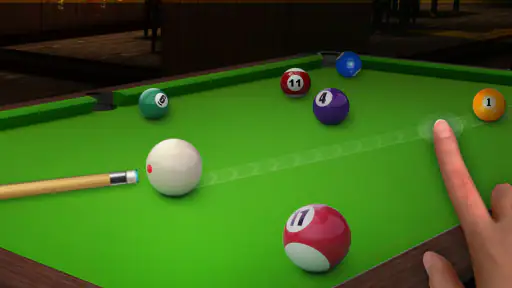
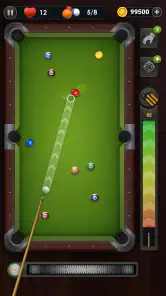
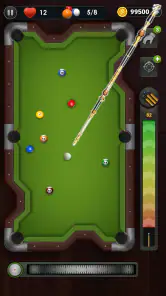
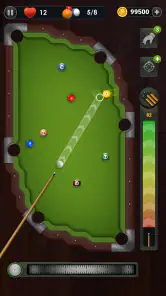
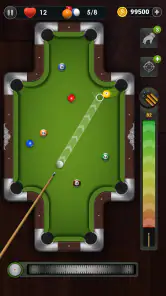
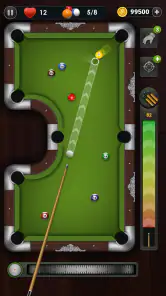
 Analysis by Frivlyz
I reach for Billiards City - 8 Ball Pool when I want a quick pool game without having to find a table or round up other players. It turns the familiar aim-and-shoot routine into a phone-sized pastime, and that makes it easy to pick up during a quiet break. I like that it gives billiards fans a way to think through shots at their own pace, though a screen can never reproduce the feel of a real cue in your hand.
Where a pool game can feel less straightforward
The first adjustment is learning to aim with a touchscreen rather than your eyes and a cue. If a shot misses, it can be tempting to blame the game, but small changes in direction or force can make a noticeable difference in where the balls end up. I find it more useful to slow down and make one deliberate adjustment at a time than to swipe quickly and hope for the best.
That distinction matters if you are used to playing on a physical table. On a phone, you are judging the layout through a fixed view and controlling the shot with gestures, so your sense of distance and angle may take a little time to settle. A missed shot is not automatically a sign that the controls are faulty; sometimes the useful lesson is simply that the line you pictured was slightly off.
My practical advice is to treat early turns as calibration. Notice how the aiming guide responds, how much movement changes the direction, and whether a lighter or firmer input suits the shot. I avoid making a last-second correction after I have already lined things up, because that often replaces a considered plan with a guess. This small habit makes play feel less erratic and helps distinguish a tricky layout from a control problem.
Simple setup checks before playing
Billiards City is a free sports game from Arbo Game, and its straightforward premise makes it approachable if you want to get into a match without first learning a complicated ruleset. It is rated for Everyone, and its current version is 1.1.7. The game runs on Android starting with version 5.1, so it can suit a range of devices, although the actual feel still depends on how comfortably your phone handles touch input and displays the table.
If the game does not respond as expected, I start with ordinary checks rather than assuming the billiards mechanics are at fault. I make sure the app has finished loading, check that the phone is responding normally to taps and swipes, and close other active tasks if the device feels sluggish. Then I try a simple shot again. These are basic troubleshooting steps, not special game settings, but they help separate a temporary device hiccup from a difficult shot.
It is also worth getting comfortable with the screen before you settle into a longer session. Hold the phone in a position where your hand can make controlled movements without covering the part of the table you need to watch. If you tend to play one-handed, take a moment to see whether that makes aiming less steady; changing your grip can be more effective than repeatedly correcting the same shot.
Gaming Stories You May Enjoy

Dancing Road Turns Short Breaks Into a Test of Rhythm and Timing

Super Stylist Makes Every Outfit a Test of Taste and Patience

Dominoes on Your Terms: Who Should Play and Who Should Pass

Pokémon GO Makes the Familiar World Feel New

Chess.com Turns Rematches Into Rivalries, but Community Has Its Costs

Archery Battle 3D Review: Sharp Aiming, Unclear Feedback
Getting Started with Billiards City
So, what’s the first thing you need to know about Billiards City - 8 Ball Pool? It’s incredibly easy to get started. The app is available for both Android and iOS, and downloading it is a breeze. Once you’ve installed it, you’re greeted with a slick interface that’s as smooth as a freshly polished cue ball. I was immediately impressed by the vibrant graphics and the intuitive layout. The game does a great job of easing you in with its simple tutorials and easy-to-follow instructions, making it perfect for both newbies and seasoned players.
Gameplay and Features
Now, let’s talk about what really matters—the gameplay. The physics engine in Billiards City is something to marvel at. Each shot feels realistic, and the balls react just like they would on a real table, which is crucial for any pool game worth its salt. I found myself getting lost in the intricate angles and the strategic planning of each shot. The game offers various levels, each with increasingly difficult challenges that keep you hooked for hours on end.
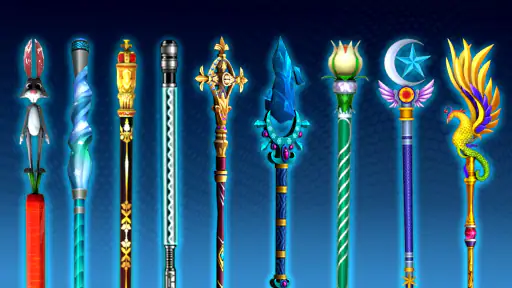
One of the standout features is the single-player mode, which allows you to hone your skills without the pressure of competing against others. However, if you’re feeling a bit more competitive, there’s also an option to challenge players online, adding an exciting social element to the game. And let’s not forget about the customizations! From cues to tables, there’s plenty of room to personalize your experience.
For a casual session, I would focus on one useful skill rather than trying to perfect everything at once. If you are practising shot placement, pay attention to whether you can reliably send a ball toward a chosen pocket; if you are working on planning, look at the next shot before taking the current one. That turns a short session into purposeful practice. It also makes it easier to decide when to stop: once you have had a few satisfying attempts, you can put the game down without feeling that every spare minute needs to become a long run.
The solo option is especially handy when you do not want the pace or social pressure of a live opponent. I would choose it on a commute break, while waiting for an appointment, or when I want to practise at my own speed. Online play is a better fit when the competition itself is the point, but it depends on having a suitable connection and being in the mood to play against someone else. If your main goal is quiet, interruption-free practice, the single-player side is the more natural choice.
Customisation can make a session feel more personal, but it is not the same thing as improving your technique. I would treat cues and tables as a way to refresh the look of play rather than assume that changing an item will solve inaccurate aiming. The more useful improvement comes from repeatable habits: settle your grip, line up patiently, and avoid changing several parts of your approach after one miss. That keeps the game enjoyable without turning every round into a test of patience.
Graphics and Sound
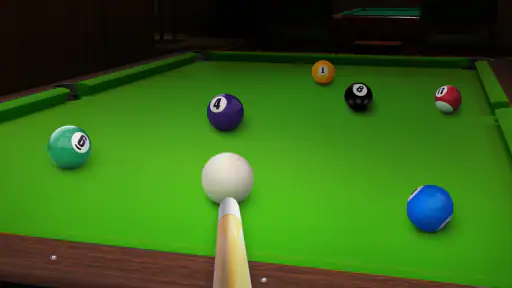
Let’s take a moment to appreciate the aesthetics of Billiards City. The developers have done a fantastic job of creating a visually appealing game. The graphics are crisp and detailed, making every shot a visual treat. The sound effects add an extra layer of immersion, from the satisfying clink of the balls to the ambient sounds of a bustling pool hall. It’s like being in your local billiards bar, minus the smoke and chatter.
That presentation helps the game feel like billiards rather than a bare aiming exercise, but it is worth keeping expectations in proportion. A polished table view and familiar ball sounds add atmosphere; they do not replace the weight, reach, and tactile feedback of an actual cue. If you enjoy the visual rhythm of lining up shots, the presentation supports that nicely. If what you miss most is the physical social setting of a pool hall, a mobile game will only approximate part of the experience.
For everyday use, I also like that the game can fill a small pocket of free time without requiring a full evening around a table. A short session while waiting for food or taking a break can be satisfying, especially if I set a modest aim for myself, such as making a cleaner opening shot or thinking one turn ahead. It is less suited to moments when I need to keep my attention on something else, because even a casual pool shot is more enjoyable when I can watch the table and make a considered move.
Choosing the right kind of pool session
Compared with a physical table, this game wins on convenience and loses on physical realism. There is no need to arrange a venue or another player for a solo session, and a phone makes it easy to practise in brief bursts. In return, aiming is mediated by the screen, and the game cannot give you the same cue feel or shared room atmosphere. I would use it as a handy companion for pool fans, not as a substitute for playing in person when that is an option.
Compared with other mobile billiards games, the appeal here is its direct focus on the familiar pool-table routine, with solo play, online competition, and personalisation all represented in the experience described above. The trade-off is that players looking for a different kind of sports game, a broad collection of activities, or a highly social experience should look elsewhere. If you mainly want to line up shots and enjoy billiards on your own terms, this is a more relevant choice than a general sports game; if you want the energy of a live club or a varied multiplayer party, another format will serve you better.
The game has a 4.7 average from around 8.7 thousand ratings, and it has passed one million installs. Those figures suggest that it has found an audience, but they do not tell me whether its controls will suit every player. I would use them as a reason to consider trying it, not as a promise that each session will feel perfect. It is free to play, which lowers the barrier to giving it a go, while the most important question is still whether its touchscreen approach feels comfortable to you.
If a session feels unusually choppy or a shot seems not to register, I would first check whether the phone is generally responding well, then restart the game if needed and try again when the device is less busy. If the same issue appears across other apps, that points more toward the phone or its current workload than toward billiards itself. If only a particular shot is awkward, I would reset my aim and test a simpler line before drawing conclusions. These are sensible ways to narrow down the cause without assuming a specific fault or changing settings blindly.
For someone deciding whether to install it, the key question is not whether you already play pool expertly. The more useful question is whether you enjoy careful aiming and are willing to adapt to touch controls. Beginners can take their time in solo play, while experienced players may appreciate having a portable way to keep thinking about angles. On the other hand, players who dislike gesture-based controls, want a strong in-person social element, or prefer fast action with little planning may find the pace less satisfying.
Wrapping Up
In conclusion, if you’re a fan of pool, Billiards City - 8 Ball Pool is a must-try. It nails the feeling of playing billiards with its realistic physics and stunning graphics. Whether you’re looking to kill some time or seriously improve your pool game, this app has got you covered. So grab your virtual cue, line up that perfect shot, and experience the joy of billiards wherever you are. Trust me, you won’t regret it!
My recommendation is a little more specific: I would try it if I wanted convenient, focused billiards practice or a quick solo game, and I would choose a real table when tactile control and company matter more. Its easy entry point, visual polish, and mix of solo and online play make it a reasonable free option for the right kind of player. The main caveat is that a touchscreen changes the feel of aiming, so give yourself time to adjust before deciding whether the game suits you. Arbo Game’s pool title is best approached as a compact way to enjoy the thinking part of billiards whenever a table is not nearby.
Billiards City - 8 Ball Pool Pros and Cons
Pros
- Realistic physics engine for a true billiards experience.
- Intuitive controls make gameplay smooth and enjoyable.
- Visually appealing graphics enhance user experience.
- Challenging levels increase in difficulty progressively.
- Free to download and play with optional in-app purchases.
Cons
- Contains ads that may interrupt gameplay.
- Lacks a multiplayer mode for playing with friends.
- Limited customization options for tables and cues.
- Requires internet connection for some features.
- Progression can be slow without in-app purchases.
Frequently Asked Questions
What is Billiards City - 8 Ball Pool and what makes it unique?
Billiards City - 8 Ball Pool is a modern arcade-style pool game with a single-player mode. Its uniqueness lies in its realistic physics and stunning 3D graphics, providing players with a highly immersive experience. Unlike other pool games, it includes a variety of challenging levels, making it not just a straightforward pool game, but a skill-based puzzle as well.
Can I play Billiards City - 8 Ball Pool offline?
Yes, Billiards City - 8 Ball Pool can be played offline. This makes it an excellent choice for players who want to enjoy a game of pool without the need for a constant internet connection. It's perfect for commuting, traveling, or simply when you're in an area with limited connectivity.
Does Billiards City - 8 Ball Pool have multiplayer options?
No, Billiards City - 8 Ball Pool is designed primarily as a single-player game. It focuses on providing a unique single-player experience with various levels and challenges. If you are looking for a multiplayer pool game, you might want to consider other options available in the app store.
Are there in-app purchases in Billiards City - 8 Ball Pool?
Yes, Billiards City - 8 Ball Pool offers in-app purchases. Players can buy additional game resources or remove ads for an enhanced experience. However, the game is entirely free to download and offers plenty of content without requiring purchases, ensuring that everyone can enjoy it without spending money.
What devices are compatible with Billiards City - 8 Ball Pool?
Billiards City - 8 Ball Pool is available for both Android and iOS devices. It runs smoothly on most modern smartphones and tablets. However, for the best experience, it's recommended to have a device with a recent OS version and sufficient processing power to handle its stunning graphics and realistic physics smoothly.


