

Beatstar - Touch Your Music
- Reviews
- 4.6
- Version
- 36.1.0.9403
- Installs
- 10,000,000+

Screenshots
 Analysis by Frivlyz
What makes a phone rhythm game satisfying is not just recognizing a song; it is matching your hands to its pulse while the track keeps moving. That is the central appeal of Beatstar - Touch Your Music: I play by tapping, swiping and holding notes as they arrive, turning familiar listening into a small test of timing. It is a music game from Space Ape, and its touch-first approach gives it a different feel from simply streaming a playlist or tapping along casually.
Reading a song with your fingers
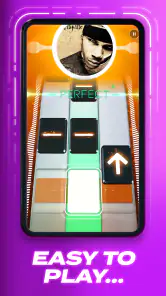
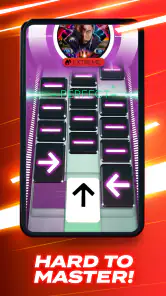
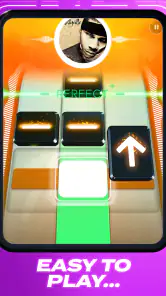
The core idea is easy to grasp, but the attention it demands is what gives each round its edge. Notes move across the screen in time with the music, and I have to respond accurately rather than just keep a general beat. A tap can feel effortless on a straightforward passage, while a quick sequence or a held note asks me to focus on both the screen and the sound. The best moments come when those cues feel synchronized and my hands seem to follow the track without conscious effort.
That makes the game useful in short bursts. I can pick it up when I have a few spare minutes and get a clear, active task rather than scrolling through songs or menus for something to do. It also gives listening a new angle: a track I already know becomes a pattern to read, while an unfamiliar one can catch my attention through its rhythm. I would not treat this as a music lesson, but it can make me listen more closely to changes and accents I might otherwise miss.
What a good session asks of you
The controls are the main point of contact, so a comfortable grip and a clear view matter more than they might in a passive music app. I find it easier to stay consistent when I hold the phone securely and keep my fingers relaxed instead of tensing up for every note. If I start missing inputs, slowing down mentally and watching the sequence ahead helps more than frantic tapping. The game rewards timing, not force.
There is a useful distinction between enjoying a song and performing well on it. A favorite track may still trip me up if its note pattern does not match the rhythm I expected, while a song I barely know can become satisfying once I learn its flow. That is part of the replay appeal, but it also means a high score is not simply a measure of musical taste. I see it as a compact coordination challenge set to recognizable music.
Feel the Rhythm
If you’re someone who grooves to the beat and loves interactive games, then Beatstar is your jam. The app turns your phone into a virtual stage where you can play along to chart-topping tracks. As the notes cascade down your screen, it’s your job to tap, swipe, and hold them in time with the music. Sounds simple? Well, it’s more challenging and addictive than you’d expect!
Let’s Talk Features
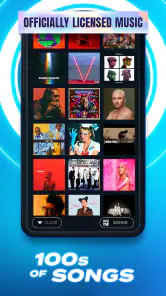
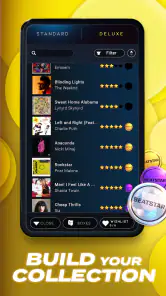
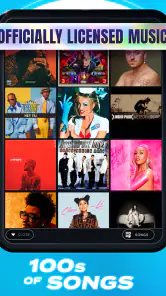
One of the cool features of Beatstar is its massive library of songs. Whether you’re into pop, rock, EDM, or even classical music, there’s something for everyone. The game regularly updates its playlists, so you’re always in for a fresh experience. Plus, the touch controls are super responsive, making it feel like you’re genuinely playing the music.
Gaming Stories You May Enjoy

Dancing Road Turns Short Breaks Into a Test of Rhythm and Timing

Super Stylist Makes Every Outfit a Test of Taste and Patience

Dominoes on Your Terms: Who Should Play and Who Should Pass

Pokémon GO Makes the Familiar World Feel New

Chess.com Turns Rematches Into Rivalries, but Community Has Its Costs

Archery Battle 3D Review: Sharp Aiming, Unclear Feedback
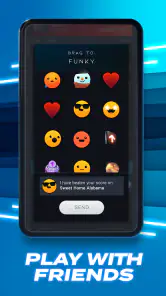
Another nifty feature is the social aspect. You can connect with friends and challenge them to beat your high scores. Trust me, nothing gets your competitive juices flowing like seeing your buddy’s name just above yours on the leaderboard. Moreover, the app’s sleek design and vibrant graphics make every session visually delightful.
Why You’ll Love It
Aside from the fun factor, Beatstar is a great way to discover new music. I’ve found myself jamming to tracks I wouldn’t have stumbled upon otherwise. And let’s not forget the satisfaction that comes with nailing those tricky note sequences; it’s pure bliss. The game also adapts to your skill level, so whether you’re a newbie or a rhythm game veteran, you’ll find the right challenge.
Now, I have to mention the in-app purchases. While Beatstar is free to download, unlocking certain songs or premium features may require a bit of spending. But hey, for the hours of entertainment it provides, it’s a small price to pay!
When it fits, and when it doesn’t
I would choose Beatstar over a standard music player when I want to do something with a song, not merely hear it. Compared with a conventional rhythm game built around abstract beats or a fixed instrumental pattern, its recognizable tracks make the challenge feel tied to listening. That distinction is appealing if a familiar chorus helps you stay engaged; it is less useful if you want uninterrupted music, a quiet background, or practice on a real instrument. For those needs, a player or an actual instrument is the better choice.
A realistic use for me is a short break between tasks: I choose a track, give it my attention, and stop when I need to return to work. I would avoid starting a round when I have to listen for someone nearby, watch traffic, or split attention between the screen and another task. This is not a hands-free companion. The timing is the point, so safe, focused play matters more than squeezing in a session anywhere.
Small choices that improve the experience
When I am learning a difficult passage, I try not to chase a perfect result on the first attempt. I pay attention to the moment where my timing slips, then approach the next run with that section in mind. It is a simple way to turn a frustrating miss into a specific thing to work on. If a song feels unexpectedly difficult, I also remind myself that knowing the recording does not mean I already know its playable pattern.
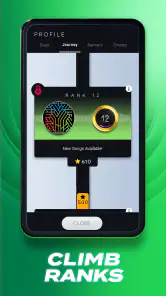
For a fair comparison with friends, I focus on the same track and treat the score as a friendly challenge rather than a ranking of who has better musical taste. A leaderboard can make a quick session more motivating, but it can also nudge me into repeating a song longer than I intended. I set a stopping point before I start if I only have a few minutes, especially when I am trying to improve a particular run.
The screen is another practical consideration. I would play somewhere I can see the note path clearly and hold the phone steadily; a cramped grip or a distracted glance can make a timing game feel harder than it is. If touch-based play is uncomfortable for you, or you prefer a controller, a microphone, or a game that lets you move around, this particular format may not suit you. Its appeal depends on enjoying precise interaction directly on a phone screen.
Cost, access and expectations
The game is free to download, with in-app purchases ranging from $0.99 to $99.99 per item. I would begin without spending and first see whether the available songs and the basic rhythm challenge hold my interest. Purchases can be tempting when I want a particular track or more from the game, so it helps to decide what I am comfortable paying before treating an unlock as necessary. The free starting point makes it easy to sample the style, but it does not mean every optional item is free.
Beatstar has a 4.6 average from 1.1 million ratings, with 37,000 reviews and over 10 million installs. Those figures suggest that it has found a large audience, but they cannot predict whether its song selection will match my taste or whether I will enjoy repeating sections to improve timing. It is rated Teen, and the current version is 36.1.0.9403; it requires Android 6.0 or later. I would check that requirement before installing on an older Android device.
Who gets the most from it
I would recommend it to people who already enjoy music and want their listening to become an active, score-based challenge, especially anyone who likes short sessions and learning a pattern through repetition. It can also work well for friends who enjoy comparing results on the same songs. The strongest fit is not necessarily the person with the broadest music knowledge; it is the person who likes paying close attention and refining a run until the timing feels right.
I would skip it if I mainly want music playing in the background, dislike touch controls, or find score-chasing more stressful than fun. It is also not a substitute for learning an instrument: the game asks for quick responses to on-screen cues, not the broader technique, interpretation or practice that an instrument involves. That difference is worth keeping in mind before choosing it over a music-learning app.
In conclusion, Beatstar - Touch Your Music is more than just an app; it’s a celebration of music and rhythm. Perfect for those moments when you want to unwind, challenge yourself, or simply groove to some good tunes. So, why wait? Hit the download button and let your fingers dance!
Beatstar - Touch Your Music Pros and Cons
Pros
- Engaging rhythm-based gameplay
- Wide variety of popular songs
- Intuitive touch controls
- Regular updates with new tracks
- Visually appealing graphics
Cons
- In-app purchases can be costly
- Requires internet connection
- Limited offline play options
- Occasional lag on older devices
- High difficulty in later levels
Frequently Asked Questions
What is Beatstar - Touch Your Music about?
Beatstar - Touch Your Music is a rhythm-based mobile game where players tap to the beat of popular songs. The objective is to hit the right notes in time with the music, providing an interactive experience that combines music enjoyment with gameplay. It's perfect for music lovers who want to engage with their favorite tracks in a fun and dynamic way.
Is Beatstar free to play?
Yes, Beatstar is free to download and play. However, like many mobile games, it offers in-app purchases. Players can buy additional songs, power-ups, and other premium features to enhance their gaming experience. While you can enjoy the game without spending money, purchasing items can unlock more content and facilitate faster progress.
What are the system requirements for Beatstar?
Beatstar requires a stable internet connection and is compatible with most modern Android and iOS devices. For Android users, it typically requires Android 5.0 and up, while iOS users should have iOS 10.0 or later. Ensure your device has sufficient storage space and meets these OS requirements for optimal performance.
Can I play Beatstar offline?
No, Beatstar cannot be played offline. The game requires an active internet connection to function, as it regularly updates its song library and leaderboard features. This connectivity ensures players have access to new content and can compete with others globally, enhancing the interactive experience Beatstar offers.
How does Beatstar handle in-app purchases?
In-app purchases in Beatstar allow players to buy new songs and game enhancements. These transactions are processed through the app store linked to your device. It is important to monitor these purchases, especially if children have access to the device, to prevent unauthorized spending. You can disable in-app purchases through your device settings if needed.


