

Beats Playground
- Reviews
- 4.5
- Version
- 1.0.19
- Installs
- 1,000,000+

Screenshots
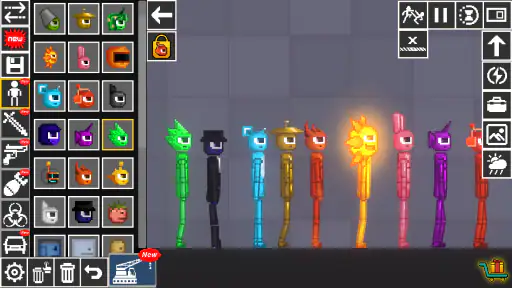
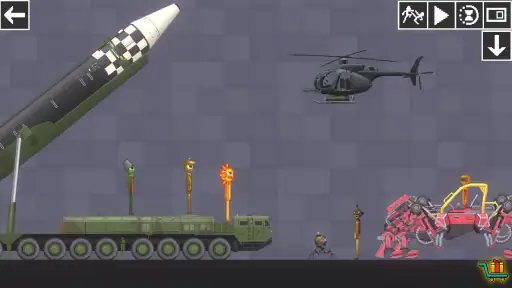
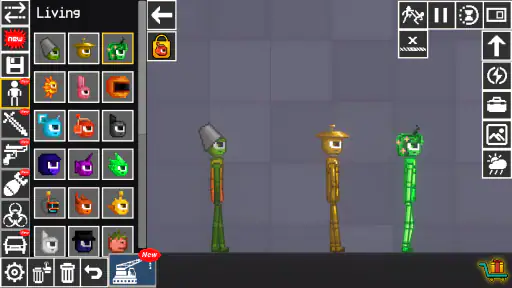
 Analysis by Frivlyz
I tend to enjoy games that let me experiment without demanding a long commitment, and Beats Playground caught my attention as a free simulation game from Alphabets Games. Its appeal is easy to understand: it invites playful, hands-on experimentation rather than asking me to master a complicated system first. That makes it tempting to open for a few minutes when I want a low-pressure diversion, though the way it is presented also leaves some important questions for a careful buyer to weigh.
What the purchase details tell me
The game is free to install, but it includes in-app purchases priced from $0.99 to $29.99 per item. I would treat that as a reason to check purchase prompts carefully, especially if a child will be playing on the device. The Teen age rating is another useful signal for families deciding whether the content suits their household. It does not, by itself, explain every scene or interaction, so I would still make that decision with the intended player in mind.
Its audience is already fairly broad: the game has passed one million installs, with an average rating of 4.5 from around 9,900 ratings. Those figures suggest that plenty of players have tried it and that the overall response is positive, but they cannot tell me whether its style will suit you. I put more weight on the basic fit: this is a simulation game for people drawn to a sandbox-like kind of play, not necessarily a structured campaign with a clear finish line.
Progress without assuming a grind
One question I would ask before spending money is whether the free experience feels satisfying on its own. The purchase range confirms that optional paid items are available, but it does not tell me what they contain, how often they appear, or whether they affect progression. I would not assume that paying is required—or that it is irrelevant—without seeing the in-game prompts firsthand. My practical advice is simple: start free, explore what the game lets you do, and only consider a purchase if a clearly described item solves a specific need for you.
That cautious approach is especially helpful in a sandbox game, where the fun often comes from trying things rather than chasing a fixed reward. If you find yourself repeating the same experiment because you are curious about a different outcome, that may be enough reason to keep playing without buying anything. If instead you hit a point where a prompt suggests you need to pay to continue, pause and check exactly what is being offered before deciding. The price range is wide enough that I would avoid treating a quick tap as a casual, consequence-free choice.
Fairness depends on what you want from it
I would not judge this game by competitive fairness in the same way I would judge a ranked multiplayer title. Its sandbox identity points toward personal experimentation, so the more relevant question is whether paid items change what a player can do compared with someone who stays free. The purchase information alone does not answer that. If you are choosing it for relaxed play, the absence of a confirmed competitive setup means I would focus on whether the free activities hold your interest, rather than expecting a level playing field for online matches.
That distinction matters for parents, too. If a younger player wants to share the game with friends, I would first check what sharing actually involves and whether purchases can be restricted through the device’s family settings. The game’s Teen rating and paid items are concrete reasons to set expectations before handing over a phone or tablet. This is not a claim that purchases are pushed aggressively; it is a sensible boundary whenever a free game offers items at different prices.
Gaming Stories You May Enjoy

Dancing Road Turns Short Breaks Into a Test of Rhythm and Timing

Super Stylist Makes Every Outfit a Test of Taste and Patience

Dominoes on Your Terms: Who Should Play and Who Should Pass

Pokémon GO Makes the Familiar World Feel New

Chess.com Turns Rematches Into Rivalries, but Community Has Its Costs

Archery Battle 3D Review: Sharp Aiming, Unclear Feedback
Useful ways to try it before committing
For a first session, I would give myself a small, specific goal: explore the core play, see what feels rewarding, and notice whether the game encourages experimentation or funnels me toward repeated tasks. That is more revealing than simply playing until a purchase prompt appears. If something is locked, check whether it is essential to the activity you enjoy or merely an optional extra. Keeping that distinction clear helps answer the most useful question: would I still open this game tomorrow if I never bought anything?
A realistic use case is a short break between errands. I might have a few minutes while waiting for a ride, want something more interactive than scrolling, and be in no mood to learn a long set of rules. A sandbox simulation can fit that moment well if it lets me get into the play quickly. It is less suited to a commute where I need a story to follow across sessions or a game that reliably saves a complex project, unless those qualities are clearly available in the experience.
I would also avoid making an early purchase just because I am curious. First, try the available play long enough to identify what you actually want more of. Then read the item description and check the final price before confirming. This simple sequence is particularly useful when the same game can be enjoyed casually: it separates genuine interest from the impulse to unlock something simply because it is visible.
How it fits among simulation games
Compared with management simulations, which usually revolve around planning, upgrades, and long-term goals, a playground-style game is more attractive when you want freedom to test ideas. Compared with physics or crafting sandboxes, it may appeal to someone who likes a more playful setup, though I would not assume it has any particular tools or systems beyond what is actually shown in the game. If your main goal is building an intricate world, optimizing resources, or following a detailed narrative, a more specialized simulation may be a better match.
The trade-off is that open-ended play can feel less purposeful. Players who like a clear checklist, steady milestones, or a strong sense of progression may find a sandbox less compelling after the initial novelty. I would think of it as a choice for curiosity and casual experimentation, not as a substitute for every kind of simulation game. That expectation makes it easier to judge it fairly: the question is whether its particular play invites you to return, not whether it offers the same structure as a city builder or career simulator.
Details worth checking in practice
The game was released on February 12, 2025, and its current version is 1.0.19. It supports Android 5.1 and later, which makes the minimum system requirement relatively approachable for compatible devices. Still, a minimum operating-system requirement does not guarantee identical performance on every phone or tablet. If your device is older or has limited storage, I would check how it behaves during a short session before investing time or money in it.
The developer is Alphabets Games, and the rating and install figures provide useful context, but neither replaces checking whether the game’s actual tone suits you. I would also distinguish between popularity and personal fit: a game can attract a large audience and still be the wrong pick if you prefer tightly guided objectives or dislike optional purchase prompts. The most reliable test is to spend time with the free version and decide whether the basic loop feels enjoyable without needing to imagine features that may not be there.
There are a few practical unknowns I would not fill in with guesses: the purchase details do not establish whether items are cosmetic or affect gameplay, and they do not explain how often offers appear. Nor do they settle how much content is available before a purchase. Those points matter if you are comparing it with another free simulation. I would look at the in-game descriptions and the first session’s actual boundaries before deciding, rather than assuming every paid item is necessary or that all optional content is purely decorative.
Rhythm and Fun Combined
When I first opened Beats Playground, I was greeted with a vibrant and intuitive interface that just screams fun. It’s like stepping into a world where every tap and swipe is a note in a symphony. The app is designed to make music-making accessible to everyone, whether you’re a seasoned musician or someone who just loves to jam along to their favorite tunes.
Features That Hit the Right Note
One of the standout features of the app is its user-friendly design. You don’t need to be a tech wizard to navigate through it. The layout is straightforward, and the tutorials are super helpful. Trust me, you’ll be creating beats in no time!
Another thing I love is the variety of instruments and sounds you can play with. From drums to synths, the app has it all. And the best part? You can layer them to create something truly unique. It’s like having a mini music studio right in your pocket!
Play, Create, and Share
Once you’ve crafted your masterpiece, sharing it with friends is a breeze. The app allows you to easily export your tracks, and I found myself sending my creations to friends just to see if I could impress them with my newfound musical talent.
But it’s not just about creating music. Beats Playground has a community feature where you can browse tracks made by others. It’s a great way to get inspired and maybe even collaborate with someone on a new track.
Why You’ll Love It
What sets this app apart from others is its ability to make music-making feel effortless and fun. Whether you’re killing time on a commute or looking to explore a new hobby, this app is a fantastic way to unleash your creativity. Plus, it’s incredibly satisfying to see how you can transform simple taps into complex rhythms.
In conclusion, if you’re looking for an app that combines creativity, fun, and a bit of musical magic, then Beats Playground is definitely worth checking out. So why not give it a try? You might just discover a hidden talent!
Beats Playground Pros and Cons
Pros
- User-friendly interface with intuitive navigation.
- Wide variety of music genres available.
- High-quality audio streaming.
- Regular updates with new features.
- Offline mode for uninterrupted listening.
Cons
- Requires subscription for premium features.
- Occasional ads in free version.
- Some songs missing in certain regions.
- High data usage for streaming.
- Limited customization options.
Frequently Asked Questions
What is Beats Playground and what are its main features?
Beats Playground is an innovative app designed for music enthusiasts who want to explore, create, and share beats effortlessly. The app offers a wide array of features such as a comprehensive library of sound samples, an intuitive beat-making interface, and robust editing tools. Users can also collaborate with friends and share their creations on social media platforms. It's available for both Android and iOS, ensuring a seamless experience across devices.
Is Beats Playground suitable for beginners or only for professional musicians?
Beats Playground caters to both beginners and professional musicians. The app's user-friendly interface makes it easy for novices to start creating beats without any prior experience. Meanwhile, its advanced features and rich sound library provide professionals with the tools they need to produce high-quality tracks. Whether you're just starting out or are a seasoned musician, Beats Playground offers something for everyone.
Does Beats Playground require an internet connection to function?
Beats Playground can be used offline for creating and editing your music projects. However, an internet connection is required for features like downloading additional sound packs, collaborating with other users, and sharing your creations online. This flexibility allows you to work on your music anywhere, anytime, while still offering connectivity for enhanced functionalities.
Are there any in-app purchases or subscription fees in Beats Playground?
While Beats Playground offers a free version with basic features, it also includes in-app purchases for premium sound packs and advanced tools. Users can opt for a subscription plan to access all features without limitations. This model allows users to choose the level of investment they're comfortable with, depending on their needs and how extensively they plan to use the app.
How can I troubleshoot common issues with Beats Playground?
If you encounter issues with Beats Playground, first try restarting the app or your device. Ensure your app is updated to the latest version for optimal performance. Check the app's settings for any specific configurations that might resolve the issue. If problems persist, consult the app's support section or contact customer support for further assistance. The community forums can also be a helpful resource for finding solutions.


