

Beat Piano Dance:music game
- Reviews
- 4.5
- Version
- 2.0.0
- Installs
- 50,000,000+

Screenshots
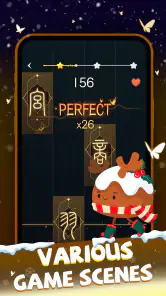
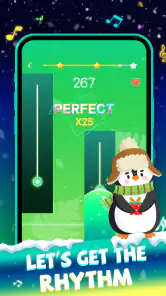
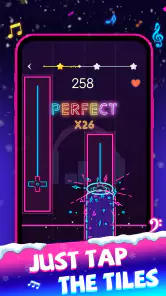
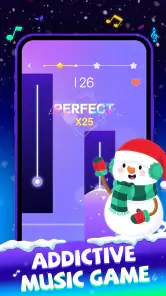
 Analysis by Frivlyz
My first impression of Beat Piano Dance:music game is that it aims for a quick, music-led challenge rather than a deep piano lesson. You follow the rhythm by tapping tiles as they arrive, so the appeal is immediate: listen, watch, react. I’d reach for it during a short break or when I want a simple game that feels more lively than tapping through a puzzle. The basic idea is easy to grasp, though getting comfortable with faster or denser sequences takes attention and practice.
Where the game stands now
This is a free music game from XGAME STUDIO, and its current version is 2.0.0. It has been available since May 7, 2023, and its broad reach—over 50 million installs and an average rating of 4.5 from around 288,000 ratings—suggests that the pick-up-and-play format has found a large audience. It is rated Everyone, so it is suitable for a general audience, although the pace and visual activity may still feel more comfortable for some players than others.
The purchase model is worth knowing before you settle in: the game is free to start, with optional in-app purchases ranging from $2.99 to $24.99 per item. I’d treat that as a reason to check what is offered before spending, especially if you are downloading it for a child or prefer games with a one-time cost. The game runs on Android 6.0 or later, which makes it accessible on a wide range of Android devices.
Our Stories on Beat Piano Dance:music game
Mastering Art Puzzle: Strategies for Jigsaw Art Games
NewsDancing Road Turns Short Breaks Into a Test of Rhythm and Timing
NewsSuper Stylist Makes Every Outfit a Test of Taste and Patience
NewsDominoes on Your Terms: Who Should Play and Who Should Pass
NewsPokémon GO Makes the Familiar World Feel New
NewsChess.com Turns Rematches Into Rivalries, but Community Has Its Costs
NewsWhat its development tells players
The release date and current version give a useful snapshot of the game’s life so far, but they don’t by themselves tell me what has changed between versions. The practical point is that a player arriving now gets version 2.0.0, not an early release. I would avoid assuming that every element has been revised or that a particular update added a specific feature unless it is visible in the game itself.
That distinction matters for returning players too. If you last played an earlier build, the most reliable way to judge the present experience is to open the game and check the track selection, available options and menus directly. A version number can signal ongoing product development, but it is not a changelog, and it should not be treated as proof that a familiar song, mode or interface has changed.
The Gameplay Experience
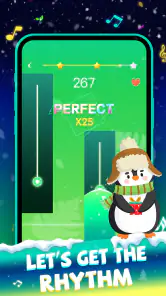
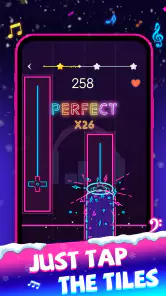
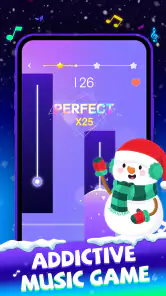
So, let's dive right in. From the moment you launch Beat Piano Dance:music game, you're greeted with a vibrant interface that immediately gets you in the mood to groove. The premise is simple yet addictive: tap the piano tiles as they appear on the screen, syncing your taps with the beat of the music. It's like Guitar Hero, but for your fingertips!
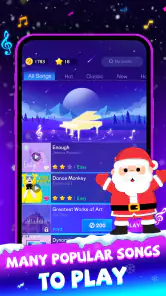
The game offers a variety of tracks to choose from, spanning different genres. Whether you're into pop, classical, or even electronic dance music, there's something for everyone. And let me tell you, the rush you get from nailing a particularly tricky section of a song is just exhilarating!
Gaming Stories You May Enjoy

Archery Battle 3D Review: Sharp Aiming, Unclear Feedback

Should You Switch to Geometry Dash Meltdown? A Test of Timing and Patience

Fidget Toys Trading・Pop It 3D: What Happens When the Game Stumbles

NBA LIVE Mobile Makes the Season the Main Event

Sonic Forces: PvP Battle Race - Speed and Strategy Combined

Unlocking the Secrets of Piano Game: Classic Music Song
Making short sessions feel worthwhile
The clearest everyday use is a spare few minutes on a commute, in a waiting room or between tasks—provided you can hear the music and keep your attention on the screen. I’d choose one track, play it through, then decide whether I want another attempt. That makes it easier to enjoy the rhythm challenge without turning a casual break into a long session. If you are playing somewhere quiet, headphones can make the beat easier to follow, while keeping the volume comfortable and staying aware of your surroundings.
For a new player, I’d focus on timing before chasing a high score. Watch the approaching tiles and listen for the pulse rather than trying to react to every visual detail at once. On a difficult passage, it can help to replay the same track and notice where your taps drift: are you consistently early, late, or losing the beat when several tiles arrive close together? That small bit of self-checking makes retries feel more purposeful than simply tapping faster.
There is also a practical trade-off in the piano-tile format. Its simple input makes it approachable for people who don’t play an instrument, but it is not a substitute for learning piano technique or reading music. The challenge is coordination and rhythm inside the game’s rules. If your goal is to practice an actual instrument, a lesson app or a real keyboard will be a better fit; if you want a compact reflex game with music at its center, this format makes more sense.
Features That Stand Out
One of the standout features of this app is its customization options. You can personalize your game experience by selecting different themes and backgrounds, making each play session feel fresh and exciting. Plus, the app is regularly updated with new songs, ensuring you always have something new to play.
Another cool feature is the multiplayer mode. Yes, you read that right! You can challenge your friends or even random players from around the world to see who can score the highest. It's a fantastic way to add a competitive edge to your gaming sessions.
How to get more from the options
Themes and backgrounds are worth treating as comfort settings, not just decoration. If a busy screen distracts you from incoming tiles, try a calmer visual choice; if you find the display too plain, a different theme can make repeat sessions feel less repetitive. The useful question is whether a change helps you read the playfield. In a timing game, visual clarity matters more than making the screen look elaborate.
Multiplayer makes the game more appealing when you want a reason to return to a track, but it shifts the goal from personal timing practice to comparison. I’d use solo play to learn a song’s rhythm first, then take a score challenge to friends or other players when I feel ready. That order can make competition more fun and less discouraging. If you mainly want a relaxed, private music game, the social side is optional rather than the main reason to install it.
People often wonder whether this kind of game is suitable for a quick, casual player or only for rhythm-game fans. In my view, the basic tapping makes it accessible to newcomers, while the appeal for experienced players depends on whether they enjoy improving through repeated attempts. It is a better match for someone who likes short challenges and score comparisons than for someone seeking a long campaign, detailed music theory or a full instrument simulator.
Graphics and Sound
Now, let's talk about the aesthetics. The graphics are sleek and modern, with a colorful palette that keeps your eyes glued to the screen. The animations are smooth, ensuring that your gaming experience is never interrupted by lag or glitches.
And the sound quality? Absolutely top-notch. The tracks sound crisp and clear, making sure that every note hits just right. It's evident that the developers put a lot of thought into the audio aspect of the game, and it pays off in spades. The combination of stunning visuals and impeccable sound design truly elevates the entire experience.
Small practical choices that affect play
Because the music and visual cues work together, I would set up a session before starting rather than adjusting everything mid-song. Put the phone where you can see the whole play area, use a grip that leaves your tapping fingers free, and avoid playing while walking or doing something that needs your attention. Those are ordinary habits, but they reduce the chance that a missed tile comes from an awkward posture rather than the challenge itself.
Sound is central to the rhythm, so a muted session may be less satisfying if you rely on listening to keep time. If you need to play quietly, headphones are a sensible option; if you are sharing a room, keep the volume considerate. I also wouldn’t judge a track only by whether I like its genre: a familiar sound can make a rhythm easier to anticipate, while an unfamiliar one may be a useful test of how well I follow the beat instead of relying on memory.
Compared with rhythm games that ask you to follow more complex patterns or use extra controls, piano-tile play keeps the physical interaction simple. That is its strength when I want something immediate on a phone, but it also limits the sense of musical control. A dedicated rhythm title with more elaborate inputs may suit players looking for a deeper challenge, while a music streaming app is the obvious choice if listening—not tapping—is the point.
What to keep in mind as you play
The biggest limitation is that a straightforward tile-tapping loop can become repetitive if you do not enjoy replaying songs to improve. Different tracks and visual themes can help, but they do not change the basic interaction. I would skip it if I wanted a substantial story, a quiet game that works equally well without sound, or a structured course that teaches piano. Those expectations are different from what this kind of music game is built to provide.
It is also sensible to decide your spending boundary early. Since optional purchases are available at several price points, a free start does not necessarily mean every choice inside the game is free. I’d look at the purchase prompt carefully and avoid buying anything simply because I want to continue a session quickly. For a family device, that conversation is especially useful: make sure the person playing knows that optional purchases cost money.
What returning players and newcomers should watch
If you are returning after time away, compare the current menus and track choices with what you remember rather than expecting the version number to explain the changes. For new players, the more useful test is whether the game’s core loop remains enjoyable after several rounds. Notice whether you want to retry because you can hear a timing mistake and improve it, or whether the repetition already feels like a chore. That is a better guide to long-term fit than a first-minute impression.
For someone choosing between this and another music game, I’d make the decision by the kind of session they want. Beat Piano Dance is the more natural pick when quick taps, familiar rhythm-game pressure and occasional competition sound appealing. A piano-learning app is better for deliberate musical instruction, while a more involved rhythm game may be preferable if you want broader controls or a steeper skill curve. The best alternative depends on that goal, not simply on which app has the larger song list.
Graphics and Sound
Now, let's talk about the aesthetics. The graphics are sleek and modern, with a colorful palette that keeps your eyes glued to the screen. The animations are smooth, ensuring that your gaming experience is never interrupted by lag or glitches.
And the sound quality? Absolutely top-notch. The tracks sound crisp and clear, making sure that every note hits just right. It's evident that the developers put a lot of thought into the audio aspect of the game, and it pays off in spades. The combination of stunning visuals and impeccable sound design truly elevates the entire experience.
Final Thoughts
In a world filled with countless mobile games, Beat Piano Dance:music game manages to stand out by offering a unique and engaging gameplay experience. It's perfect for anyone looking to kill some time while also enjoying some fantastic music. Whether you're a seasoned rhythm game veteran or a newbie looking for some fun, this app has something to offer.
So, what are you waiting for? Give Beat Piano Dance:music game a try and let your fingers dance to the beat. Trust me; you won't be disappointed!
Beat Piano Dance:music game Pros and Cons
Pros
- Engaging rhythm gameplay
- Variety of music tracks
- User-friendly interface
- Responsive controls
- Offline play available
Cons
- In-app purchases
- Ads can be intrusive
- Limited free content
- Occasional bugs
- High battery usage
Frequently Asked Questions
What is Beat Piano Dance:music game?
Beat Piano Dance:music game is a rhythm-based mobile game where players tap on the screen to the beat of popular music tracks. It combines elements of piano tiles and dance music, offering an engaging experience for music lovers. The game challenges players to follow the rhythm and achieve high scores by accurately tapping the tiles as they appear.
What are the main features of Beat Piano Dance:music game?
Beat Piano Dance:music game features a wide variety of music tracks ranging from classical to contemporary hits. The game offers multiple difficulty levels, allowing both beginners and advanced players to enjoy the game. Additionally, it provides a visually appealing interface with vibrant graphics and smooth animations that enhance the overall gaming experience.
Is Beat Piano Dance:music game free to download and play?
Yes, Beat Piano Dance:music game is free to download and play. However, it may contain in-app purchases that allow players to unlock additional features, remove ads, or access exclusive music tracks. Players can enjoy the game without spending money, but these optional purchases can enhance the gameplay experience.
Can I play Beat Piano Dance:music game offline?
Beat Piano Dance:music game requires an internet connection to download music tracks and access certain features. However, once the music tracks are downloaded, players may have the option to play the game offline. It's recommended to check the app's settings or description for detailed offline capabilities.
What platforms is Beat Piano Dance:music game available on?
Beat Piano Dance:music game is available for download on both Android and iOS platforms. Players can find the game on the Google Play Store for Android devices and the Apple App Store for iOS devices. It is compatible with most smartphones and tablets, offering a smooth experience across different devices.


