

Baby Panda's Emergency Tips
- Reviews
- 3.7
- Version
- 8.72.06.01
- Installs
- 50,000,000+

Screenshots


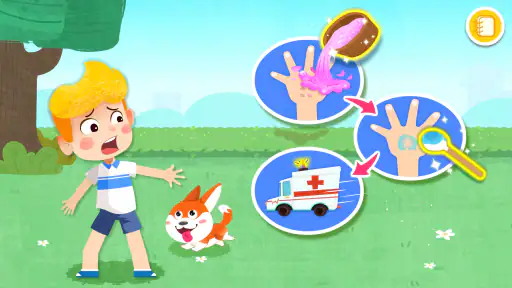
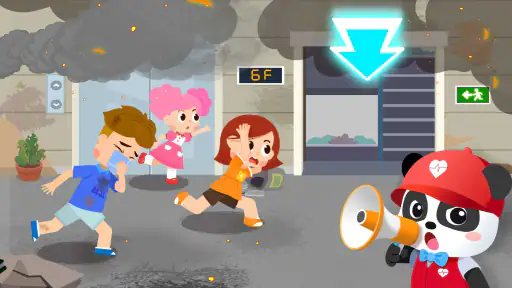
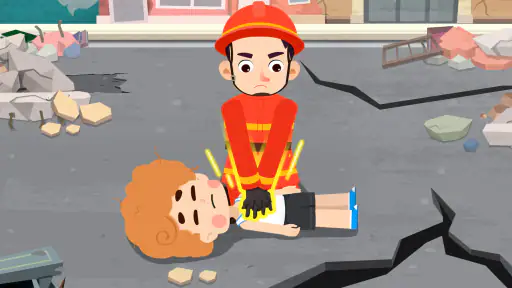



 Analysis by Frivlyz
When it comes to educational apps for kids, finding one that's both engaging and informative can be a bit like searching for a needle in a haystack. But, let me tell you, Baby Panda's Emergency Tips is one of those rare finds that hits the sweet spot perfectly! If you have little ones at home, this app is a must-have. Let's dive into what makes it stand out from the crowd.
Small goals make a useful first step
What I value most in an emergency-safety game is whether a child gets to make a choice rather than simply watch a warning play out. The appeal here is that the learning is framed around situations a young player can follow, with actions to try and a clear sense of what the immediate task is. That gives a parent an easy opening for a short conversation: “What would you do first?” It is a more approachable starting point than asking a child to memorize a long list of rules.
I would use it in brief, supervised sessions rather than treating it as a course to finish in one sitting. A few minutes gives a child time to meet a situation, consider the available actions, and explain their choice in their own words. If they rush through, I would pause the game and ask them to describe what they noticed. That small change turns tapping into a chance to check understanding, without making play feel like a test.
The early goals also suit children who are not ready for dense reading or formal instruction. A parent can sit beside them and provide context where needed, especially if a topic feels unsettling. I would avoid presenting any emergency scenario as a promise that a child can handle a real crisis alone. The useful message is that they can learn to recognize a problem and seek help; adults and emergency services remain essential.
Interactive Learning at Its Best
From the moment you open Baby Panda's Emergency Tips, you're greeted with a vibrant and friendly interface that's sure to catch the eyes of any child. The app is designed to teach kids about safety and emergency response in a playful manner. It's like having a mini first-aid course right in your pocket, but way more fun!
The app uses interactive scenarios to simulate different emergencies, from minor cuts and bruises to more serious situations like fires. Kids can tap, swipe, and drag their way through each scenario, learning what to do step-by-step. I was genuinely impressed by how intuitive and user-friendly the app is – it's clear that a lot of thought has gone into making it accessible for younger users.
Learning signals matter more than collecting rewards
For me, the best sign of progress is not how quickly a child advances, but whether they can explain why a particular action makes sense. A child may remember the order of taps in a familiar activity without understanding when the same idea applies outside the game. After a scenario, I would ask what made the situation dangerous, who they should tell, or what they would do if an adult were nearby. Those questions help distinguish recognition from real understanding.
Gaming Stories You May Enjoy

Dancing Road Turns Short Breaks Into a Test of Rhythm and Timing

Super Stylist Makes Every Outfit a Test of Taste and Patience

Dominoes on Your Terms: Who Should Play and Who Should Pass

Pokémon GO Makes the Familiar World Feel New

Chess.com Turns Rematches Into Rivalries, but Community Has Its Costs

Archery Battle 3D Review: Sharp Aiming, Unclear Feedback
There is a useful trade-off in turning safety topics into playful tasks. Friendly characters and rewards can make a difficult subject less intimidating, but they can also make the child focus on finishing the activity. I would treat praise and stickers as encouragement, not proof that a lesson has been mastered. If a child gives an uncertain answer, repeating the scene slowly and talking through it is more valuable than pushing for a perfect run.
One practical tip is to connect a game scenario to a calm, ordinary moment at home. For example, while discussing a minor injury, a parent can point out where the family keeps basic supplies and explain that a grown-up should be told. The point is not to recreate an emergency or make a child anxious; it is to give the lesson a familiar anchor. That kind of gentle follow-up is where an educational game can become more useful than screen time alone.
Engaging Content and Real-Life Skills
One of the things I love about this app is how it incorporates real-life skills into its gameplay. Kids aren't just passively watching animations; they're actively participating in each scenario. For example, in one scenario, children learn how to call 911 by actually typing the number on a virtual phone. It's these small details that make a big difference.
The app also includes mini-games that reinforce the lessons learned in each scenario. These games are not only fun but also serve as a great way to ensure that the information sticks. Plus, with the cute and lovable character of Baby Panda guiding them, kids are more likely to engage with the content and absorb the lessons being taught.
How the challenge and pace feel
The experience is best approached as guided practice, not as a test of speed or toughness. Emergency topics carry different levels of seriousness, and a younger child may be comfortable with one kind of situation but uneasy about another. I would let the child’s reaction set the pace: stay with a lighter activity if they are engaged, and stop to talk if a scene raises concerns. There is no benefit in making a child continue simply to reach another reward.
That makes the game a better fit for shared play than for unsupervised learning about safety. A parent can explain that an on-screen choice is part of a simplified scenario, while real emergencies can be unpredictable and require adult help. This distinction is especially important when a child is learning about contacting emergency services. Practising a number in a virtual activity is not a substitute for knowing the local emergency number, understanding when it is appropriate to use it, or following a caregiver’s instructions.
Compared with a children’s video about safety, the interactive format gives a child a chance to make a choice and see the next part of the activity. Compared with a real first-aid class or guidance from a trusted adult, though, it is necessarily limited: it cannot assess a child’s understanding in the way a person can, and playful actions are not hands-on training. I see it as a conversation starter and reinforcement tool, not a replacement for practical instruction.
The Power of Positive Reinforcement
Another standout feature of Baby Panda's Emergency Tips is its use of positive reinforcement. Each time a child completes a task or scenario correctly, they're rewarded with virtual stickers and praise. This not only boosts their confidence but also encourages them to keep learning and exploring within the app.
As a parent, I appreciate how the app promotes independence and critical thinking. It's reassuring to know that while kids are having a blast playing, they're also gaining valuable skills that could potentially save lives.
Where it fits into an ordinary day
A realistic time to bring this game out is a quiet stretch after school or while a caregiver is nearby at home, rather than during a moment when a child is already upset or tired. I would sit with the child for one scenario, let them make the choices, and then talk about what they would do if the situation happened in real life. If they start tapping just to get through it, that is a sign to take a break instead of turning the activity into a chore.
It can also be a useful way to introduce safety language before a family outing or a change in routine. A parent might discuss whom the child should approach if separated in a public place, or which trusted adult to ask for help. The game should not be assumed to cover every situation a family cares about, so I would use it as a prompt and add household rules that match the child’s age and circumstances. This makes the session personal without expecting the app to serve as a complete safety plan.
BabyBus is the developer, and the game is listed as an educational title for everyone. It is free to download, with optional in-app purchases priced from $0.99 to $2.49 per item. I would keep that in mind if a child uses the device independently: explain that optional purchases are not part of the safety lesson and manage purchasing settings on the device as appropriate. The game’s free entry point makes it easy to try, while the presence of paid items is a reason for parents to stay involved rather than hand over a device without checking how it is being used.
Who will enjoy it, and who may prefer another route
I think it is most suitable for a young child who likes guided activities, responds to friendly characters, and benefits from seeing a choice play out. It can also help a parent who wants a concrete way to begin talking about safety without starting with a frightening story or a lecture. The strongest use is shared: the child explores, and the adult supplies context, answers questions, and makes clear which real-world rules matter in their home.
It may be the wrong choice for a child who becomes worried by emergency themes, even when those themes are presented in a playful style. I would stop if the scenarios cause distress, and use a calmer conversation or age-appropriate material instead. Older children who want detailed first-aid guidance may find a child-focused game too simple; a trusted adult, a suitable class, or reliable guidance designed for their age would be a better next step. And if a family is looking for a broad collection of general educational activities rather than safety-focused play, a wider learning app may fit better.
The game’s audience is broad on paper, but children differ greatly in reading ability, attention span, and comfort with pretend emergencies. A parent can make it more accessible by sitting close, reading or explaining when needed, and stopping between activities to check how the child feels. I would not use a child’s ability to complete a task as evidence that they can respond correctly under pressure. Practice can build familiarity, but it cannot remove the need for supervision and real-world guidance.
What to know before making it part of a routine
The title’s public figures offer a quick sense of its reach, but they do not tell a parent whether it will suit a particular child. It has an average rating of 3.7 from around 18,000 ratings, with more than 50 million installs and 131 written reviews. I would use that as background rather than as a guarantee of quality for every family. The most useful test is whether your child stays engaged and can talk about the ideas afterward.
It was released on July 28, 2020, and its current version is 8.72.06.01, with Android 5.0 as the minimum operating system. Those details matter if you are checking whether an older device can run it. For a family deciding whether to install, I would also think about the setting: use a device that the child can handle comfortably, stay nearby during safety-themed play, and avoid treating an app session as a substitute for direct supervision.
One question parents often have is whether a child can use it alone. The controls may be approachable for young players, but I would still recommend an adult nearby because the subject calls for explanation and reassurance. Another is whether the game makes a child ready for emergencies. My answer is no app can do that by itself; this one can help start age-appropriate discussions and let children rehearse simple ideas in a playful setting, while real preparedness depends on adults, household plans, and appropriate instruction.
It is also worth setting expectations about replay. A child may enjoy repeating familiar activities, but repeating a sequence is not the same as learning how to adapt when circumstances change. Rather than asking them to replay everything, I would revisit the parts they found confusing and ask them to explain the choices in their own words. That keeps repetition purposeful and helps the parent notice where a real conversation is needed.
A measured verdict on its progression
In conclusion, Baby Panda's Emergency Tips is more than just a game; it's a learning tool that combines fun with essential safety education. Whether you're looking to teach your kids about basic first-aid or simply want an app that entertains while educating, this app is a fantastic choice. I wholeheartedly recommend giving it a try – you won't be disappointed!
My recommendation comes with one important qualification: I would use it as a starting point, not as a stand-alone safety curriculum. Its playful tasks, guided scenarios, and positive feedback give children reasons to stay involved, while an adult can turn each activity into a clearer lesson about asking for help. The game’s progress is most meaningful when a child can explain an idea, not merely collect a reward or repeat a familiar action.
For a family with a young child who enjoys interactive learning, the free download makes it reasonable to try together and see whether the tone works for them. If the child is uncomfortable, needs more advanced instruction, or expects a comprehensive emergency course, I would choose a different resource or rely on direct guidance instead. Used at the right pace, with a parent nearby and realistic expectations, it can be a cheerful way to open conversations that are important well beyond the screen.
Baby Panda's Emergency Tips Pros and Cons
Pros
- Engaging educational content for kids
- Interactive and user-friendly design
- Promotes safety and awareness
- Colorful and appealing graphics
- Available for free on Android and iOS
Cons
- Contains in-app purchases
- Ads might be intrusive for kids
- Limited content in the free version
- Requires internet connection
- May not suit older children
Frequently Asked Questions
What is Baby Panda's Emergency Tips app about?
Baby Panda's Emergency Tips is an educational app designed for children to learn important safety and emergency skills. Through interactive games and engaging scenarios, the app teaches kids how to respond to various emergency situations such as fires, earthquakes, and other natural disasters. It's a fun and informative way for children to gain confidence in handling unexpected events, making it a valuable educational tool for both kids and parents.
Is Baby Panda's Emergency Tips suitable for all age groups?
Baby Panda's Emergency Tips is primarily targeted at young children, typically aged 3 to 8 years old. The app uses age-appropriate language and engaging animations to ensure that the content is easily understandable for young minds. While older children might find it less challenging, the foundational safety skills taught can be beneficial for kids of all ages. Parents can also participate to reinforce learning.
Does Baby Panda's Emergency Tips require an internet connection to use?
No, Baby Panda's Emergency Tips does not require a constant internet connection to function. Once the app is downloaded and installed, all its features and content are available offline. This makes it convenient for use in situations where internet access might be limited or unavailable, such as during travel or in emergency preparedness drills.
Are there in-app purchases or advertisements in Baby Panda's Emergency Tips?
Baby Panda's Emergency Tips is designed to be a safe environment for children, and it does not contain any in-app purchases or advertisements. Parents can rest assured that their children can learn and play without interruptions or the risk of accidental purchases. The app provides a seamless experience focused solely on educational content.
How can parents ensure their children are using Baby Panda's Emergency Tips effectively?
Parents can enhance their children's learning experience with Baby Panda's Emergency Tips by guiding them through the app's activities and discussing the lessons learned. Encouraging children to ask questions and role-playing different emergency scenarios can reinforce the app's teachings. Additionally, setting aside regular time for app usage can help children retain the safety skills they learn.


