

Avatar World ®
- Reviews
- 4.7
- Version
- 1.145
- Installs
- 100,000,000+

Screenshots



 Analysis by Frivlyz
For a household sharing one phone or tablet, the appeal of Avatar World ® is easy to understand: it gives a player a bright, make-believe space to shape at their own pace. I’d treat it as a creative role-playing game rather than a game with a defined finish line. That distinction matters when deciding whether it suits a child who wants to invent characters and scenes, or someone looking for clear goals, competitive matches, or a story that steadily directs every next move.
A game that can fit into a shared-device routine
Picture a quiet stretch before dinner: one child chooses an avatar and arranges a scene, then hands the device to a sibling who wants to make a different character. That kind of short, informal play is where this style of game can work well. There is no need to turn every session into a long campaign; a player can focus on one small creative idea and stop when the household needs the device back.
On a shared screen, I’d agree on a simple turn-taking routine before anyone starts. A child can show what they made, while the next player gets a chance to explore or customize something of their own. This is not a claim that the game provides separate household profiles or built-in turn controls; it is just a practical way to keep a shared device from becoming a source of arguments. If several people care about preserving their own creations or progress, check how the game behaves on the device before relying on one shared play space.
Our Stories on Avatar World ®
Avatar World ®: Crafting Identity in the Digital Realm
NewsUnleash Your Inner Stylist with Monster High™ Beauty Salon
NewsHow Hero Wars: Alliance Masters Mobile Gaming Strategy
NewsHow Super Stylist Fashion Makeover Became a Mobile Gaming Sensation
NewsHow 'Children's Doctor: Dentist' Combines Fun and Learning
NewsDancing Road Turns Short Breaks Into a Test of Rhythm and Timing
NewsSet expectations before the first session
Avatar World is free to start, with in-app purchases priced from $0.99 to $14.99 per item. I’d mention that clearly before handing over a device, especially if a child can make purchases through the household’s usual app-store setup. A useful boundary is to agree that spending needs an adult’s permission, rather than treating the game’s free entry point as a promise that every item is free.
There is also a useful distinction between playing creatively and expecting a conventional role-playing progression. The game’s focus is on avatars and imaginative world play; it may not satisfy someone who wants a lengthy quest chain, tactical battles, or a tightly plotted campaign. If that is what a player means by “role-playing game,” a story-led RPG will likely be a better fit. If they enjoy making up their own scenes, the open-ended approach is a strength rather than a missing objective.
Why it works best with a little coordination
I would keep the first visit small: choose an avatar, look around, and let the player decide what they want to do next. The range of choices can be exciting, but starting with one simple goal—such as changing a character’s look or exploring one place—helps prevent the menus and possibilities from feeling like homework. Once the player knows where they like to spend time, they can broaden the session naturally.
For a parent or caregiver, a quick check-in after play can be more useful than asking whether the child “finished” anything. Ask what character they made or what scene they imagined. That gives you a sense of how they are using the game without expecting a score or a completed level. It also makes it easier to notice if a player is getting frustrated by choices or asking repeatedly for paid items, and to adjust the session accordingly.
Gaming Stories You May Enjoy

Super Stylist Makes Every Outfit a Test of Taste and Patience

Dominoes on Your Terms: Who Should Play and Who Should Pass

Pokémon GO Makes the Familiar World Feel New

Chess.com Turns Rematches Into Rivalries, but Community Has Its Costs

Archery Battle 3D Review: Sharp Aiming, Unclear Feedback

Should You Switch to Geometry Dash Meltdown? A Test of Timing and Patience
As a role-playing game from Pazu Games, it sits closer to a digital dollhouse and dress-up experience than to many combat-heavy or progression-focused RPGs. That comparison is useful because the fun comes from personal choices and make-believe, not from mastering a difficult system. The game is rated Everyone, which can help families begin an age-appropriateness conversation, but I would still make the decision based on the child and the household’s expectations rather than treating an age label as a substitute for supervision.
It is also worth remembering that a game can be enjoyable without being the right match for every child. A player who prefers a clear challenge, fast action, or a strong sense of achievement may lose interest when the fun depends on their own ideas. And in a shared-device home, anyone who expects separate personal spaces should check that arrangement before making the game part of a regular routine. Those are not reasons to dismiss it; they are the practical trade-offs I would consider before downloading.
Creating Your Own World
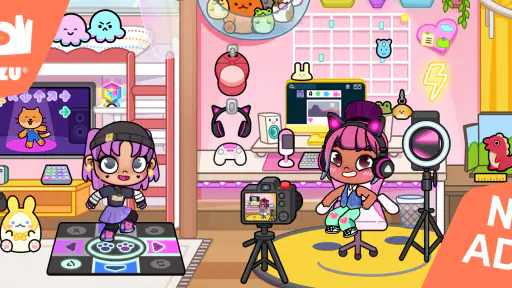
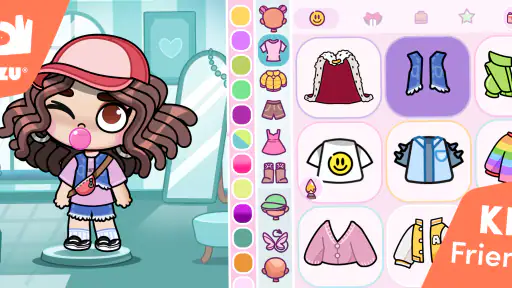
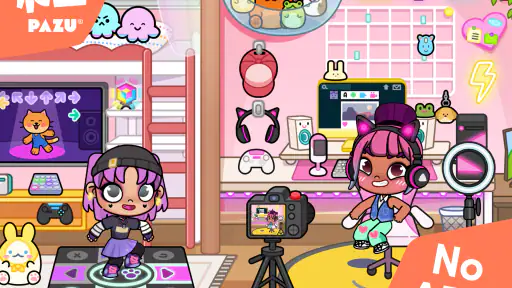
First off, let's talk about the customization options. Avatar World ® offers a mind-boggling array of choices. You can personalize everything from your avatar's hair color to the shape of their shoes. Want to give your character a green mohawk? Go for it! The app truly shines here, providing a level of detail that makes your creation feel unique and personal. It's like having a digital dress-up doll that you can tweak and adjust until it perfectly suits your style.
Exploring the Universe
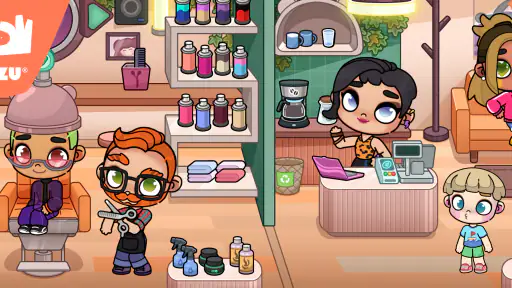
Once your avatar is ready, it's time to dive into the world. The app offers various realms to explore, each with its own unique vibe. Whether you're in a bustling city full of skyscrapers or a tranquil forest filled with magical creatures, there's always something new to discover. The graphics are vibrant and engaging, pulling you right into the action. I found myself losing track of time as I wandered through these beautifully crafted landscapes.
Interactivity and Community
One of the coolest features is the interactive element. You can meet other players, join quests, and even participate in community events. It's a social experience as much as it is an exploratory one. This interactivity adds a whole new layer to the game, making it feel like more than just an app on your phone. It's a community, and you're a part of it.
Another aspect worth mentioning is how the developers keep the content fresh. Regular updates mean there are always new adventures to be had and new items to collect. It's clear that the team behind this app is passionate about keeping the game lively and engaging for everyone.
Now, I won't lie, the app can get a bit overwhelming at first. With so many options and things to do, you might feel like you're being pulled in a thousand different directions. But stick with it! Once you get the hang of things, it becomes incredibly rewarding.
Final Thoughts
In conclusion, Avatar World ® is a fantastic app for anyone looking to escape into a world of their own making. It's perfect for creatives who love to design and explore. Plus, the social aspect adds a layer of depth that keeps you coming back for more. So if you're ready to embark on a new adventure, give it a try. Who knows, you might just find your new favorite pastime!
What to expect before you download
The game has a 4.7 average from around 4.1 million ratings, and it has been installed over 100 million times. Those figures show that it has reached a huge audience, but they do not tell you whether its relaxed, self-directed play will suit your household. I’d use them as a sign that it is widely tried, not as a guarantee that every player will enjoy the same parts of it.
It is free to play and rated Everyone, with a minimum Android requirement of version 6.0. The current version is 1.145, and the game was released on December 12, 2022. If you are choosing between a phone and a tablet, I’d favor whichever screen the player can comfortably navigate and share; the customization is more enjoyable when small visual choices are easy to inspect.
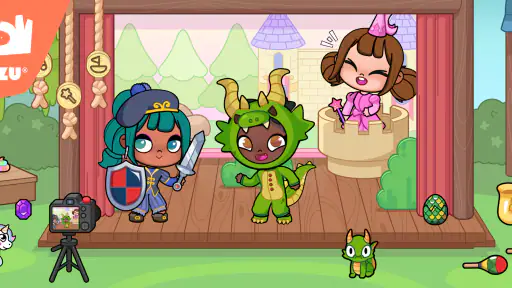
One practical tip is to let a new player explore before trying to optimize anything. Rather than asking them to build the “best” character, invite them to make a character for a particular pretend situation—getting ready for an outing, visiting a favorite kind of place, or inventing a short story. That gives the many options a purpose and helps a child discover whether the creative loop itself is enjoyable.
Choosing between this and other role-playing games
Compared with conventional RPGs, where progression often means completing missions, improving abilities, and overcoming harder encounters, this experience is more about visual expression and imagined situations. Compared with a basic dress-up app, its appeal is that character creation sits alongside places to explore and scenes to invent. That middle ground is its identity: more room for make-believe than a single outfit screen, but less direction than a quest-driven adventure.
That makes it a strong choice for a child who enjoys dressing characters, narrating what they are doing, or turning a few minutes of screen time into a pretend story. It is less suited to a player who wants rules to master or a clear reward for every session. Adults may also find the open-ended pace less engaging if they expect conventional RPG systems. I would choose a more structured game for that audience instead of hoping this one will become something it is not.
Keeping play manageable at home
When a player gets stuck deciding what to do, a small prompt can help without taking over: “Who is your character visiting?” or “What could happen in this place?” A prompt like that turns browsing into a tiny creative task, but the player remains in charge of the story. If the answer is simply that they want to change clothes or look around, that is a perfectly reasonable session too.
For families sharing a device, separate expectations matter as much as the game itself. Agree who is playing, when the device needs to be returned, and how purchases will be handled. If one child wants a personal collection of creations and another expects the same, pause to check the actual on-device experience before promising that each will have a separate space. A shared routine can work, but it should not depend on account or save options you have not checked.
Families may also wonder whether the game is appropriate for a particular child just because it carries an Everyone rating. I see that rating as a helpful starting point, not a complete parenting decision. Consider the child’s maturity, your comfort with the play experience, and whether they can follow the household’s spending and turn-taking rules. Sitting nearby for an early session is a straightforward way to see what captures their attention and whether they need help navigating the choices.
Who will enjoy it—and who may not
I’d recommend giving it a try if the player likes inventing characters, changing their appearance, and making up stories without being told exactly what to do. It can also be a pleasant shared activity when an adult is willing to let a child explain their ideas instead of steering every choice. For a quick everyday session, it offers a low-pressure alternative to a game that demands a long run of focused play.
I would skip it if the main request is for competitive play, a difficult challenge, or a campaign with a strong beginning-to-end plot. I would also be cautious if the household is not ready to manage optional purchases or if players are likely to argue over a shared device. In those cases, a more structured game, a non-digital creative activity, or a clearly agreed device schedule may be a better match.
A household verdict
Avatar World ® is a free role-playing game from Pazu Games that puts customization and imaginative exploration ahead of strict objectives. It has a 4.7 average across around 4.1 million ratings, and its broad reach makes it an easy title for families to encounter, but what matters most is whether a player enjoys making their own fun. I see its strongest use as a flexible creative break, especially when adults set clear boundaries around turns and spending.
My recommendation is to approach it as an invitation to play pretend, not as a promise of a traditional RPG campaign or a private profile for every person using the device. Start with a short session, let the player explore one idea, and see whether they come away wanting to tell you about the character or scene they created. If they do, the game is probably landing in the way it is meant to; if they keep asking for more direction, a more goal-driven alternative may serve them better.
Avatar World ® Pros and Cons
Pros
- Diverse and customizable avatars.
- Engaging and interactive gameplay.
- User-friendly interface.
- Regular updates with new features.
- Offline mode available.
Cons
- In-app purchases can be costly.
- Requires a lot of storage space.
- Occasional app crashes.
- Limited customer support.
- Some features need internet access.
This Game in Other Languages
Frequently Asked Questions
What is Avatar World ® and what can I do with it?
Avatar World ® is an interactive app that allows users to create and customize their own unique avatars in a virtual world. You can personalize every aspect of your avatar's appearance, including hair, clothing, and accessories. Additionally, the app provides a platform for social interaction, enabling you to meet new friends, join virtual events, and participate in various activities within the app's dynamic environment.
Is Avatar World ® free to use, or are there in-app purchases?
Avatar World ® is free to download and offers a range of features at no cost. However, it includes optional in-app purchases that provide access to premium items, exclusive customization options, and special events. These purchases can enhance your experience, but they are not necessary to enjoy the app fully. Be sure to review the in-app purchase options carefully to manage your spending.
What devices are compatible with Avatar World ®?
Avatar World ® is compatible with both Android and iOS devices. It requires Android version 6.0 or higher, or iOS version 11.0 or later. Make sure your device meets these requirements before downloading to ensure smooth performance and access to all features. Regular updates may also be necessary to maintain compatibility with the latest operating systems.
How can I ensure my child’s safety while using Avatar World ®?
Avatar World ® is designed with safety features to protect users, especially younger audiences. The app includes parental controls, privacy settings, and content moderation to ensure a safe environment. Parents can monitor their child's activity, limit in-app interactions, and set spending limits on purchases. Always review these settings to ensure a secure and appropriate experience for young users.
What should I do if I encounter technical issues with Avatar World ®?
If you experience technical issues while using Avatar World ®, first ensure your app is updated to the latest version. Restart your device to see if the problem persists. If the issue continues, visit the app's official support page for troubleshooting tips or to contact customer service. Providing detailed information about the issue will help in resolving it efficiently.


