

Arrow Crosswords
- Reviews
- 4.7
- Version
- 2.0.19697
- Installs
- 10,000+

Screenshots





 Analysis by Frivlyz
I like the basic idea behind Arrow Crosswords: clues sit inside the grid, and their arrows show where each answer belongs. That turns the familiar crossword into a more spatial kind of word puzzle. It suits quick, focused play, though it asks you to enjoy working out direction and placement as well as vocabulary. My overall view is that it’s a welcoming option for casual solvers, not necessarily a replacement for a newspaper-style crossword or a deep, feature-heavy puzzle app.
What the arrow layout changes
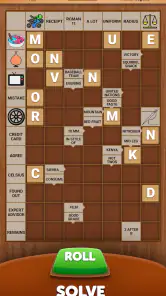
In an ordinary crossword, I scan a numbered clue list, find its entry and switch between across and down answers. Here, the clue is located at the start of its answer, with an arrow pointing along the cells to fill. That makes the board itself the main reference point. I find this especially useful when I want to keep my attention on one part of a puzzle rather than repeatedly moving between a grid and a separate list.
The arrangement also changes how I reason through uncertain answers. If a clue seems familiar but I’m not sure of the spelling, the arrow gives me a quick sense of how much space the answer has and where it runs. That can help narrow down possibilities before I commit. The trade-off is that the grid can feel busier than a simple blank crossword, because clues and answer paths share the same space. If you prefer a clean grid and a tidy list beside it, the layout may take a little getting used to.
A good fit for short, interrupted sessions
I can see this working well during a coffee break, while waiting for a ride, or in the few quiet minutes before bed. A practical approach is to start with clues you can answer immediately, then use those entries to give yourself more context for the uncertain ones. When I hit a snag, I’d rather pause and return with fresh eyes than tap a hint at once; a nearly completed section can make a clue easier without giving away the satisfaction of solving it myself.
The autosave described in the game is particularly suited to that stop-and-start rhythm. If you need to put your phone down halfway through, you can return to the puzzle instead of treating every session as a single uninterrupted challenge. That makes the game easier to fit around daily routines than a long sit-down crossword. It’s also a useful way to keep a puzzle going across several short breaks, although anyone who prefers a fresh, self-contained challenge each time may want to finish one board before starting another.
Where it sits among word games
Compared with a conventional crossword app, Arrow Crosswords puts more emphasis on navigating the board and reading clue directions. Compared with a word-search game, it asks for clue-solving rather than simply spotting a word already hidden in a jumble of letters. That middle ground gives it a distinct feel: there’s enough structure to make answers build on one another, but the arrow format keeps the solving process visually different from the standard numbered-grid routine.
That difference won’t suit everyone. If you mainly want a broad vocabulary quiz, an anagram game, or a large collection of themed puzzles, this particular format may feel narrow. Likewise, people who enjoy solving with pencil and paper may prefer the freedom of a printed crossword, where they can mark possibilities in the margins. I’d choose this app when I want a guided, self-contained grid on my phone, and choose a traditional crossword when I want more room to annotate or a different style of clue challenge.
Gaming Stories You May Enjoy

Dancing Road Turns Short Breaks Into a Test of Rhythm and Timing

Super Stylist Makes Every Outfit a Test of Taste and Patience

Dominoes on Your Terms: Who Should Play and Who Should Pass

Pokémon GO Makes the Familiar World Feel New

Chess.com Turns Rematches Into Rivalries, but Community Has Its Costs

Archery Battle 3D Review: Sharp Aiming, Unclear Feedback
Hints, grid choices and useful trade-offs
The hint button is a practical escape hatch, but I’d treat it as a tool for getting unstuck rather than a routine shortcut. Before using one, I’d check the arrow’s direction, count the available cells and revisit any crossing answers. That small sequence can reveal whether the issue is a forgotten word or a mistaken assumption about the entry. Saving hints for genuine dead ends preserves the puzzle’s challenge and helps you learn the game’s visual logic.
Being able to choose different grid sizes adds variety, but it also means the feel of a puzzle can change with the board. A smaller grid is an appealing choice when I have little time or want a lighter session; a larger one gives me more room to settle in, but can make it harder to keep every unfinished clue in mind. I’d pick a size to match my attention and available time rather than assuming that a bigger board is automatically better.
There are limits to what this format can offer. The central mechanic is the attraction, but it also defines the experience: once you understand arrow-led entries, the main pleasure still comes from solving clues within that same structure. Players who need a constant stream of new modes or extensive customization may want a broader puzzle collection. And although hints reduce the chance of being stuck indefinitely, they can take away some of the satisfaction if used too freely.
Getting Started with Arrow Crosswords
Downloading and installing Arrow Crosswords is a breeze. Available on both Android and iOS, it took me just a few minutes to get started. Once you open the app, you're greeted with a clean and intuitive interface that makes navigation a piece of cake. I was impressed right from the start with how user-friendly it is.
It’s a free word game from FunCraft Games, with optional in-app purchases ranging from $0.99 to $99.99 per item. The game is rated for Everyone, and its average rating is 4.7 from around 785 ratings; it has been installed over 10,000 times. Those figures suggest that it has found an audience, though I’d treat popularity as context rather than proof that its particular puzzle style will suit you. The current version is 2.0.19697, and it requires Android 7.0 or later. The purchase range is worth knowing before you play: the core download costs nothing, but paid options are available, so check what an item offers before buying and don’t assume you need to spend to enjoy solving.
A Unique Twist on a Classic Game
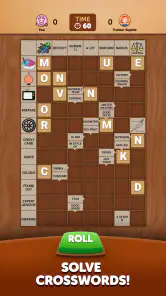
So, what's different about Arrow Crosswords compared to traditional crossword puzzles? Well, instead of giving you a list of clues, this app cleverly integrates them directly into the puzzle grid itself. Each clue is positioned at the start of the word it pertains to, marked by an arrow pointing in the direction you need to fill in. It's a small change that makes a big difference, adding an extra layer of strategy as you work through the puzzles.
That makes the first few minutes a useful time to learn the board rather than race through answers. I’d begin by tracing each arrow to its endpoint and noting how the available spaces constrain a possible word. When an answer doesn’t fit, it may be the guess that’s wrong, but it may also be that I’ve overlooked the direction or length of the entry. Treating the arrows as part of the clue—not just decoration—makes the solving feel more deliberate and cuts down on random tapping.
Challenging Yet Addictive
One of the things I love most about Arrow Crosswords is the wide range of difficulty levels. Whether you're a crossword novice or a seasoned pro, there's something here for everyone. The easy puzzles are perfect for a quick brain exercise, while the harder ones really make you think. I found myself getting hooked, spending hours trying to solve just one more puzzle. It's a fantastic way to keep your brain sharp and entertained.
For a new solver, the easiest puzzles are a sensible place to learn how the clue placement works before taking on tougher boards. More experienced crossword fans may appreciate the added spatial step, but should expect a different rhythm from solving a familiar newspaper grid. I wouldn’t use the game as a measure of vocabulary skill alone: success depends on reading the clue, finding its direction and using the surrounding entries as support. That combination is a strength when I want a change of pace, but it may frustrate someone who wants every challenge to hinge only on tricky wording.
A realistic way to use it is to open a puzzle during a short wait, solve the clues that come quickly, and leave the most ambiguous entries for later. Once a few answers are in place, crossings can offer useful confirmation. If I’m still stuck, I can decide whether a hint is worth using or whether I’d rather return another time. Because progress saves, there’s less pressure to complete the board in one sitting; that’s a small but meaningful convenience for a phone game.
Features That Enhance the Experience
The app comes with some nifty features that enhance the overall experience. For instance, there's a hint system that's perfect for when you're stuck. Just tap the hint button, and you'll get a nudge in the right direction. You can also choose between different grid sizes, which adds variety to the gameplay. Plus, the app's autosave feature means you can pick up right where you left off, even if you have to close the app suddenly.
Those options are most useful when chosen with a little intention. I’d use hints after checking the clue’s arrow and any letters supplied by answers that meet it, rather than reaching for help at the first pause. Grid size is another way to match the session to my day: a compact board when I’m likely to be interrupted, or a roomier one when I want to concentrate. Autosave makes either approach more forgiving, but it doesn’t remove the need to keep track of clues I’ve deliberately left unresolved.
One question many players have is whether this is a quick game or something that demands a long stretch of attention. In my view, it can be either: the arrow layout supports brief visits, while a harder puzzle can hold attention longer. Another practical question is whether a hint is essential. I see it as optional support, not the reason to play; trying crossings and checking answer length first keeps the challenge intact. And if you’re choosing between this and a traditional crossword, the deciding factor is whether you want clues embedded in the grid or prefer a separate clue list and more familiar conventions.
The game is best for people who enjoy word puzzles but want a visual variation on the standard crossword, especially casual solvers who appreciate being able to leave and resume. I’d also recommend it to experienced players curious about a different way to scan clues. I’d steer away anyone who dislikes on-screen grids, wants a wide range of unrelated word-game modes, or prefers paper’s open space for notes. For those players, a conventional crossword or a broader word-game collection is likely a better fit.
Final Thoughts
Overall, Arrow Crosswords is a fantastic app for anyone who enjoys word games and puzzles. It's simple to use, challenging, and incredibly fun. I thoroughly enjoyed my time with it, and I can see it becoming a staple on my phone. If you're looking for a new way to exercise your brain and have fun doing it, give Arrow Crosswords a try. You'll be glad you did!
My recommendation is therefore specific: try it if the arrow-based board sounds appealing and you want a crossword-style game that works around short breaks. The free entry point makes it easy to test that fit, while optional purchases are a reason to review any offer carefully rather than tap through automatically. It doesn’t replace every kind of word puzzle, and it needn’t. For the right player, its focused format is exactly the point; for someone seeking a much broader toolkit, another app will be more satisfying.
Arrow Crosswords Pros and Cons
Pros
- User-friendly interface and easy navigation.
- Wide variety of crossword puzzles available.
- Offline play mode for convenience.
- Regular updates with new puzzles.
- Hints and tips for challenging puzzles.
Cons
- Advertisements can be intrusive at times.
- Limited features in the free version.
- Occasional glitches in puzzle loading.
- No option for multiplayer gameplay.
- Requires frequent internet connection for updates.
Frequently Asked Questions
What is Arrow Crosswords and how does it work?
Arrow Crosswords is a mobile app that offers a unique twist on traditional crossword puzzles by incorporating arrows within the grid. These arrows serve as clues, guiding you to the correct answers. The app provides a variety of crossword puzzles with different difficulty levels, making it accessible for both beginners and seasoned crossword enthusiasts. Players can enjoy solving these puzzles at their own pace, with hints available if they get stuck.
Is Arrow Crosswords available for both Android and iOS?
Yes, Arrow Crosswords is available for download on both Android and iOS platforms. Users can find the app on the Google Play Store for Android devices and the Apple App Store for iOS devices. The app is designed to run smoothly on both operating systems, ensuring a seamless experience for all users regardless of their device type.
Does Arrow Crosswords require an internet connection to play?
No, Arrow Crosswords does not require a constant internet connection to play. Once the app is downloaded and installed, players can enjoy solving puzzles offline. This feature makes it convenient for users to play while traveling or in areas with limited internet access. However, an internet connection might be needed for downloading new puzzle packs or updates.
Are there any in-app purchases or ads in Arrow Crosswords?
Arrow Crosswords offers a free version with ads and optional in-app purchases. The ads help support the development of the app and provide users with access to free content. For those who prefer an ad-free experience, there is an option to purchase a premium version. Additionally, players can buy extra puzzle packs to expand their collection and enjoy more challenging puzzles.
Is Arrow Crosswords suitable for all ages?
Arrow Crosswords is designed to be family-friendly and suitable for players of all ages. The app offers puzzles of varying difficulty levels, making it ideal for children, teens, and adults. The intuitive interface and helpful hints ensure that even younger players can enjoy solving the puzzles. It's a great way for families to engage in a fun and educational activity together.


