

Applaydu Play & Discover
- Reviews
- 4.3
- Version
- 5.6.6
- Installs
- 10,000,000+

Screenshots






 Analysis by Frivlyz
When several people share a tablet or phone, a children’s game has to do more than keep one child busy: it needs to fit into the household’s routines. Applaydu Play & Discover is an educational game from Ferrero Trading Lux S.A. that brings stories and activities together in a playful setting. I’d consider it for a family looking for a child-focused option that can make a short stretch of waiting or downtime feel more engaging, rather than for a parent seeking a formal lesson plan.
Making a shared device work
Picture a sibling waiting while dinner is being prepared, or a child settling in for a quiet moment before a journey. A collection of different activities can be useful in these situations because the adult can offer a choice of play instead of having to find a new video or game each time. I’d treat the app as a shared activity to introduce together, then let the child explore within whatever device rules the family already uses.
On a shared device, a small routine helps: agree whose turn it is, keep the volume at a comfortable level, and put the tablet away when the agreed playtime ends. Those steps are more dependable than assuming an app will coordinate siblings or enforce household boundaries. If children take turns, an adult can also help them return the device to the same place and avoid disputes over whose activity comes next.
The game’s stories and varied activities make it more suitable for brief, flexible play than a single-purpose drill. That variety is also a trade-off: a child who wants to practise one school skill repeatedly may do better with a focused learning tool, while a child who responds to playful exploration may enjoy having different things to try. I’d use it as a companion to everyday learning, not as a replacement for reading, conversation, or hands-on play.
Setting expectations before play
Before handing over a family device, I’d open the app myself and see how its opening screens and activities feel to navigate. That first look is a practical way to decide whether a young child can use it comfortably and whether an adult should stay nearby. It also gives a parent a chance to set a clear boundary: this is time for the game, not permission to browse the rest of the phone or tablet.
Shared devices can blur the line between one child’s play and another person’s apps, accounts, or saved work. I’d keep the device’s usual household rules in place and supervise setup rather than assuming the game manages those boundaries. If a child is too young to handle transitions independently, playing together or staying within sight is a sensible choice. This is especially helpful when siblings have different levels of patience or need different amounts of help.
Age context matters as much as the game’s label. It is rated Everyone, but that does not mean every activity will suit every child equally or that all children will find the same controls easy. I’d judge fit by watching whether the child can follow what is happening, enjoys the pace, and can stop without a struggle. The game is free, has a 4.3 average from around 110,000 ratings, and has been installed over 10 million times; those figures suggest broad uptake, but they cannot tell a parent whether it fits their own child.
Gaming Stories You May Enjoy

Dancing Road Turns Short Breaks Into a Test of Rhythm and Timing

Super Stylist Makes Every Outfit a Test of Taste and Patience

Dominoes on Your Terms: Who Should Play and Who Should Pass

Pokémon GO Makes the Familiar World Feel New

Chess.com Turns Rematches Into Rivalries, but Community Has Its Costs

Archery Battle 3D Review: Sharp Aiming, Unclear Feedback
Coordinating play across ages
For households with siblings, I’d avoid making the app a prize that only one child can control for an open-ended stretch. A simple turn-taking plan can make shared play calmer: one child chooses an activity, then the other gets a turn choosing what to try. An adult can join in when a story or activity gives the children something to talk about, and step back when they are content to explore on their own.
It may also help to match the session to the moment. A quick activity can suit a short wait, while a story may work better when there is enough time to finish without rushing. I would not promise a child a particular feature before checking it on the device, and I would avoid using the game as a last-minute fix if a child is already tired or upset. These small expectations reduce the chance that stopping or sharing becomes the main event.
Applaydu is available at no charge, and its current version is 5.6.6, with Android 8.0 as the minimum operating system. For a parent considering an older household device, checking that it meets that requirement before planning a download is an easy way to avoid disappointment. I’d also let the app finish any initial setup before a trip rather than waiting until a child is ready to play in the car or at the airport.
A Whirlwind of Fun and Learning
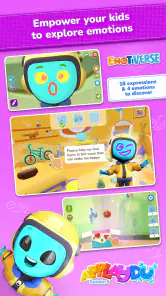
When I first installed Applaydu Play & Discover, I wasn’t quite sure what to expect. But wow, was I pleasantly surprised! This app is a colorful, interactive universe designed for kids between ages 4 and 9. It’s like stepping into a virtual playground where learning meets excitement. The app is packed with stories, games, and activities that not only entertain but also educate. Each activity is thoughtfully crafted to help develop cognitive skills, creativity, and even introduce kids to numbers and languages. As someone who’s always been a sucker for educational content, I found this approach incredibly refreshing.
Interactive Adventures Await
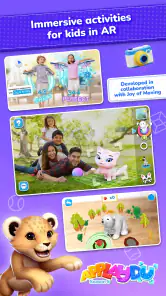
One of the standout features of Applaydu is its augmented reality experiences. Imagine your child’s favorite stories coming to life right in your living room. It’s like having a mini theme park at your fingertips! The AR elements are smooth and add a magical touch to the adventures, ensuring that your little ones are engaged and eager to learn more. Plus, the app encourages parent-child interaction, which is a wonderful way to bond while learning together.
Another aspect I loved is the customization options. Kids can create their own avatars and embark on personalized adventures. This level of engagement is crucial in making learning a personal journey, and it’s something Applaydu nails perfectly.
Safe Environment for Kids
In today’s digital age, safety is a top priority, and Applaydu takes this seriously. The app is ad-free and fully compliant with privacy standards, giving parents peace of mind. It’s a safe space where kids can explore without any unwanted interruptions or content. The developers have clearly put a lot of thought into creating a secure environment for children to thrive in.
Moreover, the app doesn’t require constant internet connectivity, so it’s perfect for those long car rides or flights. This offline capability ensures uninterrupted learning, which is a huge plus in my book.
In conclusion, Applaydu Play & Discover is more than just an app; it’s an educational tool that transforms the way kids learn and play. The blend of fun, safety, and learning makes it a must-have for any parent looking to enrich their child’s digital playtime. Give it a try, and watch your kids embark on countless adventures, learning and growing with every tap!
Where it fits among children’s learning games
Compared with a conventional alphabet or arithmetic app, this game takes a broader, less classroom-like route. That is a strength when a child is reluctant to practise through repeated questions: stories, play, and creative choices can make the experience feel less like a worksheet. The compromise is that a parent looking for a carefully sequenced curriculum or a clearly defined practice session may prefer a dedicated subject app. I would choose Applaydu for variety and shared discovery, not as a way to track a child’s progress through a particular school topic.
It is also different from simply putting on a children’s video. The interactive elements give a child something to do rather than only watch, and an adult can join the experience instead of treating it as background entertainment. Still, if the household needs a completely hands-off distraction, I would not assume this is the right fit; younger children may need help getting started, and interactive play can invite more conversation and participation than pressing play on a show.
Practical choices for parents
One useful approach is to try a short session at home before relying on the game away from home. That gives you time to see which activities hold your child’s attention, whether they need help, and how easy it is to move on when playtime ends. It also avoids introducing an unfamiliar app in a stressful moment, such as when everyone is already waiting to board or leave.
For travel, I’d prepare the device and check the experience before departure rather than treating offline use as something to discover on the road. Even when an app can be used without constant internet access, a parent benefits from knowing what is ready on that particular device. A charger, headphones if appropriate, and a clear end point are still part of a successful travel plan; the game does not replace those practical details.
When children use the same device at different times, it is worth agreeing whether they are exploring together or taking separate turns. The app’s personalized play can make a child feel invested in their own experience, but that can also make switching turns less appealing. I’d give each child a predictable opportunity to choose, and avoid promising that one child’s choices or progress will automatically carry over in a particular way. Keeping the arrangement simple is often better than trying to coordinate every detail through the game.
Parents may wonder whether the age rating alone is enough to decide. I would use it as a starting point, then consider the child’s reading comfort, patience, and ability to navigate a touch screen. A younger child may enjoy exploring alongside an adult, while an older child who wants more challenging or structured instruction could outgrow the style sooner. Watching one session is more informative than assuming the same experience will suit every child in a broad age group.
My household verdict
The best case for Applaydu is a family that wants a free, child-oriented mix of playful learning and stories, especially when an adult is willing to introduce it and occasionally join in. Its range gives it more flexibility than a narrowly focused practice game, and its interactive approach can turn a quiet shared-device moment into something children talk about together. I’d be more cautious if the priority is independent use with no supervision, strict lesson progression, or a guaranteed fit for every sibling.
With over 1,000 reviews and an Everyone content rating, it has a broad audience, but neither popularity nor a general age label should replace a parent’s own judgement. Ferrero Trading Lux S.A. has made a game that I can see working well as one option in a family’s digital routine, provided adults set the device rules and choose when it is useful. I’d try it for a relaxed at-home session first; if the child enjoys the stories and activities without turning every handoff into a negotiation, it may earn a place in the household rotation.
Applaydu Play & Discover Pros and Cons
Pros
- Engaging educational content for kids
- Colorful and intuitive interface
- Parental controls for safety
- No in-app purchases
- Supports offline play
Cons
- Limited content for older kids
- Occasional bugs and glitches
- Requires initial internet setup
- Lacks multiplayer options
- Not available for all devices
This Game in Other Languages
Frequently Asked Questions
What is Applaydu Play & Discover?
Applaydu Play & Discover is an engaging, educational app designed to stimulate creativity and learning in children through interactive adventures and activities. It offers a safe and ad-free environment for kids to explore various educational games, stories, and activities that enhance cognitive development and creative skills.
Is Applaydu Play & Discover suitable for my child’s age?
Yes, Applaydu Play & Discover is tailored for children aged 4 to 9 years old. The app includes age-appropriate content that adapts to the child's learning pace, ensuring that each activity is both educational and entertaining. It helps in the development of cognitive skills, creativity, and problem-solving abilities.
Are there any in-app purchases or ads in Applaydu Play & Discover?
No, Applaydu Play & Discover is completely free and does not contain any in-app purchases or advertisements. This ensures a safe and uninterrupted play experience for children, allowing parents to feel confident about their kids engaging with the app without the risk of unintended purchases or exposure to ads.
How does Applaydu Play & Discover ensure my child's safety online?
Applaydu Play & Discover prioritizes child safety by implementing strict privacy controls and not collecting any personal data. The app requires no internet connection once downloaded, further securing the child’s interaction within the app. This offline functionality prevents exposure to online risks and ensures a secure play environment.
Can Applaydu Play & Discover be used on multiple devices?
Yes, Applaydu Play & Discover can be installed on multiple devices, allowing children to continue their learning and play wherever they go. It is available on both Android and iOS platforms, making it accessible across various smartphones and tablets, which facilitates seamless transitions between different devices.


