

Airplane Game Flight Simulator
- Reviews
- 4.3
- Version
- 25.5.2
- Installs
- 10,000,000+

Screenshots
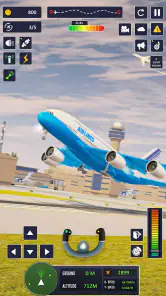
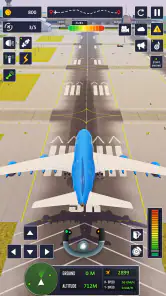
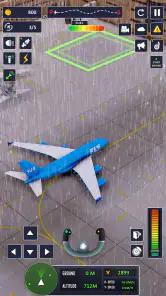
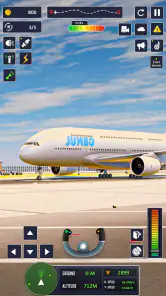
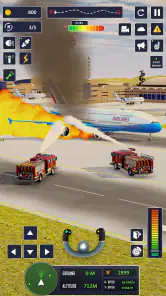
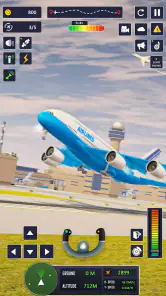
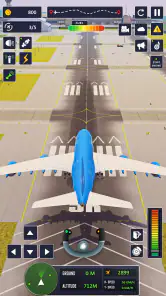
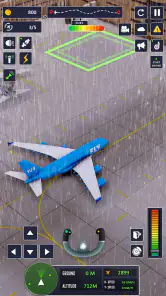
 Analysis by Frivlyz
When I decide whether an airplane game is worth keeping on my phone, I look beyond the promise of flying. I want to know whether it gives me a satisfying reason to take off, whether its controls suit a quick touch-screen session, and whether its version of piloting is meant to feel like an accessible game or a serious simulation. Those distinctions matter here: this is an adventure game built around aircraft, not a substitute for learning real aviation.
Airplane Game Flight Simulator is a free game from Arcadian Lab, and its appeal is easy to understand: it puts flying at the center rather than treating an aircraft as a brief detour in a larger open-world adventure. It has an average rating of 4.3 from around 49,000 ratings and more than 10 million installs, suggesting that plenty of players are interested in that focused premise. I would approach those figures as context, not a promise that every part of the game will suit every player.
Choose it for approachable flying, not pilot training
The key decision is what you want from the word “simulator.” If you are hoping to practice real flight procedures, study accurate aircraft systems, or build transferable piloting skills, this is not the choice I would make. Its role is entertainment: a phone-friendly way to enjoy the idea of flying and take on game-style challenges. That can be a strength, especially if detailed cockpit procedures would turn a casual game into homework.
I would also separate visual immersion from technical realism. A convincing cockpit or atmospheric engine sound can help a game feel involving, but neither proves that its handling matches a real aircraft. For me, the useful question is whether the controls feel understandable and whether a flight gives me a clear goal. Anyone comparing it with dedicated flight-simulation software should expect a different kind of experience, built for accessible play rather than deep procedural practice.
Where this game makes sense in an everyday routine
This sort of aircraft game is easiest to recommend to someone who enjoys takeoffs, landings, and mission-based play but does not want to commit to a long strategy campaign. A short break at home is a natural fit: I can pick it up when I have a little spare time, focus on one flight objective, then stop without needing to remember a complicated story. That is a more realistic use case than expecting it to replace a full console or PC simulator.
There is also a nice middle ground for players who like vehicle games but are tired of driving routes over familiar roads. Flying changes the perspective and makes steering itself the central attraction. If what you enjoy most is the sensation of controlling a vehicle and improving through repetition, the premise may hold your attention. If you need a strong narrative, social play, or a large world to explore on foot, I would look elsewhere rather than expecting an airplane game to provide those things.
One practical tip is to treat early flights as a chance to learn the control response instead of rushing for perfect results. On a touch screen, small inputs can be easier to manage than dramatic corrections; I would make modest adjustments, watch how the aircraft reacts, and then build confidence. That approach is useful in any mobile flying game, but it matters particularly when a player is switching from a controller or keyboard and assumes the same precision will carry over.
Gaming Stories You May Enjoy

Dancing Road Turns Short Breaks Into a Test of Rhythm and Timing

Super Stylist Makes Every Outfit a Test of Taste and Patience

Dominoes on Your Terms: Who Should Play and Who Should Pass

Pokémon GO Makes the Familiar World Feel New

Chess.com Turns Rematches Into Rivalries, but Community Has Its Costs

Archery Battle 3D Review: Sharp Aiming, Unclear Feedback
Realistic Flight Experience
One of the aspects that blew me away is the game’s commitment to realism. From the moment you start, you're greeted with stunning graphics that make you feel like you're actually sitting in the cockpit. The developers have clearly put a lot of effort into ensuring that every detail, from the controls to the environment, mirrors real-world flying.
Intuitive Controls
Now, I know what you're thinking: "Flying a plane must be complicated!" But fear not, the controls in this game are surprisingly intuitive. Whether you're a seasoned pilot or a complete newbie, you'll find the interface user-friendly. It didn't take long before I was performing barrel rolls and smooth landings. The tutorial mode is especially helpful, easing you into the mechanics without overwhelming you.
That accessible start is useful, but I would not assume that a tutorial removes every learning curve. The more helpful way to use it is to focus on one skill at a time: first get comfortable with steering, then pay attention to how you approach a landing, and only then try to fly more aggressively. Making a small correction and observing its effect is usually less frustrating than repeatedly oversteering and trying to recover at the last moment.
For a realistic everyday scenario, imagine opening the game during a quiet break and choosing a flight task rather than trying to complete everything at once. If a landing goes poorly, take it as a cue to slow down and practise the approach, not as proof that the controls are impossible. This kind of deliberate repetition is where a casual flying game can feel rewarding. It also gives you a fair test of whether you enjoy the handling before deciding to spend money on optional purchases.
Variety of Aircrafts
One of my favorite features in the Airplane Game Flight Simulator is the variety of aircrafts you can choose from. Each plane has its unique characteristics and challenges, keeping the gameplay fresh and exciting. Whether you're in the mood for flying a commercial airliner or a nimble fighter jet, there's a plane for every kind of aviator.
The useful trade-off with multiple aircraft is that variety can encourage experimentation, but it can also make it harder to settle into a consistent flying style. I would choose one plane for a few sessions before jumping between options. That gives me a better sense of what is down to my own control habits and what comes from the aircraft I picked. If I switch constantly, a different response can feel like inconsistency even when the game is simply asking me to adjust.
Players deciding between this and a conventional driving game should consider what they actually want to practise. Driving games tend to make route choice and road handling the focus; here, the draw is the aircraft and the challenge of managing a flight. For someone who wants a straightforward vehicle objective with less emphasis on being airborne, a racing or driving game may be a better match. For someone curious about planes but not ready for a complex simulation, this game occupies a more approachable niche.
Exciting Missions
What keeps me coming back are the missions. These tasks range from simple takeoffs and landings to complex rescue operations in adverse weather conditions. The missions are well-crafted, pushing you to improve your skills while providing a sense of accomplishment. Plus, the in-game rewards are a nice touch, motivating you to complete more challenges.
Missions also give the game a practical advantage over a flight experience with no clear objective: they provide a reason to pay attention to what the flight asks of you. I would use them to vary a session. When I want a low-pressure warm-up, a basic takeoff or landing is a natural choice; when I want a stronger test, a more demanding task makes more sense. Rather than treating every mission as a hurdle to rush through, taking time to understand the goal can make a failure more informative.
That structure is not for everyone. If you prefer to roam freely without objectives, missions can feel like interruptions rather than motivation. Likewise, players who expect a long, character-led campaign may find that task-based progression is a different kind of engagement. The game is a better fit when completing an aviation challenge is satisfying in itself, rather than when you need a dramatic plot to carry the experience.
Immersive Sound Effects
No flight simulator would be complete without immersive sound effects, and this game delivers on that front. The roar of the engines, the whoosh of the wind, and even the chatter from the control tower add layers to the experience. It's these little details that make the game so captivating and keep you glued to your device.
Sound is most useful here as part of the mood, not as a replacement for paying attention to the flight itself. I would use headphones when I want the engine and environmental effects to make a short session feel more involving, but I would not treat audio alone as a guide to whether a manoeuvre is going well. If you often play in a noisy place or prefer silent games, the atmosphere may matter less to you than the control feel and mission objectives.
Costs, device fit, and the point where another option is better
The game is free to download, with in-app purchases listed from $2.99 to $74.99 per item. That range makes it worth deciding in advance whether you are comfortable playing without paying and what, if anything, you would want an optional purchase to add. I would first try the basic experience and see whether I enjoy the controls and missions; there is little reason to spend just because an aircraft game offers purchases. The listed price of an item is not the same thing as proof that buying it is necessary to enjoy the game.
The game is rated Everyone, which makes its stated age category broad, but that alone does not tell a parent whether its style suits a particular child. I would still consider whether the child enjoys vehicle controls and mission-based play, and review any purchase choices together. The current version is 25.5.2, and it requires Android 10 or later. If your device runs an older Android release, check compatibility before planning to install it; if you play on another platform, confirm availability there rather than assuming the same version or requirements apply.
Compared with a dedicated flight simulator, this is the lighter choice: easier to approach, but not the one I would pick for detailed systems or serious practice. Compared with broad adventure games, its aircraft focus is more direct, though it may offer less variety in the kinds of activities you can do. That is the central trade-off. If you want aviation to be the point of the session, the focus helps; if you need a rich setting, a deep story, or realistic training, a different category will serve you better.
Switching from another mobile flying game should be fairly simple in principle, but your habits may need adjustment. Give the controls a few flights before judging them against another game’s handling, and avoid buying into the idea that every aircraft should feel identical. If you have spent time with a more technical simulator, lower your expectations for procedural depth; if you are new to flying games, take advantage of the gradual learning curve instead of treating early mistakes as a reason to quit. Those two audiences arrive with opposite expectations, and both benefit from judging the game on its own terms.
Who I would recommend it to
I would recommend this to someone who wants a free, accessible airplane game, likes completing flight objectives, and is happy to learn through repeated attempts. Arcadian Lab has made a game with a clear aviation focus, and its 4.3 average rating reflects a sizeable audience for that kind of play. The title has also passed 10 million installs, but popularity is not a substitute for checking whether its mission-led approach matches your own tastes.
I would skip it if my main goal were realistic flight instruction, an extensive aviation sandbox, or a story-driven adventure. I would also hesitate if I strongly dislike repeating a manoeuvre to improve, or if optional in-app purchases make a free game less appealing to me. The best way to decide is to try a few flights, notice whether controlling the aircraft is enjoyable even when a task takes practice, and only then decide whether it deserves a regular place on your device.
In conclusion, the Airplane Game Flight Simulator is a delightful blend of realism and fun. It's perfect for anyone looking to escape into the skies and experience the life of a pilot. Whether you're in it for the thrill of flying or the challenge of mastering new skills, this game has something for everyone. So, why not give it a try and let your aviation dreams take flight?
Airplane Game Flight Simulator Pros and Cons
Pros
- Realistic flight physics enhance gameplay.
- Wide range of aircraft to choose from.
- User-friendly controls for easy navigation.
- Stunning graphics improve visual experience.
- Challenging missions keep players engaged.
Cons
- In-app purchases can be expensive.
- Occasional bugs disrupt gameplay.
- Limited offline play options.
- Ads can be intrusive at times.
- Requires high-end device for smooth play.
Frequently Asked Questions
What is Airplane Game Flight Simulator and what can I expect from it?
Airplane Game Flight Simulator is an immersive aviation simulation game that allows players to experience the thrill of flying various types of aircraft. Players can expect realistic flight dynamics, diverse missions ranging from passenger transport to emergency landings, and stunning graphics that simulate different weather conditions and times of day. The game is designed to be both educational and entertaining, catering to aviation enthusiasts and casual gamers alike.
Is Airplane Game Flight Simulator suitable for beginners?
Yes, Airplane Game Flight Simulator is suitable for beginners. The game offers a range of features to help new players learn the basics of flying, including tutorials, a simplified control mode, and adjustable difficulty settings. These features make it accessible to users with no prior experience in flight simulation games, allowing them to gradually build their skills and confidence.
What devices are compatible with Airplane Game Flight Simulator?
Airplane Game Flight Simulator is compatible with a wide range of devices, including both Android and iOS smartphones and tablets. The game is optimized to run smoothly on most modern devices, but it's always a good idea to check the specific system requirements on the download page to ensure compatibility and optimal performance on your device.
Does Airplane Game Flight Simulator require an internet connection to play?
Airplane Game Flight Simulator can be played offline, allowing players to enjoy the game without an internet connection. However, certain features, such as multiplayer mode, leaderboards, and in-game purchases, may require an internet connection. Playing offline is perfect for those who wish to enjoy the game during travel or in areas with limited connectivity.
Are there in-app purchases in Airplane Game Flight Simulator?
Yes, Airplane Game Flight Simulator includes in-app purchases that allow players to enhance their gaming experience. These purchases might include additional aircraft, special missions, or cosmetic upgrades. While the game is fully playable without spending money, these optional purchases can provide extra content and customization options for those looking to expand their gameplay experience.


