

150+ Classic Card Games Pack
- Reviews
- 4.4
- Version
- 7.47.7
- Installs
- 5,000,000+

Screenshots




 Analysis by Frivlyz
I enjoy card games most when they are easy to start, quick to understand, and flexible enough for both a short break and a longer session. Classic Card Games Pack aims at exactly that space, bringing several familiar solo card formats into one free game from Classic Card Game. I found its appeal less about novelty and more about convenience: instead of switching between separate apps for different versions of solitaire, I can keep a small collection in one place and choose the style that suits my mood.
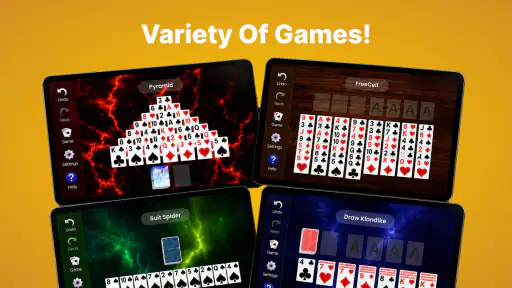
The package focuses on classic card play, including Solitaire, Spider, and FreeCell, with offline play as an important part of its identity. That makes it a practical choice for a commute, a waiting room, or any moment when I do not want to depend on a connection. It is listed as a card game for Teen players, and its long presence on Android is reflected in its release date of December 26, 2012. The current version is 7.47.7, while compatibility begins with Android 7.0.
How the game feels during ordinary play
I find ordinary play works best when I decide what kind of attention I can give before opening a deal: a familiar Solitaire round suits a brief pause, while FreeCell rewards a slower look at the board. That small choice keeps the collection from feeling like a jumble of options and makes each session feel purposeful. The next question is whether its steady rhythm gives me enough satisfaction to come back.
Quick starts and sensible expectations
My first impression of a multi-game card collection is usually shaped by how quickly I can reach an actual deal. This title is strongest when treated as a straightforward collection rather than as a heavily decorated gaming destination. The central attraction is the ability to move between recognizable formats without learning a new rule system or building a profile before playing. For someone who already knows classic solitaire, that simplicity is a real advantage.
The perceived speed should also be judged in context. Card games generally ask the device to display cards, accept taps, and update a small playing area; they are not comparable to a modern 3D game with a constantly changing world. I would therefore expect this collection to feel light during normal hands, particularly on a device that already meets its Android requirement. The experience is best for people who value immediate access over visual spectacle.
There is a useful difference between choosing a game because it is fast and choosing one because it wastes little of your time. This collection belongs in the second group. I can open it with a specific plan—one Spider round before a meeting, a FreeCell attempt during lunch, or a few Solitaire deals before bed—without committing to a long campaign. That makes it more suitable for fragmented daily use than many larger card games.
What changes when a session becomes longer
Short sessions are naturally forgiving, but longer use reveals whether a card collection has enough variety to remain useful. The inclusion of several established formats helps here. Solitaire offers the familiar rhythm many people want, Spider provides a more involved arrangement challenge, and FreeCell rewards players who think ahead instead of relying only on lucky reveals. These modes do not feel interchangeable, so changing the format can refresh a session without leaving the app.
Gaming Stories You May Enjoy

Dancing Road Turns Short Breaks Into a Test of Rhythm and Timing

Super Stylist Makes Every Outfit a Test of Taste and Patience

Dominoes on Your Terms: Who Should Play and Who Should Pass

Pokémon GO Makes the Familiar World Feel New

Chess.com Turns Rematches Into Rivalries, but Community Has Its Costs

Archery Battle 3D Review: Sharp Aiming, Unclear Feedback
My practical tip is to use the modes according to the amount of attention you have available. When I want something almost automatic, I would choose a familiar Solitaire round. When I have time to plan several moves, FreeCell makes more sense. Spider is a good middle ground for a player who wants a more substantial puzzle but still prefers cards to complicated rules. This small habit prevents the collection from feeling repetitive too quickly.
Heavy use can also mean repeatedly starting new deals, undoing mistakes, or moving between game types rather than playing one complete hand. Those actions are useful when I am testing the collection, but they can make any simple card app feel less focused. The better workflow is to choose a format first, decide whether I am playing casually or trying to improve, and then stay with that mode for a few rounds. It gives the session a clearer purpose and makes the variety more meaningful.
Offline play and everyday convenience
Offline play is one of the most practical reasons to consider this particular collection. A card game does not need a live opponent, a constantly changing feed, or a connection-dependent event to be enjoyable. Being able to use it away from Wi-Fi or mobile data suits situations such as air travel, underground transport, weak reception, or a data-saving routine. I especially like this kind of app when I want entertainment that does not compete with other online tasks.
There is a trade-off, though. Offline solo play is convenient precisely because it is self-contained, but it may feel limited to someone looking for social competition, seasonal challenges, or a large online community. If your main reason for downloading a card game is to challenge friends in real time, this is probably not the direction I would choose. Its strength is dependable personal play, not multiplayer excitement.
Stability during repeated play
For a card collection that has been available since 2012, stability matters more to me than flashy presentation. A game like this earns its place on a phone by being something I can return to without a complicated setup. The current version, 7.47.7, shows that the product is still maintained as an active release rather than being only a forgotten legacy download. I would still keep expectations realistic: an update number alone does not guarantee identical behavior on every Android device.
In ordinary use, the workload is modest by mobile gaming standards. The screen mainly needs to manage card layouts and player input, so the experience should not be judged by the demanding standards of action games. That makes it a reasonable candidate for an older compatible phone, especially for someone who wants a dedicated pastime rather than a resource-heavy entertainment app. The minimum Android 7.0 requirement is worth checking before installing on a very old device.
Reliability also includes how calmly the game handles an interrupted session. A realistic example is starting a hand while waiting for an appointment, then locking the phone when your name is called. With any mobile game, I prefer to assume that interruptions can happen and avoid treating an unfinished deal as something precious. The safest habit is to finish a natural stopping point when possible and reopen the game before beginning a serious run. That is not a criticism unique to this collection; it is sensible behavior for casual offline play.
Resource demands and the right kind of device
I would not choose this title because I expect it to test a new phone. Its appeal is the opposite: a card collection should remain comfortable without demanding the processing power, graphics capability, or battery attention associated with larger games. The basic nature of the gameplay makes it a sensible companion for a secondary phone or an older Android handset that still supports Android 7.0.
That does not mean every device will feel identical. Screen size, touch responsiveness, and the age of the operating system can affect how pleasant card movement feels. On a small display, cards may be less comfortable to inspect during Spider or FreeCell, where planning depends on seeing the available layout clearly. On a very old phone, background activity and limited storage can matter more than the game itself. I would prioritize a readable screen and reliable touch response over raw power.
For a heavy user, the main resource question is not whether the game can render complex scenes; it is whether repeated sessions remain comfortable. If you play for hours, brightness and general phone condition will likely influence battery life more than the card calculations. I would also avoid filling an aging device with many unnecessary apps if the goal is a smooth, reliable casual setup. Keeping the phone organized is a more useful performance step here than chasing gaming specifications.
Who will get the most from the collection
This is a good fit for players who want several traditional card formats in one free download. It works particularly well for someone who already understands the basics and wants to move between Solitaire, Spider, and FreeCell without maintaining multiple apps. It can also suit a family device or a personal phone used during travel, provided the player is comfortable with a Teen content rating and the Android compatibility requirement.
The audience is broader than expert card players, but beginners should approach it as a place to practice rather than as a guided course. If you have never played these formats, learning one at a time is less frustrating than jumping between all of them. Start with Solitaire to understand the basic rhythm, then try FreeCell when you want more deliberate planning. Spider can wait until you are comfortable managing several sequences at once.
I would skip it if you need a highly social experience, a story-driven game, or a constantly changing competitive ladder. I would also look elsewhere if polished modern presentation is your main priority. A collection built around classic formats may feel plain beside newer card games that add elaborate themes, animated rewards, or online systems. That is not automatically a weakness, but it makes the choice clear: this is for dependable card sessions, not a broad entertainment platform.
How it compares with separate apps and newer alternatives
The usual alternative is to install a dedicated Solitaire app, a separate Spider game, and perhaps another FreeCell title. That approach may provide a more specialized interface for each format, but it also spreads your games across several downloads and menus. Classic Card Games Pack is more convenient when variety within traditional solo play matters more than deep specialization. I would choose the collection for a single, uncomplicated card destination.
A dedicated app can be better when you want one particular mode to receive all the attention. For example, a serious FreeCell player may prefer an app designed around that one ruleset, with a layout and progression built specifically for long-term practice. A newer online card game may be the better option for live opponents or social interaction. The collection’s advantage is breadth within familiar offline formats, while its limitation is that it does not replace every kind of card-game experience.
The free price makes trying that trade-off easy, but the presence of in-app purchases means free access should not be confused with an entirely purchase-free experience. The listed purchase range runs from $1.99 to $69.99 per item. I would make a point of checking what a purchase changes before confirming anything, especially if the game is being used on a shared device. For casual players, the sensible approach is to begin with the free experience and only consider spending if a specific convenience clearly improves the way they play.
What the audience response suggests
The game has reached over five million installs and holds a 4.4 average from around sixty thousand ratings, with roughly eleven thousand written reviews. Those figures suggest that the collection has found a substantial audience and that many players consider it worthwhile. I treat that as useful context rather than a guarantee, because card-game preferences are personal and device behavior can vary.
What matters more to me is whether the audience size matches the product’s purpose. In this case, it does: a familiar group of solo card games can appeal to people who want a low-pressure pastime that remains available offline. The numbers make the app easier to trust as an established choice, but they do not change the central question. If you want social competition or a modern visual showcase, popularity alone will not solve that mismatch.
My performance verdict
After considering speed, repeated use, stability, and device demands, I see Classic Card Games Pack as a practical rather than ambitious card game. Its strongest performance quality is restraint. It does not need to occupy the role of a major gaming platform; it only needs to let me reach a familiar deal, make moves comfortably, and return for another round. The combination of multiple classic formats and offline access gives it a clear everyday purpose.
I would recommend it to a friend who wants a free card collection for quiet solo play, especially someone who travels, has irregular spare minutes, or prefers traditional rules to online distractions. I would tell that friend to check Android 7.0 compatibility, consider the Teen rating, and remember that optional purchases range from $1.99 to $69.99 per item. I would also suggest trying each included format before deciding whether the variety is enough for long-term use.
My honest conclusion is that this is best viewed as a reliable pocket card table, not a feature-packed modern game. It is a sensible choice when quick access, offline convenience, and several familiar modes matter more than competition or spectacle. Players who want a focused specialist app may find a dedicated alternative more satisfying, but for a flexible collection of classic solo card games, it remains an easy recommendation.
Classic Card Games Pack earns that recommendation because it understands the value of a small, repeatable routine. I can choose the mode that matches my attention, play without planning around a connection, and stop whenever real life interrupts. That combination will not excite everyone, but for the right player it is exactly what a mobile card game should provide.
150+ Classic Card Games Pack Pros and Cons
Pros
- Includes over 150 classic card games in one app.
- Works offline
- making it useful during travel or without Wi-Fi.
- Offers familiar games for both casual and experienced players.
- Quick game launches with no physical cards or setup required.
- Compact download replaces several separate card-game apps.
Cons
- The large game list can make finding a specific title difficult.
- Some games may have limited customization options.
- Computer opponents can feel predictable in easier modes.
- Ads may interrupt play
- depending on the app version.
- Older devices may experience slower loading with the full game pack.
Frequently Asked Questions
What is 150+ Classic Card Games Pack?
150+ Classic Card Games Pack is a collection of traditional card games gathered in one app. It is designed for players who enjoy familiar solitaire variations, patience games, and other classic formats without needing separate downloads. The exact selection may vary by version, but the main appeal is having a broad library available from a single interface.
Does 150+ Classic Card Games Pack work offline?
Many card games in 150+ Classic Card Games Pack can generally be played without a continuous internet connection, which makes the app convenient for travel or places with limited connectivity. However, internet access may still be required for the first download, advertisements, updates, analytics, or certain online features. It is worth testing your preferred games offline after installation.
Is 150+ Classic Card Games Pack free to download and play?
The app may be available as a free download, but free access does not necessarily mean that every feature is completely unrestricted. Depending on the platform and version, you may encounter advertising, optional purchases, or paid upgrades. Before downloading, check the store listing for current pricing, in-app purchase details, and whether removing advertisements requires payment.
What features and customization options does the app offer?
The experience typically focuses on straightforward card-game controls, with options such as choosing a game mode, changing card designs or backgrounds, adjusting difficulty, and reviewing scores or statistics. Available features can differ between releases. Users looking for advanced multiplayer, tournaments, or highly detailed tutorials should confirm those functions in the current app description.
Is 150+ Classic Card Games Pack suitable for beginners?
Yes, the collection can be suitable for beginners because it offers many familiar games and usually presents them through simple tap, drag, or touch controls. New players should start with well-known formats such as Klondike or FreeCell before exploring less familiar variations. Rules and help screens may differ by game, so some learning time can still be expected.


